
Thomson 145G
Інструкція користувача Thomson Streaming Stick 4K 145G
Модель: 145G
вступ
This user manual provides comprehensive instructions for the setup, operation, maintenance, and troubleshooting of your Thomson Streaming Stick 4K 145G. Please read this manual carefully before using the device to ensure proper functionality and to avoid damage.

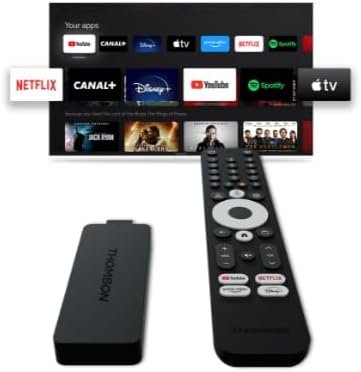
Image: The Thomson Streaming Stick 4K 145G alongside its remote control, illustrating the main components of the product.
Що в коробці
Upon unboxing your Thomson Streaming Stick 4K 145G, please verify that all components are present:
- Thomson Streaming Stick 4K 145G
- Пульт дистанційного керування
- Адаптер живлення
- USB-кабель (для живлення)
- HDMI Extender (optional, may be included)
- Короткий посібник
Посібник із налаштування
Follow these steps to set up your Thomson Streaming Stick 4K 145G:
- Connect the Streaming Stick: Plug the Thomson Streaming Stick 4K 145G directly into an available HDMI port on your television. If space is limited, use an HDMI extender if provided.
- Підключіть живлення: Connect the provided USB cable to the power input port on the streaming stick and then connect the other end to the power adapter. Plug the power adapter into a wall outlet.
- Power On TV and Select Input: Turn on your television and select the HDMI input to which the streaming stick is connected.
- Початкове налаштування: The device will boot up and guide you through the initial setup process on your TV screen. This typically includes:
- Вибір мови.
- Підключення до вашої мережі Wi-Fi.
- Вхід за допомогою облікового запису Google (потрібно для функцій Google TV та завантаження програм).
- Прийняття умов та положень.
- Сполучення дистанційного керування: The remote control should automatically pair with the device. If not, follow the on-screen instructions or press and hold the Home and Back buttons simultaneously on the remote until pairing is complete.
Зображення: Детальний view of the Thomson Streaming Stick 4K 145G, highlighting its HDMI connector for TV input and the power input port.
Інструкція з експлуатації
Once set up, you can begin using your Thomson Streaming Stick 4K 145G to access various streaming services and content.
Функції дистанційного керування
Ознайомтеся з кнопками пульта дистанційного керування:
- Кнопка живлення: Вмикає або вимикає пристрій (режим очікування).
- Кнопка Google Асистента: Активує голосові команди для пошуку та керування.
- Навігаційна панель (коло): Use up, down, left, right to navigate menus.
- Кнопка OK/Вибір: Підтверджує вибір.
- Кнопка Назад: Повернення до попереднього екрана.
- Кнопка "Додому: Повернення на головний екран Google TV.
- Кнопки регулювання гучності (+/-): Регулює гучність телевізора.
- Кнопка вимкнення звуку: Mutes TV volume.
- Кнопки швидкого доступу до програм: Dedicated buttons for Netflix, Disney+, YouTube, and Prime Video for quick access.

Image: The Thomson Streaming Stick 4K 145G and its remote control, showing the layout of the buttons on the remote.
Навігація Google TV
The Google TV interface organizes content from your streaming services into a single, personalized experience.
- Головний екран: Displays recommended content, installed apps, and your watchlist.
- програми: Отримайте доступ до всіх встановлених програм. Ви можете завантажити більше з Google Play Store.
- Бібліотека: Find your purchased movies and TV shows from Google Play.
- пошук: Use the search icon or Google Assistant button to find content by title, genre, or actor.
To stream content, simply select an app or a recommended title from the home screen. Ensure you have an active subscription for paid services.
Технічне обслуговування
Proper maintenance ensures the longevity and optimal performance of your streaming stick.
- Прибирання: Use a soft, dry, lint-free cloth to clean the device and remote control. Do not use liquid cleaners or aerosols.
- Вентиляція: Ensure the streaming stick is placed in a well-ventilated area and not covered, as proper airflow prevents overheating.
- Оновлення програмного забезпечення: The device will automatically check for and install software updates. Ensure it remains connected to the internet for these updates.
- Зберігання: Якщо пристрій не використовується протягом тривалого часу, зберігайте його в прохолодному, сухому місці, захищеному від прямих сонячних променів.
Усунення несправностей
If you encounter issues with your Thomson Streaming Stick 4K 145G, refer to the following common problems and solutions:
| проблема | Можлива причина | Рішення |
|---|---|---|
| Немає живлення/Пристрій не вмикається | Power adapter not connected, faulty outlet, or damaged cable. | Переконайтеся, що адаптер живлення надійно підключено до пристрою та робочої розетки. Спробуйте іншу розетку. |
| Немає сигналу на телевізорі | Incorrect HDMI input selected, loose HDMI connection, or device not powered on. | Verify the TV is on the correct HDMI input. Re-seat the HDMI cable. Ensure the streaming stick has power. |
| Пульт дистанційного керування не відповідає | Batteries low/dead, remote not paired, or obstruction. | Replace batteries. Re-pair the remote by holding Home and Back buttons. Ensure no obstructions between remote and device. |
| Буферизація або низька якість потокового передавання | Weak Wi-Fi signal, internet speed issues, or network congestion. | Move the device closer to the Wi-Fi router. Restart your router. Check your internet speed. Reduce other network activity. |
| Збої або зависання програм | Outdated app, insufficient memory, or software glitch. | Restart the device. Check for app updates in the Google Play Store. Clear app cache (Settings > Apps > [App Name] > Clear cache). |
If the issue persists after trying these solutions, you may need to perform a factory reset (Settings > System > About > Factory reset). Note that a factory reset will erase all data and settings on the device.
Технічні характеристики
Key technical specifications for the Thomson Streaming Stick 4K 145G:
- Назва моделі: STREAMING STICK 4K THOMSON 145G
- Номер моделі: 145G
- роздільна здатність: 4K UHD
- Підключення: Wi-Fi, USB, Ethernet (via adapter), HDMI, IR
- Тип роз'єму: HDMI
- Підтримувані служби Інтернету: Netflix, Disney+, Prime Video, YouTube, Spotify (and others via Google Play Store)
- Тип контролера: Пульт дистанційного керування
- Форм-фактор: TV Stick
- Колір: чорний
- Розміри продукту: 1.3 х 9.3 х 3.4 см
- вага: 460 г
- Виробник: Томсон
- Перші доступні: 8 серпня 2024 року
Гарантія та підтримка
For warranty information and technical support, please refer to the documentation included with your purchase or visit the official Thomson support webсайт. Зберігайте чек про покупку для гарантійних претензій.
Виробник: Томсон
Гарантовані оновлення програмного забезпечення до: Невідомо (згідно з даними продукту)
Ask a question about this manual
Ask about setup, troubleshooting, compatibility, parts, safety, or missing instructions. Manuals+ will review the question and use this page’s manual context to help answer it.