
1. Вступ
This manual provides essential instructions for the setup, operation, and maintenance of your iStorage diskAshur DT3 8TB Secure Encrypted Desktop Hard Drive. Please read this manual thoroughly before using the device to ensure proper functionality and data security.
Що в коробці
- 1 x iStorage diskAshur DT3 Secure Encrypted Desktop Hard Drive
- USB Type C & A cables
- Universal Mains Adapter
- Quick Start Guide and Product Disclaimer
2. Налаштування
2.1 Підключення пристрою
To begin using your diskAshur DT3, follow these steps:
- Connect the supplied AC adapter to the DC 12V port on the back of the drive and then to a mains power outlet.
- Insert the supplied USB cable into the USB 3.0 port on the back of the drive and connect the other end to your computer or laptop.
- Turn the power switch on the back of the drive to the 'ON' position. The red LED on the keypad will illuminate.

Зображення: Задня частина view of the iStorage diskAshur DT3, highlighting the USB 3.0 port, DC 12V power input, and the ON/OFF switch. This illustrates where to connect the power adapter and USB cable.
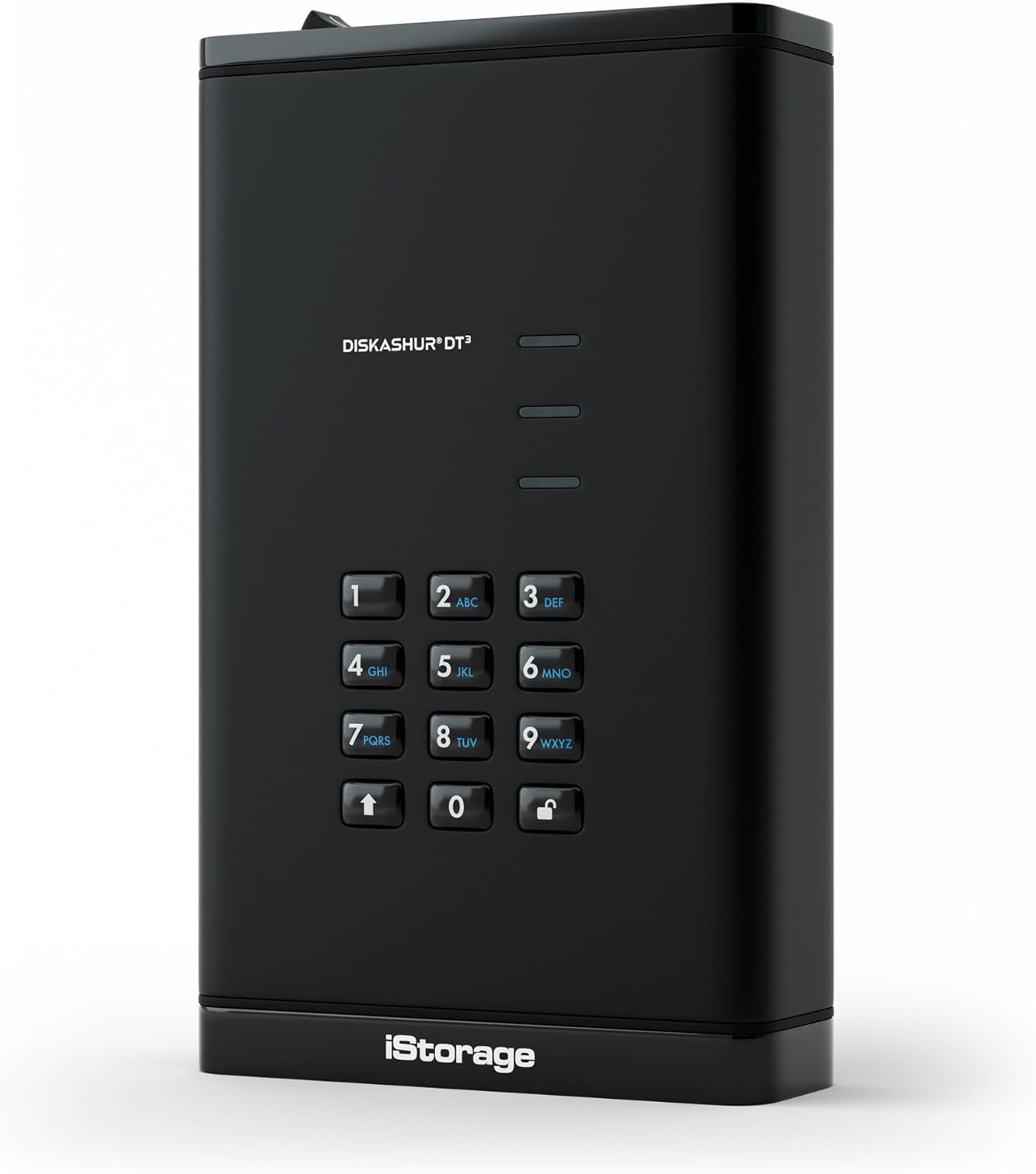
Зображення: спереду view of the iStorage diskAshur DT3, displaying the alphanumeric keypad and LED indicators. This shows the primary interface for PIN entry.
2.2 Initial Unlock
To unlock your diskAshur DT3 for the first time or after it has been locked:
- Ensure the red LED is illuminated.
- Enter your 8-64 digit User PIN on the keypad.
- Press the UNLOCK button (key with a padlock icon).
Upon successful PIN entry, the green and blue LEDs will blink, and then the middle LED will turn solid green, indicating the drive is unlocked and ready for use.
Video: This video demonstrates the process of unlocking and encrypting data using a diskAshur drive. While the video specifically mentions DT2, the steps for unlocking and data transfer are applicable to the diskAshur DT3.
3. Експлуатація пристрою
3.1 Storing Data
Once the drive is unlocked and connected to your computer, it will appear as a removable drive. You can store files від:
- Копіювання та вставка files into the drive's folder.
- Перетягування files directly into the drive's folder.
All data transferred to the diskAshur DT3 is encrypted in real-time using AES-XTS 256-bit hardware encryption.
3.2 Блокування пристрою
To secure your data and disconnect the drive:
- Safely eject the drive from your operating system (e.g., 'Safely Remove Hardware' on Windows, 'Eject' on macOS).
- Once ejected, the drive will automatically lock, and the red LED will illuminate.
- Turn the power switch on the back of the drive to the 'OFF' position.
The drive is now securely locked and can be safely disconnected and transported.
3.3 Особливості безпеки
- PIN Authentication: Access requires an 8-64 digit PIN. Without the correct PIN, data remains inaccessible.
- Апаратне шифрування: All data is encrypted in real-time using AES-XTS 256-bit hardware encryption.
- FIPS 140-3 Level 3 Certified: The diskAshur DT3 is certified to FIPS 140-3 Level 3 (pending), ensuring high-level security compliance.
- Автоблокування: The drive features an auto-lock function that can be configured to automatically lock after a predetermined period of inactivity.
- Wear-Resistant Keypad: The alphanumeric keypad is designed to prevent key usage from being easily identified, protecting against potential brute-force attacks.
- Незалежність від ОС та платформи: Works with any device that has a USB port, including Windows, macOS, iPadOS, Linux, Chrome, Android, and various embedded systems.
Відео: Вступне відео-шоуasing the iStorage diskAshur3 range, highlighting its key features and security aspects relevant to the DT3 model.
4. Технічне обслуговування
To ensure the longevity and optimal performance of your diskAshur DT3:
- Тримайте пристрій чистим та без пилу. Використовуйте для очищення м’яку суху тканину.
- Уникайте впливу на пристрій екстремальних температур або вологості.
- Do not attempt to open or disassemble the device, as this will void the warranty and may compromise its security features.
- Завжди безпечно виймайте диск перед відключенням від комп’ютера, щоб запобігти пошкодженню даних.
5. Вирішення проблем
If you encounter issues with your diskAshur DT3, consider the following:
- Диск не розпізнано: Ensure all cables (power and USB) are securely connected and the drive's power switch is ON. Try connecting to a different USB port or computer.
- Incorrect PIN entry: If the User PIN is entered incorrectly 10 consecutive times, the User PIN will be deleted. Data will remain on the device but only accessible with the Admin PIN. If the Admin PIN is entered incorrectly 10 consecutive times, all data is lost forever, and the device will need to be reconfigured.
- Низька швидкість передачі даних: Ensure you are using a USB 3.0 compatible port on your computer for optimal speeds (up to 290MB/s Read, 284MB/s Write).
- світлодіодні індикатори: Refer to the quick start guide for a detailed explanation of LED behaviors (red, green, blue) which indicate drive status (locked, unlocked, activity).
6. Технічні характеристики
| Особливість | Деталь |
|---|---|
| Ємність цифрового зберігання | 8 ТБ |
| Тип жорсткого диска | Механічний жорсткий диск |
| Інтерфейс жорсткого диска | USB 3.0 |
| Технологія підключення | USB |
| Апаратна платформа | Лінукс, Мак, ПК |
| Номер моделі товару | IS-DT3-256-8000-F |
| Вага товару | 2.05 фунта |
| Розміри продукту | 7.3 x 4.41 x 1.71 дюймів |
| Колір | чорний |
| Швидкість обертання жорсткого диска | 7200 об / хв |
| Джерело живлення | AC |
| Особливості | Backward Compatible, Dust Resistant, Hardware Encryption, Portable, Waterproof |
| Сумісні пристрої | Настільний комп'ютер, ігрова консоль, ноутбук, смартфон, планшет |
7. Гарантія та підтримка
For warranty information and technical support, please refer to the documentation included with your product or visit the official iStorage webсайт. Зберігайте чек про покупку для гарантійних претензій.