
1. Вступ
Thank you for choosing the Metal Defender TS-P1 Portable Walk-Through Metal Detector. This device is designed for rapid deployment and efficient security screening in various environments, including events, schools, and courthouses. Its foldable, lightweight design and advanced detection capabilities ensure reliable performance. This manual provides essential information for the proper setup, operation, and maintenance of your metal detector.

Image 1.1: The Metal Defender TS-P1 Portable Walk-Through Metal Detector, fully assembled and ready for use.
2. Інформація про безпеку
Please read and understand all safety instructions before operating the Metal Defender TS-P1. Failure to follow these instructions may result in injury or damage to the device.
- Джерело живлення: Use only the specified 12V power adapter or fully charged internal batteries. Ensure the power outlet meets the device's requirements.
- Умови навколишнього середовища: Operate the detector within recommended temperature and humidity ranges. Avoid exposure to extreme weather conditions unless the device's IP67 rating is specifically applicable to the situation.
- Збірка: Ensure all components are securely connected and latched before operation. Do not force connections.
- Розміщення: Position the detector on a stable, level surface. Avoid areas with strong electromagnetic interference that could affect performance.
- Діти та домашні тварини: Keep children and pets away from the device during operation and assembly.
- Технічне обслуговування: Disconnect power before cleaning or performing any maintenance. Refer to the Maintenance section for proper procedures.
3. Налаштування та складання
The Metal Defender TS-P1 is designed for quick and tool-free assembly. Follow these steps for proper setup:
- Розпакування: Обережно вийміть усі компоненти з упаковки. Перевірте наявність усіх деталей, перелічених у пакувальному листі.
- Base Unit Placement: Place the base unit (which includes the head unit and leg bases when folded) on a flat, stable surface. The base unit also features wheels for easy transportation when collapsed.
- Extending the Columns: The detector disassembles to less than one-third of its standing height. Carefully extend the side columns upwards from the base. Each segment will click into place.
- Securing Latches: Ensure all latches on the side columns are fully engaged to secure the detector in its upright position.
- Підключення живлення: The unit can operate on its internal rechargeable battery (up to 40 hours) or be plugged directly into a power source. Connect the DC input plug to either foot of the detector.
- Початкове ввімкнення: Натисніть кнопку живлення на панелі керування, щоб увімкнути пристрій.

Image 3.1: The base unit, which houses the head unit and leg bases when the detector is collapsed.

Image 3.2: Comparison of the detector's assembled height (7 ft) versus its collapsed height (2.06 ft).
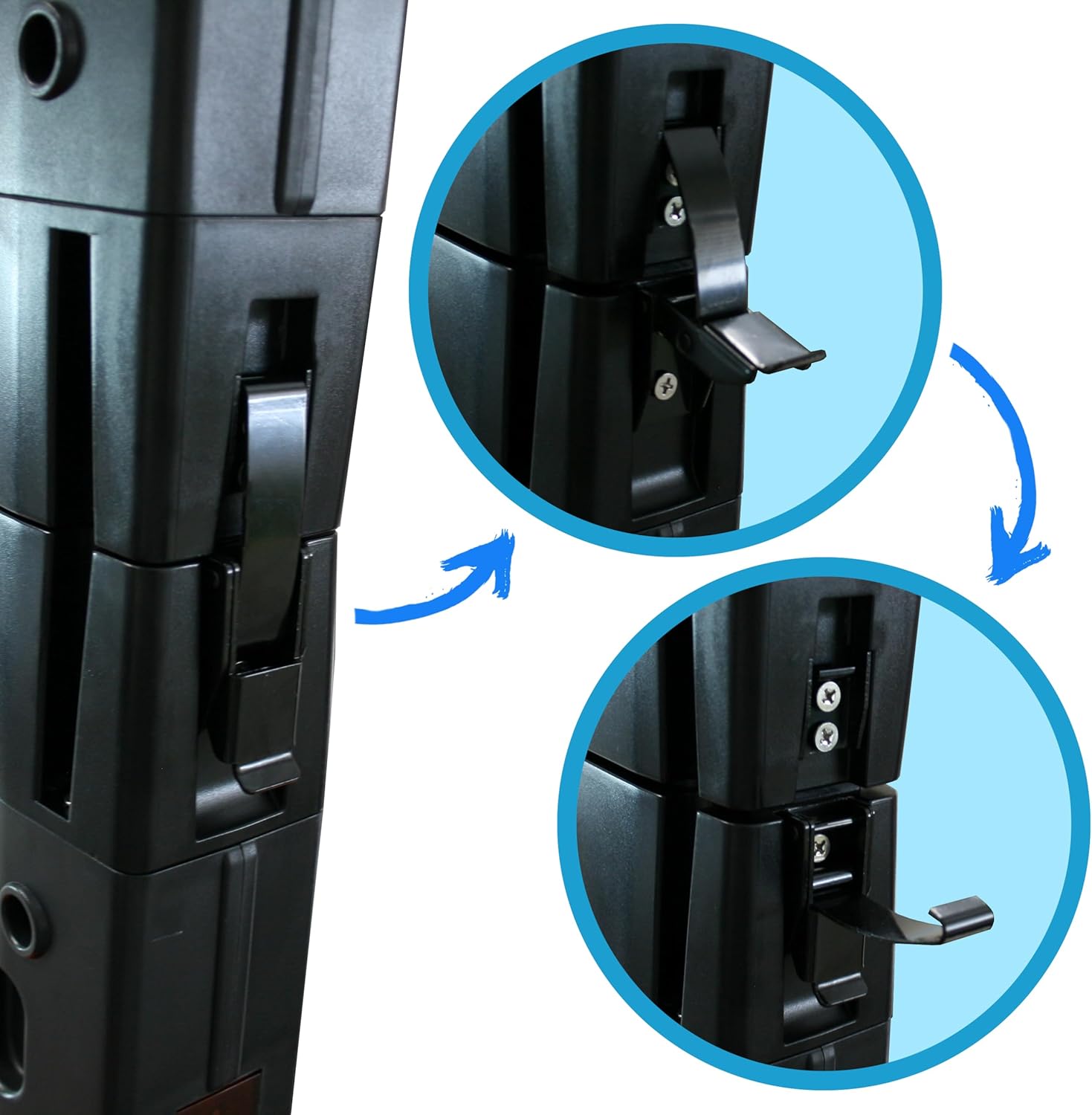
Image 3.3: Detail of the secure latching mechanism for the column segments.

Image 3.4: Location of the DC input plug on the detector's base.
The complete security package includes a strap case, a backup battery, and a free handheld wand for additional screening flexibility.

Image 3.5: Included straps and buckles for securing the detector during transport.
4. Інструкція з експлуатації
The TS-P1 features an intuitive control panel and advanced detection capabilities.
4.1 Панель керування надview
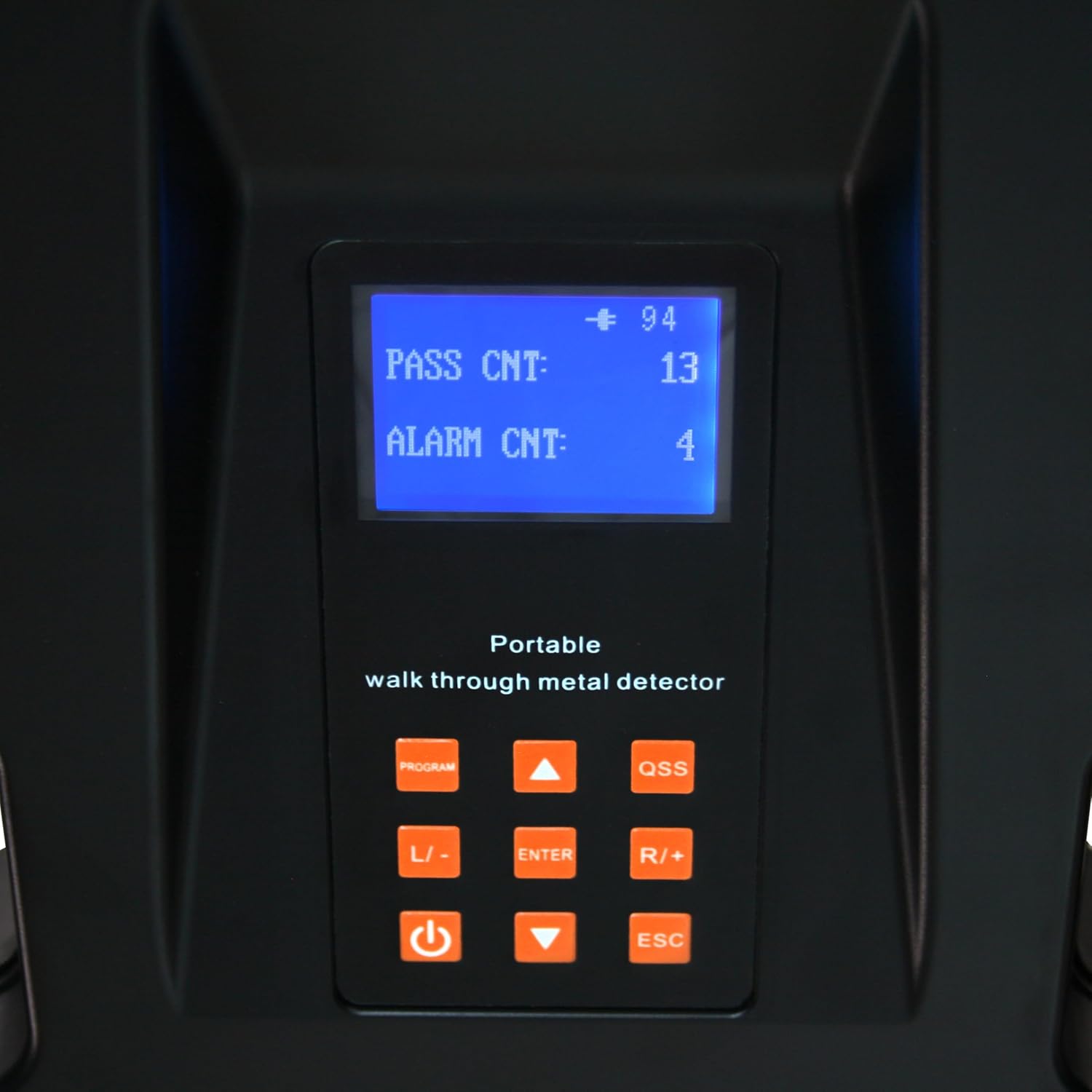
Image 4.1: The control panel displaying pass and alarm counts, with various function buttons.
- Екран дисплея: Shows current settings, pass count, and alarm count.
- Кнопка PROGRAM: Accesses the programming menu for advanced settings.
- QSS Button: Quick Sensitivity Setting for rapid adjustments.
- L/- and R/+ Buttons: Navigate menus and adjust values (Left/Decrease, Right/Increase).
- Кнопка ENTER: Підтверджує вибір.
- Кнопка живлення: Вмикає/вимикає пристрій.
- Кнопка ESC: Вихід з меню або скасування операцій.
4.2 Detection Zones and Sensitivity
The TS-P1 features 3 detection zones with LED indicators for comprehensive head-to-toe scanning. These zones can be independently programmed.
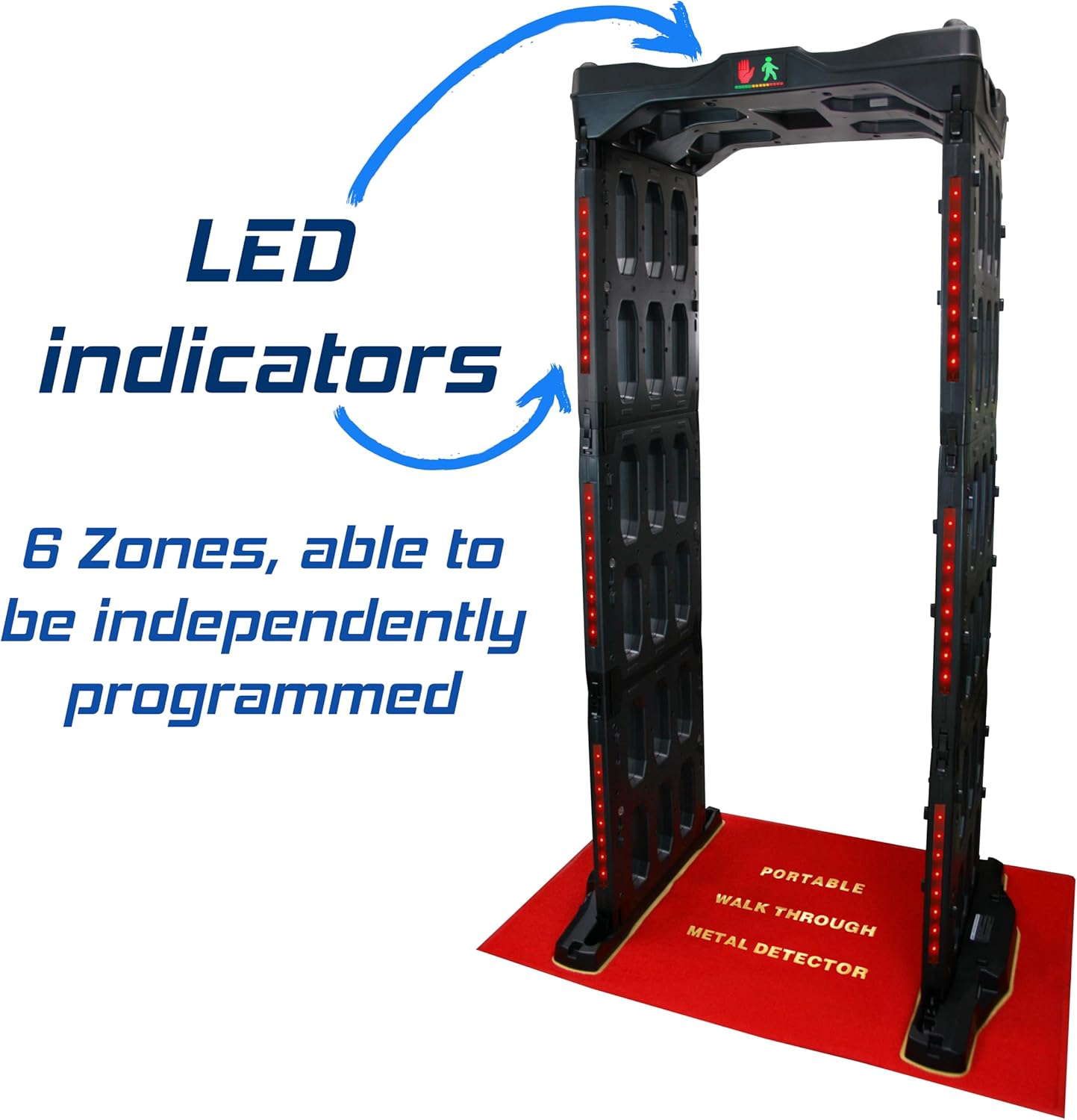
Image 4.2: LED indicators on the side columns, signifying detection zones.
- Регулювання чутливості: The detector offers 100 customizable sensitivity levels. Use the PROGRAM button to enter the sensitivity settings menu. Adjust levels using the L/- and R/+ buttons. Higher sensitivity detects smaller metallic objects (e.g., bobby pins), while lower sensitivity can be used for screening larger items or specific weapons.
- Zone Programming: Each of the 3 detection zones can be programmed independently to fine-tune detection for specific areas of the body. Refer to the detailed programming guide in the full manual for advanced zone configuration.
- Індикація тривоги: When a metallic object is detected, the corresponding LED indicators on the side columns will illuminate, and an audible alarm will sound. The display will update the alarm count.
4.3 Робота від акумулятора
The internal rechargeable 12V battery provides up to 40 hours of cord-free operation. To charge the battery, connect the power adapter to the DC input port. The device can also operate while plugged in.
5. Технічне обслуговування
Regular maintenance ensures the longevity and optimal performance of your Metal Defender TS-P1.
- Прибирання: Використовуйте м'який, damp cloth to wipe down the exterior surfaces. Do not use abrasive cleaners or solvents. Ensure the device is powered off and unplugged before cleaning.
- Точки підключення: The device features protective dust covers at connection points. Ensure these are clean and free of debris to maintain proper electrical contact.
- Зберігання: When not in use, collapse the detector and secure it with the provided straps. Store in a dry, temperate environment.
- Догляд за акумулятором: For optimal battery life, avoid fully discharging the battery frequently. Recharge as needed. If storing for extended periods, charge the battery to approximately 50% every few months.

Image 5.1: Protective dust covers for connection points and integrated wheels for mobility.
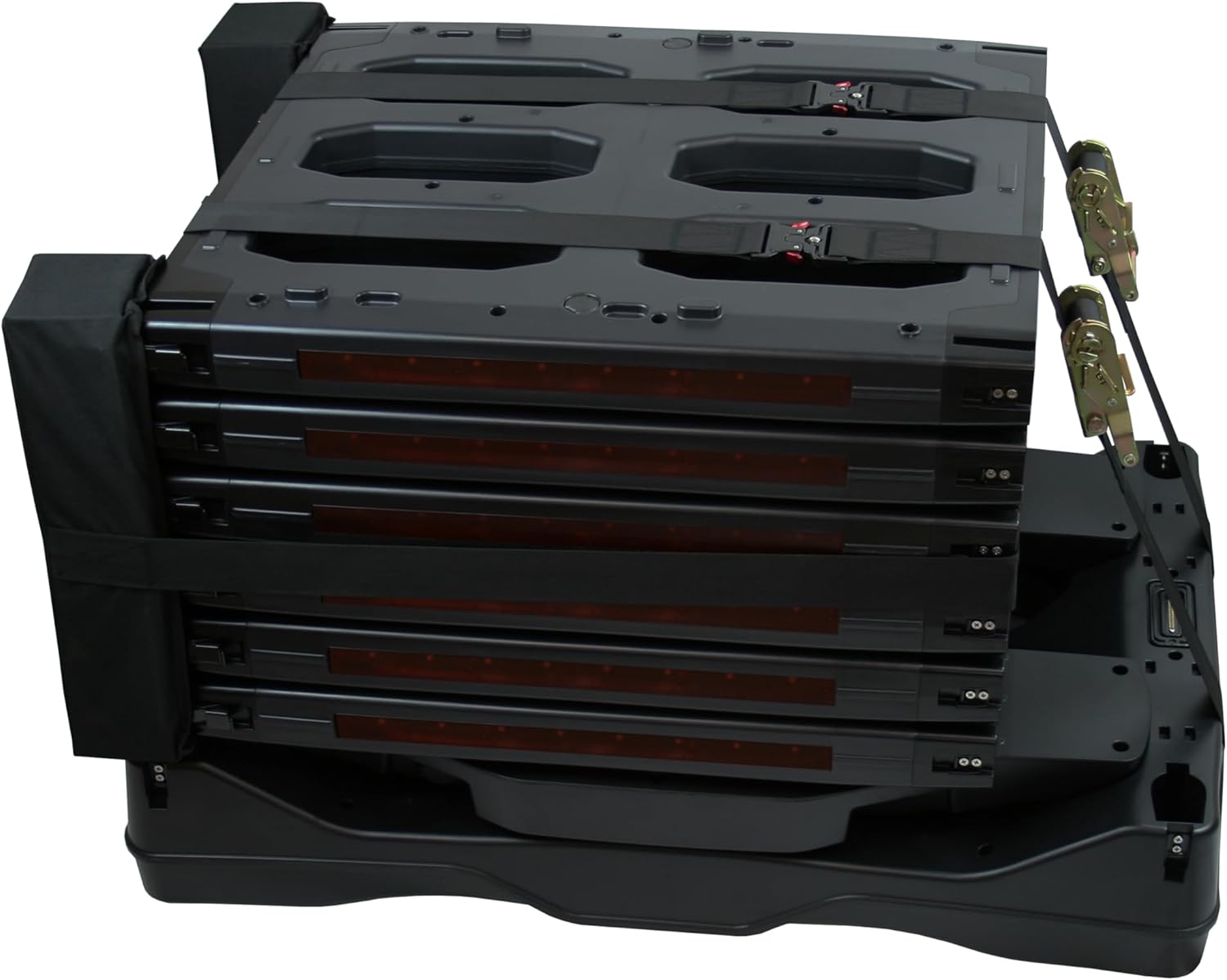
Image 5.2: The detector in its collapsed state, secured with straps.
6. Вирішення проблем
If you encounter issues with your Metal Defender TS-P1, refer to the following common problems and solutions:
| проблема | Можлива причина | Рішення |
|---|---|---|
| Пристрій не включається. | Battery discharged; Power cable not connected; Faulty power button. | Charge the battery or connect to AC power. Ensure power cable is securely plugged in. Contact support if power button is unresponsive. |
| False alarms or inconsistent detection. | High sensitivity setting; Environmental interference; Nearby metallic objects. | Reduce sensitivity settings. Relocate the detector away from large metallic structures or other electronic devices. |
| No alarm when metal is detected. | Low sensitivity setting; Alarm volume off; Faulty sensor. | Increase sensitivity. Check alarm volume settings in the PROGRAM menu. Contact support if issue persists. |
| Difficulty collapsing/assembling. | Latches not disengaged; Debris in connection points. | Ensure all latches are fully disengaged. Check connection points for obstructions and clean if necessary. Do not force components. |
For issues not listed here, please contact Metal Defender customer support.
7. Технічні характеристики
| Особливість | Деталь |
|---|---|
| Номер моделі | TS-P1 |
| Бренд | Metal Defender |
| Колір | Сірий |
| матеріал | пластик |
| Розміри виробу (у зібраному вигляді) | 48 дюймів (Д) x 32 дюймів (Ш) x 84 дюймів (В) (4 футів (Д) x 2.7 футів (Ш) x 7 фута (В)) |
| Розміри продукту (згорнуті) | Approx. 37"L x 24.75"W x 24.75"H (3.1 ft L x 2.06 ft W x 2.06 ft H) |
| Вага товару | 83 фунта |
| Джерело живлення | DC (Rechargeable 12V Battery / AC Adapter) |
| Термін служби батареї | До 40 годин |
| Зони виявлення | 3 (with LED indicators, independently programmable) |
| Рівні чутливості | 100 customizable levels |
| Робоча частота | 6.5 кГц |
| Міжнародний захист рейтингу | IP67 |
| особливості | Foldable, Lightweight, Wheels for transport, Carry strap, Handheld wand included. |
| Рекомендоване використання | Security Screening (Events, Schools, Courthouses, Stadiums, Concerts, Clubs, Checkpoints) |
| UPC | 840417439877 |
8. Гарантія та підтримка
For warranty information, please refer to the documentation included with your purchase or visit the official Metal Defender webсайт. Плани захисту доступні для розширеного покриття.
For technical support, troubleshooting assistance, or to inquire about replacement parts, please contact Metal Defender customer service. Contact details can typically be found on the product packaging or the manufacturer's webсайт.
Інтернет-ресурси: Для отримання додаткової інформації та підтримки відвідайте Metal Defender Store on Amazon.