
S.M.S.L D10
S.M.S.L D10 Portable Mini Decoder Earphone Ampпосібник користувача lifier
Модель: D10
1. Вступ
Дякуємо за покупкуasing the S.M.S.L D10 Portable Mini Decoder Earphone Amplifier. This device is designed to enhance your audio experience by providing high-fidelity sound from your computer or mobile device. Please read this manual carefully before using the product to ensure proper operation and to maximize its performance.
2. Продукт закінчивсяview
The S.M.S.L D10 is a compact and powerful audio decoder and earphone amplifier. It features dual Cirrus Logic CS43131 DAC chips for superior sound quality, supporting DSD256 and PCM 32bit/384kHz high-resolution audio formats. With both 3.5mm and 4.4mm balanced headphone jacks, it offers versatile connectivity and robust output power for a wide range of headphones.

Image: S.M.S.L D10 USB Headphone Ampліфтер надview.
3. Ключові характеристики
- High-Performance DAC Chips: Utilizes two Cirrus Logic CS43131 audio decoding chips for excellent performance and pure sound.
- Підтримка звуку високої роздільної здатності: Supports DSD256 hardware decoding and PCM 32bit/384kHz specifications.
- Два виходи для навушників: Equipped with a 3.5mm single-ended headphone jack and a 4.4mm balanced headphone jack for broad compatibility.
- Потужний вихід: Delivers up to 500mW@16Ω output power, capable of driving most headphones.
- Широка сумісність: Connects easily to computers and mobile phones, compatible with Windows 7/8/8.1/10/11 (requires driver), Mac OS X 10.6+, Linux, Android, and iOS.
- Прозорий дизайн: Features a transparent window and textured alloy casing, allowing visibility of internal components.
- Side Volume Control: Conveniently located volume button for easy adjustment.

Image: Visual representation of the D10's core features.
4. Вміст упаковки
Перевірте наявність усіх елементів в упаковці:
- S.M.S.L D10 Unit
- USB кабель
- Інструкція з експлуатації (цей документ)
5. Посібник із налаштування
5.1 Connecting to a Computer (Windows/Mac/Linux)
- Connect one end of the provided USB cable to the USB input port on the S.M.S.L D10.
- Під’єднайте інший кінець кабелю USB до вільного порту USB на комп’ютері.
- For Windows operating systems (7/8/8.1/10/11), a specific driver may be required for optimal performance. Please visit the official S.M.S.L website for the latest driver downloads. Mac OS X 10.6+ and Linux systems typically operate without additional drivers.
- Once connected, select the S.M.S.L D10 as your audio output device in your computer's sound settings.

Image: S.M.S.L D10 connected to a laptop.
5.2 Connecting to a Mobile Phone (Android/iOS)
- Connect one end of the provided USB cable to the USB input port on the S.M.S.L D10.
- Connect the other end of the USB cable to your mobile phone. An adapter (not included) may be required depending on your phone's port type (e.g., USB-C to USB-C, or Lightning to USB-A/C).
- The D10 is generally plug-and-play with Android and iOS devices.
- Ensure the D10 is selected as the audio output device in your phone's audio settings or music player application.
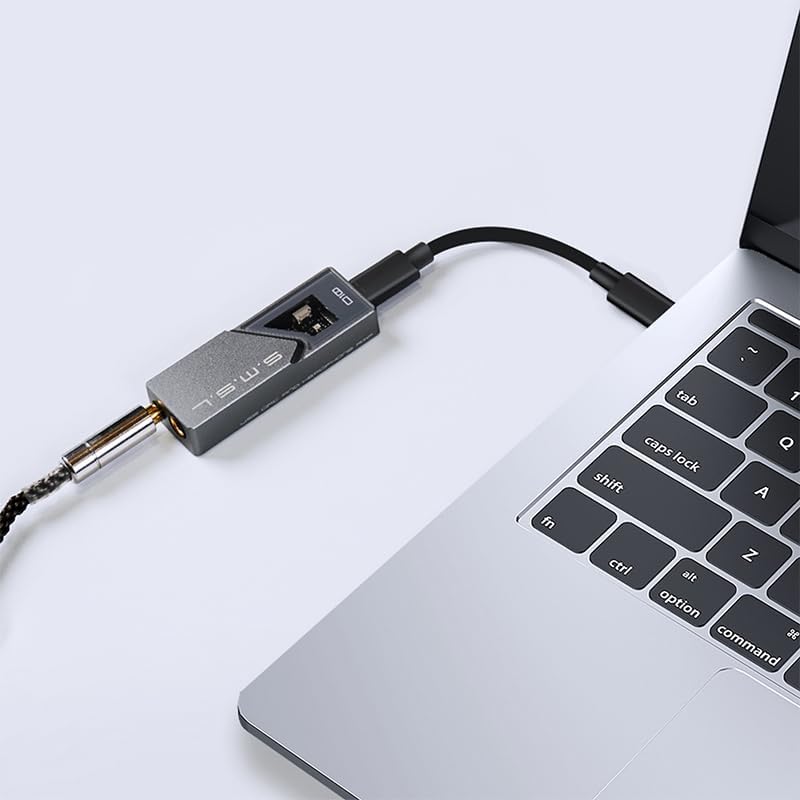
Image: S.M.S.L D10 connected to a mobile phone.
6. Інструкція з експлуатації
6.1 Підключення навушників
The S.M.S.L D10 offers two headphone output options:
- Гніздо для навушників 3.5 мм: For standard single-ended headphones.
- 4.4mm Balanced Headphone Jack: For balanced headphones, offering improved signal separation and power.
Insert your headphone's plug firmly into the corresponding jack on the D10. Ensure you use the correct type of plug for the desired output.

Зображення: Верх view of the D10 with 3.5mm and 4.4mm headphone jacks.

Image: Port diagram of the S.M.S.L D10.
6.2 Регулювання гучності
The D10 features a physical volume button on its side. Use this button to adjust the output volume to a comfortable listening level. It is recommended to start with a lower volume and gradually increase it to prevent sudden loud sounds.

Зображення: Збоку view of the D10, highlighting the volume control.
6.3 Data Status Indicator
When playing music, the data status indicator light on the D10 will illuminate, confirming active audio processing and high-resolution sound restoration.

Image: D10 connected to a phone, showing the illuminated data status indicator.
7. Технічне обслуговування
- Прибирання: Використовуйте м’яку суху тканину для очищення зовнішньої частини пристрою. Уникайте використання агресивних хімікатів або абразивних матеріалів.
- Зберігання: Store the D10 in a cool, dry place away from direct sunlight and extreme temperatures.
- Обробка: Поводьтеся з пристроєм обережно. Уникайте падінь та сильних ударів.
- Підключення: Ensure USB and headphone cables are connected securely but without excessive force to prevent damage to ports.
8. Вирішення проблем
| проблема | Можлива причина | Рішення |
|---|---|---|
| Немає звуку |
|
|
| Спотворений або погана якість звуку |
|
|
| Пристрій нагрівається під час роботи |
|
|
9. Технічні характеристики
| Особливість | Деталь |
|---|---|
| Модель | D10 |
| Мікросхеми ЦАП | 2 x Cirrus Logic CS43131 |
| Підтримувані аудіоформати | DSD256, PCM 32bit/384kHz |
| Виходи для навушників | 3.5mm (Single-ended), 4.4mm (Balanced) |
| Максимальна вихідна потужність | 500 мВт при 16 Ом |
| Сумісність | Windows 7/8/8.1/10/11 (driver required), Mac OS X 10.6+, Linux, Android, iOS |
| Розміри упаковки | 5.47 x 2.95 x 1.22 дюймів |
| Вага товару | 1.1 фунта |
| Виробник | SMSL |
| Дата першої доступності | 24 липня 2024 р |
10. Гарантія та підтримка
S.M.S.L products are covered by a manufacturer's warranty. For specific warranty terms and conditions, please refer to the warranty card included with your product or visit the official S.M.S.L website. For technical support, troubleshooting assistance beyond this manual, or warranty claims, please contact S.M.S.L customer service through their official channels.
Official S.M.S.L Webсайт: www.smsl-audio.com
Ask a question about this manual
Ask about setup, troubleshooting, compatibility, parts, safety, or missing instructions. Manuals+ will review the question and use this page’s manual context to help answer it.