
1. Вступ
This manual provides comprehensive instructions for the installation, operation, maintenance, and troubleshooting of your EIMSOAH 7in HD Carplay Screen. Please read this manual thoroughly before using the product to ensure proper function and safety.
The EIMSOAH Carplay Screen is an advanced in-dash navigation and multimedia system designed to enhance your driving experience with features such as wireless CarPlay/Android Auto, GPS navigation, and a high-definition touch screen display.
2. Інформація про безпеку
Always prioritize safety. Improper installation or operation can lead to damage to the device, vehicle, or personal injury. Observe the following safety guidelines:
- Ensure the vehicle's ignition is off and the battery is disconnected before installation to prevent electrical shorts.
- Якщо ви не впевнені щодо будь-яких кроків, зверніться до фахівця для встановлення.
- Не користуйтеся пристроєм таким чином, щоб це відволікало вас від керування. Завжди дивіться на дорогу.
- Уникайте тривалого перебування пристрою під екстремальними температурами, прямими сонячними променями або надмірною вологістю.
- Do not attempt to disassemble or modify the unit. This will void the warranty and may cause damage.
- Ensure all wiring is properly insulated and secured to prevent short circuits or interference.
3. Вміст упаковки
Перевірте, чи всі перелічені нижче предмети присутні у вашій упаковці:
- 1 x Car Multimedia Player Display
- 7 x Wiring Harnesses (various types for power, audio, video, etc.)
- 1 x GPS Box/Antenna
- 1 x Інструкція з експлуатації (цей документ)
- 1 x Wiring Instruction Diagram

Figure 3.1: Complete package contents including the main display unit, wiring harnesses, and GPS antenna.
4. Налаштування та встановлення
This section outlines the general steps for installing the EIMSOAH Carplay Screen. Specific wiring details are provided in the separate Wiring Instruction Diagram included in your package. Professional installation is recommended.
- Підготуйте транспортний засіб:
- Turn off the vehicle's ignition and remove the key.
- Disconnect the negative terminal of the car battery to prevent electrical hazards.
- Carefully remove the existing car stereo or dashboard panel to access the wiring harness and mounting area.
- Підключення джгутів проводів:
- Refer to the provided Wiring Instruction Diagram for detailed connections.
- Connect the main power harness, speaker wires, and other necessary connections (e.g., AUX, USB, reverse camera input if applicable) to the corresponding ports on the car multimedia player.
- Переконайтеся, що всі з’єднання надійні та належним чином ізольовані.
- Встановлення GPS-антени:
- Встановіть GPS-антену в місці з чітким view of the sky, typically on the dashboard or under the windshield, away from metal obstructions.
- Route the GPS antenna cable to the back of the head unit and connect it to the designated GPS input.
- Встановіть пристрій:
- Carefully slide the car multimedia player into the dashboard opening.
- Secure the unit using the provided mounting brackets or screws, ensuring it is firmly in place.
- Знову підключіть акумулятор та перевірте:
- Знову підключіть мінусову клему автомобільного акумулятора.
- Turn on the vehicle's ignition and power on the car multimedia player.
- Test all functions, including audio, touch screen response, GPS signal, Bluetooth connectivity, and any connected accessories (e.g., reverse camera).
- Зберіть приладову панель:
- Once all functions are verified, carefully reassemble the dashboard panels.

Figure 4.1: The Carplay screen integrated into a vehicle's dashboard.
5. Інструкція з експлуатації
The EIMSOAH Carplay Screen operates on Android 12, providing a user-friendly interface. Below are common operations:
5.1 Основна навігація
- Увімкнення/вимкнення живлення: Press and hold the power button (usually on the left side of the unit) to turn the device on or off. A short press typically mutes/unmutes audio.
- Регулювання гучності: Use the volume buttons on the unit or steering wheel controls (if configured) to adjust audio levels.
- Головний екран: Tap the "Home" icon to return to the main application screen.
- Кнопка Назад: Tap the "Back" icon to return to the previous screen or menu.
- Останні програми: Tap the "Recent Apps" icon to view і перемикатися між нещодавно відкритими програмами.
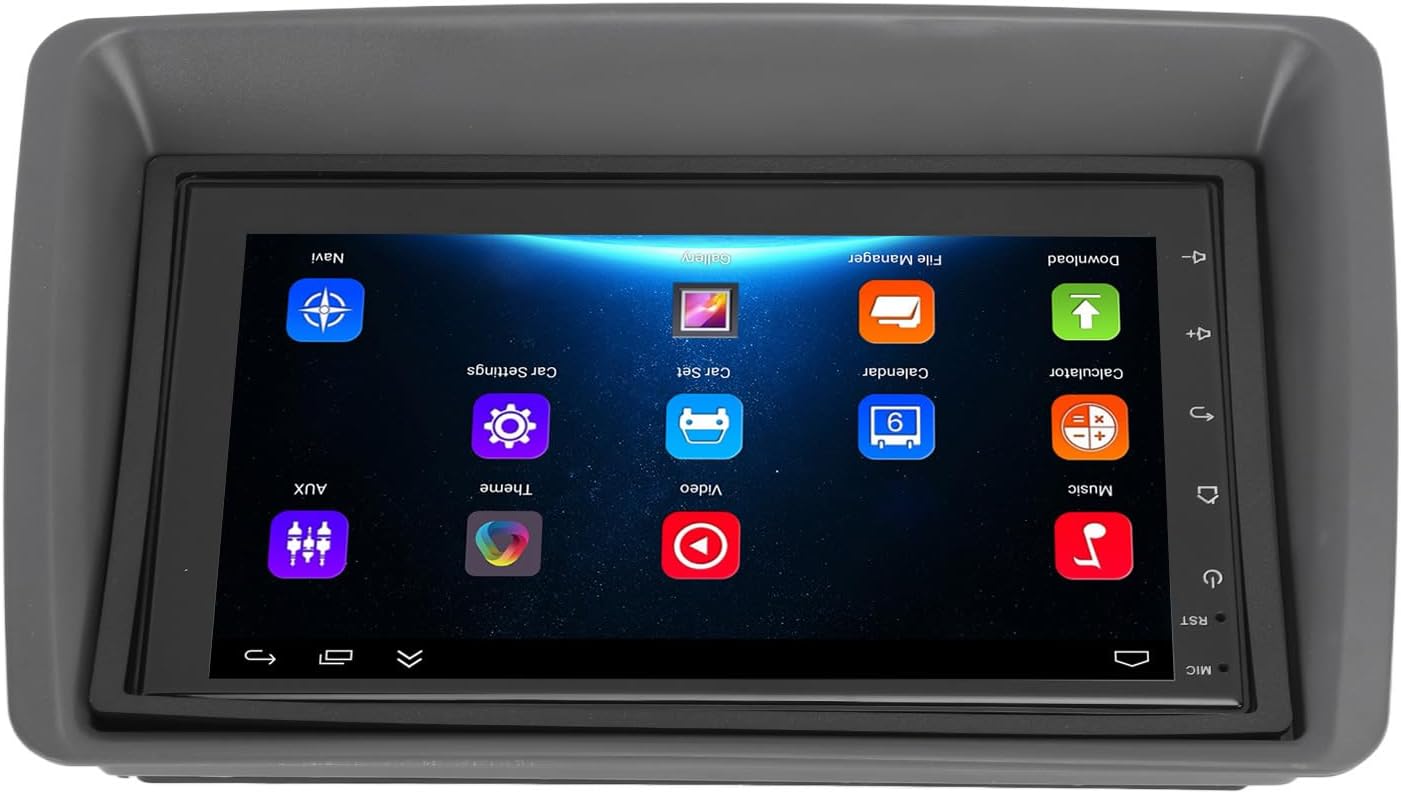
Figure 5.1: Main user interface of the Carplay screen.
5.2 Бездротовий CarPlay / Android Auto
Пристрій підтримує бездротові Apple CarPlay та Android Auto для безперешкодної інтеграції зі смартфоном.
- Переконайтеся, що Bluetooth і Wi-Fi увімкнено на вашому смартфоні.
- On the Carplay screen, navigate to the "CarPlay" or "Android Auto" application.
- Follow the on-screen prompts to pair your phone via Bluetooth. Once paired, the system will automatically establish a Wi-Fi connection for CarPlay/Android Auto functionality.
- Your phone's compatible apps (navigation, music, messaging) will be displayed on the Carplay screen.
5.3 GPS-навігація
The unit supports both online and offline GPS navigation.
- Онлайн-навігація: Connect the unit to Wi-Fi (via a mobile hotspot or vehicle Wi-Fi) to use online mapping services. Download navigation apps from the pre-installed app store.
- Офлайн-навігація: Download map data for offline use within your preferred navigation application. This allows navigation without an active internet connection.
5.4 Підключення Bluetooth
Підключіть свій смартфон через Bluetooth для дзвінків у режимі hands-free та потокової передачі аудіо.
- Go to the "Settings" menu on the Carplay screen and select "Bluetooth".
- Увімкніть Bluetooth і зробіть пристрій видимим.
- On your smartphone, search for available Bluetooth devices and select "EIMSOAH Carplay" (or similar name).
- Підтвердьте код сполучення на обох пристроях.
- Once connected, you can make/receive calls and play audio through the car's speakers.
5.5 Розділений екран
The unit supports split-screen functionality, allowing two applications to be viewред. одночасно.
- Відкрийте першу програму, яку ви хочете використовувати.
- Press and hold the "Recent Apps" button (or swipe up and hold from the bottom of the screen, depending on the Android version).
- Drag the first app to one side of the screen.
- Select the second application from the recent apps list or app drawer to fill the other half of the screen.
5.6 Reverse Image Function
If a compatible reverse camera is connected (not included), the screen will automatically display the reverse view коли транспортний засіб перемикається на задню передачу.
- Ensure the reverse camera is properly installed and connected to the designated video input.
- The system will automatically switch to the camera view при включенні задньої передачі.
6. Технічне обслуговування
Proper maintenance ensures the longevity and optimal performance of your EIMSOAH Carplay Screen.
- Очищення екрану: Використовуйте м’яку тканину без ворсу, щоб обережно протерти екран. Для стійких плям злегка протрітьampПротріть тканину водою або засобом для чищення екранів. Уникайте абразивних матеріалів або агресивних хімікатів.
- Оновлення програмного забезпечення: Periodically check for software updates through the system settings (if available) to ensure you have the latest features and bug fixes.
- Умови навколишнього середовища: Avoid exposing the unit to extreme temperatures, high humidity, or direct sunlight for extended periods.
- Управління кабелем: Переконайтеся, що всі кабелі надійно підключені, не перетиснуті та не піддаються надмірному зносу.
7. Вирішення проблем
If you encounter issues with your EIMSOAH Carplay Screen, refer to the following common problems and solutions:
| проблема | Можлива причина | Рішення |
|---|---|---|
| Пристрій не вмикається. | Немає живлення; нещільно прокладена проводка; перегорів запобіжник. | Check power connections and vehicle fuse box. Ensure battery is connected. |
| Немає аудіовиходу. | Volume muted; speaker wires disconnected; incorrect audio settings. | Check volume level and mute status. Verify speaker wire connections. Adjust audio output settings. |
| Сенсорний екран не реагує. | Software glitch; screen protector interference; physical damage. | Restart the unit. Remove any screen protectors to test. If problem persists, contact support. |
| Сигнал GPS слабкий або втрачений. | GPS antenna obstructed or disconnected; poor satellite coverage. | Переконайтеся, що GPS-антена має чіткий сигнал view of the sky and is securely connected. Move to an open area. |
| Проблеми з підключенням Bluetooth. | Bluetooth off on device/phone; pairing error; interference. | Переконайтеся, що Bluetooth увімкнено на обох пристроях. Видаліть попередні сполучення та повторіть сполучення. Перемістіть телефон ближче до пристрою. |
| CarPlay/Android Auto не підключається. | Wi-Fi/Bluetooth issues; phone compatibility; app issues. | Verify Wi-Fi and Bluetooth are active. Restart phone and unit. Ensure phone OS is up to date. |
If the problem persists after trying these solutions, please contact EIMSOAH customer support for further assistance.
8. Технічні характеристики
Detailed technical specifications for the EIMSOAH 7in HD Carplay Screen:
| Особливість | опис |
|---|---|
| Розмір екрана | 7 дюймів |
| Операційна система | Android 12 |
| ЦП | 4 ядра |
| Роздільна здатність екрана | 1024x600 |
| Версія Bluetooth | 4.0 |
| радіо | FM/RDS |
| Вихідна потужність | 4 x 45 Вт |
| Image Connection | For Android / For iOS (Wireless Apple CarPlay, Wired/Wireless Android Auto) |
| GPS навігація | Support Online/Offline Navigation |
| Тип сенсорного екрана | HD Capacitive Multi-Point Touch |
| Wireless WI-FI | Support 3G/4G/5G wireless signal reception |
| Розділений екран | Supported (left and right split screen) |
| Управління кермом | Підтримується |
| Reverse Image Input | Supported (HD reverse video input, camera not included) |
| Функція USB | Two USB ports (media playback, file transfer, DVR) |
| Функція AUX | Audio/Video input from external devices |
| Захисні схеми | Перевантаження, перенапругаtage, Коротке замикання |
| Вимкнення пам'яті | Підтримується |
| Відео вхід/вихід | Two video inputs, one video output |
| Аудіовихід | Left Audio Output, Right Audio Output |
| Підтримувані формати зображень | JPEG, GIF, PNG, BMP, JPG |
| Підтримувані формати відео | MP4 / MP5 / MKV / AVI / RMVB / 1080P |
| Підтримувані аудіоформати | MP3 / WMA / WAV / FLAC |
| Мова | Built-in Multiple Languages (Simplified Chinese, Traditional Chinese, English, German, Russian, Spanish, Italian, etc.) |
| Пристосування | Replacement for Fiat Panda 2003-2012 |
| Вага товару | 2.57 фунта |
| Розміри упаковки | 14.17 x 8.27 x 4.72 дюймів |
9. Гарантія та підтримка
EIMSOAH products are designed for reliability and performance. For warranty information and technical support, please refer to the following:
- Гарантія: Specific warranty terms and conditions may vary. Please refer to the warranty card included with your product or contact the seller/manufacturer directly for details regarding coverage period and claims process.
- Технічна підтримка: For technical assistance, troubleshooting beyond this manual, or inquiries about parts and service, please contact EIMSOAH customer support through the retailer where you purchased the product or visit the official EIMSOAH brand store on Amazon: EIMSOAH Store.