
1. Вступ
Thank you for choosing the Hama DR2002BT Digital Radio. This device offers a comprehensive audio experience with FM, DAB/DAB+ digital radio reception, and Bluetooth connectivity. Its user-friendly design, featuring large buttons and a clear 4.3-inch TFT color display, makes it suitable for all users. This manual will guide you through the setup, operation, and maintenance of your new digital radio.
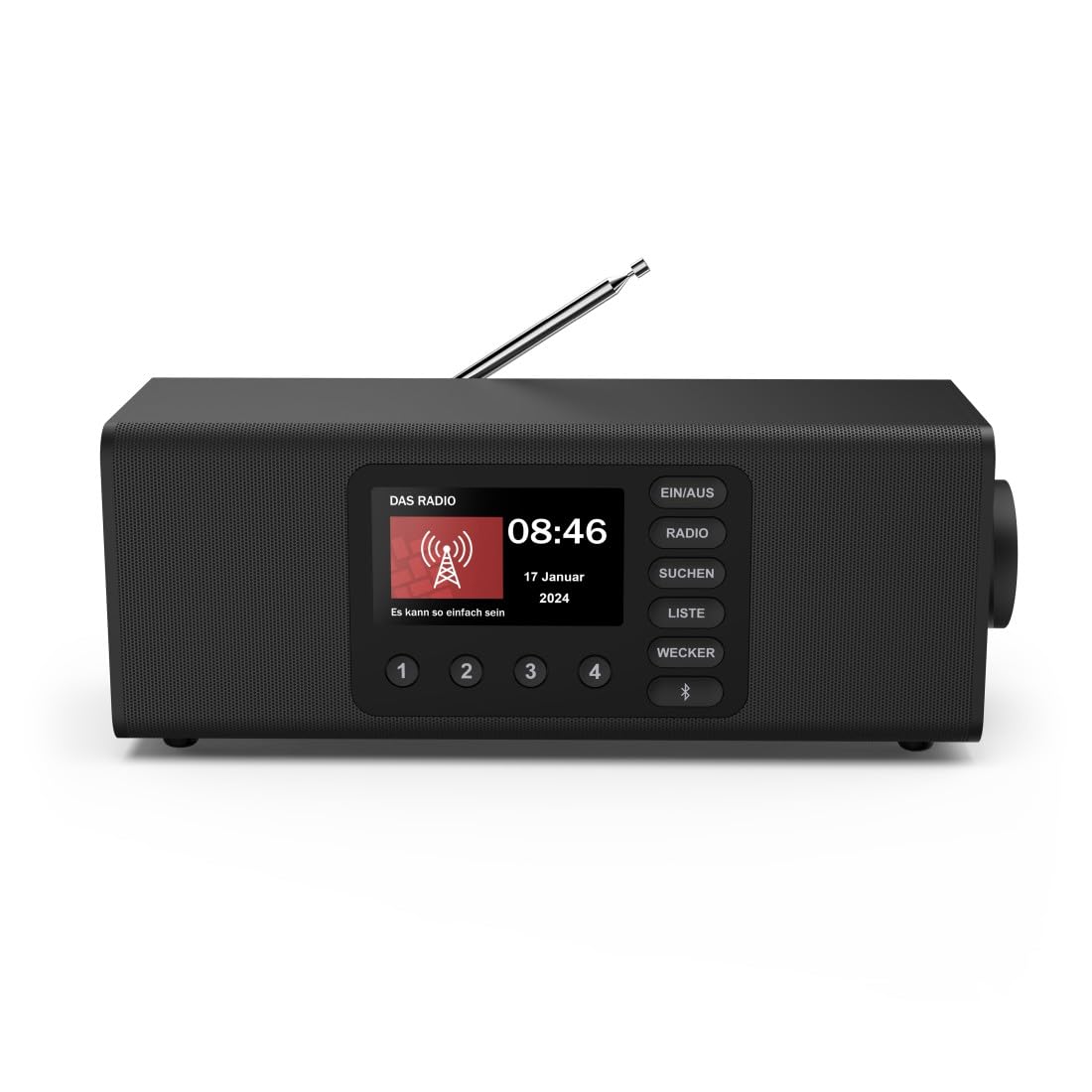
Зображення: спереду view of the Hama DR2002BT Digital Radio, showcasinйого дисплей та кнопки керування.
2. Інформація про безпеку
Будь ласка, уважно прочитайте ці інструкції з безпеки перед використанням пристрою. Зберігайте цей посібник для подальшого використання.
- Не піддавайте пристрій впливу вологи, дощу або екстремальних температур.
- Уникайте розміщення пристрою поблизу джерел тепла або під прямими сонячними променями.
- Не відкривайте пристрій casing. Ремонт повинен виконуватися лише кваліфікованим персоналом.
- Використовуйте лише наданий адаптер живлення.
- Забезпечте належну вентиляцію навколо пристрою.
3. Вміст упаковки
Переконайтеся, що всі предмети присутні під час розпакування:
- Hama DR2002BT Digital Radio
- Адаптер живлення
- Посібник користувача
4. Продукт закінчивсяview
4.1 Елементи керування та дисплей передньої панелі

Image: Front panel of the radio highlighting the display and control buttons, with icons for Bluetooth, DAB+, and Alarm functions.
The front panel features a 4.3-inch TFT color display, large control buttons, and a rotary knob for easy navigation and selection. Key buttons include:
- EIN/AUS (ON/OFF): Вмикає або вимикає пристрій.
- РАДІО: Switches between FM and DAB/DAB+ modes.
- SUCHEN (SEARCH): Initiates station scanning.
- LISTE (LIST): Accesses the list of available stations.
- WECKER (ALARM): Налаштовує параметри будильника.
- Кнопка Bluetooth: Активує режим сполучення Bluetooth.
- Кнопки попередньо встановлених налаштувань (1-4): Quick access to stored favorite stations.
- Rotary Knob (LAUTSTÄRKE/NAVIGIEREN): Керує гучністю та переміщується по меню.
4.2 Підключення задньої панелі
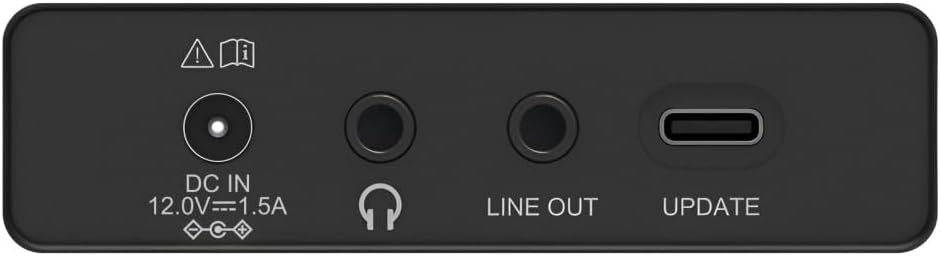
Image: Close-up of the rear panel showing the DC IN, Headphone, Line Out, and UPDATE (USB-C) ports.
Задня панель забезпечує основні можливості підключення:
- DC IN 12.0V --- 1.5A: Power input for the external adapter.
- Гніздо для навушників (3.5 мм): Для приватного прослуховування.
- ЛІНІЙНИЙ ВИХІД: Audio output for connecting to external ampліфікатори або колонки.
- UPDATE (USB-C): Для оновлень прошивки.
- Телескопічна антена: For FM and DAB/DAB+ reception.

Зображення: Задня частина view of the Hama DR2002BT Digital Radio with its telescopic antenna extended for optimal signal reception.
5. Налаштування
5.1 Підключення живлення
- Підключіть наданий адаптер живлення до DC IN порт на задній панелі радіоприймача.
- Підключіть адаптер живлення до відповідної розетки.
- The radio will power on automatically or enter standby mode.
5.2 Позиціонування антени
For optimal FM and DAB/DAB+ reception, fully extend the telescopic antenna. Position the radio near a window if reception is poor.
5.3 Початкове налаштування (перше використання)
Upon first power-on, the radio may guide you through an initial setup process, including language selection and an automatic DAB station scan. Follow the on-screen prompts.
6. Інструкція з експлуатації
6.1 Увімкнення/вимкнення живлення
Натисніть EIN/AUS кнопку, щоб увімкнути або вимкнути радіо.
6.2 Режим радіо DAB/DAB+
- Натисніть РАДІО щоб вибрати режим DAB.
- If this is the first time in DAB mode or if you want to rescan, press SUCHEN to perform a full scan for available stations.
- Use the rotary knob to navigate through the station list. Press the knob to select a station.
- до view the station list, press the СПИСКУЙТЕ кнопку.
6.3 Режим FM-радіо
- Натисніть РАДІО щоб вибрати режим FM.
- Прес SUCHEN to automatically scan for the next available FM station.
- Alternatively, use the rotary knob to manually tune to a frequency.
6.4 Збереження та виклик пресетів
The radio allows you to store up to 4 favorite stations using the dedicated preset buttons (1-4).
- Tune to the desired station (DAB or FM).
- Press and hold one of the preset buttons (1-4) until the display confirms the station has been saved.
- To recall a preset station, simply press the corresponding preset button (1-4).
6.5 Робота Bluetooth

Зображення: спереду view of the radio with Bluetooth and stereo speaker icons, indicating its wireless audio streaming capability.
The Hama DR2002BT can stream audio from your smartphone, tablet, or laptop via Bluetooth 5.0.
- Press the Bluetooth button on the front panel to enter Bluetooth pairing mode. The display will show a pairing indicator.
- On your external device (smartphone, tablet), enable Bluetooth and search for available devices.
- Select "Hama DR2002BT" from the list of devices to pair.
- Once paired, you can play audio from your device, and it will be output through the radio's speakers.
6.6 Функція будильника

Image: A person waking up with the Hama DR2002BT Digital Radio placed on a bedside table, illustrating its alarm clock functionality.
The radio features two independent alarm settings.
- Натисніть WECKER кнопку для доступу до налаштувань будильника.
- Use the rotary knob to select Alarm 1 or Alarm 2.
- Configure the alarm time, source (buzzer or radio station), and repetition (once, daily, weekdays, weekends, or specific days).
- Press the rotary knob to confirm each setting.
- To quickly activate/deactivate an alarm, press the WECKER button and use the rotary knob to toggle the alarm status.

Image: A person interacting with the Hama DR2002BT Digital Radio, demonstrating its ease of use for setting functions like alarms or tuning stations.
7. Технічне обслуговування
To ensure the longevity and optimal performance of your Hama DR2002BT Digital Radio, follow these maintenance guidelines:
- Прибирання: Використовуйте м’яку, суху тканину без ворсу для очищення зовнішньої частини радіоприймача. Не використовуйте абразивні засоби для чищення, віск або розчинники.
- Пил: Regularly dust the device to prevent accumulation in vents and ports.
- Зберігання: Якщо радіоприймач зберігатиметься протягом тривалого часу, від’єднайте його від джерела живлення та зберігайте у прохолодному сухому місці.
- Антена: Обережно поводьтеся з телескопічною антеною, щоб уникнути її погнуття або поломки.
8. Вирішення проблем
Якщо у вас виникли проблеми з радіо, зверніться до наступних поширених проблем та способів їх вирішення:
| проблема | Можлива причина | Рішення |
|---|---|---|
| Немає живлення | Адаптер живлення не підключено; розетка несправна | Check power adapter connection; Try a different power outlet. |
| Поганий радіоприйом (DAB/FM) | Антена не висунута; Зона слабкого сигналу; Перешкоди | Fully extend the telescopic antenna; Reposition the radio (e.g., near a window); Perform a new station scan. |
| Помилка з’єднання Bluetooth | Bluetooth not enabled on external device; Radio not in pairing mode; Device too far | Ensure Bluetooth is on and visible on your device; Press the Bluetooth button on the radio; Move devices closer (within 10m). |
| Ні звуку | Занадто низька гучність; увімкнено вимкнення звуку; вибрано неправильне джерело | Increase volume using the rotary knob; Check if mute is active; Ensure the correct mode (DAB, FM, Bluetooth) is selected. |
| Сигналізація не звучить | Alarm not activated; Incorrect alarm time/day set | Verify alarm is enabled in settings; Check alarm time and repetition settings. |
9. Технічні характеристики

Image: Diagram showing the dimensions of the Hama DR2002BT Digital Radio: 35 cm (width), 12.5 cm (depth), and 13 cm (height).
| Особливість | Деталь |
|---|---|
| Номер моделі | DR2002BT (00054298) |
| Рецепція | DAB, DAB+, FM |
| Версія Bluetooth | 5.0 |
| Вихідна потужність (RMS) | 10 Вт (стерео) |
| Дисплей | 4.3-дюймовий кольоровий TFT-дисплей |
| Зв'язки | 3.5mm Jack (Headphone), USB-C (Update), Line Out, DC IN |
| Джерело живлення | Зовнішній адаптер живлення |
| Розміри (Ш x Г x В) | 35 х 12.5 х 13 см |
| вага | 1788 грамів |
| матеріал | пластик |
| Колір | чорний |
| Додаткові функції | Alarm Function (2 alarms), Direct Selection Keys |
10. Гарантія та підтримка
Hama GmbH & Co KG provides a warranty for this product. Please refer to the warranty card included in your package or visit the official Hama webсайт для отримання детальних гарантійних умов.
For technical support, troubleshooting assistance, or spare parts, please contact Hama customer service or visit their website. The availability of spare parts in the EU is guaranteed for 7 years.
- Виробник: Hama GmbH & Co KG
- Країна походження: Німеччина
- Наявність запасних частин у ЄС: 7 років