1. Вступ
This manual provides essential instructions for the installation, setup, and operation of your TONGOU Wi-Fi Smart Switch 1P+N DIN Rail DIY with Power Monitoring. This device allows you to transform traditional household appliances into smart, connected devices, offering remote control, voice control, and energy consumption monitoring through the Smart Life or Tuya application.

Image 1.1: TONGOU Wi-Fi Smart Switch integrated into a smart home system, showing app control and Wi-Fi connectivity.
2. Інформація про безпеку
WARNING: Electrical installation should only be performed by qualified personnel. Incorrect installation can lead to electric shock, fire, or property damage.
- Завжди відключайте живлення за допомогою головного автоматичного вимикача перед встановленням або технічним обслуговуванням.
- Переконайтеся, що пристрій встановлено в сухому середовищі, подалі від вологи та екстремальних температур.
- Переконайтеся, що обtage and current ratings of the switch match your electrical system requirements.
- Do not exceed the maximum current rating of 6A for this model.
- Переконайтеся, що всі з’єднання проводів надійні та належним чином ізольовані.
3. Вміст упаковки
Перевірте наявність усіх елементів в упаковці:
- 1 x TONGOU Wi-Fi Smart Switch (Model: With Power Monitoring 6A)
- 1 х посібник користувача
4. Технічні характеристики
| Особливість | Специфікація |
|---|---|
| Бренд | ТОНГОУ |
| Номер моделі | With Power Monitoring 6A |
| Робочий випtage | AC 90 - 240 V, 50/60 Hz |
| Бездротовий тип | Wi-Fi 2.4 GHz (5/4 GHz not supported) |
| Поточний рейтинг | 6 А |
| Maximum Wiring Capacity | 10 mm² (Power side and Load side) |
| Тип монтажу | Кріплення на DIN -рейку |
| Розміри (Д x Ш x В) | 9 х 2 х 8 см |
| вага | 120 грами |
| Контактний матеріал | Silver-plated relay contacts |
| Режим роботи | Увімкнення/вимкнення |
| Сертифікати | CE |
| Робоча температура | До 80 градусів за Цельсієм |
5. Монтаж
The TONGOU Wi-Fi Smart Switch is designed for DIN rail mounting. Follow these steps for proper installation:
- Відключення живлення: Перш ніж розпочинати будь-які електромонтажні роботи, переконайтеся, що головне живлення кола вимкнено автоматичним вимикачем.
- Монтаж: Mount the smart switch onto a standard 35mm DIN rail. The device occupies one position (18mm width).
- Електропроводка: Connect the power input (N for Neutral, L for Live) to the top terminals labeled 'Power'. Connect the load output (N for Neutral, L for Live) to the bottom terminals labeled 'Load'. The maximum wiring capacity is 10 mm² for both power and load sides. Ensure correct polarity.
- Захист ланцюга: It is recommended to install an upstream residual current circuit breaker (RCBO/A type, 30mA/10kA) to protect the circuit.
- Безпечні з'єднання: Use a screwdriver to securely tighten all wire connections.

Image 5.1: Wiring diagram illustrating the connection of the TONGOU Wi-Fi Smart Switch to a circuit with an upstream circuit breaker and a light bulb as a load.
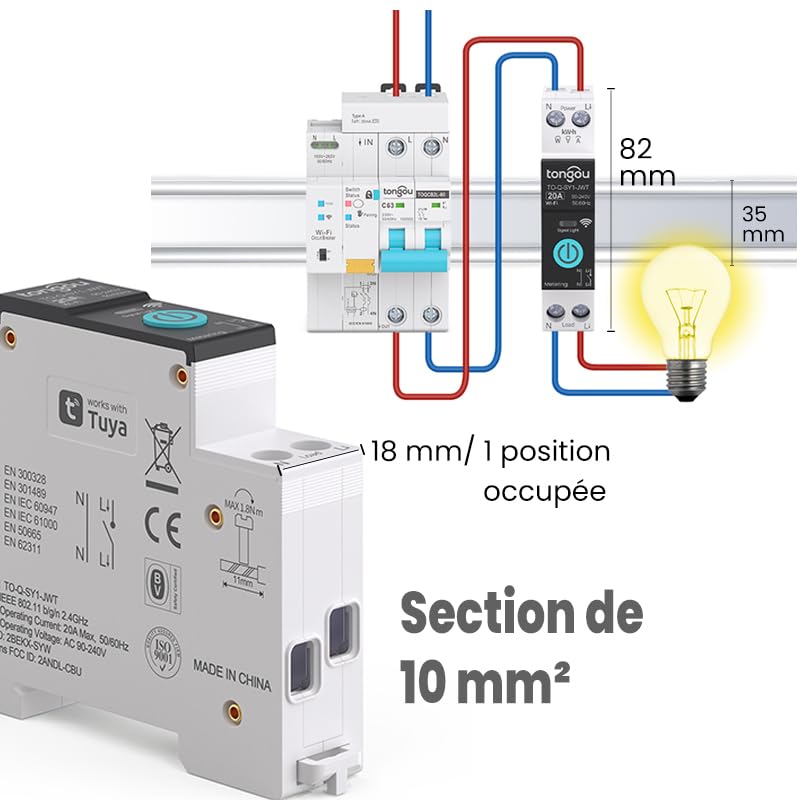
Image 5.2: Close-up of the smart switch showing its dimensions (82mm height, 35mm depth, 18mm width) and indicating a 10 mm² wiring section capacity.
6. Налаштування
To enable smart functionalities, connect your TONGOU Wi-Fi Smart Switch to the Smart Life or Tuya application.
- Завантажте додаток: Download the "Smart Life" or "Tuya Smart" application from the App Store (iOS) or Google Play Store (Android).
- Реєстрація/Увійти: Відкрийте застосунок і зареєструйте новий обліковий запис або увійдіть, використовуючи існуючий.
- Увійдіть у режим сполучення: After restoring power to the switch, press and hold the main button on the device for 5 to 10 seconds until the signal light blinks rapidly in blue. This indicates the device is in pairing mode.
- Додати пристрій у застосунку: In the Smart Life/Tuya app, tap the "+" icon (usually in the top right corner) to add a new device. The app should automatically discover the switch. If not, manually select "Electrical" > "Circuit Breaker (Wi-Fi)" or similar.
- Підключіться до Wi-Fi: Follow the in-app instructions to connect the device to your 2.4 GHz Wi-Fi network. Примітка: The device only supports 2.4 GHz Wi-Fi; 5 GHz networks are not compatible.
- Перейменувати пристрій: Once connected, you can rename the device for easier identification (e.g., "Living Room Light").

Image 6.1: Visual guide showing how to press and hold the button for 5-10 seconds until the blue indicator light blinks rapidly, signifying pairing mode.

Image 6.2: Screenshot of the Smart Life/Tuya app showing the login/register screen, a Wi-Fi router, and the process of adding a discovered "WiFi Din Rail Switch" device.
7. Операційна
Once the smart switch is successfully paired, you can control it and monitor energy usage through the app or voice commands.
7.1. Дистанційне керування через додаток
Open the Smart Life or Tuya app. Select your TONGOU Smart Switch from the device list. You can:
- Turn the connected appliance On or Off remotely from anywhere.
- Set up various timer modes:
- Режим синхронізації: Schedule specific on/off times for daily or weekly routines.
- Режим зворотного відліку: Встановіть таймер зворотного відліку, щоб пристрій вимкнувся після певного часу.
- Cyclic Timing Mode: Налаштуйте повторювані цикли ввімкнення/вимкнення.
- Astronomical Timing Mode: Automate based on sunrise and sunset times.
7.2. Голосове керування
The TONGOU Smart Switch is compatible with Amazon Alexa and Google Assistant. To enable voice control:
- Link your Smart Life/Tuya account to Amazon Alexa or Google Home app.
- Відкрийте для себе нові пристрої.
- Використовуйте голосові команди, такі як:
- «Alexa, увімкни [Назва пристрою]»
- «Окей, Google, вимкни [Назва пристрою]»

Image 7.1: An Amazon Echo device displaying a voice waveform, indicating it is processing a command to turn off a lamp.
7.3. Моніторинг живлення
The smart switch provides real-time and historical energy consumption data:
- View струм реального часу, об'ємtage, and power consumption of the connected load.
- Access historical data (hourly, daily, monthly, yearly) to track energy usage patterns.
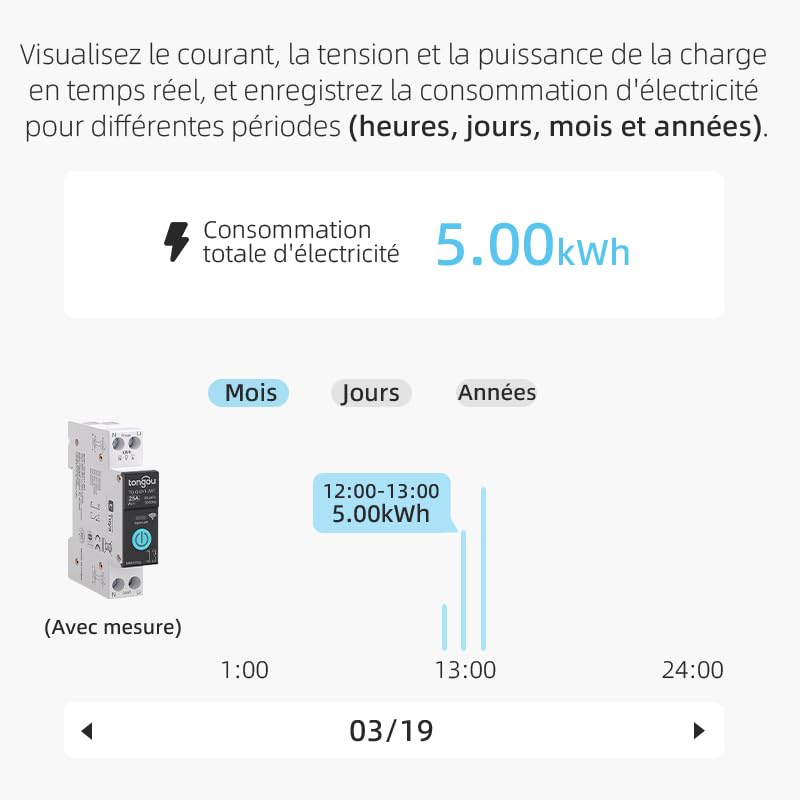
Image 7.2: A graphical representation within the app showing total electricity consumption (5.00 kWh) and a bar chart illustrating hourly consumption data for a specific date.
8. Технічне обслуговування
To ensure optimal performance and longevity of your TONGOU Wi-Fi Smart Switch:
- Тримайте пристрій чистим та без пилу. Використовуйте для очищення суху м’яку тканину.
- Не використовуйте рідкі засоби для чищення або розчинники.
- Забезпечте належну вентиляцію навколо пристрою, щоб запобігти перегріву.
- Регулярно перевіряйте міцність з'єднань проводів, особливо після початкового встановлення.
9. Вирішення проблем
If you encounter issues with your TONGOU Wi-Fi Smart Switch, refer to the following common problems and solutions:
| проблема | Можлива причина | Рішення |
|---|---|---|
| Пристрій не підключається до Wi-Fi | Incorrect Wi-Fi band (5GHz), weak signal, incorrect password, device not in pairing mode. | Ensure your Wi-Fi is 2.4 GHz. Move the device closer to the router. Re-enter Wi-Fi password carefully. Put the device back into pairing mode (rapid blue blinking). |
| Пристрій офлайн у додатку | Wi-Fi відключено, живлення вимкненоtage, router issues. | Check your Wi-Fi router and internet connection. Verify the device has power. Re-pair if necessary. |
| Не працює голосове керування | Account not linked, device not discovered, incorrect commands. | Ensure Smart Life/Tuya account is linked to Alexa/Google Home. Discover devices in the voice assistant app. Use the exact device name. |
| Power monitoring data is inaccurate or missing | Incorrect wiring, device malfunction. | Double-check wiring according to the installation diagram. Contact support if the issue persists. |
| Device not responding to manual button press | Немає живлення, внутрішня несправність. | Check power supply to the device. If power is present and the device is unresponsive, contact support. |
10. Гарантія та підтримка
For warranty information and technical support, please refer to the documentation provided with your purchase or contact TONGOU customer service through their official channels. Keep your purchase receipt as proof of purchase.