
вступ
This manual provides detailed instructions for the AULCMEET RC80B replacement remote control, designed for use with Edifier R1280DBs active speakers. Please read this manual carefully to ensure proper operation and to maximize your experience with the product.
Продукт закінченийview
The AULCMEET RC80B remote control offers a comprehensive set of functions for your Edifier R1280DBs speakers. Its ergonomic design ensures comfortable handling and intuitive button placement.
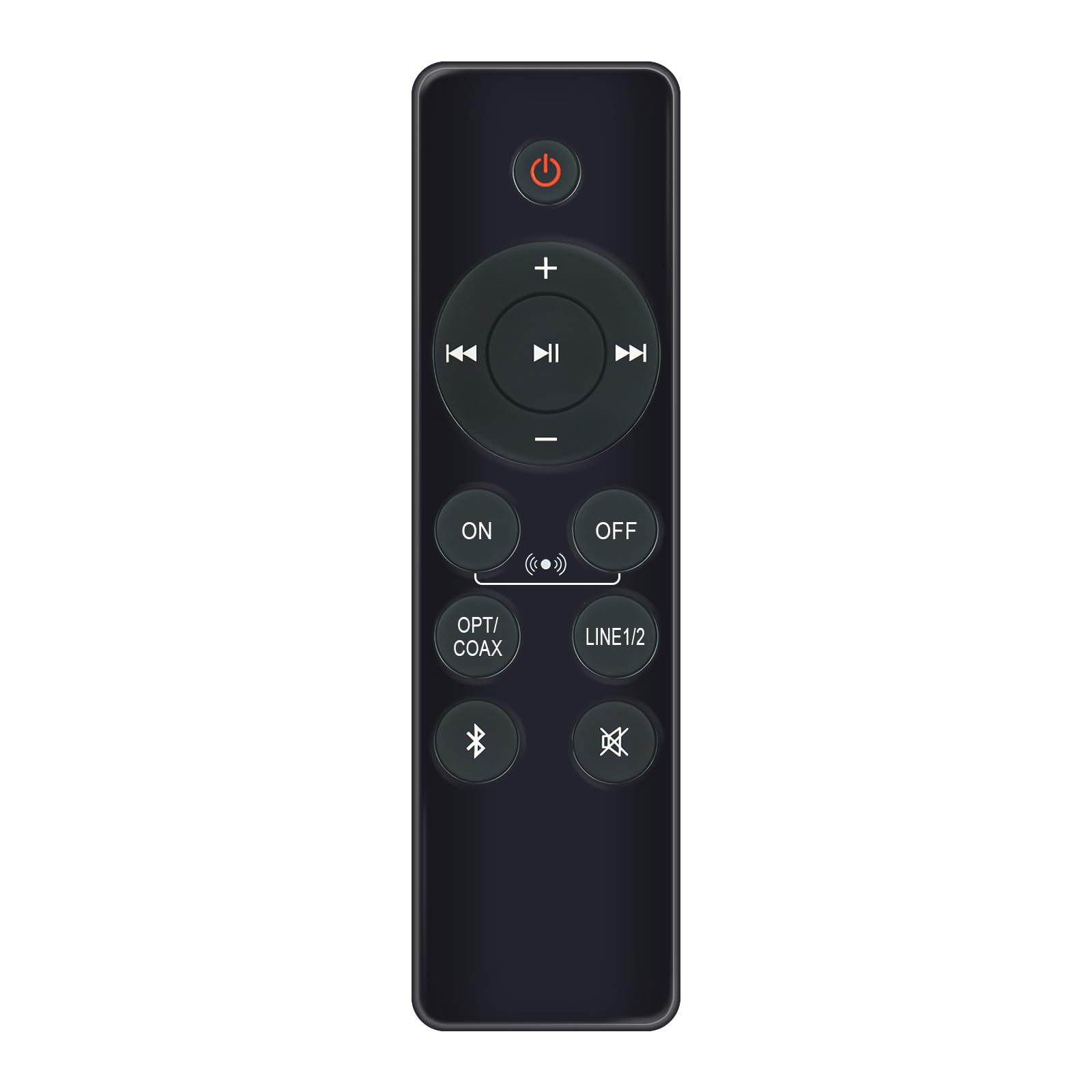
Image: AULCMEET RC80B Replacement Remote Control. The remote measures approximately 13.8 cm (5.43 inches) in length and 3.8 cm (1.5 inches) in width.
Функції кнопок:
- Кнопка живлення (⏻): Turns the speakers ON or OFF.
- Збільшення гучності (+) / Зменшення гучності (-): Adjusts the speaker volume.
- Попередній трек (⏮) / Next Track (⏭): Skips to the previous or next audio track.
- Відтворити/Пауза (⏯): Plays or pauses audio playback.
- ON / OFF (Input Selection): Toggles between different input modes.
- OPT/COAX: Selects Optical or Coaxial input.
- ЛІНІЯ1/2: Selects Line In 1 or Line In 2 input.
- Bluetooth (☋): Activates or selects Bluetooth input.
- Вимкнути звук (🛇): Mutes or unmutes the speaker audio.
Налаштування
The AULCMEET RC80B remote control is designed for immediate use without complex setup procedures. Simply install the batteries, and it is ready to operate your compatible Edifier R1280DBs speakers.
Установка батареї:
- Знайдіть батарейний відсік на задній панелі пульта дистанційного керування.
- Відкрийте кришку батарейного відсіку.
- Insert two AAA alkaline batteries, ensuring the correct polarity (+ and -) as indicated inside the compartment.
- Надійно закрийте кришку батарейного відсіку.
Примітка: No programming or pairing is required for this replacement remote control. It functions directly with the specified Edifier R1280DBs active speakers.
Інструкція з експлуатації
To operate your Edifier R1280DBs speakers using the AULCMEET RC80B remote control, point the remote directly towards the speakers' infrared receiver. Ensure there are no obstructions between the remote and the speakers.
- Увімкнення/вимкнення живлення: Натисніть ⏻ button to turn the speakers on or off.
- Регулювання гучності: Використовуйте + і - кнопки для збільшення або зменшення гучності.
- Вибір входу: Натисніть УВІМК./ВИМК, OPT/COAX, ЛІНІЯ1/2, або Bluetooth buttons to switch between the available audio input sources.
- Керування відтворенням: When using Bluetooth or other compatible sources, use the ⏮ (Previous), ⏭ (Next), and ⏯ (Play/Pause) buttons to control media playback.
- Функція відключення звуку: Натисніть 🛇 button to temporarily silence the audio. Press it again to restore the sound.
Технічні характеристики
| Бренд | AULCMEET |
| Модель | RC80B |
| Сумісні пристрої | Edifier R1280DBs Active Speakers |
| Колір | чорний |
| особливості | Ергономічний дизайн |
| Інтерфейс зв'язку | Інфрачервоний (ІЧ) |
| Кількість кнопок | 30 |
| Максимальна дальність | Приблизно 33 футів (10 метра) |
| Тип батареї | 2 лужні батарейки типу AAA (не входять до комплекту) |
| Розміри (Д x Ш) | 13.8 см x 3.8 см (5.43 дюймів x 1.5 дюймів) |
Усунення несправностей
If you encounter issues with your AULCMEET RC80B remote control, please refer to the following common solutions:
- Пульт дистанційного керування не відповідає: Ensure the batteries are correctly installed and are not depleted. Replace batteries if necessary.
- Короткий робочий діапазон: Check for any obstructions between the remote and the speaker's IR receiver. Ensure the remote is pointed directly at the speakers. Low battery power can also reduce range.
- Specific button not working: Clean the remote control surface and buttons. If the issue persists, the button may be faulty, or the remote may require battery replacement.
- Speakers not responding to any remote: Ensure the speakers are powered on and functioning correctly. Try using the manual controls on the speaker unit if available.
Технічне обслуговування
Належний догляд та обслуговування подовжать термін служби вашого пульта дистанційного керування:
- прибиранняПротріть пульт дистанційного керування м’якою сухою тканиною. Не використовуйте абразивні засоби для чищення або розчинники.
- Догляд за акумулятором: Remove batteries if the remote control will not be used for an extended period to prevent leakage.
- Зберігання: Store the remote control in a cool, dry place, away from direct sunlight and extreme temperatures.
- Уникайте крапельЗахищайте пульт дистанційного керування від фізичних ударів, оскільки падіння можуть пошкодити внутрішні компоненти.
Гарантія та підтримка
Specific warranty information for this AULCMEET RC80B replacement remote control is not provided in the product details. For warranty claims, technical support, or further assistance, please contact the seller or manufacturer directly through your purchase platform. Keep your purchase receipt or order number handy for faster service.