
1. Вступ
The AIYEEN USB-C TF/Micro SD Card Reader is a compact and versatile device designed to expand storage and facilitate data transfer for your USB-C enabled smartphones, tablets, laptops, and PCs. Its plug-and-play functionality and durable design make it an essential accessory for managing your digital content on the go.
2. Особливості продукту
- Mini USB-C Card Reader with LED Indicator: Extends storage capacity for USB-C devices. A blue LED light confirms device connection status.
- Широка сумісність карт: Supports TF (Micro SD, Micro SDHC, Micro SDXC) cards.
- Функціональність OTG: Enables direct connection and data transfer with compatible smartphones and tablets without needing a computer.
- Компактний і портативний дизайн: Crafted from high-quality zinc alloy, lightweight, and includes an anti-loss keychain for easy transport.
- Широка сумісність пристроїв: Works with most USB-C devices supporting OTG, including MacBook Pro/Air, iPhone 15 series, Samsung Galaxy, Google Pixel, and PCs running Mac OS, Windows, and Linux.
- Високошвидкісна передача даних: USB 3.0 interface for fast file перекази.

Figure 2.1: The AIYEEN USB-C Card Reader connected to a tablet, highlighting the built-in LED indicator that illuminates when the device is connected.
3. Вміст упаковки
- 1 x AIYEEN USB-C TF/Micro SD Card Reader (Light Gold)
- 1 x брелок

Figure 3.1: The AIYEEN USB-C Card Reader, showing its compact size, light gold finish, attached keychain, and a compatible MicroSD card.
4. Інструкції з налаштування
- Вставте картку Micro SD: Gently insert your TF (Micro SD, Micro SDHC, or Micro SDXC) card into the card slot on the AIYEEN reader until it clicks into place. Ensure the card is inserted in the correct orientation.
- Підключення до пристрою: Plug the USB-C connector of the card reader into the USB-C port of your compatible device (smartphone, tablet, laptop, or PC).
- Перевірте підключення: The blue LED indicator on the card reader will illuminate, confirming a successful connection. Your device should recognize the card reader as external storage.

Figure 4.1: The card reader connected to a laptop and a smartphone, illustrating how it can be used with different USB-C enabled devices.
5. Інструкція з експлуатації
5.1. Доступ Files
Once connected, your device will typically display a notification or automatically open a file manager application. You can then navigate to the external storage (usually labeled as "USB Drive," "SD Card," or similar) to access, copy, move, or delete files on your Micro SD card.
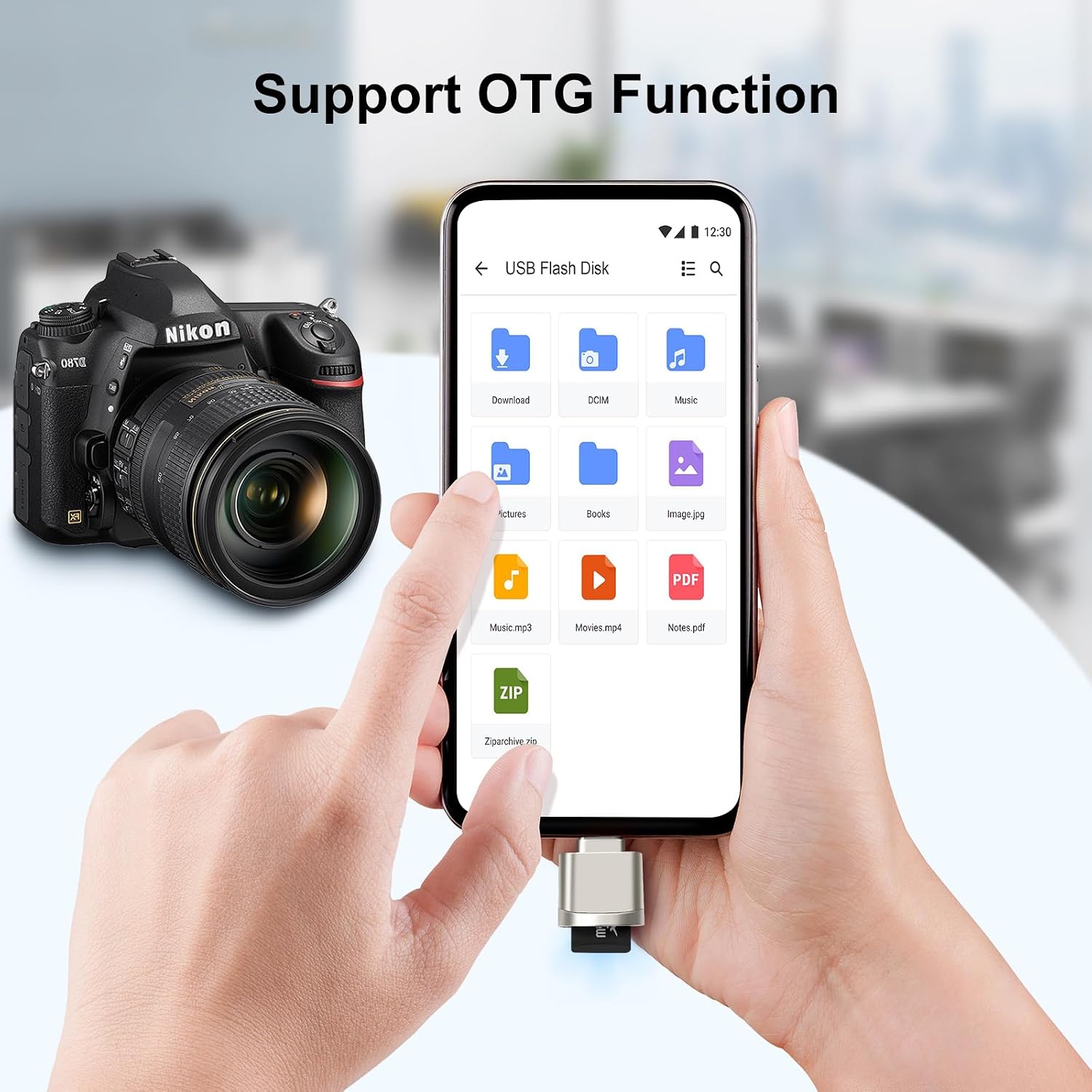
Figure 5.1: A smartphone displaying its file manager, with the card reader connected, allowing direct access to files on the Micro SD card via OTG.
5.2. Передача даних
Utilize your device's file management system to transfer photos, videos, documents, and other data between your device's internal storage and the Micro SD card. The USB 3.0 interface ensures fast transfer speeds for efficient data management.

Figure 5.2: The card reader connected to a laptop, demonstrating its capability for ultra-fast file transfer speeds, indicated by "USB 3.0 5Gbps".
5.3. Відтворення медіафайлів
You can directly play media files (movies, music, photos) stored on the Micro SD card through the card reader on your compatible device, without needing to transfer them to internal storage first.

Figure 5.3: A smartphone playing a movie, demonstrating the ability to enjoy media content directly from the Micro SD card via the card reader.
6. Сумісність
The AIYEEN USB-C TF/Micro SD Card Reader is designed for broad compatibility with various devices and operating systems:
- Пристрої: Personal Computers, Laptops, Smartphones, Tablets with a USB Type-C port supporting OTG functionality.
- Examples: MacBook Pro/Air, iPhone 15 series, Samsung Galaxy Note/S series, Google Pixel, and other USB-C enabled devices.
- Операційні системи: Mac OS, Windows, Linux, Android.
- Типи носіїв: Micro SD, Micro SDHC, Micro SDXC (TF cards).

Figure 6.1: The card reader's universal compatibility with a range of USB-C devices and various Micro SD card formats.

Figure 6.2: Supported operating systems for the AIYEEN USB-C Card Reader.
7. Технічне обслуговування
To ensure the longevity and optimal performance of your AIYEEN USB-C TF/Micro SD Card Reader:
- Тримайте пристрій чистим та без пилу та сміття. Використовуйте м’яку суху тканину для очищення.
- Уникайте впливу екстремальних температур, вологості або прямих сонячних променів на зчитувач.
- Не намагайтеся розбирати або модифікувати пристрій, оскільки це призведе до анулювання гарантії.
- Always safely eject the card reader from your device before unplugging it to prevent data corruption.
8. Вирішення проблем
| проблема | Можлива причина | Рішення |
|---|---|---|
| Пристрій не розпізнано. |
|
|
| Blue LED not lighting up. |
|
|
| Slow data transfer. |
|
|
9. Технічні характеристики
| Атрибут | Деталь |
|---|---|
| Бренд | AIYEEN |
| Назва моделі | AY-MiniReader-GD |
| Технологія підключення | USB Type-C |
| Апаратний інтерфейс | USB 3.0 Type-C |
| Сумісні пристрої | Персональний комп'ютер, ноутбук, смартфон |
| Сумісні операційні системи | Mac ОС, Windows, Linux |
| Підтримуваний тип носія | Micro SDHC (also Micro SD, Micro SDXC) |
| Швидкість передачі даних | Up to 5 Gigabits per second (USB 3.0) |
| матеріал | Високоякісний цинковий сплав |
| Колір | Світле золото |

Figure 9.1: Dimensions of the MiniReader model (bottom row of devices in the image) are approximately 23mm x 16mm (0.9in x 0.63in).
10. Гарантія та підтримка
All AIYEEN products come with a Гарантія 2 рік against manufacturing defects. If you encounter any issues or have questions regarding your product, please do not hesitate to contact AIYEEN customer support for assistance.
For support, please refer to the contact information provided with your purchase or visit the official AIYEEN webсайт.