
1. Вступ
This manual provides essential instructions for the installation, operation, and maintenance of your MAXSafes Quick Access Wall Safe, Model 50002NV. This wall-mounted safe is designed to secure valuables using advanced finger vein recognition, a numeric keypad, or a traditional key. Please read this manual thoroughly before installation and use to ensure proper function and safety.
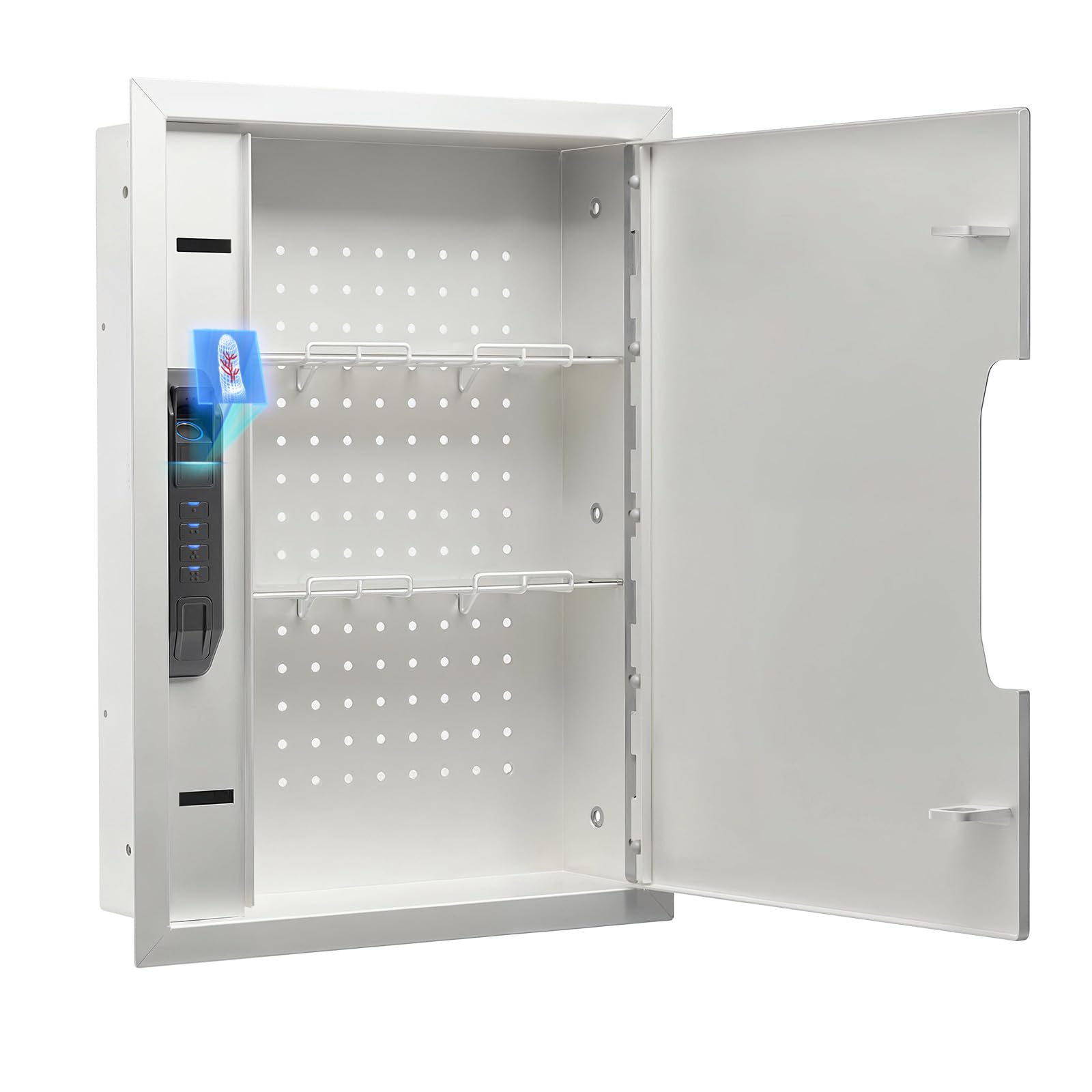
Figure 1: MAXSafes Quick Access Wall Safe (Model 50002NV)
2. Особливості продукту
- Finger Vein Recognition Lock: Utilizes unique blood vessel texture for high-security, unforgeable access. Stores up to 50 finger vein IDs, unaffected by external factors like oil, dryness, or humidity.
- Three Ways to Open: Offers versatile access via finger vein recognition, numeric keypad (4-6 digit code), or physical key.
- Heavy Duty Dual-Latch: All locking mechanisms are positioned on one side of the door to maximize interior storage space.
- Removable Shelves & Pegboard: Includes pre-drilled holes (DIY Pegboard) and adjustable, removable shelves for customized organization.
- Built-in Light & Silent Mode: Features internal LED lighting for visibility in low-light conditions and a silent mode (activated by pressing and holding the "1" key) to disable keypad sounds.
- Сигналізація: Activates a 120-second alarm after three incorrect entry attempts. The alarm can be deactivated by using the key, removing the battery, or entering the correct finger vein/passcode.

Figure 2: Finger Vein Recognition in Use
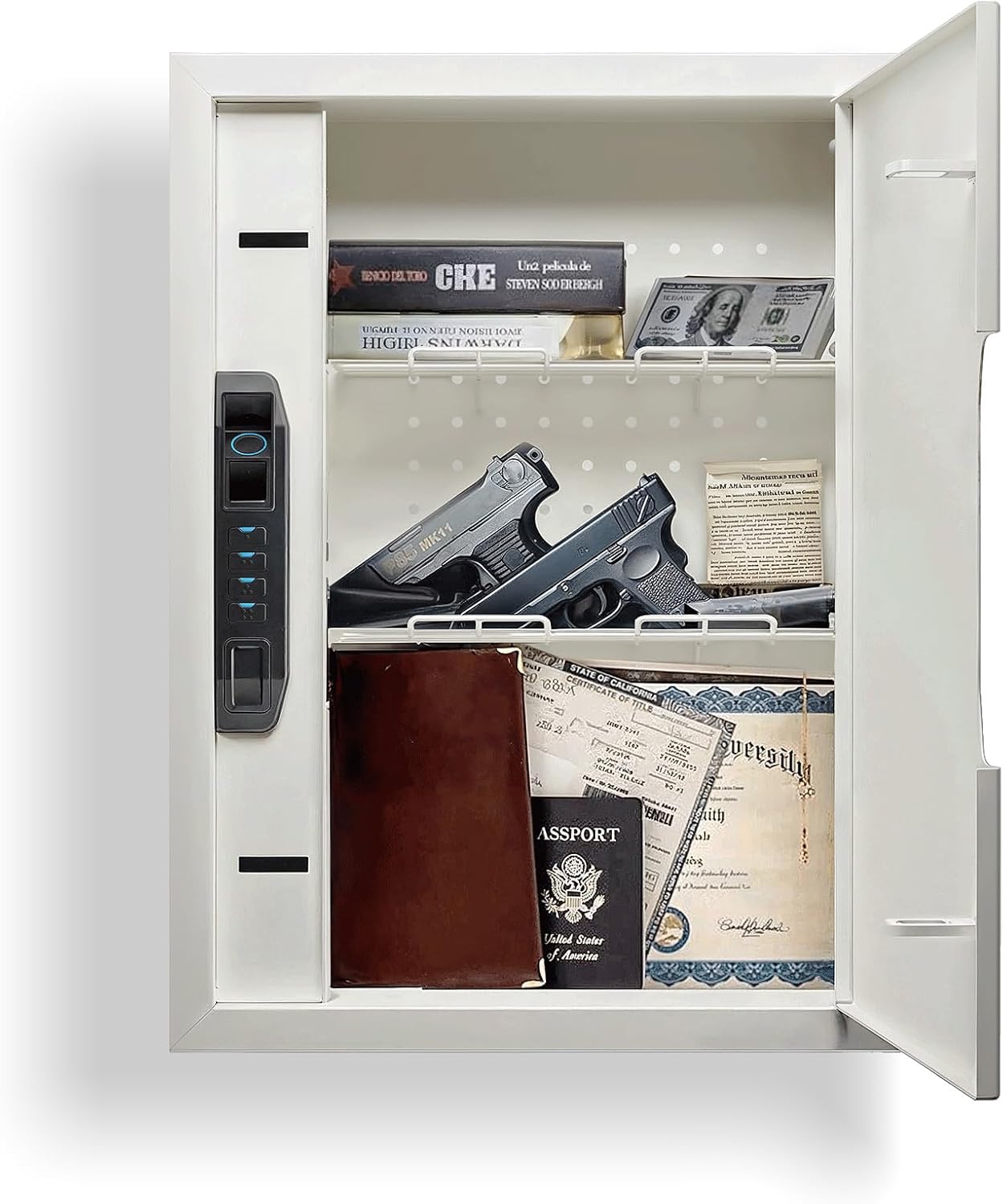
Figure 3: Safe Interior with Removable Shelves and Pegboard
3. Вміст упаковки
Перевірте наявність усіх предметів у вашій упаковці:
- 1 x MAXSafes Wall Safe
- 1 х Інструкція з експлуатації
- 2 x Override Keys
4. Інформація про безпеку
- Always store override keys in a secure location away from the safe and out of reach of unauthorized individuals.
- Do not store the override keys inside the safe.
- Ensure the safe is securely mounted to wall studs to prevent unauthorized removal.
- Тримайте дверцята сейфа зачиненими та замкнутими, коли він не використовується.
- Regularly check battery levels to ensure continuous operation of electronic locking mechanisms.
5. Налаштування та встановлення
Proper installation is crucial for the security of your wall safe. It is recommended to install the safe between standard 16-inch on-center wall studs.
5.1 Відеоінструкція з встановлення
Video 1: Official MAXSafes guide on how to install the wall safe. This video demonstrates locating wall studs, cutting the drywall, placing the safe, marking and drilling holes, and securing the safe to the studs.
5.2 Покрокове встановлення
- Виберіть місце: Select a suitable location between two wall studs. Ensure there are no electrical wires, plumbing, or other obstructions behind the drywall.
- Виміряйте та відзначте: Use the safe's dimensions (refer to Specifications) to mark the rectangular opening on the drywall.
- Різання гіпсокартону: Carefully cut out the marked rectangular section of the drywall using a drywall saw.
- Тестова відповідність: Insert the safe into the opening to ensure it fits correctly.
- Позначте монтажні отвори: Open the safe door to access the pre-drilled mounting holes on the interior sides. Use a pencil to mark these locations on the wall studs.
- Remove Safe & Drill Pilot Holes: Remove the safe from the wall. Using a 1/4-inch drill bit, drill pilot holes at the marked locations on the wall studs.
- Insert Safe & Secure: Re-insert the safe into the wall opening. Align the mounting holes with the pilot holes. Use the provided bolts and a socket wrench to securely fasten the safe to the wall studs. Tighten firmly but do not overtighten to avoid damaging the wall or safe.

Figure 4: Internal Components and Dimensions for Installation

Figure 5: Installed Wall Safe
6. Операція
6.1 Відеопосібник з експлуатації
Video 2: Official MAXSafes guide on how to use the wall safe. This video covers initial setup, programming finger vein IDs, programming access codes, and understanding the alarm mode.
6.2 Початкове налаштування
- Вставте батарею: Open the safe using an override key. Locate the battery compartment inside the safe. Remove the battery cover and insert a new 9V battery (not included).
- Store Override Keys: Keep the override keys in a secure location outside of the safe for emergency access.
6.3 Programming Finger Vein IDs
The safe can store up to 50 unique finger vein IDs.
- Access Program Button: Open the safe using an override key or the default access code. Locate the program button inside the safe (usually under a rubber cover). Press the program button.
- Register Finger Vein: Place your finger on the scanner. The scanner will prompt you to lift and place your finger three times to register your finger vein ID.
- Repeat for Additional Users: Repeat the process for any additional finger vein IDs you wish to register.
6.4 ерasing All Finger Vein IDs
To erase all stored finger vein IDs:
- Access Program Button: Open the safe and press the program button.
- Видалити: Press and hold the program button for 5 seconds, then press the '4' key on the keypad. All registered finger vein IDs will be erased.
6.5 Programming Numeric Combinations
The safe can store one 4-6 digit numeric code at a time.
- Access Program Button: Open the safe and press the program button.
- Enter New Code: Введіть бажаний 4-6-значний код на клавіатурі.
- Confirm Code: Press the program button again to confirm and save the new code. Repeat the process to re-enter the code for verification.

Figure 6: Multiple Access Methods
6.6 Key Override
In case of battery failure or forgotten codes, the safe can be opened using the physical override keys. Locate the hidden keyhole, remove its magnetic cover, insert the key, and turn to open.
6.7 Тихий режим
To enable or disable silent mode (which mutes keypad sounds), press and hold the "1" key on the keypad.
Система сигналізації 6.8
If three incorrect finger vein or numeric code entries are made consecutively, the safe's alarm system will activate for 120 seconds. During this time, the safe will also enter a 2-minute lockout period, preventing further attempts.
To stop the alarm and end the lockout:
- Enter a correct finger vein ID or numeric passcode.
- Use an override key to open the safe.
- Remove the 9V battery.

Figure 7: Safe with Interior LED Lighting
7. Технічне обслуговування
- Заміна батареї: Replace the 9V battery annually or when the low battery indicator activates.
- Прибирання: Wipe the exterior and interior of the safe with a soft, dry cloth. Avoid using abrasive cleaners or solvents.
- Механізм блокування: Do not lubricate the lock mechanism. If the lock becomes stiff, contact customer support.
8. Вирішення проблем
| проблема | Можлива причина | Рішення |
|---|---|---|
| Safe does not open with finger vein or code. | Low battery; incorrect finger vein/code; finger not placed correctly. | Replace 9V battery; re-register finger vein; re-enter code; ensure finger covers scanner completely. Use override key if necessary. |
| Несподівано звучить сигналізація. | Three incorrect entries; tampспроба. | Enter correct finger vein/code; use override key; remove battery to reset. |
| Клавіатура не реагує. | Dead battery; electronic malfunction. | Replace 9V battery. If issue persists, use override key and contact customer support. |
| Двері не зачиняються або не замикаються належним чином. | Obstruction; latch mechanism issue. | Check for obstructions. Ensure safe is installed level. If mechanism is faulty, contact customer support. |
9. Технічні характеристики
| Особливість | Деталь |
|---|---|
| Бренд | MAXSafes |
| Номер моделі | 50002NV |
| Розміри продукту (Д x Ш x В) | 4" Г x 16.13" Ш x 21.88" В |
| Тип замка | Biometric (Finger Vein), Electronic Combination Lock, Key |
| Ємність | 1.31 кубічних футів |
| матеріал | Вуглецева сталь |
| Тип монтажу | Wall Mount (between studs) |
| Особливості | Alarm System, Biometric Finger Vein, Combination Lock, Removable Shelf, Pegboard |
| UPC | 762736659692 |
10. Гарантія та підтримка
For warranty information or technical support, please refer to the contact details provided with your purchase documentation or visit the official MAXSafes webсайт. Зберігайте чек про покупку як підтвердження покупки для гарантійних претензій.