
вступ
This manual provides essential instructions for the safe and efficient use of your Aiwa AW-KF4 Portable Bluetooth Speaker. Please read this manual thoroughly before using the product and retain it for future reference.
The Aiwa AW-KF4 is a portable Bluetooth speaker designed for robust audio performance with dynamic LED lighting, a rechargeable battery, and resistance to water and dust (IPX6). It offers versatile connectivity options including Bluetooth, USB, and AUX input.
Вміст упаковки
Carefully unpack your speaker and ensure all items are present and in good condition. If any items are missing or damaged, please contact your retailer.
- Aiwa AW-KF4 Portable Bluetooth Speaker
- Зарядний кабель USB-C
- Інструкція з експлуатації

Image: The Aiwa AW-KF4 speaker in its retail packaging, showing the speaker and branding.
Продукт закінченийview
The Aiwa AW-KF4 speaker features a compact, cylindrical design with integrated controls and dynamic LED lighting. It is built for portability and durability.
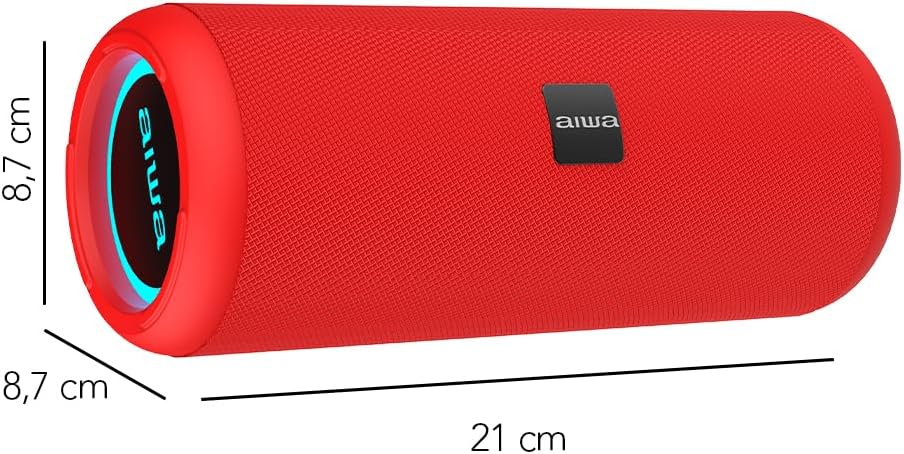
Image: A red Aiwa AW-KF4 speaker showing its approximate dimensions: 21 cm in length and 8.7 cm in diameter.

Image: Two Aiwa AW-KF4 speakers (red and black) illustrating key features: 20W output, LED lighting, TWS function, IPX6 water resistance, Bluetooth, USB, and SD card compatibility.

Image: A collage showing the Aiwa AW-KF4 speaker in various outdoor settings, emphasizing its IPX6 water resistance, up to 10 hours of battery life, and hands-free calling capability with an integrated microphone.
Налаштування
1. Заряджання динаміка
Before first use, fully charge the speaker. Use the provided USB-C cable to connect the speaker to a compatible USB power adapter (not included) or a computer's USB port.
- Індикатор заряджання світитиметься під час заряджання.
- Повна зарядка займає приблизно 3 години.
- Після повного заряджання індикатор може змінитися або згаснути.
A fully charged battery provides up to 10 hours of playback, depending on volume level and usage.
2. Увімкнення/вимкнення живлення
- To power on: Press and hold the Power button for a few seconds until you hear an audible prompt and the LED lights activate.
- To power off: Press and hold the Power button for a few seconds until you hear an audible prompt and the LED lights turn off.
Інструкція з експлуатації
1. Підключення Bluetooth
The speaker will automatically enter Bluetooth pairing mode when powered on for the first time or if no device is connected. The LED indicator will flash, indicating it's ready to pair.
- Переконайтеся, що динамік увімкнено та перебуває в режимі сполучення.
- Увімкніть Bluetooth на своєму смартфоні, планшеті або іншому аудіопристрої.
- шукати "AW-KF4" in the list of available Bluetooth devices.
- Select "AW-KF4" to connect. You will hear a confirmation sound once paired.
- The LED indicator will stop flashing and remain solid.
The speaker has a Bluetooth range of up to 10 meters (33 feet).
2. Функція справжнього бездротового стерео (TWS)
The TWS function allows you to pair two Aiwa AW-KF4 speakers together for a stereo sound experience.

Image: A visual representation of the TWS (True Wireless Stereo) function, showing two Aiwa AW-KF4 speakers being used together for synchronized sound.
- Ensure both AW-KF4 speakers are powered on and not connected to any Bluetooth device.
- On one speaker (this will be the primary speaker), press and hold the TWS button (if available, or a designated button as per specific model instructions) until you hear a pairing tone.
- Два динаміки автоматично підключаться один до одного. Після підключення пролунає звуковий сигнал підтвердження.
- Тепер підключіть свій пристрій Bluetooth до основного динаміка, як описано в розділі «Спарювання Bluetooth».
Note: Refer to the specific button layout on your speaker for the exact TWS pairing button.
3. Відтворення з USB та AUX
- Відтворення через USB: Вставте USB-накопичувач із аудіо fileв порт USB. Динамік автоматично розпізнає накопичувач і почне відтворювати музику з нього.
- AUX відтворення: Connect an audio device using a 3.5mm AUX cable (not included) to the AUX input port. The speaker will switch to AUX mode.
4. Світлодіодні ліхтарі
The speaker features dynamic LED lights. These lights typically activate automatically when the speaker is powered on. Specific controls for changing light modes or turning them off may be available via a dedicated button on the speaker (refer to your speaker's button layout).
5. Елементи керування
The speaker features tactile controls for various functions:
- Кнопка живлення: Натисніть і утримуйте, щоб увімкнути/вимкнути живлення.
- Кнопка відтворення/паузи: Натисніть, щоб відтворити або призупинити музику.
- Збільшення гучності/наступний трек: Натисніть, щоб збільшити гучність. Натисніть і утримуйте, щоб перейти до наступного треку.
- Зменшення гучності/попередній трек: Натисніть, щоб зменшити гучність. Натисніть і утримуйте, щоб перейти до попередньої композиції.
- Кнопка режиму: Press to switch between Bluetooth, USB, and AUX modes.
- Call Button (if applicable): Press to answer/end calls. Press and hold to reject calls.
Note: Button functions may vary slightly. Consult the diagrams in your physical manual for precise button identification.
Технічне обслуговування
To ensure the longevity and optimal performance of your Aiwa AW-KF4 speaker, follow these maintenance guidelines:
- Прибирання: Use a soft, dry cloth to clean the speaker's exterior. Do not use abrasive cleaners, solvents, or harsh chemicals.
- Водонепроникність (IPX6): The speaker is resistant to strong water jets. It is not designed for submersion. Ensure all port covers are securely closed before exposing the speaker to water or dust. After exposure to water, wipe the speaker dry before charging.
- Зберігання: Зберігайте динамік у прохолодному, сухому місці, подалі від прямих сонячних променів та екстремальних температур.
- Догляд за акумулятором: Щоб продовжити термін служби акумулятора, регулярно заряджайте динамік, навіть якщо він не використовується часто. Уникайте повного розряджання акумулятора протягом тривалого часу.

Image: The Aiwa AW-KF4 speaker positioned near a pool, illustrating its IPX6 water resistance feature, suitable for outdoor and poolside use.
Усунення несправностей
Якщо у вас виникли проблеми з динаміком, зверніться до наступних поширених проблем та способів їх вирішення:
| проблема | Можлива причина / рішення |
|---|---|
| Динамік не вмикається. |
|
| Не вдається підключитися через Bluetooth. |
|
| Ні звуку. |
|
| Спотворення звуку. |
|
| Не вдалося підключити TWS. |
|
Технічні характеристики
| Назва моделі | AW-KF4 (AWKF4B) |
| Бренд | Aiwa |
| Вихідна потужність динаміка | Середня потужність 20 Вт |
| АЧХ | 80 Гц (мінімальна зазначена частота) |
| Технологія підключення | Bluetooth 5.0, USB, AUX |
| Режим аудіовиходу | Стерео |
| Матеріал корпусу | пластик |
| Тип динаміка | НЧ динамік |
| Рівень водонепроникності | IPX6 (Resistant to strong water jets) |
| Діапазон Bluetooth | До 10 метрів (33 фути) |
| мікрофони | 1 (for hands-free calling) |
| Ємність акумулятора | 2000 мАг літій-іонний |
| Термін служби батареї | До 10 годин (залежить від обсягу та використання) |
| Час зарядки | Приблизно 3 годин |
| Вхідний об'ємtage | 5 вольт |
| Імпеданс | 4 Ом |
| Спосіб контролю | Тактильні кнопки |
| Розміри (Д x Г) | Приблизно 21 см x 8.7 см |
| Сумісні пристрої | Смартфони, планшети |
| Походження | Китай |
Гарантія та підтримка
Your Aiwa AW-KF4 Portable Bluetooth Speaker comes with a 1-річна гарантія виробника з дати покупки. Ця гарантія поширюється на виробничі дефекти за умов нормального використання.
Гарантія не поширюється на:
- Damage caused by misuse, abuse, negligence, or accident.
- Пошкодження внаслідок несанкціонованого ремонту або модифікацій.
- Нормальний знос.
For warranty claims or technical support, please contact your retailer or the official Aiwa customer service in your region. Please have your proof of purchase and product model number (AW-KF4) ready when contacting support.