
вступ
The Beghelli Salvalavita SLV20 Plus is a mobile phone specifically designed for seniors, prioritizing ease of use, safety, and clear communication. It features large backlit keys, a high-volume speaker, a bright 2.8-inch color display, and a dedicated SOS button for emergencies. This manual provides detailed instructions to help you set up, operate, and maintain your device.
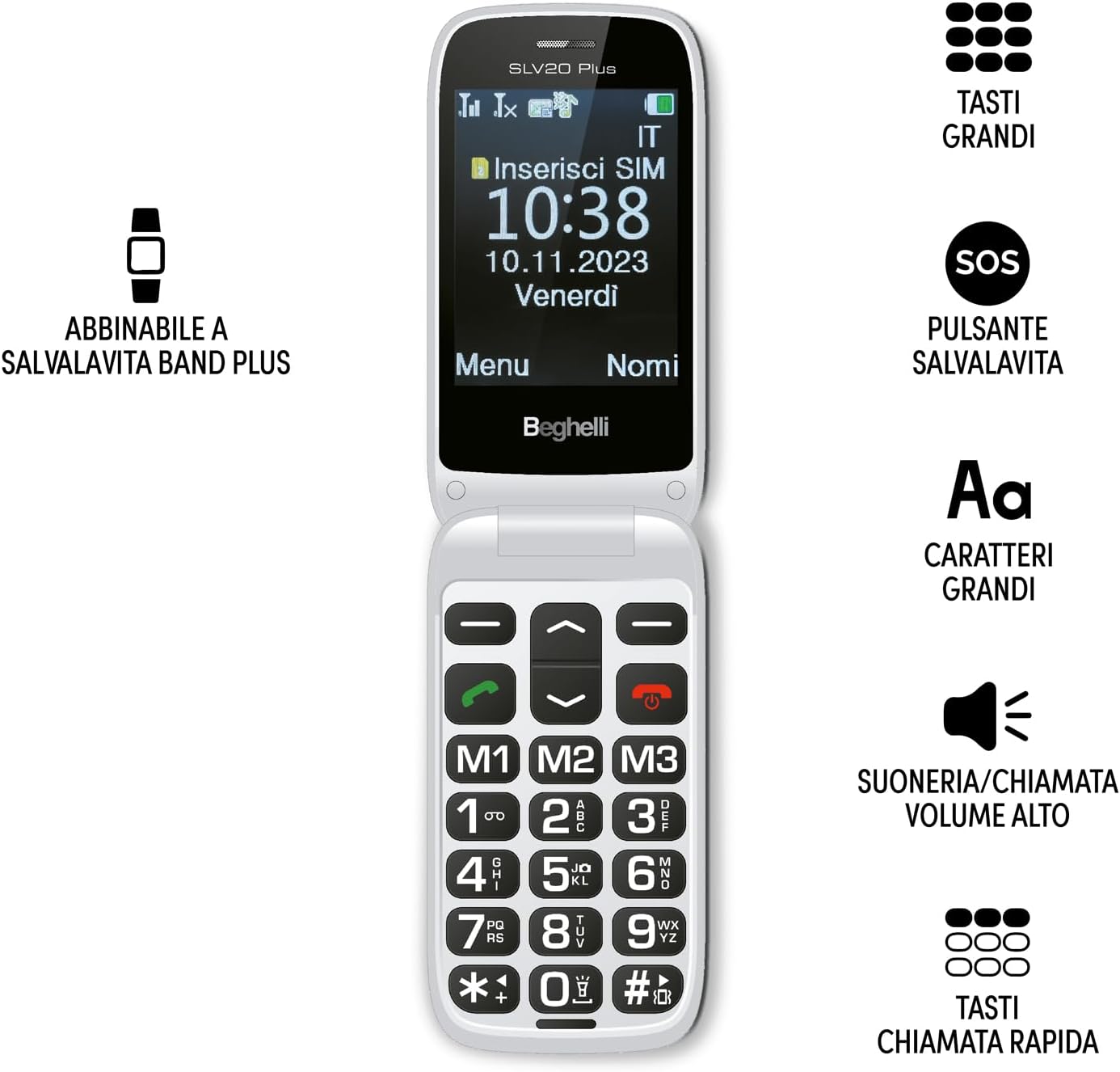
Image: The Beghelli Salvalavita SLV20 Plus, shown open to highlight its large, easy-to-read keys and clear display, designed for user convenience.
Налаштування
1. Розпакування та компоненти
Перш ніж почати, переконайтеся, що всі компоненти присутні в упаковці:
- Beghelli Salvalavita SLV20 Plus Mobile Phone
- Перезаряджуваний літій-іонний акумулятор
- Зарядна база
- Адаптер живлення
- Посібник користувача (цей документ)

Image: The included charging base and power adapter for the Beghelli Salvalavita SLV20 Plus, facilitating easy and convenient recharging.
2. Встановлення SIM-карти
- Turn off the phone and remove the back cover.
- Знайдіть слот для SIM -карти.
- Insert your activated SIM card into the slot, ensuring the gold contacts face downwards and the cut corner aligns correctly.
- Обережно натисніть на SIM-картку, доки вона не зафіксується почувши клацання.
- Встановіть задню кришку.
3. Встановлення та зарядка акумулятора
- With the back cover removed, insert the rechargeable Lithium-ion battery into its compartment, aligning the contacts.
- Встановіть задню кришку.
- Підключіть адаптер живлення до зарядної бази.
- Place the phone into the charging base. Ensure the phone is correctly seated and the charging indicator appears on the screen.
- For first use, charge the phone for at least 4 hours to ensure optimal battery performance.
4. Початкове увімкнення
Press and hold the Power/End Call button (usually marked with a red phone icon) until the screen lights up and the Beghelli logo appears. The phone will then guide you through any initial setup steps, such as setting the language or time.
Інструкція з експлуатації
1. Основні функції телефону
- Здійснення дзвінка: Dial the desired number using the large keypad and press the Green Call button.
- Отримання дзвінка: When the phone rings, press the Green Call button to answer.
- Завершення дзвінка: Натисніть червону кнопку завершення виклику.
- Регулювання гучності: Use the dedicated volume keys on the side of the phone during a call or to adjust ringtone volume. The phone features high volume for clear audio.
- Надсилання SMS: Navigate to the 'Messages' menu, select 'New Message', type your text using the keypad, and select the recipient from your contacts or enter a number.
2. SOS Button Functionality
The SOS button is a critical safety feature. In an emergency, press and hold the SOS button located on the back of the phone for a few seconds. The phone will automatically:
- Initiate calls to up to 5 pre-programmed emergency numbers in sequence until one is answered.
- Send a pre-set emergency SMS message to these same 5 numbers.
Programming SOS Numbers: Refer to the phone's settings menu under 'SOS Settings' to add or modify emergency contact numbers and the emergency SMS message.
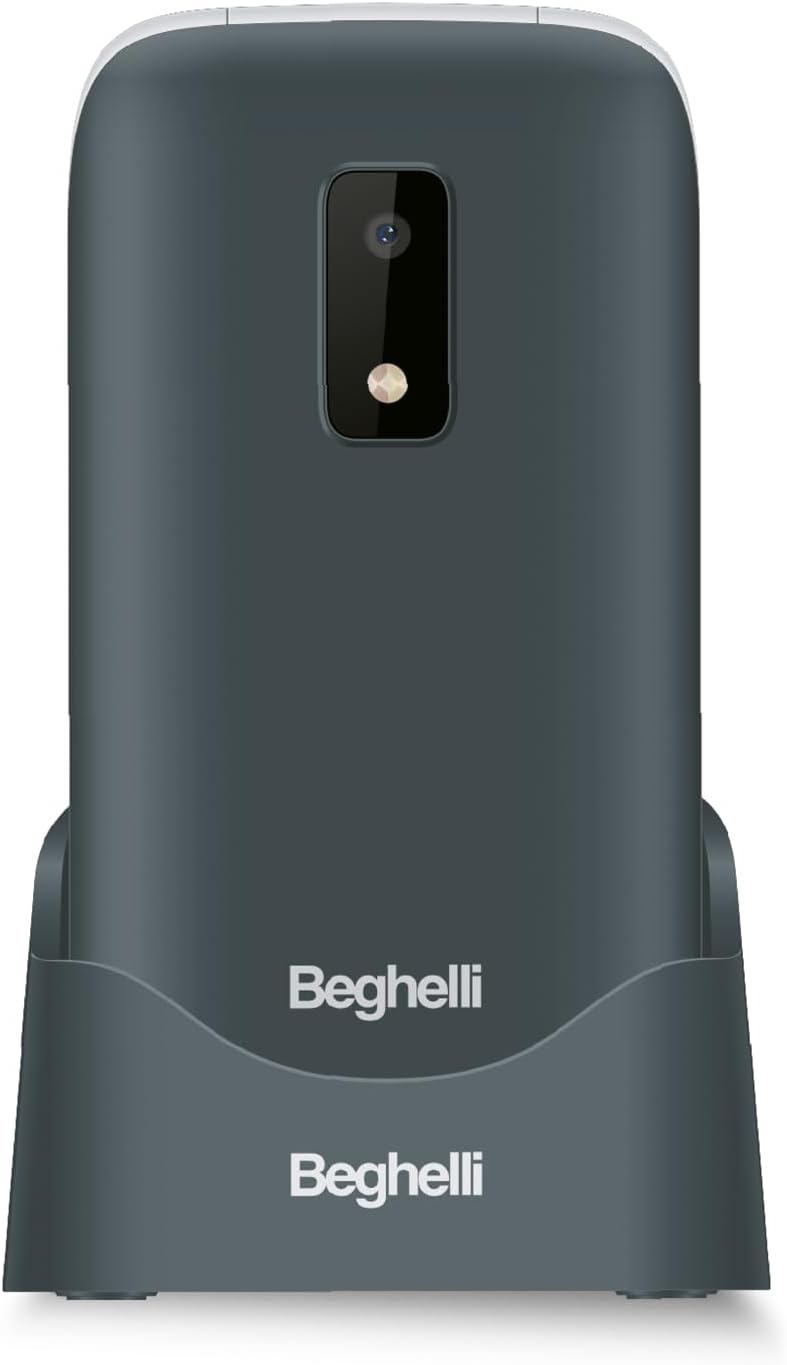
Зображення: Задня частина view of the Beghelli Salvalavita SLV20 Plus, highlighting the prominent SOS button and integrated camera, designed for quick access to emergency features.
3. Quick Dial Keys (M1, M2, M3)
The M1, M2, and M3 keys allow for quick dialing of frequently contacted numbers. To program these keys:
- Перейдіть до меню «Налаштування».
- Select 'Speed Dial' or 'Quick Dial Settings'.
- Choose M1, M2, or M3 and assign a contact from your phonebook or enter a new number.
- Once programmed, simply press and hold the M1, M2, or M3 key to dial the assigned number.
4. Додаткові функції
- Камера: Access the camera from the main menu to take photos. Photos are saved to the phone's memory or an inserted SD card (if applicable).
- Ліхтарик: Activate the built-in flashlight via a dedicated button or menu option for convenience in low-light conditions.
- FM-радіо: Tune into your favorite FM radio stations. Headphones may be required to act as an antenna.
5. Optional Salvalavita 24/7 Service
The Beghelli Salvalavita SLV20 Plus can be connected to the optional Salvalavita 24/7 Center service. This service provides constant support and protection by connecting your SOS button directly to a monitoring center. For more information on subscribing to this service, please refer to the documentation provided with the service or visit the official Beghelli webсайт.
Технічне обслуговування
- Прибирання: Використовуйте м’яку суху тканину для очищення зовнішньої поверхні телефону. Уникайте використання рідких засобів для чищення або абразивних матеріалів.
- Догляд за акумулятором: Щоб подовжити термін служби акумулятора, уникайте екстремальних температур. Не залишайте телефон повністю розрядженим на тривалий час.
- Зберігання: Якщо ви зберігаєте телефон протягом тривалого часу, зарядіть акумулятор приблизно до 50% та зберігайте його в прохолодному сухому місці.
Усунення несправностей
| проблема | Можливе рішення |
|---|---|
| Телефон не включається. | Переконайтеся, що акумулятор правильно вставлено та заряджено. Підключіть телефон до зарядного пристрою та спробуйте ще раз. |
| Немає сигналу мережі. | Check if the SIM card is properly inserted. Ensure you are in an area with network coverage. Contact your service provider if the issue persists. |
| Cannot hear calls clearly. | Adjust the call volume using the side keys. Ensure the speaker is not obstructed. |
| Кнопка SOS не працює. | Verify that emergency numbers are correctly programmed in the SOS settings. Ensure the phone has network signal. |
If you encounter issues not listed here or if the suggested solutions do not resolve the problem, please contact Beghelli customer support for assistance.
Технічні характеристики
| Особливість | Деталь |
|---|---|
| Номер моделі | SLV20 Plus |
| Розміри (Д x Ш x В) | 10.9 х 5.5 х 1.9 см |
| вага | 100 грами |
| Тип батареї | 1 літій-іонні (у комплекті) |
| Розмір дисплея | 2.8 дюймів |
| Ключові характеристики | Large Backlit Keys, SOS Button, High Volume, Flashlight, FM Radio, Camera, Quick Dial Keys |
Гарантія та підтримка
The Beghelli Salvalavita SLV20 Plus typically comes with a manufacturer's warranty. Please refer to the warranty card included in your product packaging for specific terms and conditions. Generally, spare parts availability is indicated for 2 years from the date of purchase.
In case of product defects or issues, a refund or replacement policy is usually available for 30 days from the purchase date, subject to retailer terms.
Для отримання технічної підтримки, обслуговування або гарантійних претензій зверніться до служби підтримки клієнтів Beghelli через їх офіційний website or the contact information provided in your product documentation. Always have your model number (SLV20 Plus) and proof of purchase ready when contacting support.