
1. Вступ
Дякуємо за покупкуasing the Womier SK80 Wired Gaming Keyboard. This mechanical keyboard features a 75% compact layout, an integrated LCD screen, hot-swappable switches, and customizable RGB backlighting. Designed for both gaming and daily use, it offers a comfortable and responsive typing experience. This manual provides detailed instructions for setup, operation, maintenance, and troubleshooting to ensure optimal performance of your keyboard.

Figure 1: Womier SK80 Wired Gaming Keyboard (Black)
2. Налаштування
2.1 Вміст упаковки
- Womier SK80 Keyboard Unit
- Кабель USB-C
- Знімач ключів
- Посібник користувача
2.2 Підключення клавіатури
- Знайдіть порт USB-C на задній панелі клавіатури.
- Підключіть один кінець наданого кабелю USB-C до клавіатури.
- Connect the other end of the USB-C cable to an available USB port on your computer (Windows PC or Mac).
- Клавіатура буде автоматично розпізнана вашою операційною системою.

Figure 2: USB-C Cable Connection
2.3 Перемикач сумісності системи
The keyboard features a switch to toggle between Windows and Mac operating system modes. Locate the switch on the back or side of the keyboard and set it to the appropriate position for your system.

Figure 3: Windows/Mac System Switch
2.4 регульовані ноги
The keyboard is equipped with adjustable feet on the underside. You can extend these feet to change the typing angle for improved ergonomics and comfort.

Рисунок 4: Регульовані ніжки клавіатури
3. Операція
3.1 LCD Multimedia Display
The Womier SK80 features a vibrant color multimedia display on the upper right side. This screen provides visual feedback for various settings and functions:
- Власні GIF-зображення: Display personalized GIF animations.
- Caps Lock Status: Indicates whether Caps Lock is active.
- Режим підключення: Shows the current connection status.
- WIN/MAC System: Confirms the selected operating system mode.
- Backlight Brightness/Speed: Налаштуйте і view current backlight settings.
- RGB Mode/Color: Виберіть та попередньоview RGB lighting effects and colors.
- обсяг: Displays the current audio volume level.
- мова: Shows the selected language setting.
The display screen is designed with an 11° tilt angle for optimal viewing ergonomics.

Figure 5: LCD Screen Displaying Various Settings
3.2 Підсвічування RGB
The keyboard offers extensive RGB backlighting customization:
- 19 світлових ефекту: Choose from a variety of pre-set lighting patterns.
- 9 кольори освітлення: Select your preferred color scheme.
- Регульована яскравість і швидкість: Fine-tune the intensity and animation speed of the backlight.
- Режим синхронізації музики: In this mode, lighting patterns will dynamically respond to playing music.
All RGB backlight modes and settings can be customized using the dedicated keyboard driver software.
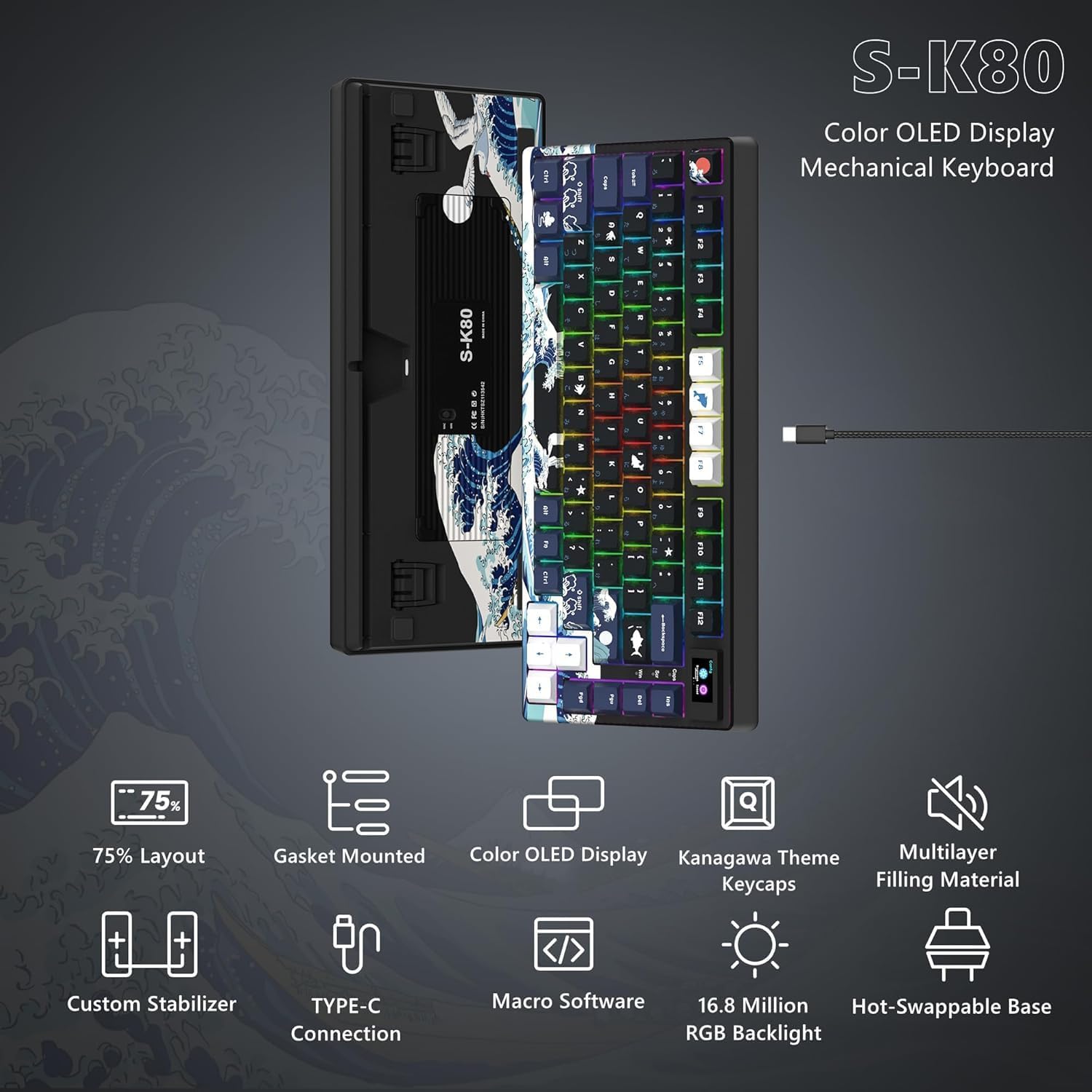
Рисунок 6: Налаштовуване RGB-підсвічування
3.3 Програмоване програмне забезпечення
The Womier SK80 keyboard is fully customizable through its dedicated driver software. This software allows users to:
- Set dynamic GIF animations for the LCD screen.
- Define custom lighting effects.
- Program macro functions for individual keys.
Refer to the software's interface for detailed instructions on customization options.

Figure 7: Keyboard Driver Software Interface
3.4 Комутатори з можливістю гарячої заміни
The keyboard features a hot-swappable PCB, allowing you to easily change mechanical switches without soldering. It supports both 3-pin and 5-pin switches. This enables personalization of your typing feel and sound.
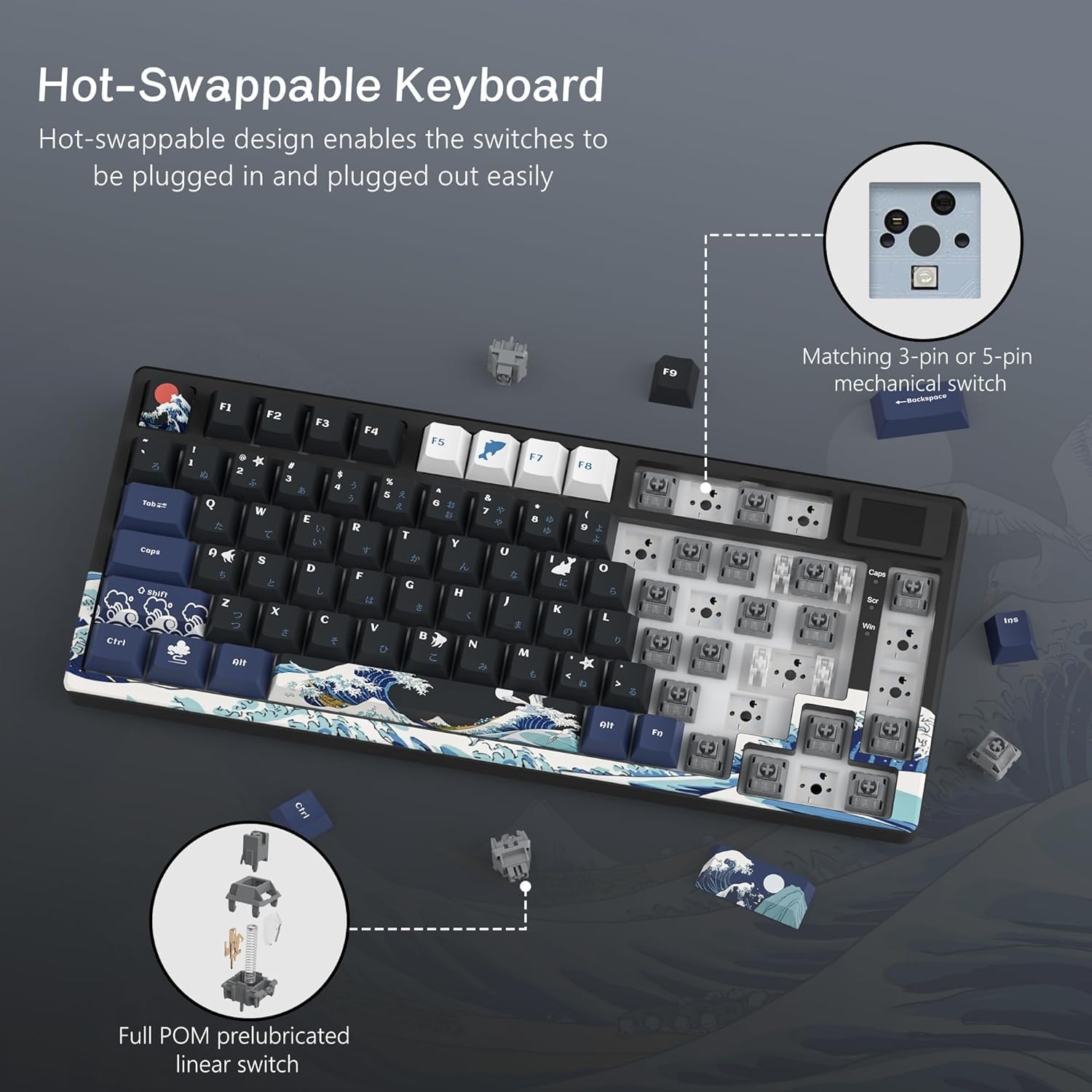
Рисунок 8: Механізм гарячої заміни комутатора
3.5 Gasket Mount Design and Keycaps
The SK80 utilizes a gasket mount design, which enhances typing stability and reduces noise, contributing to a more immersive experience. It comes with classic Cherry profile PBT keycaps, offering durability and a comfortable feel.

Figure 9: Gasket Mount Structure and Keycap Profile
4. Технічне обслуговування
4.1 Очищення клавіатури
- Від’єднайте клавіатуру від комп’ютера перед чищенням.
- Використовуйте м’яку безворсову тканину dampened with a small amount of water or a mild cleaning solution to wipe the keycaps and keyboard surface.
- Для видалення пилу та сміття між клавішами використовуйте стиснене повітря або невелику щітку.
- To clean under the keycaps, use the provided keycap puller to carefully remove them. Clean the switches and plate, then reattach the keycaps.
- Уникайте використання агресивних хімікатів або абразивних матеріалів, оскільки вони можуть пошкодити покриття клавіатури або підписи на клавішах.
4.2 Заміна комутатора (гаряча заміна)
- Ensure the keyboard is disconnected from your computer.
- Use a keycap puller to remove the desired keycap.
- Use a switch puller (not included, but commonly available) to gently grip and pull the switch straight up from the PCB.
- Зіставте контакти нового перемикача з отворами на друкованій платі та міцно натисніть, доки він не зафіксується. Переконайтеся, що контакти не зігнуті.
- Замініть ковпачок клавіші.
5. Вирішення проблем
5.1 Клавіатура не реагує
- Переконайтеся, що кабель USB-C надійно підключено як до клавіатури, так і до комп’ютера.
- Спробуйте підключити клавіатуру до іншого USB-порту на комп'ютері.
- Перевірте клавіатуру на іншому комп'ютері, щоб виключити проблему, пов'язану з певним комп'ютером.
- Verify that the Windows/Mac compatibility switch is set correctly for your operating system.
5.2 Підсвічування не працює або працює неправильно
- Check the backlight brightness settings via the LCD screen or the programmable software.
- Переконайтеся, що немає жодного спеціального освітлювального фахівцяfile is overriding your desired settings.
- If using the software, ensure it is up to date and correctly installed.
5.3 Клавіші не реєструються або друкуються двічі
- For hot-swappable switches, carefully remove the keycap and switch for the affected key. Reinsert the switch firmly to ensure proper contact.
- Clean any debris around the switch stem.
- If the issue persists, consider replacing the switch.
6. Технічні характеристики
| Особливість | опис |
|---|---|
| Бренд | Womier |
| Модель | SK80 |
| Підключення | Дротовий (USB-C) |
| Опис клавіатури | Механічний |
| Рекомендоване використання | Gaming, Office Work, Typing, Programming, Esports, General Computer Use |
| Особливості | LCD Screen, Hot-Swappable, RGB Backlight, 75% Compact Layout, Wired Connection, Windows/Mac Compatible, Gaming/Office Compatible, Japanese Layout, Programmable Keys, Customizable Display |
| Колір | чорний |
| Підтримка кольорів підсвічування | RGB |
| Стиль | Ігри |
| Розміри продукту (Д x Ш x В) | 34 х 17 х 3.5 см |
| Сумісні пристрої | Windows PC, Mac, Desktop Computers, Laptops, Gaming PCs |
| Тип перемикача | Mechanical Switch (Hot-Swappable) |
| Розкладка клавіатури | QWERTY (Japanese Layout) |
| Кількість клавіш | 80 (75% layout) |
| Waterproof Type | Не водонепроникний |
| Compatible OS Family | Windows, Mac |
| Включені компоненти | USB Cable, Keycap Puller, Keyboard Unit, User Manual |
| Product Exterior Material | ABS, Aluminum, Plastic, Polyethylene Terephthalate |
| Keyboard Plate Material | Aluminum Alloy, Polycarbonate |
7. Інформація про гарантію
The Womier SK80 Wired Gaming Keyboard comes with a 1-річна гарантія виробника з дати покупки. Ця гарантія поширюється на дефекти матеріалів та виготовлення за умов нормального використання. Будь ласка, збережіть підтвердження покупки для пред'явлення претензій за гарантією.
Гарантія не поширюється на:
- Пошкодження, спричинені нещасним випадком, зловживанням, неправильним використанням, повінню, пожежею, землетрусом або іншими зовнішніми причинами.
- Damage caused by operating the product outside the permitted or intended uses described by Womier.
- Damage caused by service performed by anyone who is not a representative of Womier.
- Products or parts that have been modified to alter functionality or capability without the written permission of Womier.
8. Підтримка клієнтів
For technical assistance, warranty claims, or general inquiries, please contact Womier customer support through the following channels:
- Інтернет-підтримка: Visit the official Womier webсайт із поширеними запитаннями та ресурсами підтримки.
- Електронна пошта: Зверніться до упаковки вашого продукту або до офіційного webсайт для адреси електронної пошти служби підтримки.
When contacting support, please have your product model (SK80) and proof of purchase readily available.