
1. Важливі інструкції з техніки безпеки
When using electrical appliances, basic safety precautions should always be followed to reduce the risk of fire, electric shock, and personal injury. Read all instructions carefully before using the Milex Digital Steam Iron.
- Завжди переконайтеся, що обtage на етикетці з характеристиками відповідає потужності вашої мережіtage.
- Не занурюйте праску, шнур живлення або вилку у воду чи інші рідини.
- Unplug the iron from the electrical outlet when filling with water, emptying, or when not in use.
- Не використовуйте прилад із пошкодженим шнуром або вилкою, а також після того, як прилад вийшов з ладу, був упущений чи будь-яким чином пошкоджений.
- Тримайте праску та її шнур у недоступному для дітей та домашніх тварин місці, коли вона ввімкнена або охолоджується.
- Never leave the iron unattended while it is connected to the power supply or on an ironing board.
- Використовуйте праску лише за призначенням у побуті.
- The soleplate of the iron can become extremely hot. Avoid direct contact with the hot soleplate.
- Завжди ставте праску на стійку, термостійку поверхню, коли відпочиваєте.
2. Продукт закінчивсяview
The Milex Digital Steam Iron MSI004 is designed for efficient garment care. Familiarize yourself with its components before use.
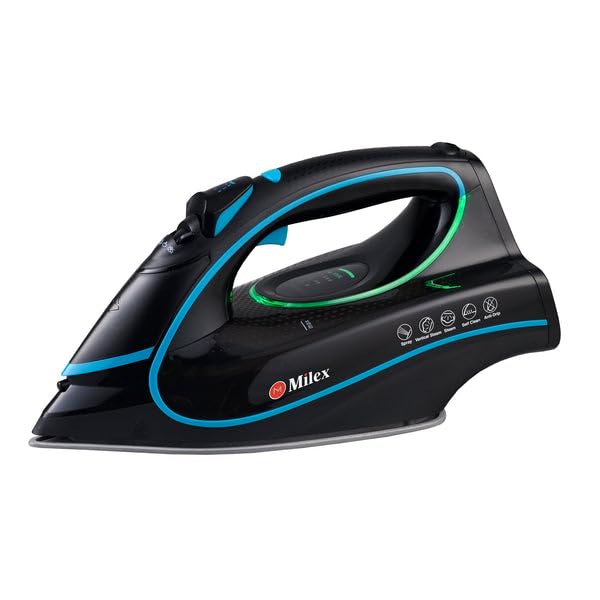
Figure 1: Milex Digital Steam Iron (3/4 view)
This image displays the Milex Digital Steam Iron from a three-quarter angle, highlighting its sleek black design with blue and green accents. Key features visible include the handle, water tank, and the general shape of the soleplate.
Компоненти:
- Розпилювальна форсунка для води: Для зволоження тканин.
- Впускний отвір для заповнення водою: Куди додається вода в резервуар.
- Steam Control Dial/Buttons: To adjust steam output.
- Temperature Control Dial/Buttons: To select desired heat setting.
- Світлодіодний дисплей: Показує поточні налаштування.
- Ручка: For gripping the iron.
- Бак для води: Reservoir for water.
- Підошва: Нагріта поверхня, яка ковзає по тканині.
- Шнур живлення: Підключає праску до електричної розетки.

Figure 2: Ceramic Soleplate
Це зображення забезпечує крупний план view of the ceramic soleplate, showing its textured surface and steam vents designed for even heat distribution and smooth gliding.
3. Налаштування та перше використання
3.1 Розпакування
- Remove the iron from its packaging.
- Зніміть будь-яку захисну плівку або наклейки з підошви праски.
- Inspect the iron for any signs of damage. If damaged, do not use and contact customer support.
3.2 Наповнення резервуара для води
- Переконайтеся, що праска відключена від розетки.
- Set the steam control to the "Dry Ironing" position (if applicable).
- Відкрийте кришку вхідного отвору для наповнення водою.
- Using a measuring cup, carefully pour clean tap water into the water tank up to the "MAX" fill line. Do not overfill.
- Щільно закрийте кришку впускного отвору для води.
Примітка: For areas with hard water, it is recommended to use a mixture of 50% tap water and 50% distilled water to prevent mineral buildup. Never use perfumed water, vinegar, starch, or descaling agents in the water tank.
4. Інструкція з експлуатації
4.1 Підготовка до прасування
- Sort garments according to fabric type (e.g., linen, cotton, wool, silk, synthetics).
- Перевірте етикетки з інструкціями з догляду за одягом, щоб дізнатися про рекомендовану температуру прасування.
- Plug the iron into a suitable electrical outlet. The LED display will illuminate.
4.2 Налаштування температури та пари
- Use the temperature control buttons to select the appropriate heat setting for your fabric. The LED display will show the selected temperature.
- Allow the iron to heat up until the indicator light (if present) or LED display confirms it has reached the desired temperature.
- For steam ironing, ensure the water tank is filled. Adjust the steam control to the desired steam level. Steam is typically available at higher temperature settings.
- For dry ironing, ensure the water tank is empty or the steam control is set to "Dry Ironing".
4.3 Використання функцій пари
- Безперервний Steam: Select a steam setting on the control. Steam will be continuously emitted from the soleplate.
- Паровий удар: Press the "Burst" button for an extra shot of steam to remove stubborn wrinkles. Wait a few seconds between bursts.
- Розпилення води: Press the "Spray" button to lightly moisten fabric before ironing.
4.4 Auto-Shutoff Feature
The iron is equipped with an auto-shutoff safety feature. If left unattended horizontally for a certain period (e.g., 30 seconds) or vertically (e.g., 8 minutes), the heating element will automatically turn off. To reactivate, simply move the iron.
4.5 Система запобігання протіканню
The anti-drip system prevents water from dripping from the soleplate when the iron is not hot enough to produce steam. This helps prevent water stains on delicate fabrics.
5. Технічне обслуговування та очищення
Regular maintenance ensures optimal performance and extends the life of your Milex Digital Steam Iron.
5.1 Після кожного використання
- Вимкніть праску з мережі та дайте їй повністю охолонути.
- Злийте залишки води з резервуара для води.
5.2 Очищення підошви праски
- When the soleplate is cool, wipe it with a damp тканину та неабразивний засіб для чищення за потреби.
- Не використовуйте абразивні губки або агресивні хімікати, оскільки вони можуть пошкодити керамічне покриття.
5.3 Функція самоочищення
The iron features a self-cleaning function to remove mineral deposits from the steam vents.
- Наповніть резервуар водою до лінії MAX.
- Підключіть праску до мережі та встановіть максимальну температуру.
- Once the iron reaches maximum temperature, unplug it.
- Тримайте праску горизонтально над раковиною.
- Press and hold the self-clean button (refer to product diagram for location). Hot water and steam will be expelled from the soleplate, flushing out mineral deposits.
- Обережно струшуйте праску вперед і назад, доки резервуар для води не спорожніє.
- Plug the iron back in and allow it to heat up again to dry the soleplate.
- Від’єднайте від мережі та зберігайте після охолодження.
5.4 Зберігання
Always store the iron upright on its heel rest, with the cord neatly wrapped, once it has completely cooled down and the water tank is empty.
6. Вирішення проблем
| проблема | Можлива причина | Рішення |
|---|---|---|
| Праска не нагрівається. | Не підключено; живлення відключеноtage; auto-shutoff activated; faulty outlet. | Check power connection; check circuit breaker; move iron to reactivate; try a different outlet. |
| Немає або недостатньо пари. | Water tank empty; temperature too low for steam; steam vents clogged; steam control set to "Dry". | Fill water tank; increase temperature setting; perform self-clean; adjust steam control. |
| Вода капає з підошви. | Temperature too low for steam (anti-drip system working); water tank overfilled. | Збільште температуру; не переповнюйте резервуар для води. |
| Білі пластівці або залишки на одязі. | Mineral buildup in water tank/steam vents. | Perform self-clean function; use distilled water or a mix with tap water. |
7. Технічні характеристики
| Номер моделі | MSI004 |
| Бренд | Мілекс |
| потужність | 2400 Вт |
| томtage | 220-240 В, 50 Гц |
| Функції | Dry, Spray, Steam, Burst |
| Матеріал підошви | Керамічний |
| Тип дисплея | LED |
| Ємність резервуара для води | 450 мл |
| Особливості | Anti-drip, Auto-shutoff, Lightweight |
| Розміри виробу (Д х Ш) | 32 Д x 16 Вт сантиметрів |
8. Гарантія та підтримка клієнтів
Щоб отримати інформацію щодо гарантійного покриття, зверніться до гарантійного талона, що додається до вашого продукту, або зверніться до продавця, у якого було придбано продукт.
If you experience any issues or have questions about your Milex Digital Steam Iron, please contact Milex customer support. You can find more information and contact details on the official Milex webсайт або через Milex Store on Amazon.