
1. Вступ
Thank you for choosing the TONGVEO PTZ HDMI Camera. This manual provides essential information for the proper installation, operation, and maintenance of your camera. Please read this manual thoroughly before using the product to ensure optimal performance and to prevent damage. This camera is designed for high-quality video capture in various settings, including live streaming, video conferencing, education, and worship services.
2. Продукт закінчивсяview
2.1 Основні характеристики
- Відео високої чіткості: 1080p resolution at 60 frames per second (fps) for clear and smooth video.
- Оптичний зум: 3x optical zoom lens with a 55.8° field of view, allowing for detailed close-ups without loss of quality.
- Pan/Tilt/Zoom (PTZ) Functionality: Silent movement with 350° pan and 180° tilt capabilities, controllable remotely.
- Кілька виходів: HDMI and USB 3.0 for versatile connectivity.
- Легке налаштування: Plug and Play functionality, automatically recognized by computers without driver installation.
- Широка сумісність: Compatible with Windows, Mac, and popular conferencing software like Zoom, Skype, OBS, Google Hangouts, Cisco WebEx, and Microsoft Teams.
- Розширена обробка зображень: Superior white balance and exposure modes, supporting YUV, MJPG, and H.264 video compression formats.
- Пульт дистанційного керування: Includes an infrared (IR) remote control with 10 presets for quick camera positioning.
- Управління джойстиком: Supports external joystick control via RS485 or RS232 interfaces.
2.2 Вміст упаковки
Перевірте наявність усіх елементів в упаковці:
- TONGVEO USB PTZ Camera
- Кабель USB 9.8 довжиною 3.0 фути
- Адаптер живлення DC 12V
- ІЧ-пульт дистанційного керування
- Настінне кріплення за допомогою гвинтів
- Посібник користувача (цей документ)

Image: Package contents including the camera, USB cable, power adapter, remote, wall mount, and user manual.
3. Налаштування
3.1 Фізичне встановлення
The TONGVEO PTZ camera offers flexible mounting options to suit various environments:
- Розміщення на робочому столі: Розмістіть камеру на стійкій, рівній поверхні.
- Кріплення монітора: Надійно закріпіть на верхній частині монітора.
- Настінне кріплення: Use the provided wall mount and screws to fix the camera to a wall.
- Кріплення штатива: Attach the camera to a standard tripod using the tripod screw hole at the base.
- Стельовий монтаж: Install the camera upside down on the ceiling using a compatible mount (sold separately or included if specified).
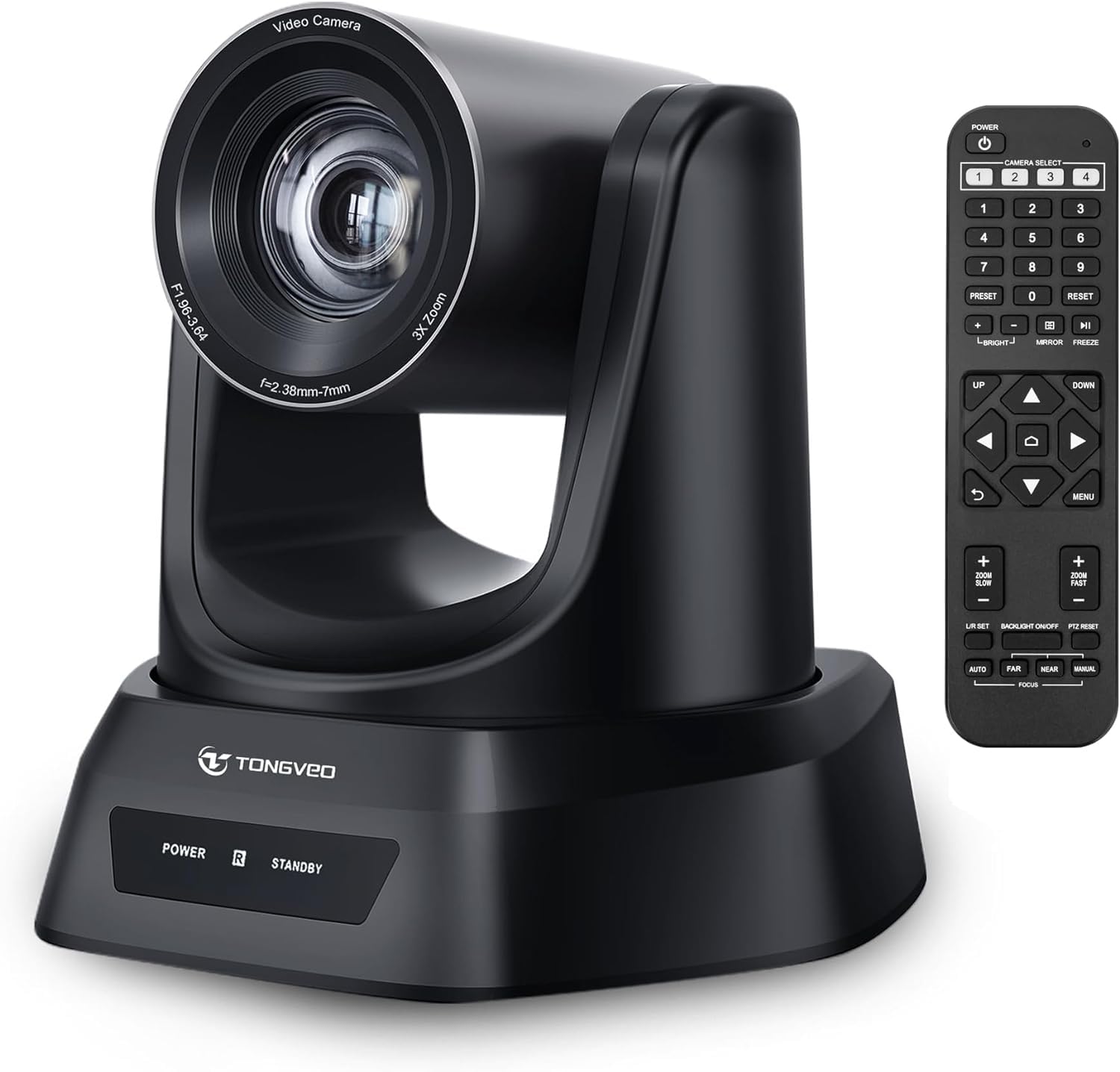
Зображення: Оверview of the TONGVEO PTZ camera highlighting 3x optical zoom, 1080p 60fps, and pan/tilt capabilities.
3.2 Підключення
Connect the camera to your devices using the ports on the rear panel:
- Живлення постійного струму 12 В: Connect the included power adapter to the DC 12V port and then to a power outlet.
- USB 3.0: Connect the USB 3.0 cable from the camera to your computer (PC/Mac) for video and control.
- HDMI: Connect an HDMI cable from the camera to a display (TV/Monitor) or a video switcher (e.g., Blackmagic ATEM) for video output.
- RS232/RS485: These ports are for connecting an external joystick controller for advanced PTZ control. RS485 supports daisy-chaining multiple cameras.

Image: Rear panel of the TONGVEO PTZ camera showing DC 12V, RS485, RS232, USB, and HDMI ports.
3.3 Встановлення програмного забезпечення
The TONGVEO PTZ camera is a Plug and Play device. No specific drivers are required for most operating systems. Your computer should automatically recognize the camera when connected via USB. It supports the UVC1.1 standard.
4. Операція
4.1 Пульт дистанційного керування
Use the included IR remote control to manage camera functions:
- PTZ Movement: Use the directional buttons to pan (left/right) and tilt (up/down) the camera.
- Масштаб: Adjust the optical zoom in and out. The remote typically offers fast and slow zoom options.
- Пресети: The remote allows you to save and recall up to 10 preset positions. To save a preset, move the camera to the desired position, then press the 'SET' button followed by a number (1-10). To recall a preset, press the corresponding number button.
- Вибір камери: If multiple TONGVEO cameras are connected, use the camera select buttons to control a specific unit.
4.2 Параметри зображення
Access the On-Screen Display (OSD) menu via the remote control to adjust image parameters:
- Фокус: The camera features auto-focus by default. Manual focus adjustment is available through the OSD menu.
- Баланс білого: Adjust for accurate color reproduction under different lighting conditions.
- Контакт: Control brightness and contrast to optimize image visibility.
4.3 Сумісність програмного забезпечення
The camera is compatible with a wide range of operating systems and video conferencing applications:
- Операційні системи: Windows XP, Vista, 7, 8, 8.1, 10, 11; Mac 10.4 or higher.
- Застосування: Zoom, Skype, Google Hangouts, Cisco WebEx, Microsoft Teams, GoToMeeting, BlueJeans, OBS, and other UVC-compliant software.

Image: Diagram illustrating the TONGVEO PTZ camera's compatibility with various devices and software platforms.
5. Технічне обслуговування
To ensure the longevity and optimal performance of your TONGVEO PTZ camera, follow these maintenance guidelines:
- Прибирання: Використовуйте м’яку суху тканину для очищення корпусу камери. Для об’єктива використовуйте спеціальну тканину для очищення об’єктивів та розчин. Уникайте абразивних засобів для чищення або розчинників.
- Зберігання: Якщо камера не використовується протягом тривалого часу, зберігайте її в прохолодному, сухому місці, подалі від прямих сонячних променів та екстремальних температур.
- Обробка: Handle the camera with care. Avoid dropping or subjecting it to strong vibrations.
- Потужність: Disconnect the power adapter when the camera is not in use or during electrical storms.
6. Вирішення проблем
If you encounter issues with your TONGVEO PTZ camera, refer to the following common problems and solutions:
- Немає живлення:
- Переконайтеся, що адаптер живлення надійно підключено до камери та справної розетки.
- Перевірте справність розетки.
- Немає відеовиходу:
- Check all cable connections (USB, HDMI) are secure.
- Ensure the correct input source is selected on your display or video switcher.
- Verify the camera is selected as the video input device in your software (e.g., Zoom, OBS).
- Image is Blurry/Out of Focus:
- Allow the camera's auto-focus to adjust.
- Access the OSD menu to manually adjust the focus if needed.
- Переконайтеся, що лінза чиста та на ній немає плям.
- Пульт дистанційного керування не працює:
- Перевірте батарейки в пульті дистанційного керування та замініть їх, якщо необхідно.
- Переконайтеся, що між пультом дистанційного керування та ІЧ-приймачем камери немає перешкод.
- PTZ Movement is Unresponsive:
- Verify the camera is powered on and the remote control is functioning.
- If using a joystick, ensure it is correctly connected via RS232/RS485.
7. Технічні характеристики
Detailed technical specifications for the TONGVEO PTZ HDMI Camera (Model TV-NV3H-UK):
| Особливість | Специфікація |
|---|---|
| Номер моделі | TV-NV3H-UK (819988df-b012-4f6a-b3ce-5c96af8001c3) |
| Бренд | ТОНГВЕО |
| Оптичний зум | 3x |
| Ефективна роздільна здатність відео | 1080 Pixels (1080p 60fps) |
| Технологія фотосенсора | CMOS |
| Розмір оптичного сенсора | 1/2.7 дюйма |
| Максимальна фокусна відстань | 10 міліметрів |
| Мінімальна фокусна відстань | 5 міліметрів |
| Формат захоплення відео | MP4 (Supports YUV, MJPG, H.264) |
| Пан Рух | 350° |
| Рух нахилу | 180° |
| Підключення | HDMI, USB 3.0, RS232, RS485 |
| Джерело живлення | 12 В постійного струму |
| Стабілізація зображення | немає |
| Робоча температура | від -10°C до +50°C |
| Розміри упаковки | 28 х 21 х 19 см |
| вага | 2 кілограма |

Зображення: Нижня частина view of the TONGVEO PTZ camera showing model number (TV-V3H) and other regulatory information.
8. Гарантія та підтримка
The TONGVEO PTZ HDMI Camera comes with a Гарантія 3 рік. For any questions, technical assistance, or warranty claims, please contact TONGVEO customer service. Our support team is available to respond to your inquiries within 24 hours.
Please refer to the contact information provided on the TONGVEO official webсайт або в документації щодо придбання, щоб отримати найактуальніші канали підтримки.