
вступ
This manual provides comprehensive instructions for the ProtoArc EK01 Plus Ergonomic Wireless Backlit Keyboard. Please read this guide carefully to ensure proper setup, operation, and maintenance of your device. Keep this manual for future reference.
Вміст упаковки
Перевірте наявність усіх елементів в упаковці:
- ProtoArc EK01 Plus Ergonomic Wireless Backlit Keyboard
- Опора для зап'ястя
- Зарядний кабель USB-C
- USB-приймач 2.4G
- Посібник користувача
Продукт закінченийview
The ProtoArc EK01 Plus is a full-size ergonomic keyboard designed to enhance typing comfort and reduce muscle strain. Its split and curved keyframe design promotes a natural hand and wrist posture.
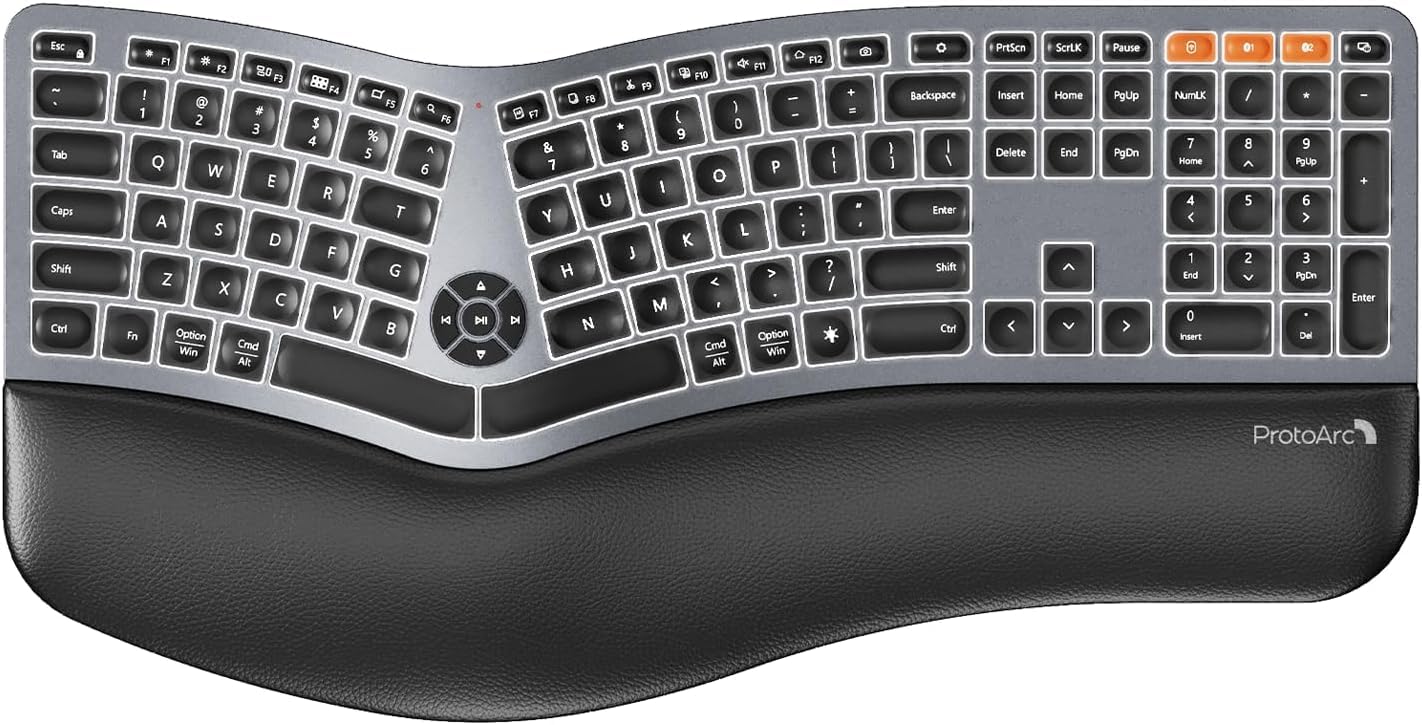
Image 1: ProtoArc EK01 Plus Ergonomic Wireless Backlit Keyboard. This image displays the full keyboard with its split design, integrated wrist rest, and key layout.
Ключові характеристики:
- Ergonomic Full-Size Design: Features a split, curved keyframe and integrated wrist rest to minimize muscle fatigue and promote proper posture.
- Adjustable Tilt Feet: Four adjustable tilt feet allow customization of the keyboard angle for optimal comfort.
- Adjustable Backlighting: Soft white LED backlighting with three adjustable brightness levels (low-medium-high) for comfortable typing in various lighting conditions.
- Підключення кількох пристроїв: Connects to up to three devices simultaneously via Bluetooth and 2.4G USB. Easily switch between devices with a dedicated key.
- Перезаряджається USB-C: Equipped with a 2000 mAh rechargeable lithium battery for extended use.
- Автоматичний режим сну: Enters sleep mode after 60 minutes of inactivity to conserve power, waking up within 3 seconds upon key press.
- Сумісність: Widely compatible with Windows 7/8/10, Mac OS X 10.12 or higher, and Android 4.3 or higher.
Налаштування
1. Заряджання клавіатури
- Знайдіть порт зарядки USB-C на клавіатурі.
- Connect the provided USB-C cable to the keyboard and the other end to a USB power source (e.g., computer USB port, wall adapter).
- Індикатор заряджання засвітиться. Після повного заряджання індикатор може змінити колір або згаснути.
2. Підключення до пристроїв
The keyboard supports both 2.4G USB and Bluetooth connectivity.
2.1. USB-з'єднання 2.4G
- Locate the 2.4G USB receiver (dongle). It is usually stored in a compartment on the keyboard or in the packaging.
- Підключіть USB-приймач у вільний USB-порт на комп’ютері.
- Увімкніть клавіатуру за допомогою вимикача живлення.
- The keyboard should automatically connect to your device.
2.2. Підключення Bluetooth (до 3 пристроїв)
- Увімкніть клавіатуру.
- Press and hold one of the Bluetooth channel keys (e.g., BT1, BT2, або BT3) for 3-5 seconds until the indicator light flashes, indicating pairing mode.
- На своєму пристрої (комп’ютері, планшеті, смартфоні) увімкніть Bluetooth та почніть пошук нових пристроїв.
- Select "ProtoArc EK01 Plus" (or similar name) from the list of available devices.
- Виконайте будь-які підказки на екрані, щоб завершити процес сполучення. Індикатор перестане блимати після встановлення з’єднання.
- Repeat these steps for up to two additional Bluetooth devices using the other Bluetooth channel keys.
Операція
1. Перемикання між пристроями
Щоб перемикатися між підключеними пристроями, просто натисніть відповідну клавішу підключення:
- Прес 2.4G щоб переключитися на пристрій, підключений через USB-приймач.
- Прес BT1 to switch to the first Bluetooth device.
- Прес BT2 to switch to the second Bluetooth device.
- Прес BT3 to switch to the third Bluetooth device.
2. Регулювання підсвічування
The keyboard features a soft white LED backlight with three brightness levels.
- To cycle through brightness levels (low, medium, high, off), press the dedicated backlight key (refer to keyboard layout for specific key).
3. Sleep Mode and Power Saving
To conserve battery life, the keyboard will automatically enter sleep mode after 60 minutes of inactivity. To wake the keyboard, press any key. The keyboard will be ready for use within 3 seconds.
4. Adjustable Tilt
The keyboard includes four adjustable tilt feet. Extend or retract these feet to customize the typing angle to your preference, ensuring comfortable wrist positioning whether sitting or standing.
Технічне обслуговування
1. Очищення клавіатури
- Перед чищенням від’єднайте клавіатуру від усіх пристроїв та джерел живлення.
- Злегка протріть м’якою тканиною без ворсу dampводою або м’яким миючим розчином, щоб протерти поверхню клавіатури.
- Уникайте використання агресивних хімікатів, абразивних засобів для чищення або розчинників, оскільки вони можуть пошкодити покриття клавіатури.
- Для очищення між клавішами використовуйте стиснене повітря для видалення пилу та сміття.
2. Догляд за акумулятором
- Регулярно заряджайте клавіатуру, щоб підтримувати справність акумулятора.
- Уникайте частого повного розряджання акумулятора.
- Якщо клавіатура зберігатиметься протягом тривалого часу, зарядіть її приблизно до 50% перед зберіганням.
Усунення несправностей
| проблема | Можлива причина | Рішення |
|---|---|---|
| Клавіатура не відповідає | Low battery; Keyboard off; Incorrect connection mode; USB receiver not plugged in (2.4G); Bluetooth not paired. | Charge the keyboard; Turn on the keyboard; Switch to the correct connection mode (2.4G, BT1/2/3); Ensure USB receiver is securely plugged in; Re-pair Bluetooth. |
| Затримка або затримка введення | Перешкоди; Відстань від приймача/пристрою; Низький заряд батареї. | Move closer to the receiver/device; Ensure no strong interference sources nearby; Charge the keyboard. |
| Не працює підсвічування | Підсвічування вимкнено; низький заряд батареї. | Press the backlight key to adjust brightness; Charge the keyboard. |
| Не вдається підключитися через Bluetooth | Keyboard not in pairing mode; Device Bluetooth off; Already connected to 3 devices. | Ensure keyboard is in pairing mode (flashing indicator); Enable Bluetooth on your device; Disconnect from an existing Bluetooth device if maximum reached. |
Технічні характеристики
| Бренд | ProtoArc |
| Номер моделі | EK01 Плюс |
| Технологія підключення | Bluetooth, 2.4G USB |
| Опис клавіатури | Ergonomic, Full Size, Split Design |
| Особливості | Ergonomic, Full Size, Wrist Rest, Backlit, Rechargeable |
| Колір | Космічний сірий |
| Підтримка кольорів підсвічування | Monochromatic (White LED) |
| матеріал | пластик |
| Джерело живлення | Battery Powered (2000 mAh Lithium Battery) |
| Тип перемикача | Мембрана |
| Розкладка клавіатури | QWERTY (UK layout for this variant) |
| Кількість клавіш | 117 |
| Сумісні пристрої | Laptop, PC, Tablet, Windows/Mac/Android |
| Вага товару | 1.6 кілограма |
| Розміри (прибл.) | 48 см (довжина) x 25 см (ширина) |
Гарантія та підтримка
For warranty information and technical support, please refer to the ProtoArc official website or contact their customer service. Details are typically provided on the product packaging or the official brand store.
ProtoArc Official Store: Visit ProtoArc Store on Amazon