
1. Вступ
This manual provides detailed instructions for the setup, operation, and maintenance of your AMIR Projection Alarm Clock (Model WA146-AMUS). This digital alarm clock features a 7.9-inch LED display, a 180° rotatable projector, adjustable brightness, multiple alarm modes, and temperature display. Please read this manual thoroughly before use to ensure proper functionality and to maximize your product experience.

Зображення 1.1: спереду view of the AMIR Projection Alarm Clock showing its 7.9-inch display and key features like time, alarm, 12/24H, snooze, projection, 4-level brightness, temperature, and night mode.
2. Вміст упаковки
Перевірте наявність усіх елементів в упаковці:
- AMIR Projection Alarm Clock (WA146-AMUS)
- USB-кабель для заряджання (1.5 метра)
- Посібник користувача
3. Особливості продукту
- 7.9-inch LED Display: Large, clear digital display for easy viewінж.
- Проектор, що обертається на 180°: Projects time onto walls or ceilings, adjustable for optimal viewінж.
- Регульована яскравість: Four levels of display brightness (Bright, Medium, Low, Off) to suit different environments.
- Кілька режимів сигналізації: Set alarms for Monday-Friday, Monday-Saturday, or Everyday.
- Функція затримки: Customizable snooze interval from 1 to 60 minutes.
- Багатофункціональний дисплей: Shows time, date, and indoor temperature.
- 12/24-годинний формат: Easily switch between 12-hour and 24-hour time formats.
- Нічний режим: Automatically dims the display between 18:00 and 6:00 (adjustable time range).
- Подвійне джерело живлення: Operates via USB cable (for constant display) or 3 AAA batteries (for memory function during power outages).
4. Елементи керування та дисплей
Familiarize yourself with the clock's buttons and display elements.

Зображення 4.1: Ззаду view of the alarm clock, indicating the power port, battery compartment, projection lamp, and control buttons (SWAP, +, -, ALARM, MODE, PROJECT/SNOOZE).
- Екран дисплея: Shows time, date, temperature, and alarm status.
- Проекція Lamp: Located on the side, projects time onto a surface.
- Порт живлення (DC 5V): Для підключення кабелю живлення USB.
- Батарейний відсік: Holds 3 AAA batteries for backup power.
- SWAP Button: Використовується для налаштування різних параметрів.
- Кнопки '+' / '-': Adjust values during settings, or change display brightness.
- Кнопка ALARM: Used to set and activate alarms.
- Кнопка MODE: Cycles through display modes and enters setting modes.
- PROJECT/SNOOZE Button: Activates/deactivates projection, or triggers snooze during an alarm.
5. Налаштування
5.1 Живлення годинника
Будильник може живитися двома способами:
- USB Cable Power (Recommended): Connect the provided USB cable to the DC 5V power port on the back of the clock and plug the other end into a USB power adapter (not included) or a USB port. The LED screen will remain constantly on.
- Потужність батареї: Insert 3 AAA batteries (not included) into the battery compartment. When powered by batteries, the display will turn off after a short period to conserve power. Press any button to activate the display. Batteries also provide a memory feature, retaining time settings during power outages when using USB power.
5.2 Початкова підготовка
Before first use, ensure you remove the protective film from the display screen.
6. Інструкція з експлуатації
6.1 Setting the Time and 12/24 Hour Format
- Натисніть і утримуйте РЕЖИМ button for 3 seconds. The 12/24H format will flash. Use the «+» or '-' buttons to select your preferred format.
- Прес РЕЖИМ again. The hour digits will flash. Use «+» or '-' щоб налаштувати годину.
- Прес РЕЖИМ again. The minute digits will flash. Use «+» or '-' для регулювання хвилин.
- Прес РЕЖИМ again to confirm and exit time setting.

Image 6.1: Visual guide for setting the time and selecting 12-hour or 24-hour format using the MODE, '+' and '-' buttons.
6.2 Налаштування будильника
- Натисніть і утримуйте ТРИВОГА button for 3 seconds. The alarm hour digits will flash. Use «+» or '-' щоб налаштувати годину будильника.
- Прес ТРИВОГА again. The alarm minute digits will flash. Use «+» or '-' щоб налаштувати хвилини будильника.
- Прес ТРИВОГА again. The snooze time (default 5 minutes) will flash. Use «+» or '-' to set the snooze interval from 1 to 60 minutes.
- Прес ТРИВОГА again. The alarm mode (1-5, 1-6, or 1-7) will flash. Use «+» or '-' щоб вибрати:
- 1-5: з понеділка по п'ятницю
- 1-6: з понеділка по суботу
- 1-7: Щодня
- Прес ТРИВОГА again to confirm and exit alarm setting.

Image 6.2: Visual guide for setting the alarm time, snooze duration, and selecting one of the three alarm modes.
6.3 Увімкнення/вимкнення будильника
After setting the alarm, a small alarm icon will appear on the display, indicating the alarm is active. To deactivate the alarm, short press the ТРИВОГА button until the alarm icon disappears.
6.4 Використання функції повтору будильника
Коли пролунає будильник, натисніть велику кнопку PROJECT/SNOOZE button to activate snooze. The alarm will pause for the set snooze interval and then sound again. To turn off the alarm completely, press any other button.

Image 6.3: Illustration of the snooze function, showing a person pressing the large PROJECT/SNOOZE button for extra sleep time.
6.5 Регулювання яскравості дисплея
Коротко натисніть кнопку «+» or '-' buttons to cycle through the four display brightness levels: Bright, Medium, Low, and Off.

Image 6.4: Demonstrates the four adjustable brightness levels of the clock's display: Bright, Medium, Dim, and Off.
6.6 Using the Projection Feature
The clock can project the time onto a wall or ceiling. The projection distance ranges from 1.6ft to 16ft.
- Activate/Deactivate Projection: Коротко натисніть кнопку PROJECT/SNOOZE кнопку, щоб увімкнути або вимкнути проекцію.
- Відрегулюйте кут проекції: Manually rotate the projection lamp on the side of the clock to adjust the projection angle.
- 180° Flip Projection: If the projected time appears upside down, press and hold the ОБМІН button to flip the projection 180 degrees.
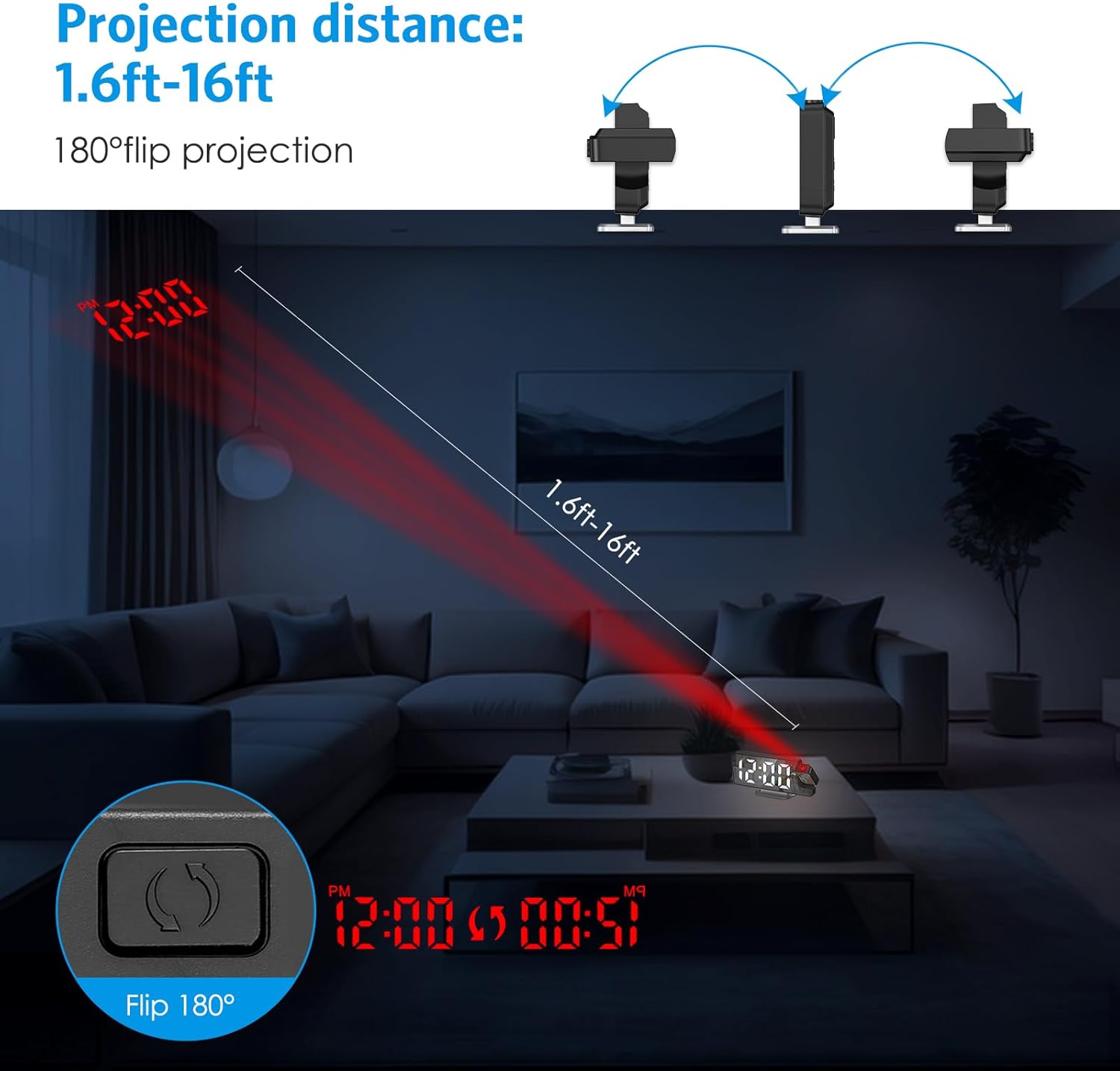
Image 6.5: Illustrates the projection distance range (1.6ft-16ft) and the 180° flip projection capability.
Video 6.1: This video demonstrates the AMIR Projection Alarm Clock's features, including 3 levels of brightness adjustment, time/date/temperature rotation on the main display, manual adjustment of projection angle, one-touch on/off projection, and 180-degree projection rotation.
6.7 Нічний режим
Night mode automatically dims the display during a specified period to reduce light disturbance. The default night mode period is from 18:00 to 6:00.
- Activate/Deactivate Night Mode: Натисніть РЕЖИМ button repeatedly until 'ON' or 'OFF' appears next to the night mode icon. Use «+» or '-' перемикати.
- Adjust Night Mode Time Range: When night mode is active, press and hold the РЕЖИМ button until the start hour flashes. Use «+» or '-' для налаштування. Натисніть РЕЖИМ to move to the start minute, then end hour, and end minute, adjusting each with «+» or '-'. Прес РЕЖИМ зберегти.

Image 6.6: The alarm clock operating in Night Mode, showing the display dimmed and time projected onto the wall.
7. Технічне обслуговування
To ensure the longevity and optimal performance of your AMIR Projection Alarm Clock, follow these maintenance guidelines:
- Прибирання: Use a soft, dry cloth to wipe the display and exterior surfaces. Avoid abrasive cleaners or solvents, which can damage the finish.
- Розміщення: Розмістіть годинник на стійкій, рівній поверхні, подалі від прямих сонячних променів, екстремальних температур та високої вологості.
- Потужність: If not using the clock for an extended period, remove the AAA batteries to prevent leakage.
8. Вирішення проблем
If you encounter issues with your alarm clock, refer to the following common problems and solutions:
| проблема | Можлива причина | Рішення |
|---|---|---|
| Display is off or intermittent (on battery power) | Battery saving mode activated. | Press any button to activate the display. For continuous display, use USB power. |
| Time changes randomly or is incorrect. | Power interruption or incorrect setting. | Ensure AAA batteries are installed for memory backup. Re-set the time following Section 6.1. Avoid placing near strong electromagnetic fields. |
| Проекція розмита або нечітка. | Incorrect focus or distance. | Adjust the projection lamp's focus ring (if available) or move the clock closer/further from the projection surface. Ensure the surface is flat and clear. |
| Сигналізація не звучить. | Будильник не активовано або гучність занадто низька. | Verify the alarm icon is visible on the display. Check alarm settings (Section 6.2). Ensure alarm volume is not set to minimum (if adjustable). |
| Projection is upside down. | Потребує коригування орієнтації проекції. | Натисніть і утримуйте ОБМІН button to flip the projection 180 degrees (Section 6.6). |
9. Технічні характеристики
| Особливість | Деталь |
|---|---|
| Бренд | АМІР |
| Номер моделі | WA146-AMUS |
| Тип дисплея | Цифровий світлодіод |
| Розмір екрана | 7.9 дюймів |
| Розміри виробу (Ш x В) | 4.13"W x 1.25"H (Note: This seems to be a partial dimension, likely referring to height/depth. The main image shows 7.5in width.) |
| Джерело живлення | USB Cable Power (DC 5V) or 3 AAA Batteries |
| Тип матеріалу | Акрилонітрилбутадієнстирол (АБС) |
| Особливості | 2 Alarms + 3 Levels Volume, Adjustable Brightness, Large Display, Snooze, USB/Battery Powered, 180° Rotatable Projector, Temperature Display, Night Mode |
10. Гарантія та підтримка
The AMIR Projection Alarm Clock (WA146-AMUS) comes with a Lifetime Warranty, ensuring long-term reliability. For any questions, technical assistance, or support needs, please contact AMIR customer service. Refer to the product packaging or the official AMIR webсайт для контактної інформації.