
1. Вступ
This manual provides detailed instructions for the installation, operation, and maintenance of the Intellinet 48-Port L3 Managed Gigabit PoE+ Switch, Model 562041. This device is designed for enterprise networks requiring efficient and scalable routing solutions with high-powered Power over Ethernet (PoE) capabilities.
2. Інформація про безпеку
Observe the following safety precautions to prevent damage to the device and injury to personnel:
- Забезпечте належне заземлення пристрою.
- Do not expose the switch to water or excessive humidity.
- Використовуйте пристрій у зазначених діапазонах температури та вологості.
- Use only the power cable provided or a compatible replacement.
- Do not open the switch casinг; зверніться до кваліфікованого персоналу для обслуговування.
- Забезпечте належну вентиляцію навколо вимикача, щоб запобігти перегріву.
3. Вміст упаковки
Перевірте наявність усіх елементів в упаковці:
- Intellinet 48-Port L3 Managed Gigabit PoE+ Switch (Model 562041)
- Силовий кабель
- 19" rackmount brackets
- Гумові ніжки
- Інструкції (цей посібник)
4. Продукт закінчивсяview
The Intellinet 562041 is a robust Layer 3 managed switch featuring 48 Gigabit PoE+ ports and six 10G SFP+ uplink slots. It supports a total power budget of 850 watts for PoE devices.
4.1 Передня панель
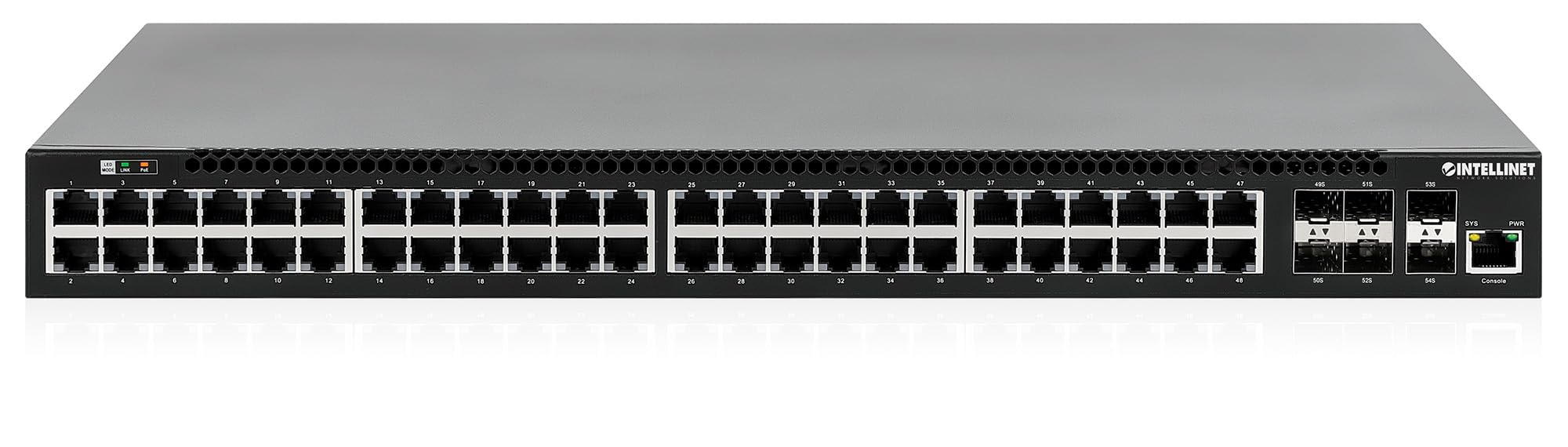
Передня панель містить:
- 48 x 10/100/1000 Mbps RJ45 Ports: These ports support Power over Ethernet Plus (PoE+) for connecting compatible devices.
- 6 x 10 Gigabit SFP+ Slots: For high-speed uplink connections to other network devices.
- Світлодіодні індикатори: Provide status information for power, system, link activity, and PoE status.
- Порт консолі: For local management and configuration.


4.2 Задня панель

The rear panel typically includes the AC power input and cooling fans for heat dissipation.

5. Налаштування
5.1 Фізичне встановлення
Комутатор можна встановити у стандартну 19-дюймову стійку для обладнання або розмістити на робочому столі.
- Установка в стійку: Attach the provided rackmount brackets to the sides of the switch using the included screws. Secure the switch into a standard 19-inch rack.
- Встановлення на робочий стіл: Attach the provided rubber feet to the bottom of the switch to prevent scratching and ensure stability. Place the switch on a flat, stable surface.
5.2 Підключення живлення
Connect the provided power cable to the AC power input on the rear panel of the switch and then to a grounded electrical outlet. Ensure the power switch is in the OFF position before connecting the power cable.
5.3 Мережеві підключення
- Пристрої PoE: Connect PoE-compatible devices (e.g., IP cameras, VoIP phones, wireless access points) to any of the 48 Gigabit RJ45 ports. The switch will automatically detect and provide power to these devices.
- Вихідні підключення: Insert compatible SFP+ transceivers into the 10 Gigabit SFP+ slots and connect them to your core network or other high-speed devices using appropriate fiber optic cables.
- Підключення консолі: For initial configuration or direct management, connect a console cable from your computer to the console port on the switch.
5.4 Початкова конфігурація
Refer to the separate software configuration guide for detailed instructions on accessing the switch's management interface (web-based GUI or command-line interface via console port) and performing initial setup, including IP address assignment, user accounts, and basic network settings.
6. Інструкція з експлуатації
6.1 Layer 3 Routing
This switch offers dynamic Layer 3 IP routing capabilities, including OSPF (Open Shortest Path First), RIP (Routing Information Protocol), and VRRP (Virtual Router Redundancy Protocol). These protocols enable efficient and scalable routing within complex network environments.

6.2 Живлення через Ethernet (PoE+)
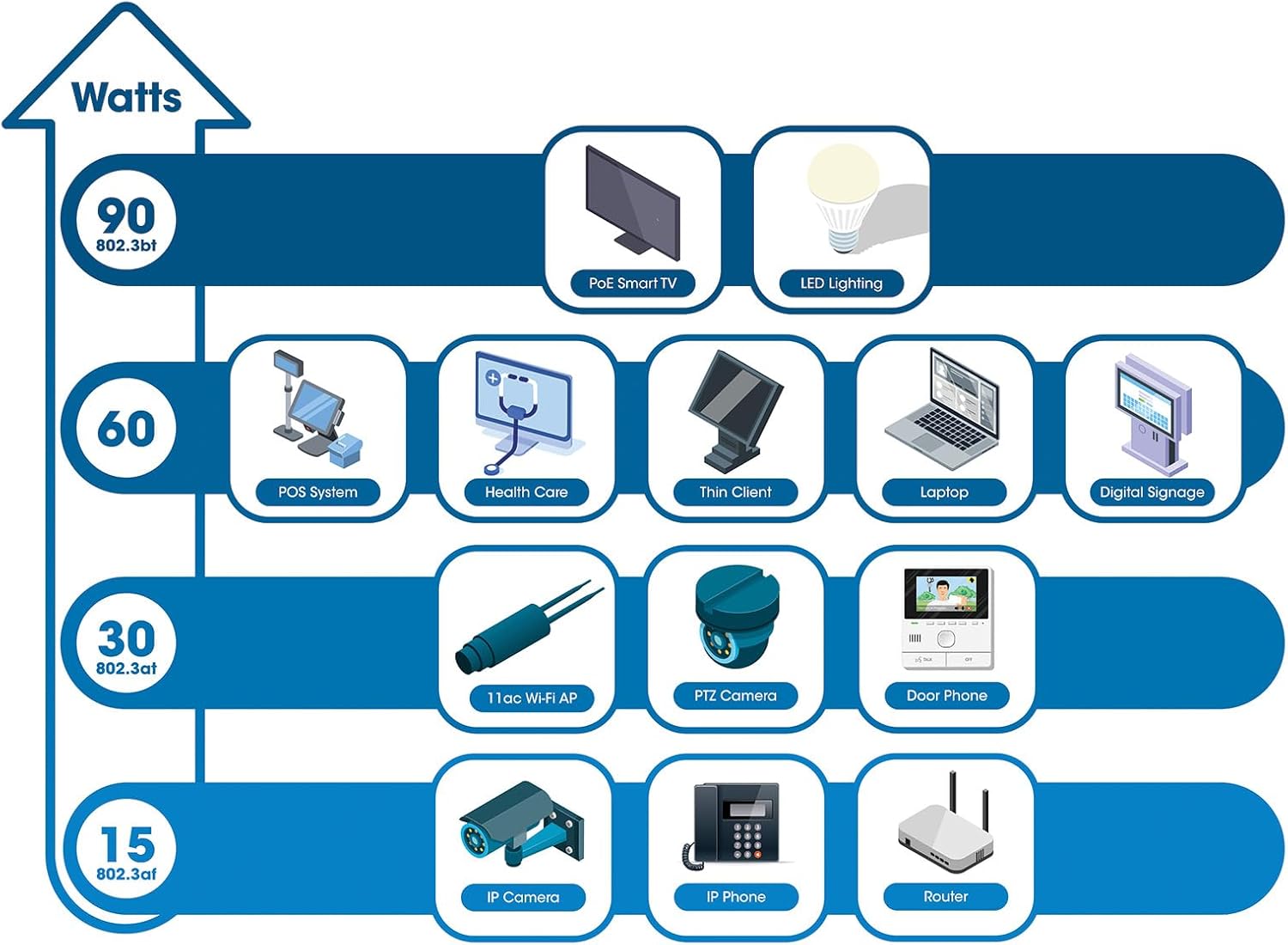
The switch provides up to 30 watts of power per port across its 48 PoE+ ports, with a total power budget of 850 watts. This allows for seamless integration of various PoE devices without the need for separate power adapters.
6.3 PoE Scheduling
The switch supports PoE scheduling, allowing administrators to define specific times for powering on, powering off, or rebooting connected PoE devices. This feature can optimize power consumption and enhance network security.


6.4 Self-Healing Functionality (PDM)
The Powered Device Monitor (PDM) feature enables the switch to proactively monitor the status of connected PoE devices. If a device becomes unresponsive, the PDM can automatically restart the PoE port to restore functionality, minimizing downtime and maintaining network integrity.
6.5 Управління хмарами
The switch supports cloud management capabilities, allowing for remote configuration, monitoring, and troubleshooting of the device from a centralized platform. Refer to the cloud management documentation for setup and usage details.
7. Технічне обслуговування
7.1 оновлень мікропрограми
Regularly check the Intellinet Network Solutions website for the latest firmware updates. Applying firmware updates can improve performance, add new features, and address security vulnerabilities. Follow the instructions provided with the firmware update package carefully.
7.2 Очищення
To clean the switch, power it off and disconnect all cables. Use a soft, dry cloth to wipe the exterior. Do not use liquid or aerosol cleaners. Ensure ventilation openings are free from dust and debris.
7.3 Екологічні міркування
Ensure the switch operates within its specified temperature and humidity ranges. Avoid placing the switch in direct sunlight, near heat sources, or in areas with high dust accumulation.
8. Вирішення проблем
This section addresses common issues you might encounter with the switch.
8.1 Немає живлення
- Verify the power cable is securely connected to both the switch and a working electrical outlet.
- Ensure the power switch on the rear panel is in the ON position.
- Перевірте розетку за допомогою іншого пристрою, щоб переконатися, що вона справна.
8.2 Немає з'єднання на порту
- Check the Ethernet cable connection at both ends. Ensure it is securely plugged in.
- Verify the cable is not damaged. Try a different cable.
- Переконайтеся, що підключений пристрій увімкнено та працює належним чином.
- Перевірте стан порту в інтерфейсі керування комутатора.
8.3 Пристрій PoE не отримує живлення
- Confirm the connected device is a PoE-compatible device.
- Перевірте світлодіод стану PoE для конкретного порту.
- Verify the total PoE power budget (850W) is not exceeded by all connected devices.
- Utilize the Powered Device Monitor (PDM) feature to automatically restart the port if the device is unresponsive.
- Check PoE settings in the switch's management interface.
9. Технічні характеристики
| Особливість | Специфікація |
|---|---|
| Номер моделі | 562041 |
| Бренд | МЕРЕЖЕВІ РІШЕННЯ INTELLINET |
| Кількість портів | 54 (48 x Gigabit PoE+, 6 x 10G SFP+) |
| Тип інтерфейсу | PoE, SFP |
| Максимальна потужність (бюджет PoE) | 850 Вт |
| Швидкість передачі даних | 10 Gigabits Per Second (SFP+ uplinks) |
| Вага товару | 6.2 кілограмів (13.64 фунти) |
| Розміри продукту (Д x Ш x В) | 13.78 x 17.32 x 1.73 дюймів |
| Верхня температура | 104 градусів за Фаренгейтом (40°C) |
| Низька температура | 32 градусів за Фаренгейтом (0°C) |
| Сумісні пристрої | Desktop, Router, PoE devices (IP cameras, VoIP phones, WAPs) |
| Включені компоненти | 19" rackmount brackets, Instructions, Rubber feet, power cable |
| UPC | 766623562041 |
10. Гарантія та підтримка
10.1 Інформація про гарантію
This Intellinet Network Solutions product is covered by a 3-річна гарантія виробникаБудь ласка, збережіть чек про покупку для гарантійного обслуговування. Гарантія поширюється на дефекти матеріалів та виготовлення за умов нормального використання.
10.2 Технічна підтримка
For technical assistance, product documentation, or to register your product, please visit the official Intellinet Network Solutions website or contact their customer support. Contact information can typically be found on the manufacturer's webсайту або в упаковці продукту.