
GOOJODOQ Portable Handheld Turbo Fan
GOOJODOQ Portable Handheld Turbo Fan User Manual
Model: Portable Handheld Turbo Fan
1. Вступ
Thank you for choosing the GOOJODOQ Portable Handheld Turbo Fan. This manual provides essential information for the safe and efficient operation, maintenance, and troubleshooting of your device. Please read it thoroughly before use and retain it for future reference.
2. Техніка безпеки
- Не занурюйте вентилятор у воду чи інші рідини.
- Keep the fan away from open flames, heat sources, and direct sunlight to prevent battery damage or overheating.
- Не вставляйте пальці або сторонні предмети в решітку вентилятора.
- Цей пристрій не є іграшкою. Зберігати в недоступному для дітей.
- Використовуйте для заряджання лише наданий зарядний кабель або сертифікований кабель USB-C.
- Do not attempt to disassemble, repair, or modify the fan. Contact customer support if service is required.
- Dispose of the fan and its battery according to local regulations.
3. Вміст упаковки
Будь ласка, перевірте упаковку на наявність наступних предметів:
- GOOJODOQ Portable Handheld Turbo Fan
- Зарядний кабель USB-C
- Посібник користувача
- Hand Strap (may be pre-attached or included separately)
4. Продукт закінчивсяview
4.1 Fan Components
The GOOJODOQ Portable Handheld Turbo Fan features a compact design with a powerful motor and intuitive controls.

малюнок 1: Фронт view of the GOOJODOQ Portable Handheld Turbo Fan, showing the digital display and airflow.
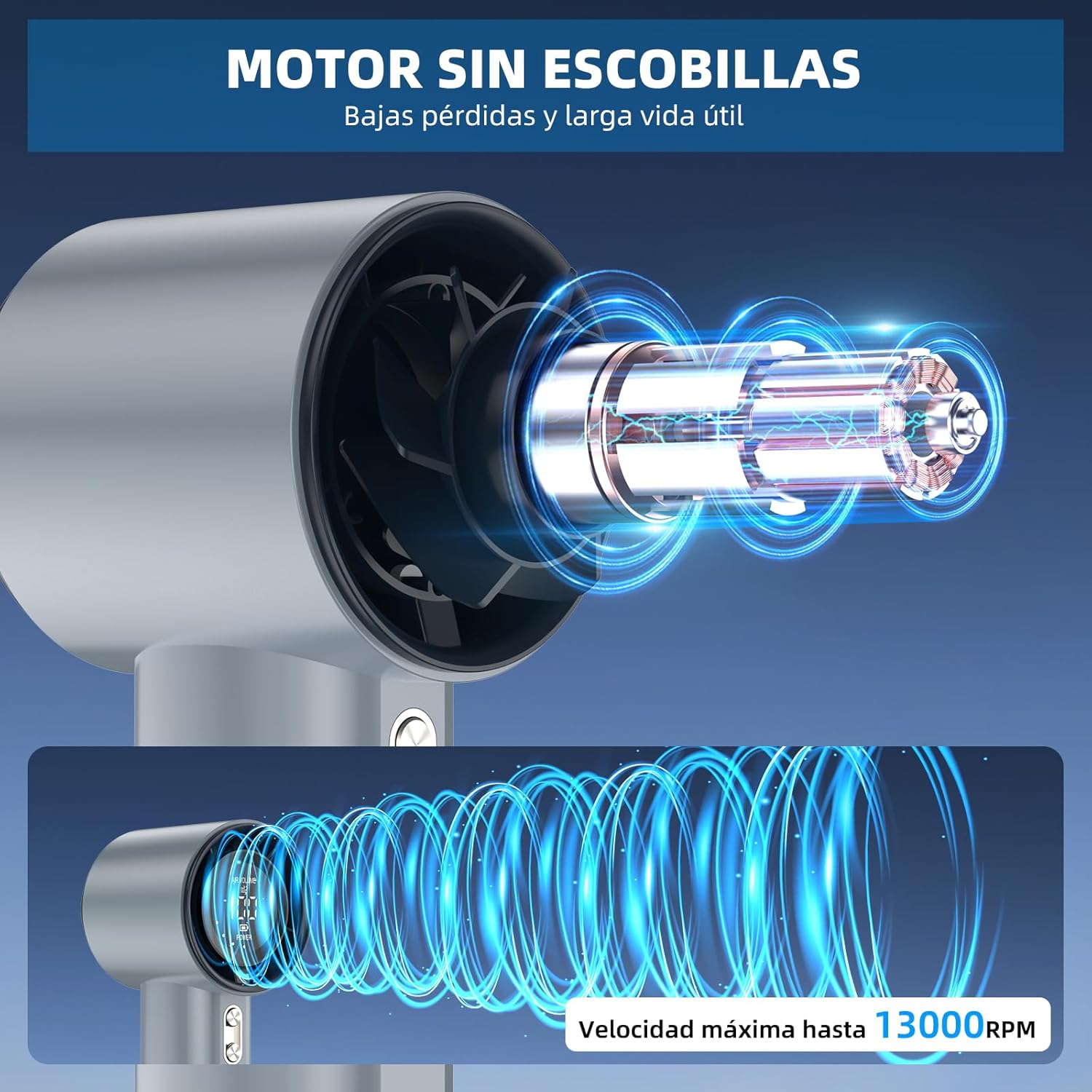
малюнок 2: Internal structure illustrating the brushless motor and optimized airflow design, capable of up to 13000 RPM.
4.2 Кнопки керування
The fan is equipped with two control buttons for easy operation.
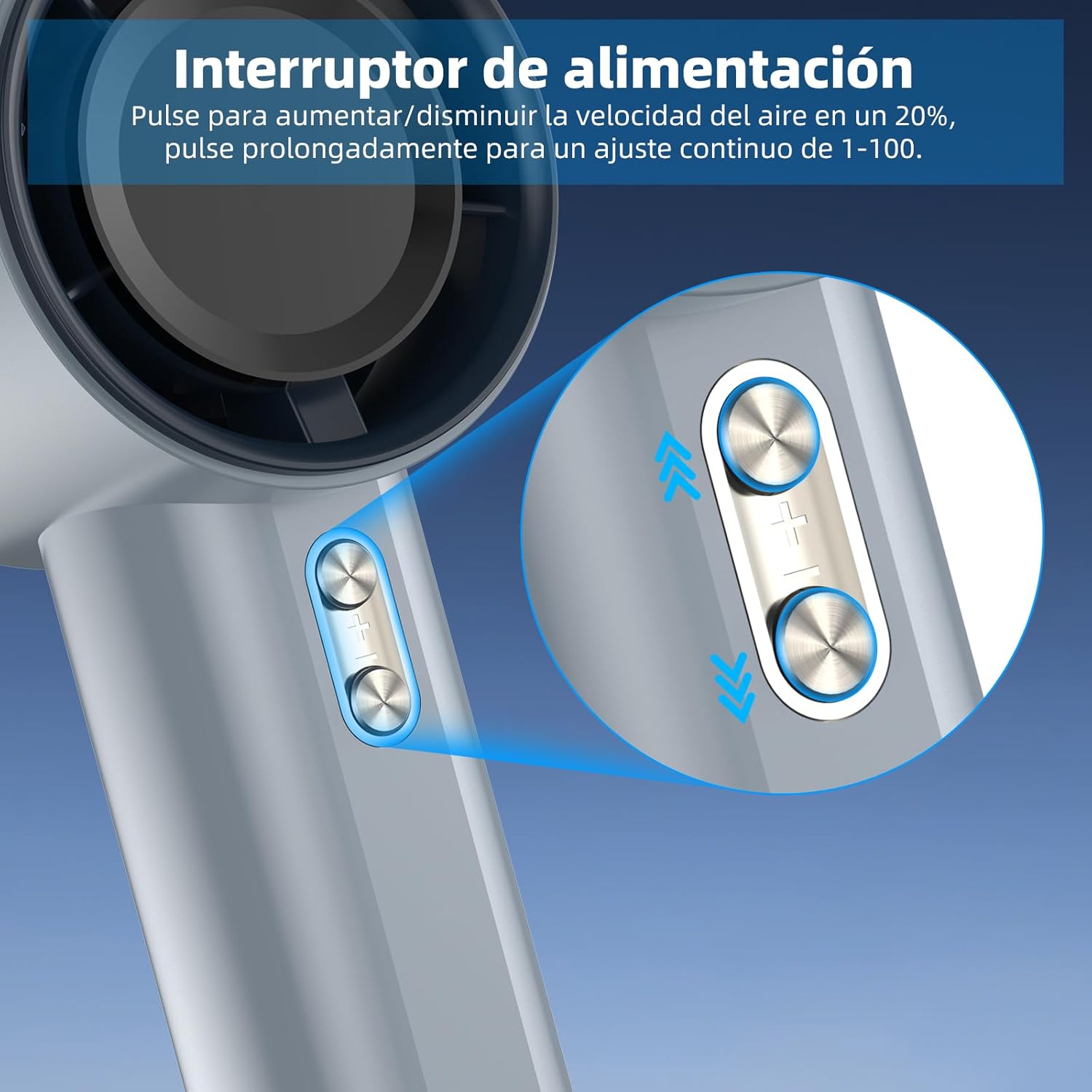
малюнок 3: Detail of the power/speed adjustment buttons. Short press to adjust speed by 20%, long press for continuous 1-100 speed adjustment.
4.3 Цифровий дисплей
The integrated digital display provides real-time information about the fan's status.

малюнок 4: The digital display indicates the current air volume (speed level from 1-100) and battery power level.
Дисплей показує:
- ОБ'ЄМ ПОВІТРЯ: Indicates the current fan speed level (1-100).
- ПОТУЖНІСТЬ: Показує залишок заряду акумулятора.
5. Налаштування
5.1 Початкове заряджання
Before first use, fully charge the fan. The fan is equipped with a 4000mAh battery.
- Connect the provided USB-C charging cable to the charging port on the fan.
- Connect the other end of the USB-C cable to a compatible USB power adapter (e.g., phone charger, computer USB port) or power bank.
- The digital display will show the charging status. A full charge typically takes approximately 2.5 hours.
- Після повного заряджання від’єднайте зарядний кабель.

малюнок 5: The fan's USB-C charging port and internal 4000mAh battery, indicating a 2.5-hour charging time for up to 12 hours of operation.
A full charge can provide up to 12 hours of working time, depending on the speed setting.
5.2 Attaching the Hand Strap
For added security and portability, attach the hand strap to the designated loop on the fan handle.

малюнок 6: The fan with an attached hand strap, demonstrating its use for secure carrying.
6. Інструкція з експлуатації
6.1 Увімкнення/вимкнення живлення
- To turn on the fan: Press and hold either the '+' or '-' button for a few seconds until the display illuminates and the fan starts.
- To turn off the fan: Press and hold either the '+' or '-' button for a few seconds until the display turns off.
6.2 Регулювання швидкості вентилятора
The fan offers 100 adjustable speed levels.
- Поступове коригування: Short press the '+' button to increase the fan speed by 20 levels. Short press the '-' button to decrease the fan speed by 20 levels.
- Continuous Adjustment: Press and hold the '+' button to continuously increase the fan speed. Press and hold the '-' button to continuously decrease the fan speed. Release the button when the desired speed is reached.
The current speed level (AIR VOLUME) will be displayed on the digital screen.
7. Технічне обслуговування
7.1 Очищення
- Перед чищенням переконайтеся, що вентилятор вимкнено та від’єднано від будь-якого джерела живлення.
- Протріть зовнішню частину вентилятора м’якою сухою тканиною.
- Use a soft brush or cotton swab to gently remove dust from the air inlet and outlet grilles. Do not use water or harsh cleaning agents.
7.2 Зберігання
- Зберігайте вентилятор у прохолодному, сухому місці, подалі від прямих сонячних променів та екстремальних температур.
- If storing for an extended period, charge the battery to approximately 50% every three months to prolong battery life.
8. Вирішення проблем
| проблема | Можлива причина | Рішення |
|---|---|---|
| Вентилятор не вмикається. | Акумулятор розрядився. | Charge the fan fully using the USB-C cable. |
| Вентилятор не вмикається. | Кнопка живлення натиснута неправильно. | Press and hold either the '+' or '-' button for a few seconds to power on. |
| Fan speed cannot be adjusted. | Кнопки не реагують. | Ensure the fan is on. If issue persists, try charging the fan. |
| Зменшення повітряного потоку. | Повітрявхідні/вихідні отвори заблоковані пилом. | Clean the air grilles as described in the Maintenance section. |
| Вентилятор несподівано зупиняється. | Низький заряд батареї. | Перезарядіть вентилятор. |
If you encounter issues not listed here or if problems persist, please contact GOOJODOQ customer support.
9. Технічні характеристики
| Бренд | GOOJODOQ |
| Модель | Портативний ручний турбовентилятор |
| Потужність/Втtage | 5 Вт |
| матеріал | пластик |
| Кількість швидкостей | 100 (регульований) |
| Ємність акумулятора | 4000 мАг (приблизно) |
| Час зарядки | прибл. 2.5 години |
| Час роботи | До 12 годин (залежно від швидкості) |
| Вага товару | 400 г |
| Розміри продукту | 6.1 Г x 5.9 Ш x 16 В сантиметрів |
| Джерело живлення | USB-C |
| Тип управління | Touch Panel Control (Buttons) |

малюнок 7: The compact and portable design of the fan, shown being placed into a small bag. While the image indicates 225g, the product specifications state an item weight of 400g.
Примітка. Специфікації можуть бути змінені без попереднього повідомлення.
10. Гарантія та підтримка
For warranty information, technical support, or customer service inquiries, please refer to the contact details provided on the product packaging or visit the official GOOJODOQ webсайт. Будь ласка, підготуйте модель вашого продукту та дату покупки, коли звертаєтесь до служби підтримки.