
1. Вступ
Дякуємо за покупкуasing the ELECTROPRIME K22T Multifunctional Rotatable Clock Night Light Wireless Fast Charger. This device combines a digital clock, an adjustable night light, and a 15W wireless fast charger into one compact unit. This manual provides essential information for safe operation, setup, and maintenance of your new device. Please read it thoroughly before use and retain it for future reference.
2. Інформація про безпеку
- Не піддавайте пристрій впливу води, вологи або екстремальних температур.
- Уникайте падіння та сильних ударів пристрою.
- Use only the provided or a certified power adapter (9V/2A recommended) to prevent damage.
- Не розбирайте, не ремонтуйте та не модифікуйте пристрій самостійно. Зверніться за допомогою до кваліфікованого сервісного персоналу.
- Тримайте пристрій подалі від дітей і домашніх тварин.
- Забезпечте належну вентиляцію під час заряджання, щоб запобігти перегріву.
- Remove any metal objects or magnetic cards from the charging area before placing a device for wireless charging.
3. Продукт закінчивсяview
3.1 Компоненти
The ELECTROPRIME K22T features a sleek design integrating multiple functions:
- Дисплей цифрового годинника: LED display for time.
- Бездротова зарядна панель: Top surface for wireless charging compatible devices.
- Rotatable Night Light: Adjustable light source for ambient illumination.
- Кнопки управління: Touch-sensitive buttons for operating the clock and light functions.
- USB-C/Type-C Input Port: Для підключення живлення.
- Силіконова основа: Забезпечує стійкість та запобігає ковзанню.
3.2 Основні характеристики
- 15W Wireless Fast Charging: Supports 5W, 7.5W, 10W, and 15W output.
- Багатофункціональний дизайн: Combines alarm clock, night light, and wireless charger.
- Rotatable Night Light: Adjustable angle for optimal lighting.
- Світлодіодний дисплей: Clear time display with three levels of brightness adjustment.
- Сенсорне керування: Intuitive operation for various functions.
- Кілька функцій захисту: Built-in overcurrent, overtemperature, and short circuit protection for safe charging.
- Тепле біле світло: 3500K color temperature for comfortable illumination.
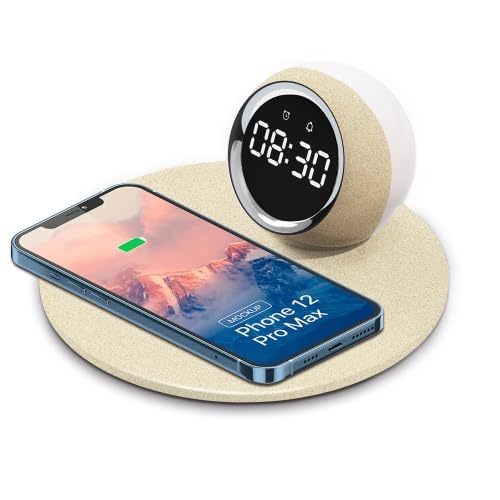
Image 1: The ELECTROPRIME K22T device, showcasing its digital clock, wireless charging pad, and night light.
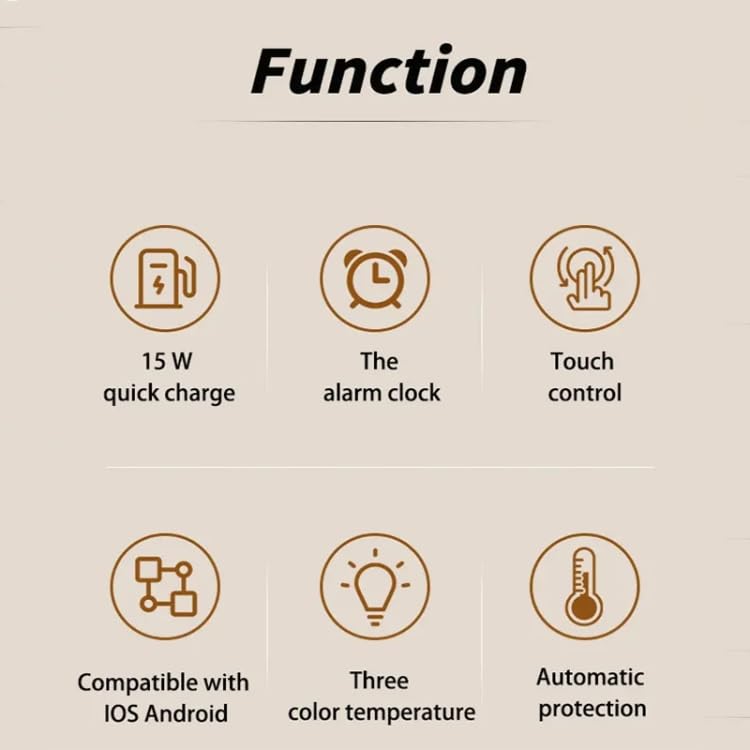
Image 2: Visual representation of the key functions including 15W quick charge, alarm clock, touch control, compatibility, adjustable color temperature, and automatic protection.
4. Налаштування
- Розпакуйте пристрій: Carefully remove the ELECTROPRIME K22T from its packaging.
- Підключіть живлення: Insert the USB-C connector of the power cable into the input port on the back of the device. Connect the other end of the cable to a compatible power adapter (9V/2A recommended) and plug it into a wall outlet.
- Початкове ввімкнення: The digital clock display will illuminate, indicating the device is powered on and ready for use.
5. Інструкція з експлуатації
5.1 Налаштування годинника
The device typically features touch-sensitive buttons for time adjustment. Refer to the icons near the display for specific functions (e.g., 'M' for Mode, '+' for Increase, '-' for Decrease).
- Увійдіть у режим налаштування часу: Press and hold the 'Mode' button (or similar icon) for a few seconds until the hour digits start blinking.
- Налаштувати годину: Use the '+' and '-' buttons to set the correct hour.
- Налаштувати хвилину: Press the 'Mode' button again to switch to minute adjustment. Use the '+' and '-' buttons to set the correct minutes.
- Вихід з режиму налаштування: Press the 'Mode' button once more, or wait a few seconds for the display to stop blinking, to save the time.
5.2 Використання нічника
The night light offers adjustable brightness and a rotatable design.
- Увімкнути/вимкнути: Tap the light icon button (or similar) to turn the night light on or off.
- Налаштувати яскравість: With the light on, tap the light icon button repeatedly to cycle through brightness levels: 100% > 50% > 10% > Off.
- Відрегулювати кут: Gently rotate the night light component to direct the illumination as desired.
5.3 Бездротова зарядка
The device supports 15W wireless fast charging for compatible smartphones and other devices.
- Розміщення: Place your wireless charging compatible device (e.g., smartphone) centrally on the charging pad.
- Індикатор зарядки: The device's display or a dedicated LED indicator (if present) may show a charging status. Your phone will also indicate that it is charging.
- Оптимальна зарядка: Ensure your device is properly aligned on the charging pad for efficient charging. Remove phone cases thicker than 3mm or those containing metal.
6. Технічне обслуговування
- Прибирання: Disconnect the power before cleaning. Use a soft, dry cloth to wipe the surface of the device. Do not use abrasive cleaners, solvents, or harsh chemicals.
- Зберігання: Якщо пристрій не використовується протягом тривалого часу, зберігайте його в прохолодному, сухому місці, захищеному від прямих сонячних променів.
- Уникайте перешкод: Keep the charging pad clear of dust and debris to ensure optimal performance.
7. Вирішення проблем
| проблема | Можлива причина | Рішення |
|---|---|---|
| Пристрій не включається. | Немає підключення до живлення або несправний адаптер. | Ensure the power cable is securely connected and the adapter is working. Try a different power outlet. |
| Бездротова зарядка повільна або не працює. | Misalignment, phone case, or incompatible device. | Reposition the device on the charging pad. Remove thick or metallic phone cases. Ensure your device supports wireless charging. Use a 9V/2A power adapter. |
| Нічне світло не працює. | Light is off or device is not powered. | Tap the light button to turn it on. Check if the device is powered on. |
| Clock display is dim or off. | Brightness setting or power issue. | Adjust the display brightness using the control buttons. Ensure the device is powered on. |
8. Технічні характеристики
| Параметр | Значення |
|---|---|
| Назва моделі | K22T |
| Номер моделі | TBD0604275402 |
| Введення | 9В/2А |
| Вихід | 9В/1.67А |
| Бездротова зарядка | 5W / 7.5W / 10W / 15W |
| Сила світла | 0.5 Вт |
| Колірна температура | 3500K (теплий білий) |
| Режими освітлення | 100% - 50% - 10% Brightness |
| Інтерфейс зарядки | USB-C / Type-C |
| Зарядка відстань | 3-8 мм |
| Charge Conversion Rate | 75% |
| матеріал | ABS + PP (Acrylonitrile Butadiene Styrene, Polypropylene, Silicone) |
| Розмір продукту | 180 x 180 x 84 мм |
| Вага нетто | 270г |
9. Гарантія та підтримка
Щоб отримати інформацію про гарантію або технічну підтримку, зверніться до документації, що додається до вашої покупки, або зверніться до продавця. Зберігайте чек про покупку для будь-яких гарантійних претензій.
Manufacturer Contact Information: ELECTROGADGETSSTORE