
1. Вступ
This manual provides comprehensive instructions for the Blackmagic Design Pyxis 6K Cinema Camera, L-Mount. It covers essential information regarding setup, operation, maintenance, and troubleshooting to ensure optimal performance and longevity of your camera. Please read this manual thoroughly before using the camera.
2. Інформація про безпеку
- Не піддавайте камеру впливу води або надмірної вологи.
- Avoid operating the camera in extreme temperatures.
- Use only Blackmagic Design approved accessories and power supplies.
- Не намагайтеся розбирати або модифікувати камеру. Звертайтеся до кваліфікованого персоналу для проведення будь-яких технічних робіт.
- Тримайте камеру подалі від сильних магнітних полів.
3. Вміст упаковки
Перевірте наявність усіх елементів в упаковці:
- Blackmagic Design Pyxis 6K Cinema Camera (L-Mount)
- Джерело живлення
- Посібник користувача (цей документ)
- DaVinci Resolve Studio activation key
4. Камера закінченаview
The Blackmagic Design Pyxis 6K Cinema Camera features a 36x24mm full-frame 6K sensor, offering exceptional image quality and flexibility for cinematic content creation. It supports various recording formats including Blackmagic RAW and H.264 proxies, with resolutions up to 6048 x 4032.

Рисунок 4.1: Передня сторона view of the Blackmagic Design Pyxis 6K Cinema Camera with an L-Mount lens attached. This image highlights the camera's robust body, the lens mount, and the integrated top handle.
Key features include a built-in 4-inch HDR 1500 nit LCD screen for clear monitoring, and support for open gate 3:2, full height 6:5 anamorphic, and Super 35 recording modes. The camera records full resolution up to 36 frames per second (fps) or 120 fps in windowed mode.

Малюнок 4.2: Задня частина view of the Blackmagic Design Pyxis 6K Cinema Camera, showcasing the 4-inch HDR LCD touchscreen display, control buttons, and the attached lithium-ion battery pack. The screen displays recording settings and menu options.
The camera utilizes CFexpress for flash memory storage and offers HDMI connectivity for external monitoring. Audio is supported in AAC, MP3, and PCM formats.
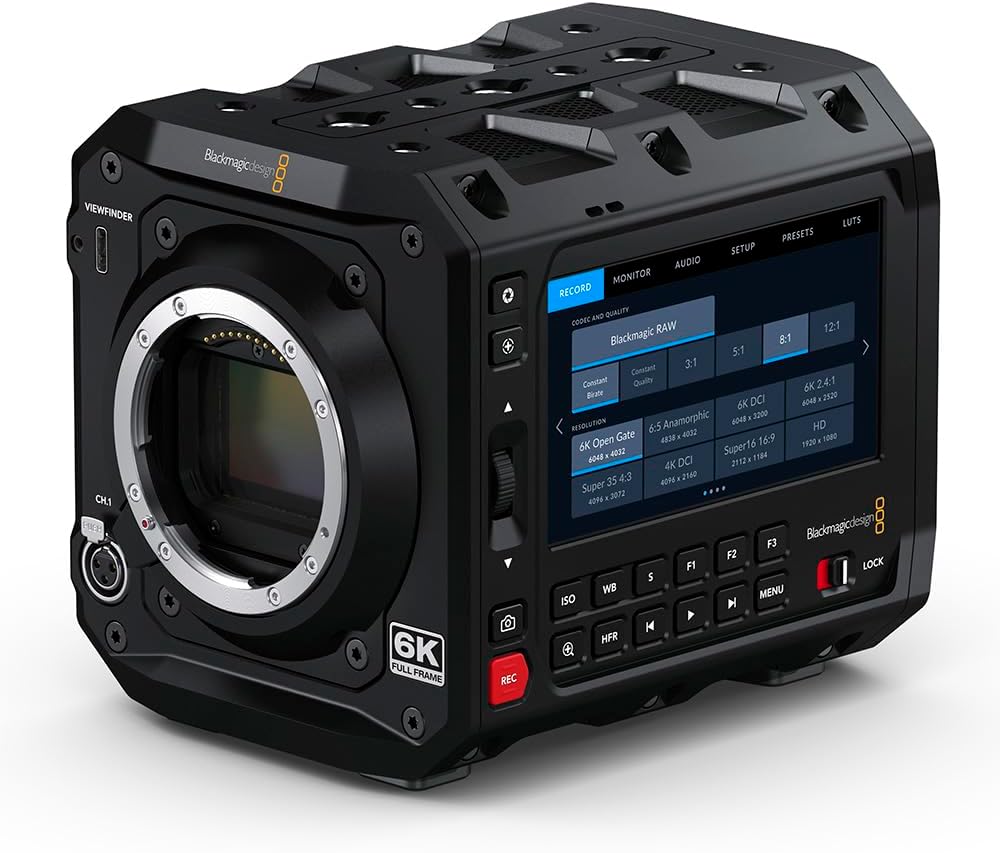
Малюнок 4.3: Спереду view of the Blackmagic Design Pyxis 6K Cinema Camera without a lens, clearly showing the L-Mount for lens attachment and the '6K FULL FRAME' designation. This view highlights the camera's robust construction and lens interface.
5. Налаштування
5.1. Встановлення батареї
- Переконайтеся, що камеру вимкнено.
- Locate the battery compartment on the rear of the camera.
- Insert a compatible lithium-ion battery pack, ensuring it clicks securely into place.
5.2. Lens Attachment (L-Mount)
- Remove the body cap from the camera and the rear cap from your L-Mount lens.
- Зіставте білу індексну мітку на об’єктиві з білою індексною міткою на байонеті об’єктива камери.
- Insert the lens into the mount and rotate it clockwise until it locks into position.
5.3. Media Card Insertion
- Locate the CFexpress card slot.
- Insert a CFexpress card with the label facing the correct direction until it clicks into place.
- To remove, press the card gently to eject it.
5.4. Увімкнення/вимкнення живлення
- Щоб увімкнути живлення, пересуньте перемикач живлення в положення «УВІМК.».
- Щоб вимкнути живлення, пересуньте перемикач живлення у положення «ВИМК.».
5.5. Початкові налаштування
Upon first power-on, you may be prompted to set the language, date, and time. Follow the on-screen instructions using the touchscreen LCD.
6. Робота з камерою
6.1. Навігація по меню
The 4-inch HDR LCD screen is a touchscreen interface. Tap icons and swipe to navigate through menus and adjust settings. Physical buttons are also available for quick access to common functions like ISO, White Balance, and Frame Rate.
6.2. Запис
- Формати запису: The camera supports Blackmagic RAW for maximum quality and H.264 proxies for efficient workflow. Select your desired format in the 'Record' menu.
- Роздільна здатність і частота кадрів: Adjust resolution (e.g., 6K Open Gate, 6K DCI, Super 35) and frame rate (up to 36 fps at full resolution, 120 fps windowed) via the 'Record' or 'Project' settings.
- Почати/зупинити запис: Press the dedicated 'REC' button on the camera body to start and stop recording.
6.3. Налаштування звуку
Access audio input levels, monitoring options, and format settings (AAC, MP3, PCM) through the 'Audio' menu. Ensure external microphones are properly connected to the camera's audio inputs.
6.4. Monitoring and Connectivity
Use the built-in LCD for on-camera monitoring. For external displays, connect an HDMI cable from the camera's HDMI output to your monitor. Adjust display settings in the 'Monitor' menu.
7. Технічне обслуговування
7.1. прибирання
- Використовуйте м’яку суху тканину для очищення корпусу камери.
- Для РК-екрана використовуйте спеціальний розчин для чищення екранів та мікрофіброву серветку.
- Keep the lens mount free of dust and debris. Use a blower brush for sensor cleaning if necessary, or consult a professional.
7.2. Зберігання
When not in use, store the camera in a cool, dry place, preferably in a padded camera bag or case to protect it from physical damage and environmental factors.
7.3. Оновлення мікропрограми
Periodically check the Blackmagic Design website for firmware updates. Updates can improve performance, add features, and resolve issues. Follow the instructions provided with the firmware update carefully.
8. Вирішення проблем
- Камера не вмикається: Ensure the battery is fully charged and correctly inserted, or the external power supply is connected.
- Немає зображення на РК-дисплеї: Check lens attachment, ensure the lens cap is removed, and verify monitor settings.
- Проблеми із записом: Confirm a compatible CFexpress card is inserted and has sufficient free space. Check recording format and resolution settings.
- Проблеми зі звуком: Verify microphone connection, audio input levels, and selected audio format.
- For persistent issues, perform a factory reset (refer to the 'Settings' menu) or contact Blackmagic Design support.
9. Технічні характеристики
| Особливість | Специфікація |
|---|---|
| Розміри продукту | 5.91 x 4.72 x 4.33 дюймів |
| Вага товару | 4.62 фунта |
| Номер моделі товару | CINECAMCPYXA60LFL |
| Технологія фотосенсора | CMOS |
| Роздільна здатність захоплення відео | 6K (6048 x 4032), 1080p, 720p |
| Максимальна діафрагма | 2 Millimeters (Lens dependent) |
| Тип флеш-пам'яті | CFexpress |
| Формат захоплення відео | Blackmagic RAW, CinemaDNG, ProRes, DNxHR |
| Підтримуваний аудіоформат | AAC, MP3, PCM |
| Розмір екрана | 4 Inches (HDR 1500 nit LCD) |
| Технологія підключення | HDMI |
| Колір | чорний |
| Виробник | Blackmagic Design |
10. Гарантія та підтримка
10.1. Інформація про гарантію
Blackmagic Design products typically come with a limited manufacturer's warranty. Please refer to the warranty card included with your product or visit the official Blackmagic Design webсайт для отримання детальних гарантійних умов, що стосуються вашого регіону.
10.2. Технічна підтримка
For technical assistance, product registration, or to download the latest software and drivers, please visit the official Blackmagic Design support page. You can find comprehensive FAQs, knowledge base articles, and contact information for customer support.
Official Blackmagic Design Store: Blackmagic Design on Amazon