
1. Вступ
The Portkeys HS8 is an 8-inch high-brightness camera field monitor designed for professional video production. It features an 1100nit display, 3D LUT support, 4K HDMI input, and 3G SDI input/output, all housed in a durable aluminum body. This manual provides detailed instructions for setting up, operating, and maintaining your HS8 monitor.

Зображення 1.1: спереду view of the Portkeys HS8 Camera Field Monitor.
2. Вміст упаковки
Please check the package contents upon opening to ensure all items are present.
- Portkeys HS8 Monitor
- Кабель живлення постійного струму D-TAP B з гвинтовим кріпленням
- Серветка для очищення екрана
- Картка відгуків клієнтів
- M3 Allen Screw*4
- M2 Аллен-ключ
- Прокладка головки блоку циліндрів * 4
- Флешка Micro USB

Image 2.1: Visual representation of the Portkeys HS8 package contents.
3. Посібник із налаштування
3.1 Монтаж монітора
The Portkeys HS8 features VESA 100 x 100 mounting points for secure attachment to various camera rigs or stands. It also includes standard 1/4-inch screw threads for flexible mounting options.
Зображення 3.1: Ззаду view of the monitor highlighting VESA mounting points and dual NP-F battery plates.
3.2 Живлення монітора
The HS8 monitor offers multiple power options:
- Dual NP-F Battery Plates: Insert two compatible Sony NP-F style batteries into the dedicated slots on the back of the monitor.
- DC 7-20V Input: Connect an external power source using the provided D-Tap cable to the 5.5mm barrel connector.
- VESA 100 x 100 Mounting Points: These points can be used with V-Mount or Gold-Mount battery plates (sold separately) for extended power.
- NP-F Dummy Battery Plate with Power Passthrough: A built-in dummy battery plate provides 8V/10W power passthrough, allowing you to attach and power a wireless transmitter directly from the monitor.

Image 3.2: Detail of the NP-F battery plates and power passthrough for accessories.

Image 3.3: Illustration of the dual NP-F battery plate configuration.
3.3 Підключення джерел відеосигналу
The HS8 monitor supports both HDMI and SDI video inputs and outputs.
- Вхід через HDMI: Connect your camera or video source to the HDMI IN port. The monitor supports up to 4K HDMI input.
- 3G SDI Input/Output: Use the SDI IN port for SDI video sources. The SDI OUT port can be used to loop out the signal to another monitor or device.
- Вихід HDMI: The HDMI OUT port allows simultaneous output of the video signal.

Зображення 3.4: закінченоview вхідних та вихідних портів монітора.
4. Інструкція з експлуатації
4.1 Увімкнення/вимкнення живлення
Locate the power switch on the side of the monitor. Slide it to the "ON" position to power on the device. Slide to "OFF" to power down.
4.2 Навігація в інтерфейсі користувача (UI)
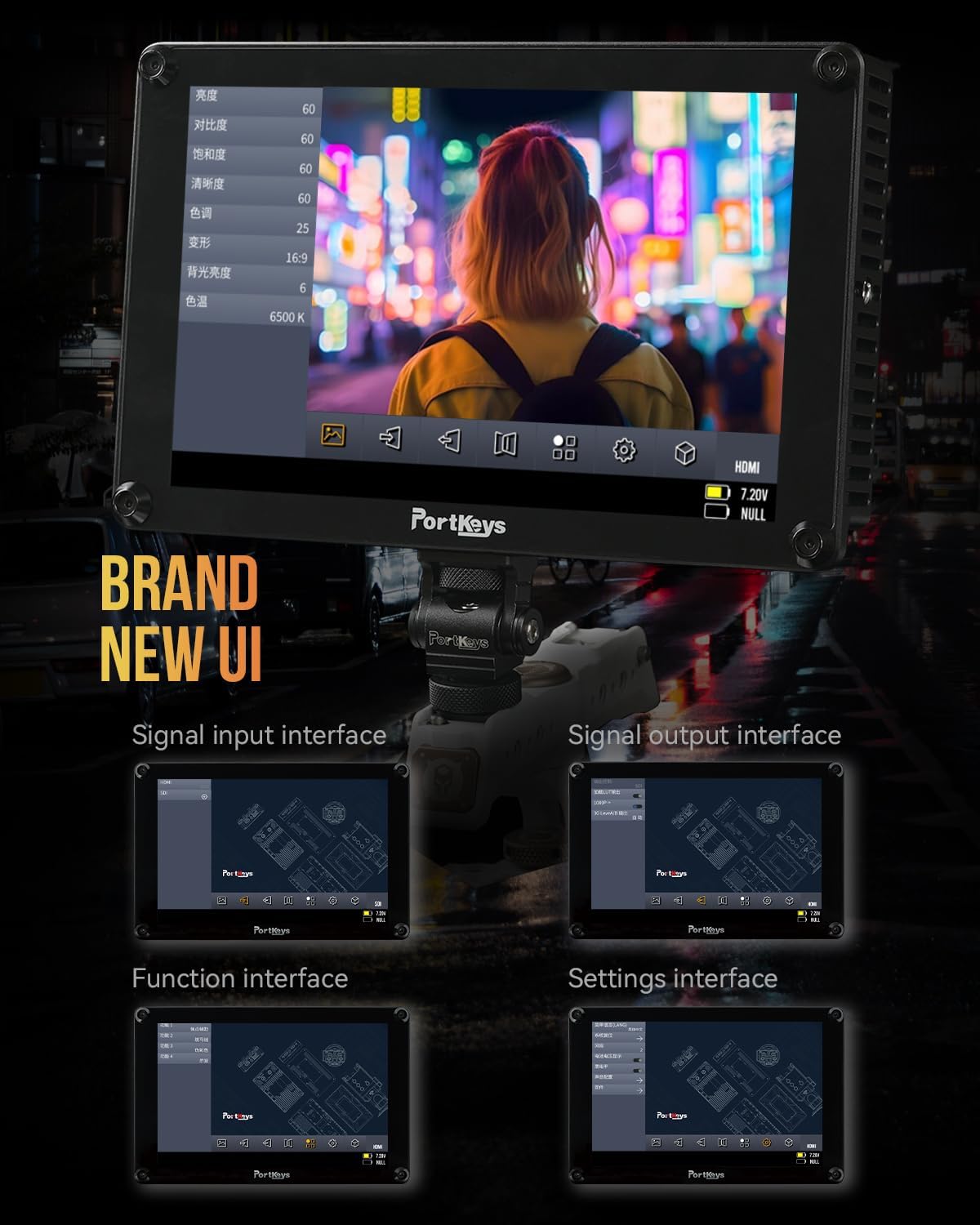
The Portkeys HS8 features a custom operating system with a user-friendly interface. Navigate through menus and settings using the touch screen or the physical buttons.

Image 4.1: The monitor's intuitive user interface for accessing functions and settings.
4.3 Професійні інструменти моніторингу
The HS8 includes a suite of professional monitoring tools accessible via the UI:
- Форма хвилі: Visualizes the luminance and chrominance levels of your video signal.
- Гістограма: Displays the distribution of tones in your image.
- Зебра: Виділяє переекспоновані ділянки, щоб запобігти обрізанню.
- пік: Assists with focus by highlighting sharp edges.
- Помилковий колір: Використовує кольорові накладання для представлення рівнів експозиції.
- Anamorphic Image De-squeeze: Виправляє співвідношення сторін анаморфного зображенняtage.
- Вимірювачі звуку: Displays audio levels for monitoring sound.
- 3D LUT: Supports loading custom 3D Look-Up Tables for accurate color representation and creative grading.

Зображення 4.2: Монітор показуєasing its professional monitoring features.

Зображення 4.3: Детальний опис view of waveform and histogram tools on the HS8 monitor.

Image 4.4: False color display on the HS8 for precise exposure control.

Image 4.5: Peaking function in action on the HS8 monitor to aid focusing.

Image 4.6: Key features of the Portkeys HS8 monitor.

Image 4.7: The monitor's display quality with REC.709 color and high brightness.
5. Технічне обслуговування
5.1 Очищення монітора
To clean the screen, use the provided screen cleaning wipe or a soft, lint-free cloth. For stubborn smudges, lightly dampen the cloth with a screen-safe cleaning solution. Avoid harsh chemicals or abrasive materials.
5.2 Зберігання
When not in use, store the monitor in a dry, cool place, away from direct sunlight and extreme temperatures. It is recommended to use a protective case to prevent damage during transport or storage.
6. Вирішення проблем
6.1 Немає живлення
- Переконайтеся, що батареї повністю заряджені та правильно вставлені.
- If using DC power, verify the power cable is securely connected and the power source is active.
- Check the power switch is in the "ON" position.
6.2 Немає відеосигналу
- Confirm the video source (camera) is powered on and outputting a signal.
- Check that the HDMI or SDI cables are securely connected to both the monitor and the source.
- Verify the correct input source is selected on the monitor.
- Test with different cables or video sources if possible.
6.3 Image Lag (HDMI)
Some cameras, such as the Canon R5, may experience a delay when switching between playback and shooting modes via HDMI. This is often a characteristic of the camera's HDMI output processing rather than the monitor itself. Ensure your camera's firmware is up to date and check its settings for HDMI output options.
7. Технічні характеристики
| Особливість | опис |
|---|---|
| Бренд | Порт ключі |
| Номер моделі | HS8 |
| Розмір екрана | 8 дюймів |
| Рідна роздільна здатність | 1920 х 1200 |
| Тип дисплея | ЖК |
| Яскравість | 1100 ніт |
| Коефіцієнт контрастності | 1000:1 |
| Viewкут нахилу | 170 градусів |
| Глибина кольору | 10-bit (8+2 FRC) panel |
| Підключення | HDMI (4K input), 3G SDI In/Out |
| Вхідна потужність | Dual NP-F Battery Plates, DC 7-20V (5.5mm barrel) |
| Power Passthrough | 8V/10W NP-F dummy battery plate |
| Точки кріплення | VESA 100 x 100, 1/4-inch screw threads |
| житло | Алюміній |
| Вага товару | 0.68 кілограмів (1.48 фунта) |
| Калібрування кольору | Рек.709 |

Image 7.1: Visual summary of Portkeys HS8 specifications.
8. Офіційне відео продукту
Video 8.1: Official product video for the Portkeys HS8 Camera Monitor, demonstrating its features and connectivity options.
9. Гарантія та підтримка
9.1 Інформація про гарантію
The Portkeys HS8 Camera Field Monitor comes with a 1-річна гарантія виробника з дати покупки. Ця гарантія поширюється на дефекти матеріалів та виготовлення за умов нормального використання. Будь ласка, збережіть підтвердження покупки для пред'явлення претензій за гарантією.
9.2 Підтримка клієнтів
For technical assistance, troubleshooting, or warranty inquiries, please contact Portkeys Official Store customer support. Refer to the contact information provided with your product or visit the official Portkeys webсайт.