
Продукт закінченийview
The CREWORKS 180 PPD Commercial Dehumidifier is designed for effective humidity control in large spaces, ranging from 600 to 1600 square feet. This unit features a robust design with upgraded components for efficient moisture removal and durability. Key features include automatic defrost, a user-friendly control panel, and portability for flexible placement.

Зображення: спереду view of the CREWORKS 180 PPD Commercial Dehumidifier, highlighting its compact and robust design.
- Effective Dehumidification: Capable of removing up to 180 PPD (Pints Per Day) at saturation, suitable for areas up to 1600 sq. ft.
- Автоматичне розморожування: Prevents frost buildup on coils, ensuring continuous operation and efficiency.
- Міцна конструкція: Features upgraded copper coils for enhanced heat dissipation and longevity.
- Зручні елементи керування: An intuitive display panel allows for easy adjustment of humidity levels and timer settings.
- Портативний дизайн: Equipped with large rear wheels and a convenient handle for easy movement.
Інструкції з налаштування
Follow these steps to properly set up your CREWORKS 180 PPD Commercial Dehumidifier.
1. Розпакування та розміщення
- Обережно вийміть осушувач повітря з упаковки. Перевірте його на наявність пошкоджень під час транспортування.
- Place the unit on a level, stable surface in the desired location. Ensure there is at least 12 inches (30 cm) of clear space around all sides for proper airflow.
- Consider the dimensions of the unit for optimal placement.

Image: Diagram showing the dimensions of the dehumidifier (23.11"D x 17.32"W x 34.13"H).

Зображення: Прamples of suitable environments for the dehumidifier, including warehouses, garages, basements, and fitness centers.
2. Підключення дренажу
The unit includes a drain hose for continuous drainage. This eliminates the need for manual emptying of a water tank.
- Знайдіть зливний отвір на пристрої.
- Надійно під’єднайте наданий зливний шланг до зливного отвору.
- Route the other end of the hose to a suitable drain point, such as a floor drain, sink, or large container. Ensure the hose is sloped downwards to allow for gravity drainage and is free from kinks or obstructions.

Image: Illustration of the drain hose connection and the overflow alarm feature, which notifies users if drainage is improper.
3. Підключення живлення
Підключіть шнур живлення до заземленої електричної розетки. Переконайтеся, що гучністьtage відповідає вимогам пристрою.
Інструкція з експлуатації
This section details how to operate your dehumidifier using the control panel.
Панель управління завершенаview
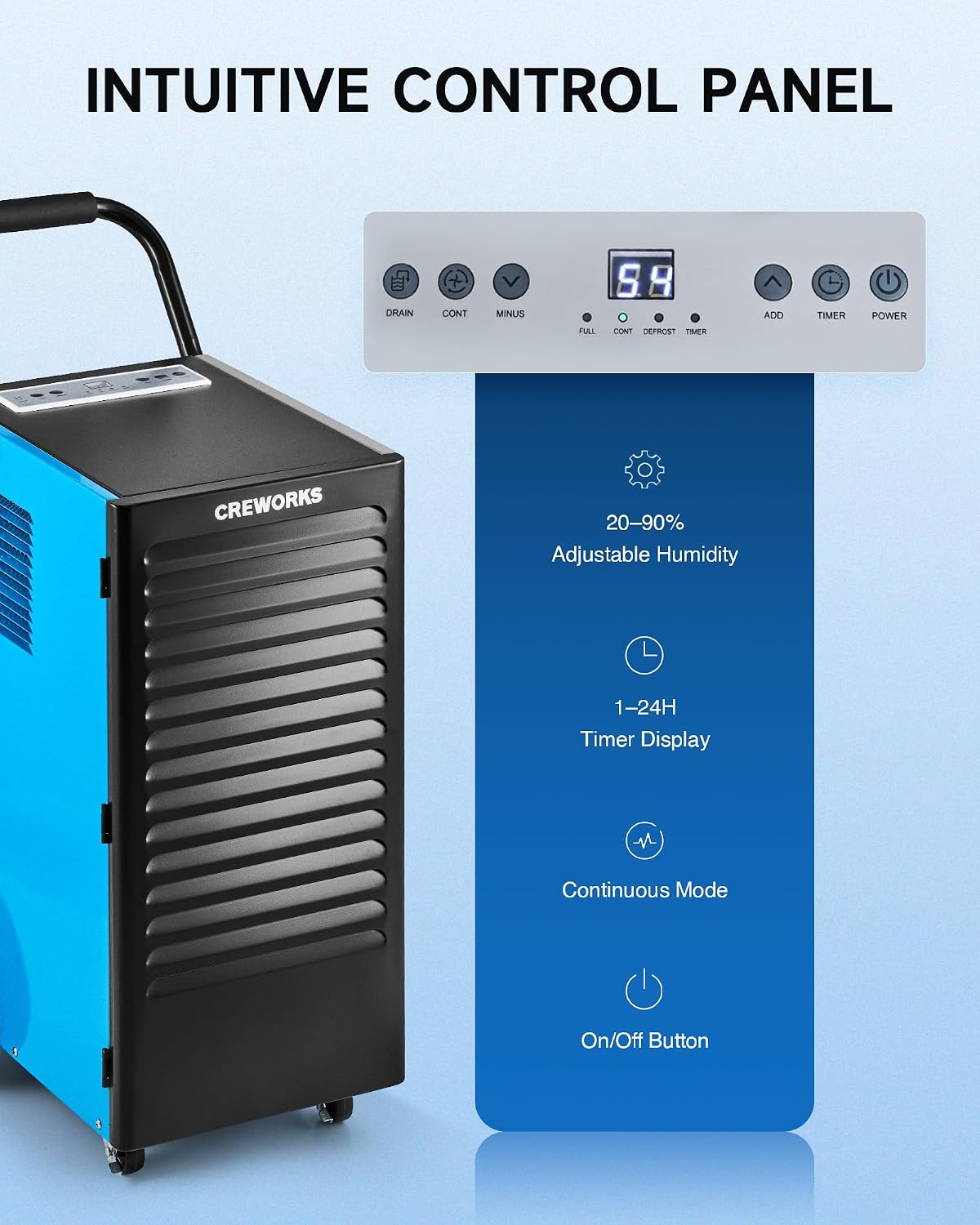
Зображення: Крупний план view of the dehumidifier's intuitive control panel with various buttons and a digital display.
The control panel features a digital display and several buttons for managing the dehumidifier's functions:
- Кнопка живлення: Вмикає або вимикає пристрій.
- ADD / MINUS Buttons: Adjusts the desired humidity level (20-90%) or timer setting (1-24 hours).
- Кнопка таймера: Встановлює робочий таймер.
- Кнопка CONT (Безперервний режим): Activates or deactivates continuous dehumidification mode.
- Кнопка ЗЛИВУ: Activates or deactivates the drain pump (if applicable to the model).
- Індикатори дисплея: Shows current humidity, timer, and status indicators for FULL, CONT, DEFROST, and TIMER.
Основна операція
- Увімкнення: Натисніть ПОТУЖНІСТЬ button to turn on the dehumidifier. The display will show the current room humidity.
- Встановіть бажану вологість: Використовуйте ДОДАТИ or МІНУС buttons to set your desired humidity level between 20% and 90% Relative Humidity (RH). The unit will operate until the set humidity is reached, then cycle on and off to maintain it.
- Безперервний режим: Натисніть ПРОДОВЖЕННЯ button for continuous operation, where the unit will run constantly regardless of the humidity level. This is useful for very damp conditions or for faster drying.
- Функція таймера: Натисніть ТАЙМЕР кнопку, щоб встановити час автоматичного ввімкнення або вимкнення (1-24 години).
Video: Demonstration of setting the desired humidity level and activating continuous mode on the dehumidifier's control panel.
Автоматичне розморожування
The dehumidifier is equipped with an automatic defrost function. If frost builds up on the evaporator coils, the compressor will temporarily shut off, and the fan will continue to run to melt the frost. The DEFROST indicator light will illuminate during this cycle. Once defrosted, the unit will resume normal dehumidification.

Image: Illustration showing the automatic defrost function, where the dehumidifier temporarily halts the compressor to prevent frosting.
Технічне обслуговування
Регулярне технічне обслуговування забезпечує оптимальну продуктивність та подовжує термін служби вашого осушувача повітря.
1. Очищення повітряного фільтра
The dehumidifier is equipped with a washable air filter. A dirty filter can reduce efficiency and airflow.
- Вимкніть осушувач повітря та від’єднайте його від розетки.
- Locate and remove the air filter from the unit. Refer to the product diagram for filter location.
- Помийте фільтр теплою водою з милом. Ретельно промийте та дайте йому повністю висохнути, перш ніж вставляти його назад. Не використовуйте посудомийну машину або агресивні хімікати.
- Знову вставте сухий фільтр у пристрій.
Рекомендація: Clean the air filter every 2-4 weeks, or more frequently depending on usage and air quality.

Image: Illustration showing the removable and reusable air filter for easy cleaning.
2. Очищення зовнішньої частини
Протріть зовнішню поверхню пристрою м’якою, damp тканина. Не використовуйте абразивні засоби чи розчинники.
3. Зберігання
If storing the unit for an extended period, ensure it is clean and dry. Coil the power cord and store the unit in a cool, dry place.
Посібник з усунення несправностей
Зверніться до цього посібника, щоб дізнатися про поширені проблеми та їх вирішення.
| проблема | Можлива причина | Рішення |
|---|---|---|
| Осушувач повітря не вмикається. | No power, power cord loose, unit not plugged in. | Ensure the unit is properly plugged into a working outlet. Check circuit breaker. |
| Пристрій працює, але не набирає воду. | Humidity setting too high, room temperature too low, air filter clogged, unit in defrost mode. | Lower the desired humidity setting. Ensure room temperature is above 41°F (5°C). Clean the air filter. Wait for defrost cycle to complete. |
| Unit is freezing up (frost on coils). | Low room temperature, refrigerant issue. | The unit has an automatic defrost function. If freezing persists, ensure room temperature is within operating range. If problem continues, contact support. |
| Вода тече. | Drain hose not connected properly, drain hose kinked or blocked, unit not level. | Check drain hose connection and ensure it is secure. Clear any kinks or blockages in the hose. Ensure the unit is on a level surface. |
| Пристрій шумить. | Нещільно закріплені деталі, блок нерівно встановлений, засмічення вентилятора. | Ensure the unit is on a stable, level surface. Check for any loose components. Inspect fan for obstructions. |
Технічні характеристики продукту
Detailed technical specifications for the CREWORKS 180 PPD Commercial Dehumidifier.
| Особливість | Деталь |
|---|---|
| Бренд | КОМПЛЕКТИ |
| Назва моделі | 180PPD |
| Здатність осушення (насиченість) | 180 пінт на день |
| Потужність осушення (AHAM) | 85 пінт на день |
| Рекомендована зона покриття | Від 600 до 1600 квадратних футів |
| Розміри продукту (Д x Ш x В) | 23.11 см x 17.32 см x 34.13 см |
| Потужність повітряного потоку | 350 кубічних сантиметрів за хвилину |
| Режим роботи | Безперервний |
| Особливості | Automatic Defrost, Portable, Timer, Wheels, Drain Hose, Display Panel |
| матеріал | метал |
| Холодоагент | R32 (Low-Impact) |
Гарантія та підтримка
Інформація про гарантію
CREWORKS products typically come with a manufacturer's warranty. Specific warranty terms, including duration and coverage, may vary. Please refer to the warranty card included with your product or contact CREWORKS customer service for detailed information. Keep your purchase receipt as proof of purchase for warranty claims.
Примітка: Some customer reviews indicate a potential for issues after approximately one year of use. Regular maintenance and proper operation as outlined in this manual can help ensure product longevity.
Підтримка клієнтів
For technical assistance, troubleshooting beyond this guide, or warranty inquiries, please contact CREWORKS customer support. Contact information can typically be found on the manufacturer's official webсайту або в упаковці продукту.
When contacting support, please have your product model number (180PPD) and purchase date available.