
1. Більшеview
The Cisco Catalyst 1300-16XTS is a fully managed switch designed to provide reliable and secure connectivity for small business networks. This switch offers full Layer 2/3 capabilities, an intuitive web dashboard, advanced networking features, and Power over Ethernet Plus (PoE+) support.
Ключові особливості:
- Порти комутатора: 8 ports 10G Copper + 8x 10GE SFP+ ports + 1x GE Management Port.
- Спрощене управління: Intuitive Cisco Business mobile app and local web interface for setup, management, and monitoring.
- Покращена безпека: IP-MAC port binding and IPv6 First Hop Security for network protection.
- Енергоефективність: Optimizes power usage, compliant with IEEE 802.3az Energy Efficient Ethernet.
- Готовий до бізнесу: No subscription or licenses required, includes limited lifetime hardware warranty and complimentary 1-year technical support.
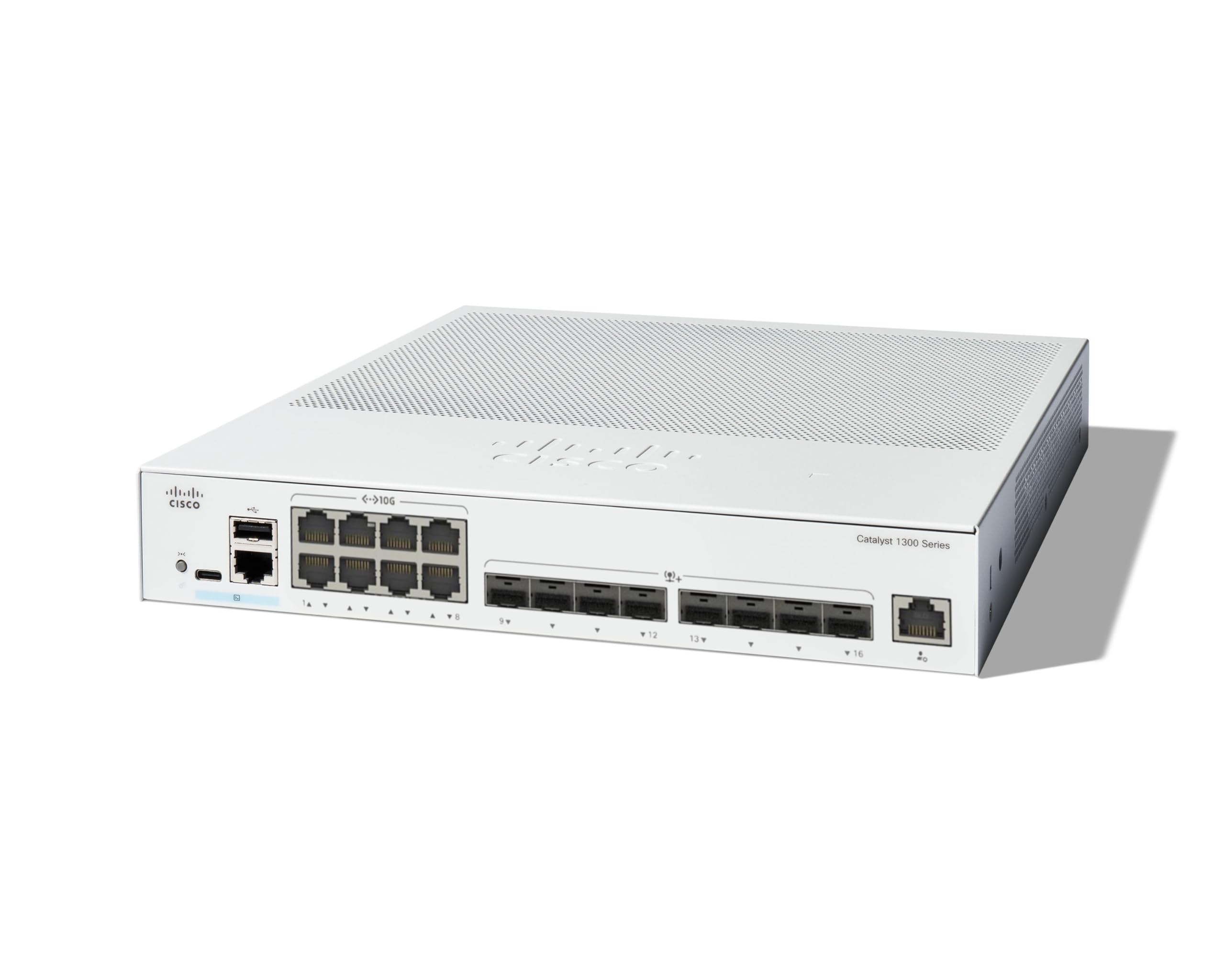
2. Вміст упаковки
Переконайтеся, що ваш пакет містить такі елементи:
- Cisco Catalyst 1300-16XTS Managed Switch unit
- Шнур живлення або адаптер
- Кабель USB Type-C
- Монтажна фурнітура
If any items are missing or damaged, please contact your vendor or Cisco support.
3. Налаштування
Follow these steps to set up your Cisco Catalyst 1300-16XTS Managed Switch:
- Підключіть живлення: Connect the power adapter to the switch's power input and then plug the power cord into an electrical outlet. Ensure the power LED on the switch illuminates.
- Підключення до маршрутизатора/мережі: Use an Ethernet cable to connect one of the switch's 10G copper ports (or SFP+ ports with appropriate transceivers) to your router or existing network infrastructure.
- Підключіть пристрої: Connect your network devices (e.g., computers, servers, wireless access points) to the remaining available ports on the switch.
- Початкова конфігурація (мобільний додаток):
- Завантажте мобільний додаток Cisco Business з магазину додатків вашого пристрою.
- Launch the app and follow the on-screen instructions to create your site and add your switch.
- The app will guide you through basic configuration, including setting up site credentials and adding wired/wireless devices.
- Початкова конфігурація (Web інтерфейс користувача): Або ж ви можете отримати доступ до перемикача web- заснований на інтерфейсі користувача (Web UI) by connecting a computer directly to the switch and navigating to its default IP address (refer to the Quick Start Guide for details).

4. Інструкція з експлуатації
Once the switch is powered on and connected, it will begin forwarding network traffic. For advanced configuration and monitoring, use the following tools:
- Мобільний додаток Cisco для бізнесу: Provides real-time monitoring of device status, network activity, and connected clients. It also allows for basic actions like rebooting devices and upgrading firmware.
- Web Користувацький інтерфейс (Web інтерфейс користувача): Offers comprehensive configuration options for all Layer 2/3 features, including VLANs, QoS, security settings, and port management.
- Бізнес-панель Cisco: For managing multiple Cisco Business devices across different sites, the Dashboard provides a centralized platform for monitoring, configuration, and troubleshooting.
Refer to the detailed documentation available via the QR code on the product packaging or the Cisco support website for in-depth configuration guides.
5. Технічне обслуговування
To ensure optimal performance and longevity of your Cisco Catalyst 1300-16XTS switch, consider the following maintenance practices:
- Оновлення прошивки: Regularly check for and apply the latest firmware updates to benefit from new features, performance improvements, and security patches.
- Умови навколишнього середовища: Ensure the switch is operated within its specified temperature and humidity ranges. Avoid placing it in direct sunlight or near heat sources.
- Фізичний огляд: Periodically inspect the switch for any physical damage, loose cables, or excessive dust accumulation. Clean vents and ports as needed to maintain proper airflow.
- Конфігурація резервного копіювання: Регулярно створюйте резервні копії конфігурації комутатора, щоб запобігти втраті даних у разі виникнення непередбачених проблем.
6. Вирішення проблем
If you encounter issues with your switch, try these basic troubleshooting steps:
- Немає живлення: Verify that the power cord is securely connected to both the switch and the electrical outlet. Check the power adapter and outlet for functionality.
- Немає підключення до мережі:
- Check the Ethernet cables connecting devices to the switch and the switch to the router. Ensure they are securely plugged in and not damaged.
- Observe the link/activity LEDs on the switch ports. A solid green or amber light typically indicates a valid connection, while a blinking light indicates activity. No light may suggest a cable or device issue.
- Перевірте налаштування IP-адрес на підключених пристроях та комутаторі.
- Повільна продуктивність:
- Check for excessive network traffic or loops using the switch's management interface.
- Ensure all devices are connected at their optimal speed (e.g., 10G devices to 10G ports).
- Розгляньте можливість оновлення прошивки.
- Доступ до інтерфейсу керування: Якщо ви не можете отримати доступ до Web UI or mobile app, ensure your device is on the same network segment as the switch or connected directly. Verify the switch's IP address.
For more complex issues, refer to the comprehensive troubleshooting guides on the Cisco support webсайт або зверніться до технічної підтримки.
7. Технічні характеристики
| Особливість | Деталь |
|---|---|
| Бренд | Cisco |
| Номер моделі | C1300-16XTS |
| Кількість портів | 16 (8x 10G Copper, 8x 10GE SFP+) + 1x GE Management Port |
| Швидкість передачі даних | 80 гігабіт на секунду |
| Тип перемикача | Керований мережевий комутатор |
| Інтерфейс | PoE, SFP |
| Розміри предмета (Д x Ш x В) | 11.81 см (Д) x 10.55 см (Ш) x 1.73 см (В) |
| Вага товару | 3.6 кілограма |
| Тип матеріалу корпусу | Мідь |
| UPC | 889728521482 |
8. Гарантія та підтримка
The Cisco Catalyst 1300-16XTS Managed Switch comes with a Обмежена довічна гарантія на обладнання, which includes return-to-factory replacement. Additionally, you receive 1-year complimentary phone support to the Small Business Support Center.
For technical assistance, warranty claims, or to access additional resources, please visit the official Cisco support website or contact the Small Business Support Center.