
БСП D9
Посібник користувача ігрового контролера BSP D9
Модель: D9
1. Вступ
The BSP D9 Game Controller is a versatile gaming accessory designed to enhance your mobile and PC gaming experience. It supports a wide range of devices including iPhones, iPads, Android phones and tablets, PCs, Nintendo Switch, and PlayStation consoles. Featuring advanced Hall Effect joysticks and triggers, programmable back buttons, and a stretchable design, the D9 controller provides precise control and comfortable gameplay across various platforms.
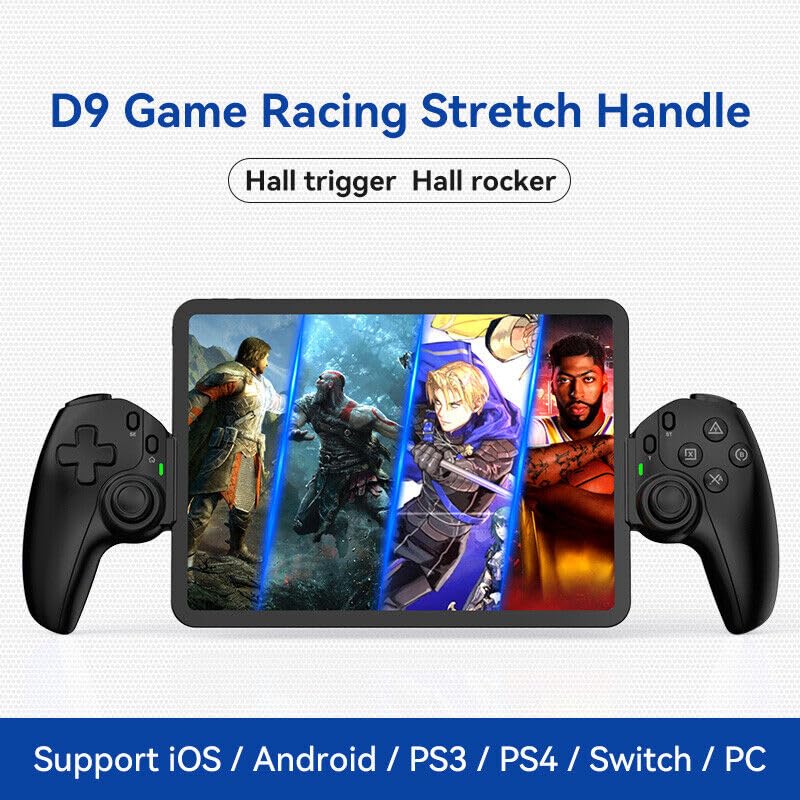
Figure 1.1: The BSP D9 Game Controller attached to a tablet, showcasing its design and compatibility with mobile gaming.
2. Продукт закінчивсяview: Key Details
Familiarize yourself with the various buttons and components of your D9 Game Controller.

Figure 2.1: Detailed diagram of the D9 controller's button layout, including the Cross Key, SELECT, HOME, START, A/B/X/Y buttons, L1/R1, L2/R2 triggers, M1/M2 back buttons, Left/Right Sticks (L3/R3), Status Indicator, and Charging Indicator.
- Cross Key (D-Pad): Спрямований вхід.
- Left Stick/L3: Left analog joystick, press down for L3.
- Кнопка ВИБІР: Function button, typically for menu selection.
- Кнопка "Додому: Power on/off, mode switching, return to home screen.
- Індикатор стану: Shows connection status and mode.
- Індикатор зарядки: Відображає стан заряджання акумулятора.
- Right Stick/R3: Right analog joystick, press down for R3.
- Кнопки A/B/X/Y: Стандартні кнопки дій.
- Кнопка ПУСК: Function button, typically for pausing or starting games.
- Кнопка TURBO: Активує/деактивує функцію турбо для призначених кнопок.
- Кнопки L1/R1: Плечові ґудзики.
- Тригери L2/R2: Analog triggers.
- Кнопки M1/M2: Програмовані кнопки повернення.
3. особливості
3.1 Тригери та джойстики на ефекті Холла
The D9 controller is equipped with advanced Hall Effect technology for both its triggers and joysticks. This provides superior precision and durability compared to traditional potentiometers.

Figure 3.1: Explanation of Hall Effect Triggers and Joysticks, highlighting 0.1mm accuracy for triggers and benefits like no drift issues, no dead zone, long lifespan, and precise control for joysticks.
- Тригери ефекту Холла: Provide 0.1mm accuracy for precise micro-operations in games.
- Джойстики на ефекті Холла: Eliminate drift issues, maintain stable trajectory, offer precise positioning, and provide a smooth feel without stuttering.
3.2 Функція Турбо
The Turbo function allows you to set automatic rapid firing for specific buttons, giving you an advantagе у швидких іграх.

Figure 3.2: The Turbo function allows setting A/B/X/Y, L1/R1, L2/R2 buttons for rapid fire. Three adjustable turbo speeds are available: 8 shots/s, 15 shots/s, and 25 shots/s.
3.3 Macro Programming Function
The M1 and M2 back buttons can be programmed to execute complex key combinations with a single press, reducing repetitive actions and extending controller lifespan.

Figure 3.3: Instructions for setting and canceling macro programming on the M1 and M2 back buttons. Macros can be assigned to A/B/X/Y/L1/R1/L2/R2/Cross Key combinations.
3.4 Stretchable Design
The controller features a stretchable design to accommodate a wide range of smartphones and tablets, ensuring a secure fit and comfortable grip.

Figure 3.4: The controller supports device lengths from 130mm to 280mm (5-11 inches) and a maximum thickness of 13mm. It is perfectly compatible with iPhone 15 series and supports silicone & clear phone cases.
4. Сумісність
The BSP D9 Game Controller offers broad compatibility with various operating systems and gaming platforms, transforming your mobile device into a portable gaming console.

Figure 4.1: The controller supports streaming & cloud gaming (PS Remote Play, Xbox Game Pass, Steam Link, Rainway, NVIDIA GeForce NOW, Moonlight Game Streaming, Apple Arcade), direct play on iOS devices (Genshin Impact, Call of Duty Mobile, Diablo Immortal, Minecraft, Roblox), and direct play on Android devices (Call of Duty Mobile, Diablo Immortal, Minecraft, NBA 2K, Asphalt).
- Операційні системи: iOS, Android, Windows (PC).
- Консолі: Nintendo Switch, PlayStation (PS3, PS4, PS5 via remote play).
- Хмарні ігри: Supports services like Xbox Game Pass, PS Remote Play, Steam Link, NVIDIA GeForce NOW, and more.
- Direct Play: Compatible with popular mobile games on both iOS and Android.
5. Налаштування
5.1 Заряджання контролера
- Connect the provided USB-C charging cable to the charging port on the controller.
- Підключіть інший кінець кабелю до джерела живлення USB (наприклад, USB-порту комп'ютера, настінного адаптера).
- The Charging Indicator light will illuminate during charging and turn off when fully charged.
5.2 Inserting Your Device
- Gently pull the two sides of the controller apart to extend the stretchable mechanism.
- Carefully place your smartphone or tablet into the central slot, ensuring it is securely seated. The controller supports devices with lengths between 130mm and 280mm and a maximum thickness of 13mm.
- The controller is designed to accommodate devices with slim cases.
5.3 Connecting to Your Device (Bluetooth Pairing)
The connection method varies slightly depending on your device's operating system.
Для пристроїв Android:
- Натисніть і утримуйте ДІМ button until the Status Indicator light begins to flash rapidly, indicating pairing mode.
- На своєму пристрої Android перейдіть до Налаштування > Bluetooth та увімкніть Bluetooth.
- шукати available devices and select "BSP-D9" or similar from the list.
- Once connected, the Status Indicator light on the controller will become solid.
Для пристроїв iOS:
- Натисніть і утримуйте ДІМ button until the Status Indicator light begins to flash rapidly.
- На вашому пристрої iOS перейдіть до Налаштування > Bluetooth та увімкніть Bluetooth.
- шукати available devices and select "Xbox Wireless Controller" or "DUALSHOCK 4 Wireless Controller" (depending on the mode the D9 emulates for iOS compatibility) from the list.
- Once connected, the Status Indicator light on the controller will become solid.
For PC/Switch/PS (Wired/Wireless):
Refer to the specific connection instructions provided with your controller for PC, Switch, or PS modes, as these may involve different button combinations or wired connections.
6. Інструкція з експлуатації
6.1 Основні функції кнопок
Див. розділ 2, «Продукт понадview: Key Details," for the layout and basic functions of all buttons (Cross Key, A/B/X/Y, L1/R1, L2/R2, Joysticks, SELECT, START, HOME).
6.2 Using the Turbo Function
- Натисніть і утримуйте ТУРБО кнопку.
- Поки тримає ТУРБО, press the button you wish to assign the turbo function to (e.g., A, B, X, Y, L1, R1, L2, R2). The button will now have turbo enabled.
- To adjust the turbo speed, press and hold ТУРБО and then press the Right Stick (R3) up or down to cycle through the 3 available speeds (8, 15, 25 shots/s).
- To cancel the turbo function for a specific button, press and hold ТУРБО і знову натисніть призначену кнопку.
- To clear all turbo settings, press and hold ТУРБО and then press the SELECT button.
6.3 Programming Macro Buttons (M1/M2)
The M1 and M2 back buttons can be programmed to store a sequence of button presses.
Як налаштувати макрос:
- Натисніть і утримуйте ВИБРАТИ кнопку та M1 (or M2) key for 2 seconds. The LED indicator light will flash quickly.
- Press the key(s) you want to set for the macro programming function (e.g., A+B+X+Y).
- After setting the sequence, press the M1 (or M2) key again. The LED light will become solid, indicating that the setting is complete.
- Once set, pressing M1 (or M2) will automatically execute the programmed key combination.
Як скасувати макрос:
- Натисніть і утримуйте ВИБРАТИ кнопку та M1 (or M2) key for 2 seconds. The LED indicator light will flash quickly.
- Натисніть M1 (or M2) key again to clear the macro programming. (Note: Do not press other buttons at this time). The LED light will remain solid to confirm the setting is cleared.
7. Технічне обслуговування
- Прибирання: Використовуйте м’яку суху тканину для очищення контролера. Не використовуйте абразивні засоби для чищення або розчинники.
- Зберігання: Зберігайте контролер у прохолодному, сухому місці, подалі від прямих сонячних променів та екстремальних температур.
- Догляд за акумулятором: Щоб продовжити термін служби акумулятора, уникайте частого повного розряджання контролера. Регулярно заряджайте його, навіть якщо він не використовується протягом тривалого часу.
- Уникайте крапель: Захищайте контролер від падінь та ударів, які можуть пошкодити внутрішні компоненти.
8. Вирішення проблем
| проблема | Можлива причина | Рішення |
|---|---|---|
| Контролер не включається. | Низький заряд батареї. | Заряджайте контролер щонайменше 30 хвилин. |
| Не вдається підключитися через Bluetooth. | Контролер не в режимі сполучення; перешкоди Bluetooth; Bluetooth пристрою вимкнено. | Ensure controller is in pairing mode (flashing LED). Turn off and on Bluetooth on your device. Move closer to the device. |
| Кнопки або джойстики не реагують. | Проблема з підключенням; програмний збій; фізичне пошкодження. | Reconnect the controller. Restart your device. If problem persists, contact customer support. |
| Пристрій не підходить до контролера. | Device dimensions exceed supported limits. | Ensure your device length is between 130-280mm and thickness is max 13mm. Remove bulky cases. |
9. Технічні характеристики
- модель: D9
- Бренд: BSP
- Підключення: Bluetooth, Wired (for PC/Switch/PS, specific modes may vary)
- Підтримувана довжина пристрою: 130 мм - 280 мм (5 - 11 дюймів)
- Підтримувана товщина пристрою: До 13 мм
- Joystick/Trigger Technology: Ефект Холла
- Програмовані кнопки: M1, M2 (кнопки «назад»)
- Турбофункція: Yes, with 3 adjustable speeds
- Виробник: Шеньчжень ШаньВань Технологічна Компанія, Лтд.
- Перша доступна дата: 30 березня 2024 р
10. Гарантія та підтримка
For warranty information and technical support, please refer to the documentation included with your purchase or visit the official BSP product support webсайт. Зберігайте чек про покупку для гарантійних претензій.
Примітка: Конкретні гарантійні умови та контактна інформація служби підтримки можуть відрізнятися залежно від регіону.
Ask a question about this manual
Ask about setup, troubleshooting, compatibility, parts, safety, or missing instructions. Manuals+ will review the question and use this page’s manual context to help answer it.