
1. Вступ
This manual provides essential information for the safe and efficient operation, maintenance, and troubleshooting of your RYOBI USB Lithium Desktop Vacuum, model FVH67K. Please read this manual thoroughly before using the product and retain it for future reference.
The RYOBI USB Lithium Desktop Vacuum is designed for light-duty cleaning tasks on flat surfaces such as desks, office spaces, and computer equipment. It is powered by a 2.0 AH USB Lithium-ION battery, offering cordless convenience.
2. Інформація про безпеку
УВАГА: To reduce the risk of injury, always follow basic safety precautions when using this product.
- Перед використанням прочитайте всі інструкції.
- Не збирайте легкозаймисті або горючі рідини, такі як бензин, і не використовуйте в місцях, де вони можуть бути присутніми.
- Не беріть нічого, що горить або димить, наприклад сигарети, сірники чи гарячий попіл.
- Не використовуйте без пилозбірника та фільтра.
- Тримайте волосся, вільний одяг, пальці та всі частини тіла подалі від отворів і рухомих частин.
- Використовуйте лише так, як описано в цьому посібнику. Використовуйте лише рекомендовані виробником насадки.
- Не торкайтеся зарядного пристрою або пристрою мокрими руками.
- Не заряджайте акумулятор на відкритому повітрі.
- Store the vacuum indoors.
3. Вміст упаковки
Verify that all items listed below are included in your package. If any items are missing or damaged, contact customer service.
- RYOBI USB Lithium Desktop Vacuum (FVH67K)
- 2.0 AH USB Lithium-ION Battery
- Зарядний кабель (USB)
- Щілинний інструмент

Image 3.1: Package contents including the vacuum, 2.0 AH USB Lithium-ION battery, and charging cable.
4. Продукт закінчивсяview
Familiarize yourself with the components of your RYOBI USB Lithium Desktop Vacuum.
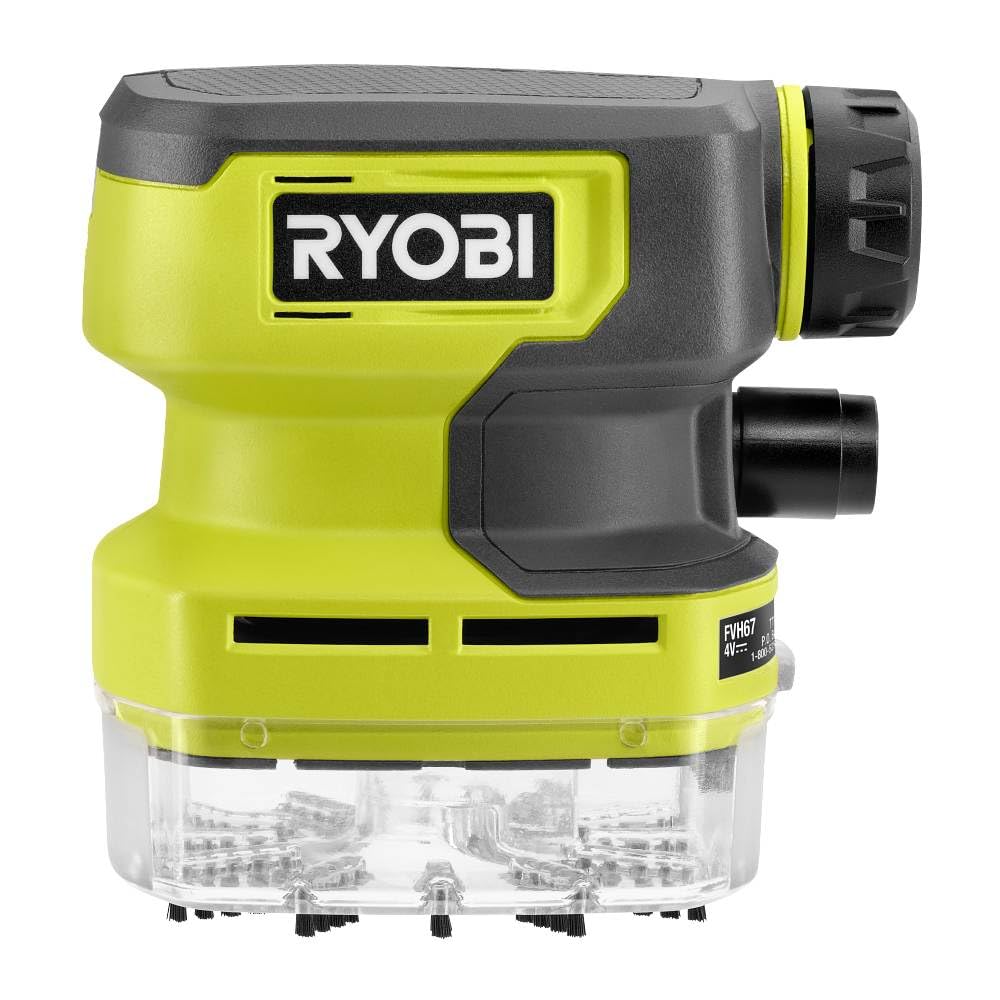
Image 4.1: Annotated diagram of the FVH67K Desktop Vacuum.
- Кнопка ON/OFF: Вмикає та вимикає вакуум.
- Світлодіодний індикатор: Signals low battery status.
- Знімний фільтр: Captures dust and debris, designed for easy cleaning.
- Nylon Bristles: Located at the intake for effective debris collection.
- Ergonomic Overmold Grip: Забезпечує комфортне керування.
- Бортове сховище: Conveniently stores the included crevice tool.
- Easy to Empty Clear Dust Cup: Transparent design allows visibility of debris level and simplifies emptying.
5. Налаштування
5.1 Заряджання батареї
- Connect the USB charging cable to the 2.0 AH USB Lithium-ION Battery.
- Plug the other end of the USB charging cable into a compatible USB power source (e.g., computer, wall adapter).
- Allow the battery to charge fully before first use. The LED indicator on the battery will show charging status.
5.2 Встановлення батареї
- Переконайтеся, що пилосос вимкнено.
- Align the charged 2.0 AH USB Lithium-ION Battery with the battery compartment on the vacuum.
- Вставте батарею на місце, доки вона надійно не зафіксується.
5.3 Приєднання аксесуарів
- The crevice tool can be attached to the vacuum's intake nozzle for reaching tight spaces.
- For storage, the crevice tool can be placed in the on-board storage slot.
6. Інструкція з експлуатації
6.1 Увімкнення/вимкнення
- To turn on the vacuum, press the ON/OFF button.
- To turn off the vacuum, press the ON/OFF button again.
6.2 Using the Vacuum
- Hold the vacuum by the ergonomic overmold grip.
- Move the intake nozzle over the surface to be cleaned. The nylon bristles assist in sweeping debris into the vacuum.
- For narrow areas, attach the crevice tool.
- The vacuum is designed for dry pick-up only. Do not attempt to vacuum liquids.
6.3 Спорожнення пилозбірника
- Переконайтеся, що пилосос вимкнено.
- Detach the clear dust cup from the main body of the vacuum.
- Empty the contents of the dust cup into a waste receptacle.
- Reattach the dust cup securely to the vacuum.
7. Технічне обслуговування
7.1 Очищення фільтра
Regular filter cleaning ensures optimal suction performance.
- Вимкніть пилосос і вийміть пилозбірник.
- Carefully remove the removable filter from the dust cup.
- Tap the filter gently over a waste bin to dislodge dust. For thorough cleaning, rinse the filter with water.
- Allow the filter to air dry completely before reinserting it into the dust cup. Do not use the vacuum with a wet filter.
7.2 Генеральне прибирання
- Протріть зовнішню частину пилососа м’якою губкоюamp тканина. Не використовуйте агресивні хімікати або абразивні засоби для чищення.
- Ensure the charging port on the battery is free from dust and debris.
7.3 Догляд за акумулятором
- Зберігайте батарею в прохолодному сухому місці подалі від прямих сонячних променів і екстремальних температур.
- Не піддавайте батарею впливу води або вологи.
- If the vacuum will not be used for an extended period, charge the battery periodically to maintain its health.
8. Вирішення проблем
If you encounter issues with your vacuum, refer to the following common problems and solutions.
| проблема | Можлива причина | Рішення |
|---|---|---|
| Пилосос не вмикається. | Акумулятор не заряджений або неправильно вставлений. | Переконайтеся, що акумулятор повністю заряджений та надійно вставлений. |
| Низька потужність всмоктування. | Dust cup is full, filter is clogged, or nozzle is blocked. | Empty dust cup, clean filter, check for and remove any blockages in the nozzle. |
| Акумулятор не заряджається. | Проблема із зарядним кабелем або джерелом живлення. | Verify the charging cable is properly connected and the USB power source is functional. Try a different cable or power source. |
| Незвичайний шум під час роботи. | Debris caught in the fan or motor area. | Turn off and disconnect the battery. Inspect the intake and fan area for obstructions and carefully remove them. |
9. Технічні характеристики
Technical specifications for the RYOBI USB Lithium Desktop Vacuum FVH67K.
| Особливість | Специфікація |
|---|---|
| Назва моделі | ФВХ67К |
| Бренд | RYOBI |
| Джерело живлення | Живлення від батареї (літієва батарея від USB) |
| Тип батареї | 2.0 AH Lithium-ION |
| томtage | 4 вольт |
| Час виконання | Приблизно 1 година |
| Тип фільтра | Тканина |
| Ємність | 0.3 літра |
| Максимальне всмоктування | 0.1 meters (approximate) |
| Рекомендоване використання | Desk, Office, Computer (flat surfaces) |
| Форм-фактор | Портативний |
| Технологія підключення | USB |
| Розміри предмета (Д x Ш x В) | 2.5 см x 7 см x 7.5 см |
| Вага товару | 1.12 унції |
| Включені компоненти | USB Lithium 2Ah Battery, Cable, Crevice Tool |
10. Гарантія та підтримка
For warranty information and customer support, please refer to the documentation provided with your purchase or visit the official RYOBI webсайт. Зберігайте чек про покупку для гарантійних претензій.


