
1. Інформація про безпеку
Please read all instructions carefully before installation and operation. Failure to follow these instructions may result in damage to the product, vehicle, or personal injury. Keep this manual for future reference.
- Ensure the vehicle's ignition is off and the negative battery terminal is disconnected before installation to prevent electrical shorts.
- Якщо ви не впевнені щодо будь-яких кроків, зверніться до фахівця для встановлення.
- Не використовуйте пристрій таким чином, щоб це відволікало вас від керування автомобілем. Завжди ставте безпеку дорожнього руху на перше місце.
- Уникайте впливу екстремальних температур, прямих сонячних променів або вологи на пристрій.
- Використовуйте лише зазначені кабелі живлення та аксесуари.
2. Вміст упаковки
Перш ніж продовжувати встановлення, переконайтеся, що всі елементи присутні в упаковці.

Image: Components included in the UNITOPSCI A3612A3 package, including the main unit, wiring harnesses, and accessories.
- UNITOPSCI A3612A3 Car Stereo Unit
- Power Cable & Speaker Cable Harnesses
- Пульт дистанційного керування на кермі
- мікрофон
- 12LED Rear Camera
- антена
- Посібник користувача (цей документ)
- Монтажні кронштейни
3. Монтаж
Proper installation is crucial for optimal performance. Refer to the wiring diagram and consult a professional if needed.
3.1 Схема підключення

Image: Detailed wiring connections for the car stereo unit.
Connect the power and speaker cables according to the diagram. Ensure all connections are secure to prevent malfunctions.
- Червоний (ACC): Connect to ignition switch +12V.
- Yellow (BATTERY+): Connect to constant +12V.
- Чорний (GND): Connect to vehicle ground.
- Синій (АНТ): Connect to antenna power.
- Orange (ILLUMINATION): Connect to vehicle illumination wire.
- Рожевий (зворотний бік): Connect to reverse light signal for backup camera activation.
- Браун (KEY): Connect to steering wheel control wire.
- Speaker wires (White, Gray, Green, Purple) should be connected to corresponding vehicle speakers (Front Left, Front Right, Rear Left, Rear Right).
3.2 Встановлення пристрою
Use the provided mounting brackets to secure the double din unit into your vehicle's dashboard opening. Ensure a snug fit to prevent vibrations.
3.3 Встановлення камери заднього виду
Mount the backup camera at the rear of your vehicle. Connect its video output to the 'CAM IN' input on the stereo and its power to the reverse light circuit.
4. Налаштування
4.1 Початкове ввімкнення
After installation, reconnect the vehicle battery. Turn on the ignition. The unit should power on and display the main interface.
4.2 Основні налаштування
Navigate to the 'Settings' menu to configure basic parameters such as language, time, and date.
4.3 Display Backlight Adjustment
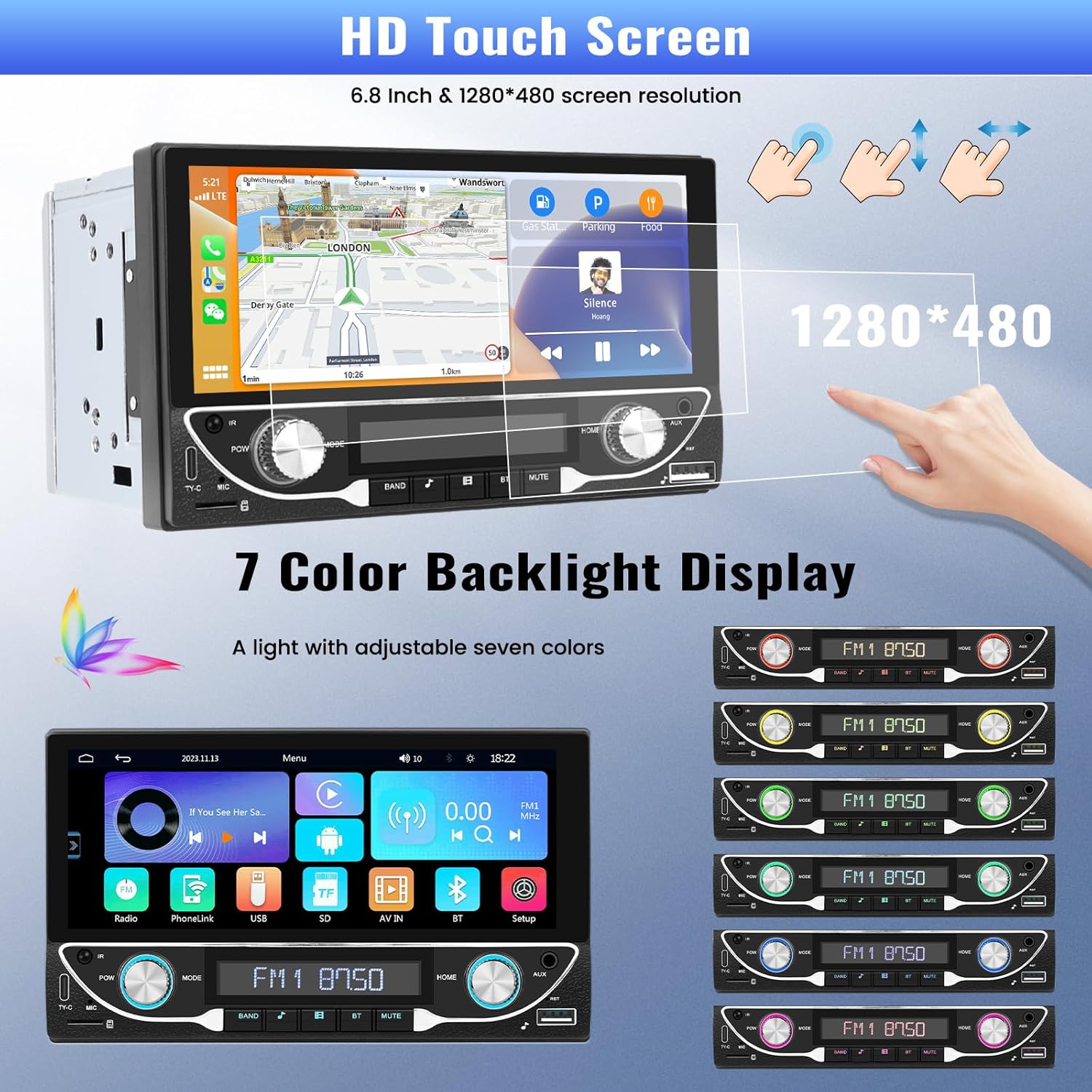
Image: The HD touchscreen and customizable 7-color backlight display options.
Access the display settings to adjust brightness and select from 7 available backlight colors for the physical buttons.
5. Інструкція з експлуатації
5.1 Бездротовий зв'язок Apple CarPlay та Android Auto
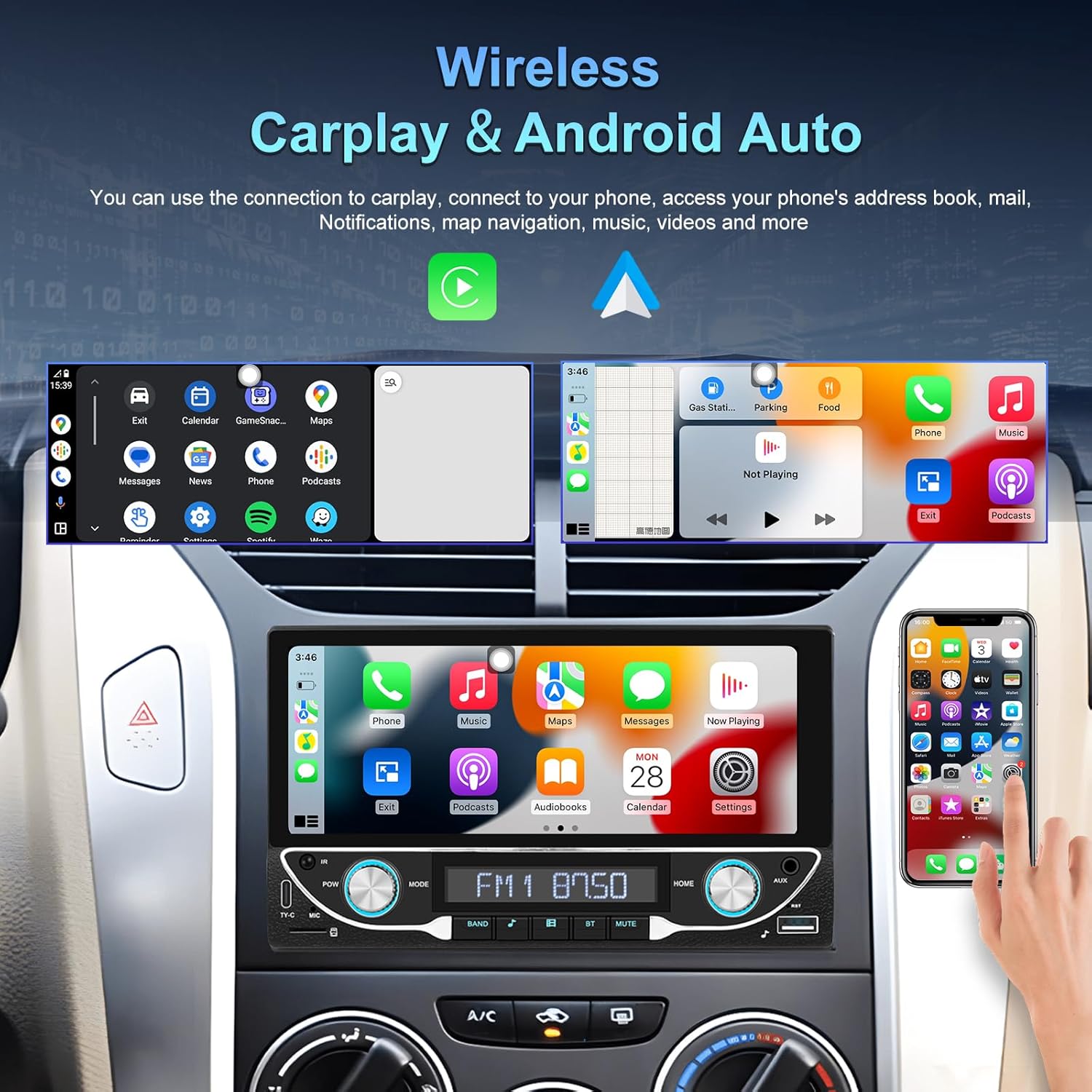
Image: The car stereo displaying both Apple CarPlay and Android Auto interfaces.
Connect your smartphone wirelessly to access Apple CarPlay or Android Auto. This allows for navigation, music, calls, and messages directly from the car stereo display.
- Переконайтеся, що Bluetooth і Wi-Fi увімкнено на вашому смартфоні.
- On the car stereo, select the CarPlay or Android Auto icon.
- Дотримуйтесь підказок на екрані, щоб підключити пристрій.
5.2 Підключення Bluetooth 5.1
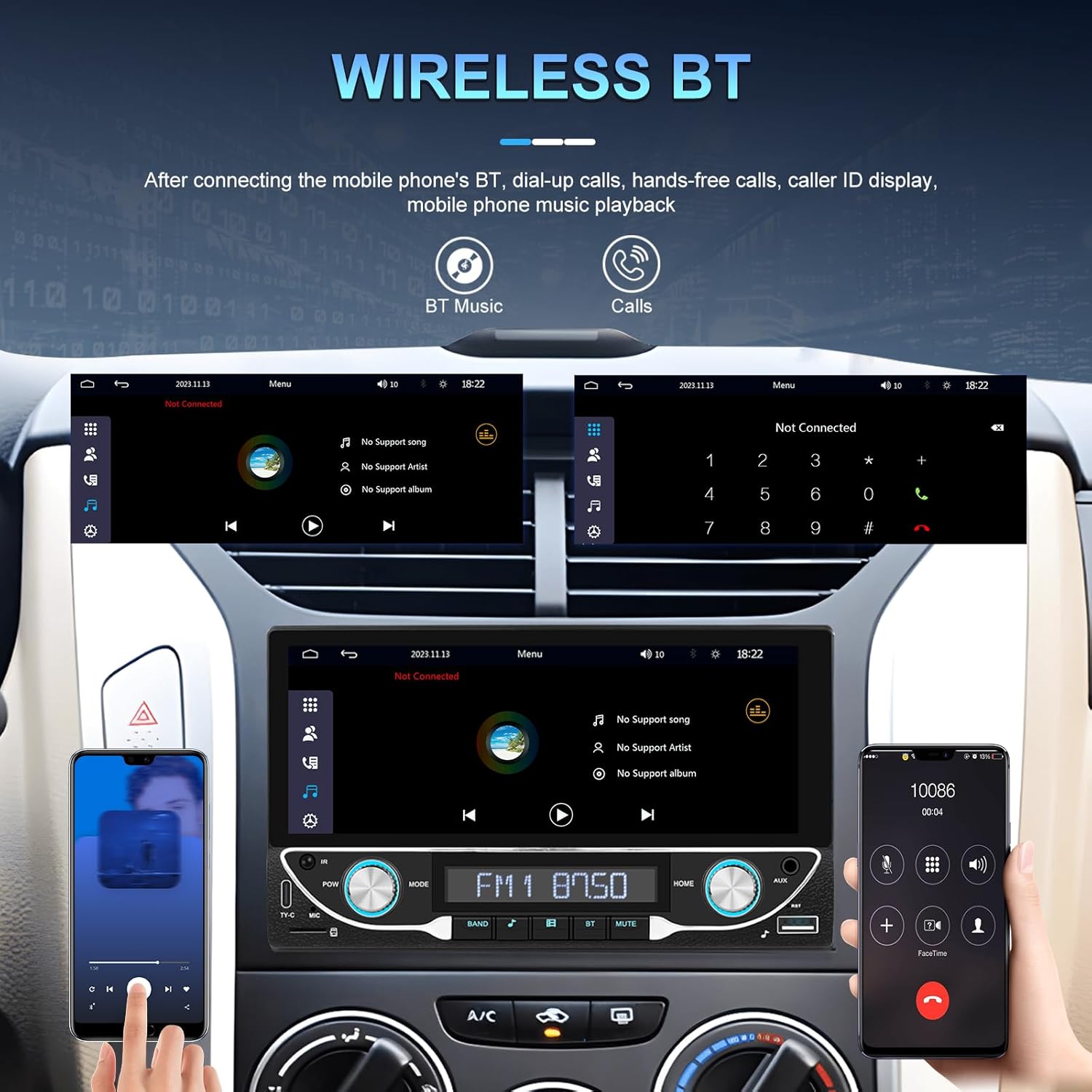
Image: Bluetooth interface for hands-free calling and music streaming.
Підключіть телефон через Bluetooth для дзвінків у режимі hands-free та бездротової потокової передачі аудіо.
- Go to the 'Bluetooth' menu on the stereo.
- Увімкніть Bluetooth на телефоні та здійсніть пошук доступних пристроїв.
- Select 'UNITOPSCI A3612A3' (or similar name) from your phone's list and confirm pairing.
- Use the built-in microphone for calls and stream music from your phone.
5.3 Робота FM-радіо

Image: FM radio interface with frequency display and sound quality DSP/EQ settings.
Select the 'FM' icon to access the radio tuner. Use the on-screen controls or physical buttons to scan for stations, save presets, and adjust frequency.
5.4 Audio & Video Playback (USB/TF/AUX/Type-C)

Image: Available input options for audio and video playback: USB, TF Card, Type-C, and AUX-in.
The unit supports various media inputs for audio and video playback:
- USB-вхід: Connect a USB drive with media files.
- TF слот для карт: Insert a TF (MicroSD) card with media files.
- Вхід AUX: Connect external audio devices using a 3.5mm audio cable.
- Порт Type-C: For charging compatible devices and potentially data transfer.
Select the corresponding input source from the main menu to access your media.
5.5 Кермове керування

Image: Steering wheel control setup interface on the car stereo.
If your vehicle supports steering wheel controls, connect the 'KEY' wire during installation. Access the 'Steering Wheel Control' settings to program the buttons for functions like volume, track change, and mode selection.
5.6 Задня частина View Camera / HD Reversing Video
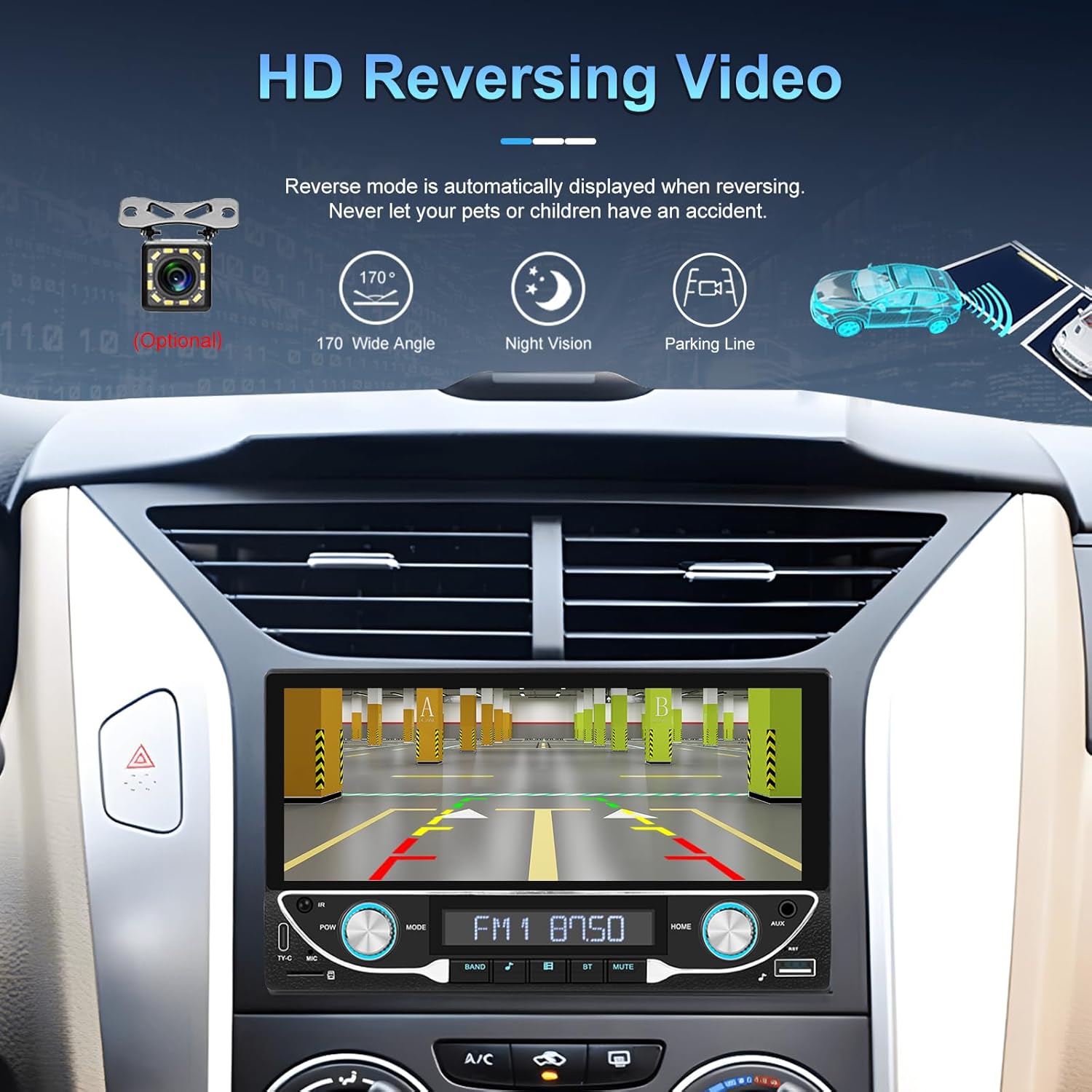
Image: High-definition reversing video display with parking guidelines.
When the vehicle is shifted into reverse, the stereo automatically displays the rear view camera feed. The included camera offers a 170-degree wide angle and night vision capabilities, along with parking lines for assistance.
5.7 DVR Function Support
The unit supports an optional DVR (Digital Video Recorder) function. Connect a compatible USB DVR camera to the dedicated USB input on the rear of the car radio to record driving footage.
5.8 Функція дзеркального зв'язку
Use the Mirror Link function to display your smartphone's screen directly on the car stereo. This feature is compatible with both Android and iOS devices, allowing you to view apps and content from your phone on the larger display.
5.9 Voice Control & GPS Navigation
When connected via Apple CarPlay or Android Auto, you can utilize voice commands (e.g., Siri, Google Assistant) for navigation, making calls, sending messages, and controlling music, enhancing driving safety and convenience.
5.10 Sound Quality (DSP & EQ)
The built-in Digital Sound Processor (DSP) and Equalizer (EQ) allow for precise audio customization. Access the 'EQ Setup' menu to adjust bass, treble, and other frequency bands to match your audio preferences. Pre-set EQ modes (e.g., Jazz, Rock, Pop) are also available.
6. Технічне обслуговування
Щоб забезпечити довговічність та оптимальну роботу вашої автомобільної стереосистеми, дотримуйтесь цих правил технічного обслуговування:
- Очищення екрану: Use a soft, lint-free cloth to gently wipe the touchscreen. Avoid abrasive cleaners or solvents that could damage the display.
- Генеральне прибирання: Keep the unit free from dust and debris. Use a soft brush or compressed air for hard-to-reach areas.
- Оновлення програмного забезпеченняПеріодично перевіряйте інструкції виробника webсайт для отримання будь-яких доступних оновлень прошивки для покращення продуктивності та додавання нових функцій.
- Уникайте рідин: Do not spill liquids on the unit. If accidental spillage occurs, power off the unit immediately and allow it to dry completely before use.
7. Вирішення проблем
If you encounter issues with your UNITOPSCI A3612A3 car stereo, refer to the following common problems and solutions:
| проблема | Можлива причина | Рішення |
|---|---|---|
| Немає живлення | Неправильне підключення проводки; перегорілий запобіжник; нещільне з'єднання. | Check power cable connections (ACC, BATTERY+, GND). Verify vehicle fuse and unit's fuse. Ensure all wires are securely connected. |
| Немає звуку | Відключені дроти динаміка; Занадто низька гучність; Активована функція вимкнення звуку; Неправильне джерело аудіо. | Check speaker wire connections. Increase volume. Deactivate mute. Select correct audio source (FM, USB, BT, etc.). |
| Bluetooth не підключається | Bluetooth off on phone/stereo; Device not in pairing mode; Interference. | Ensure Bluetooth is enabled on both devices. Put stereo in pairing mode. Delete previous pairings and try again. Move closer to the unit. |
| CarPlay/Android Auto не працює | Wi-Fi/Bluetooth off; Phone not compatible; App issues. | Ensure Wi-Fi and Bluetooth are active on your phone. Restart phone and stereo. Check phone's settings for CarPlay/Android Auto permissions. |
| Задня камера не відображається | Камера не підключена; відеокабель нещільно прикріплений; дріт курка реверсу не підключений. | Check camera power connection. Ensure video cable is securely connected to 'CAM IN'. Verify Pink (REVERSE) wire connection. |
| Сенсорний екран не реагує | Зависання системи; бруд на екрані. | Restart the unit (if possible, by briefly disconnecting power). Clean the screen. |
If the problem persists after trying these solutions, please contact UNITOPSCI customer support for further assistance.
8. Технічні характеристики
Key technical specifications for the UNITOPSCI A3612A3 car stereo:
- Номер моделі: A3612A3
- Розмір дисплея: 6.86 дюйма
- Роздільна здатність дисплея: 1280 x 480 пікселів
- Вихідна ватtage: 180 Watts (4 channels)
- Версія Bluetooth: 5.1
- Підтримувані Інтернет-послуги: Maps (via CarPlay/Android Auto)
- Тип аудіовиходу: Внутрішній
- Підтримувані медіаформати: AVI, WAV, WMA
- Вхідні дані: USB, TF Card, AUX, Type-C
- особливості: Wireless Apple CarPlay, Wireless Android Auto, FM Radio, Mirror Link, DSP, EQ, Steering Wheel Control, Backup Camera Input, DVR Function Support, 7-Color Backlight.
Image: Front, rear, and side dimensions of the UNITOPSCI A3612A3 car stereo.
Розміри (приблизні):
- Front Panel: 17.8cm (7.0in) width x 10.3cm (4.0in) height
- Chassis: 17.8cm (7.0in) width x 10.0cm (3.9in) height x 11cm (4.3in) depth
9. Гарантія та підтримка
UNITOPSCI products are designed for reliability and performance. For warranty information and technical support, please refer to the warranty card included in your package or visit the official UNITOPSCI webсайт.
When contacting support, please have your product model number (A3612A3) and purchase details ready.


