
1. Вступ
The OWON HDS25 is a compact, multi-functional handheld device integrating a 2-channel oscilloscope and a 20,000-count multimeter. Designed for portability and versatility, it features a 3.5-inch LCD display, USB Type-C connectivity for charging and data transfer, and supports SCPI commands for remote control. This manual provides essential information for the safe and effective operation, maintenance, and troubleshooting of your HDS25 device.
2. Продукт закінчивсяview
2.1 Основні характеристики
- Функціональність 3-в-1: Combines a 2-channel oscilloscope and a 20,000-count True RMS multimeter.
- Осцилограф: Пропускна здатність 25 МГц, швидкість 250 Мвиб/с у режимі реального часуample rate, 8K record length.
- Мультиметр: Вимірює AC/DC voltage, AC/DC current, resistance, capacitance, diode, and continuity.
- Дисплей: 3.5-дюймовий РК-дисплей з високою роздільною здатністю.
- Підключення: USB Type-C for charging and PC communication, supports SCPI commands.
- Портативність: Compact design with approximately 4 hours of continuous battery operation.
2.2 Компоненти пристрою
The following image illustrates the main components of the OWON HDS25 device:
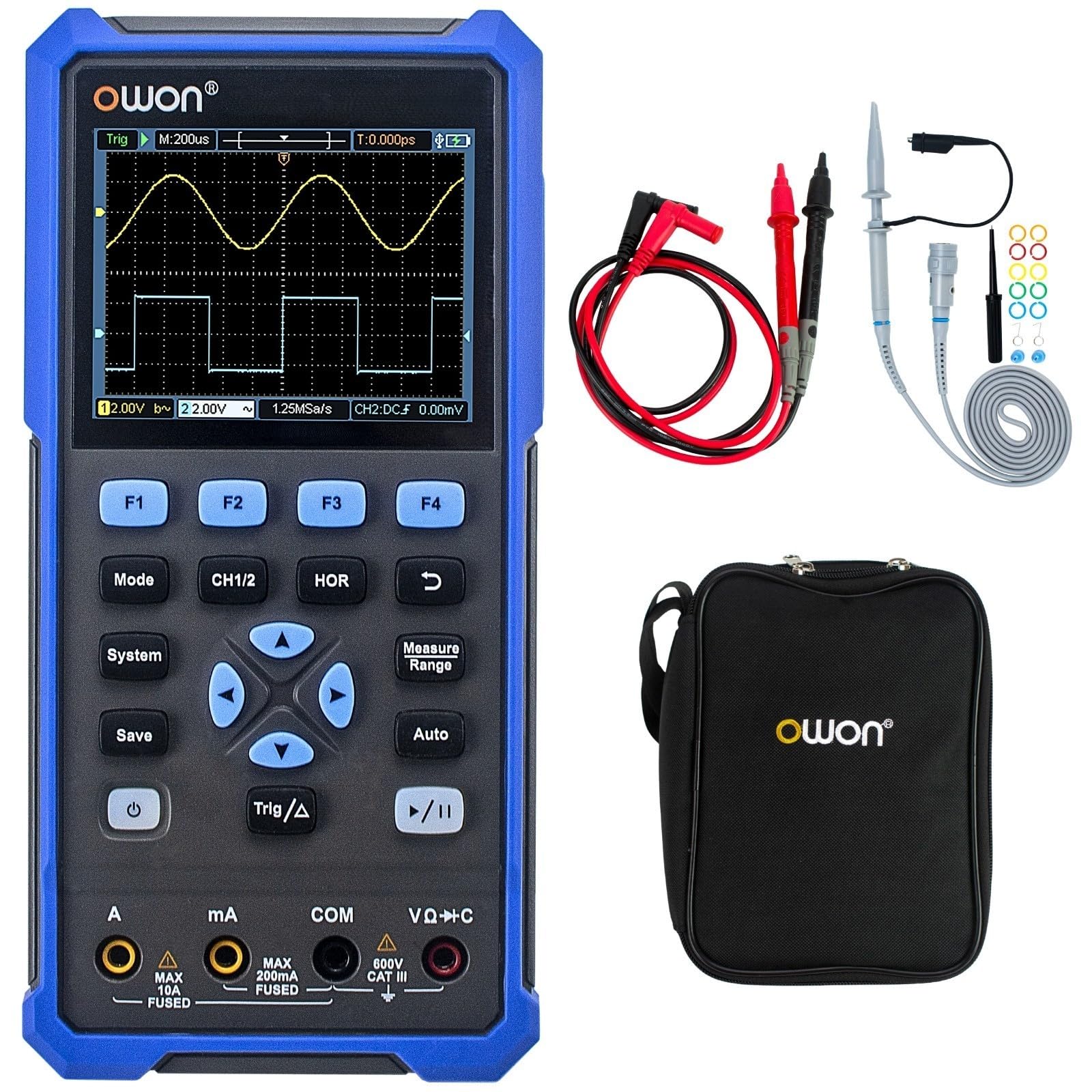
The device features a central 3.5-inch LCD screen for waveform display and measurement readings. Below the screen are function buttons (F1-F4), mode selection buttons (Mode, CH1/2, HOR, System, Save, Auto, Trig/Δ, Power, Play/Pause), and a directional pad for navigation. At the bottom, there are input jacks for current (A, mA), common ground (COM), and voltage/resistance/capacitance (VΩ+C) measurements.

2.3 Включені аксесуари
- USB-кабель Type-C
- Щупи осцилографа (2)
- Інструмент для налаштування зонда
- Вимірювальні щупи мультиметра
- Захисна сумка

3. Налаштування
3.1 Зарядка пристрою
Before initial use, fully charge the device using the provided USB Type-C cable and a compatible power adapter (not included). The charging indicator on the device will show the charging status.
3.2 Підключення зондів та проводів
- Зонди осцилографа: Connect the BNC connector of the oscilloscope probes to the CH1 and CH2 input ports on the top of the device. Ensure a secure connection.
- Multimeter Test Leads: For multimeter functions, insert the red test lead into the VΩ+C jack and the black test lead into the COM jack. For current measurements, use the A or mA jacks as appropriate.
3.3 Увімкнення/вимкнення
Натисніть і утримуйте потужність button (usually marked with a circle and vertical line symbol) to turn the device on or off.
4. Інструкція з експлуатації
4.1 Загальна навігація
- Використовуйте Режим button to switch between Oscilloscope and Multimeter modes.
- The directional pad (up, down, left, right) is used to navigate menus and adjust parameters.
- кнопки F1 до F4 correspond to on-screen menu options.
- The система button accesses system settings.
- The зберегти button allows saving waveforms or measurement data.
4.2 Режим осцилографа
In Oscilloscope mode, the device displays real-time waveforms. Use the following controls:
- CH1/2: Selects the active channel or displays both.
- HOR (Horizontal): Adjusts the time base (horizontal scale) of the waveform.
- Vertical Scale: Use the directional pad (up/down) to adjust the voltage scale for the selected channel.
- Trig/Δ (Trigger): Configures trigger settings (edge, level, mode) to stabilize the waveform display.
- Авто: Automatically adjusts vertical, horizontal, and trigger settings for a stable waveform display.
- Відтворення/пауза: Freezes or resumes the waveform acquisition.
4.3 Режим мультиметра
In Multimeter mode, the device functions as a digital multimeter. Use the directional pad to select the desired measurement function (Voltage, Current, Resistance, etc.). Ensure the test leads are connected to the correct input jacks for the selected measurement type.
- томtagВимірювання (В): Connect leads in parallel with the circuit.
- Current Measurement (A/mA): Connect leads in series with the circuit. Ensure correct jack selection (A or mA) based on expected current.
- Вимірювання опору (Ом): Connect leads across the component when power is off.
- Continuity/Diode: For checking circuit continuity or diode function.
- Вимірювання ємності (F): Connect leads across the capacitor when power is off.
5. Технічне обслуговування
5.1 Очищення
Протріть зовнішню частину пристрою м’якою тканиноюamp cloth. Do not use abrasive cleaners or solvents. Ensure the device is powered off and disconnected from all power sources and measurement circuits before cleaning.
5.2 Догляд за акумулятором
To prolong battery life, avoid fully discharging the battery frequently. Charge the device regularly, especially if it will be stored for an extended period. Store the device in a cool, dry place.
5.3 Зберігання
When not in use, store the HDS25 in its protective bag in a clean, dry environment away from direct sunlight, extreme temperatures, and high humidity.
6. Вирішення проблем
If you encounter issues with your OWON HDS25, refer to the following common problems and solutions:
| проблема | Можлива причина | Рішення |
|---|---|---|
| Пристрій не включається. | Низький заряд батареї або несправна кнопка живлення. | Заряджайте пристрій щонайменше 30 хвилин. Якщо пристрій все ще не реагує, зверніться до служби підтримки. |
| У режимі осцилографа не відображається форма сигналу. | Incorrect probe connection, wrong vertical/horizontal scale, or trigger settings. | Ensure probes are securely connected. Press the Авто button. Adjust vertical (voltage) and horizontal (time) scales. Check trigger level. |
| Multimeter readings are inaccurate or zero. | Incorrect lead connection, wrong measurement function selected, or open circuit. | Verify test leads are in the correct jacks for the selected function. Ensure proper connection to the circuit. Check for open circuits. |
| Пристрій зависає або перестає реагувати. | Збій програмного забезпечення. | Perform a soft reset by holding the power button until the device turns off, then restart. If the issue persists, contact support. |
7. Технічні характеристики
| Особливість | Специфікація |
|---|---|
| Модель | HDS25 |
| Пропускна здатність | 25 МГц |
| Канали | 2 |
| Sample Rate | 250 Мвиб/с |
| Довжина запису | 8K |
| Кількість мультиметрів | 20,000 |
| Дисплей | 3.5-дюймовий РК-дисплей |
| Підключення | USB Type-C (charging & data) |
| Термін служби батареї | прибл. 4 години |
| Сертифікати | CE, RoHS, UL |
| Включені елементи | USB cable, probes, probe adjustment tool, multimeter leads, bag |
8. Гарантія та підтримка
8.1 Інформація про гарантію
The OWON HDS25 comes with a 3-річна гарантія виробника для основного блоку та Гарантія 1 рік for included accessories. Please retain your proof of purchase for warranty claims.
8.2 Підтримка клієнтів
For technical assistance, troubleshooting, or warranty inquiries, please contact OWON customer support. You can also find the latest user manual and support resources on the official OWON webсайт (owon.co.jp) or on the product page where you purchased the device.