
вступ
Thank you for choosing the Thunderobot K87 Wired Mechanical Keyboard. This manual provides essential information for the proper setup, operation, maintenance, and troubleshooting of your new keyboard. Please read this manual thoroughly before using the product to ensure optimal performance and longevity.

Рисунок 1: Кутовий view of the Thunderobot K87 Mechanical Keyboard.
Налаштування
Вміст упаковки
Before proceeding, please verify that your package contains the following items:
- Thunderobot K87 Wired Mechanical Keyboard
- USB кабель
- Посібник користувача (цей документ)
Підключення клавіатури
- Unpack the Thunderobot K87 keyboard and the included USB cable.
- Connect the USB-C end of the cable to the port located on the keyboard.
- Підключіть кінець кабелю USB-A до вільного порту USB на вашому комп’ютері.
- The keyboard will be automatically recognized by your operating system. No additional drivers are typically required for basic functionality.

Малюнок 2: Нижня частина view of the keyboard, illustrating adjustable feet and cable management options.
Інструкція з експлуатації
Основні функції
The Thunderobot K87 is a standard 87-key (TKL) layout mechanical keyboard. Simply plug it into your computer, and it is ready for typing. The keyboard features Red mechanical switches, known for their linear feel and quiet operation, making them suitable for both typing and gaming.
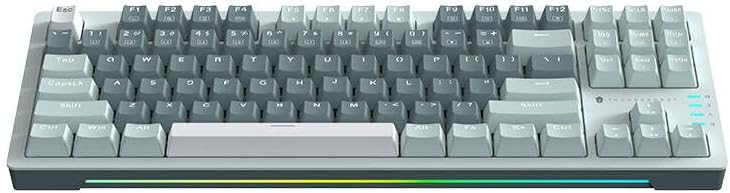
Рисунок 3: Зверху вниз view of the Thunderobot K87 keyboard layout.
Мультимедійні та функціональні клавіші
The keyboard includes a Function (Fn) key, typically located near the right Alt key. This key, when pressed in combination with the F1-F12 keys, activates various multimedia and system functions. Refer to the keycap legends for specific functions.
- Fn + F1-F12: Typically control media playback, volume, and other system shortcuts.
- Fn + клавіша Windows: Блокує/розблоковує клавішу Windows, щоб запобігти випадковому натисканню під час гри.
Керування підсвічуванням
The Thunderobot K87 keyboard features customizable RGB backlighting. Specific key combinations allow you to change lighting modes, brightness, and speed. Consult the keyboard's keycap legends or the manufacturer's website for detailed instructions on lighting customization.

Малюнок 4: Спереду view showing the RGB lighting strip.

Рисунок 5: Бічний профіfile view demonstrating keycap height and keyboard angle.
Технічне обслуговування
Очищення клавіатури
Регулярне чищення допомагає підтримувати зовнішній вигляд та функціональність клавіатури.
- Відключити: Завжди від’єднуйте клавіатуру від комп’ютера перед чищенням.
- Видалення пилу: Використовуйте балончик зі стисненим повітрям, щоб здути пил та сміття між клавішами.
- Очищення поверхні: Обережно протріть клавіші та поверхню клавіатури м’якою тканиною без ворсу, злегкаampводою або м’яким неабразивним миючим розчином. Уникайте надмірної вологості.
- Уникайте: Do not use harsh chemicals, solvents, or abrasive materials, as these can damage the keyboard's finish or keycap legends.
Зберігання
When not in use for extended periods, store the keyboard in a dry, cool place away from direct sunlight and extreme temperatures. Consider covering it to prevent dust accumulation.
Усунення несправностей
If you encounter issues with your Thunderobot K87 keyboard, please refer to the following common solutions:
| проблема | Можлива причина | Рішення |
|---|---|---|
| Клавіатура не відповідає | Нещільне USB-з'єднання, несправний USB-порт, проблема з драйвером. | Ensure USB cable is securely connected. Try a different USB port on your computer. Restart your computer. |
| Певні клавіші не працюють | Debris under keycap, switch malfunction. | Use compressed air to clear debris. If the issue persists, contact customer support. |
| Підсвічування не працює або працює неправильно | Lighting mode disabled, software conflict. | Check keyboard's lighting control key combinations (Fn + specific keys). Ensure no conflicting software is running. |
| Keyboard input lag | USB port issues, system performance. | Try a different USB port. Close unnecessary background applications. |
If the problem persists after trying these solutions, please contact Thunderobot customer support for further assistance.
Технічні характеристики
| Особливість | Деталь |
|---|---|
| Номер моделі | JM03NQ002 |
| Бренд | Thunderobot |
| Підключення | Дротова (USB) |
| Тип перемикача | Червоний механічні перемикачі |
| Макет | 87-key (Tenkeyless) |
| Підсвічування | RGB |
| Виробник | Thunderobot |
| ASIN | B0CWS77B83 |
| Гарантія | 2 років виробника |
Інформація про гарантію
The Thunderobot K87 Wired Mechanical Keyboard (Model JM03NQ002) comes with a 2-річна гарантія виробника from the date of purchase. This warranty covers defects in materials and workmanship under normal use. It does not cover damage caused by accident, misuse, abuse, neglect, unauthorized modification, or improper installation.
To claim warranty service, please retain your proof of purchase. For detailed warranty terms and conditions, or to initiate a warranty claim, please contact Thunderobot customer support.
Підтримка
For technical assistance, product inquiries, or warranty claims, please visit the official Thunderobot website or contact their customer support team. Please have your product model number (JM03NQ002) and proof of purchase ready when seeking support.
Official Thunderobot Webсайт: www.thunderobot.com (Зверніть увагу: це тимчасовий варіант) URL оскільки немає конкретної підтримки URL was provided in the product data. Refer to your product packaging or official Thunderobot documentation for the correct support contact information.)