
1. Вступ
This manual provides detailed instructions for the safe and efficient use of your Blitzwolf BW-CML5 Monitor Light Bar. Please read this manual thoroughly before operating the device and retain it for future reference.
2. Вміст упаковки
Please check the package contents upon opening to ensure all items are present and undamaged. If any items are missing or damaged, please contact customer support.
- Blitzwolf BW-CML5 Monitor Light Bar
- Бездротовий пульт дистанційного керування
- USB кабель живлення
- Посібник користувача (цей документ)
3. Техніка безпеки
Для забезпечення безпечної роботи та запобігання пошкодженням, будь ласка, дотримуйтесь наступних запобіжних заходів:
- Не піддавайте пристрій впливу води або надмірної вологи.
- Уникайте розміщення пристрою поблизу джерел тепла або під прямими сонячними променями.
- Не намагайтеся розбирати або ремонтувати пристрій самостійно. Звертайтеся до кваліфікованого персоналу для проведення будь-яких робіт з обслуговування.
- Use only the provided USB power cable or a certified equivalent.
- Зберігати в недоступному для дітей місці.
- Ensure the light bar is securely attached to the monitor to prevent accidental falls.
4. Налаштування та встановлення
Follow these steps to set up your monitor light bar:
- Прикріпіть світлову панель: Gently place the light bar on top of your monitor. The adjustable clip mechanism should securely grip the top edge of the monitor. Ensure the light source faces downwards towards your desk.
- Підключіть живлення: Connect the USB power cable to the light bar's power input port. Plug the other end of the USB cable into a USB port on your computer or a compatible USB power adapter (5V/1A recommended).
- Розташування пульта дистанційного керування: Place the wireless remote control on your desk within easy reach. The remote operates wirelessly and does not require direct line of sight to the light bar.
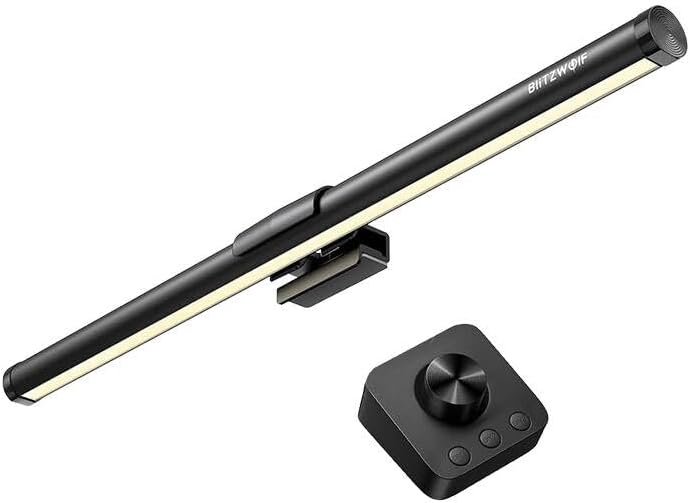
малюнок 1: The Blitzwolf BW-CML5 Monitor Light Bar attached to a monitor, with its wireless remote control placed on a desk. This image illustrates the typical setup of the product.
5. Інструкція з експлуатації
The Blitzwolf BW-CML5 is controlled via its wireless remote. Familiarize yourself with the remote's functions:
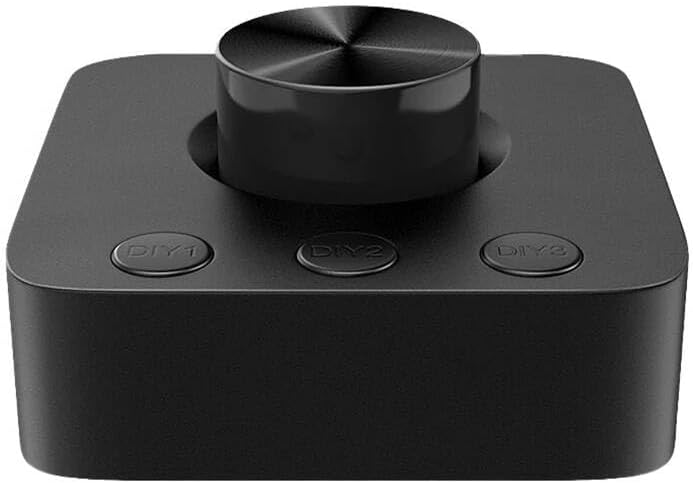
малюнок 2: Крупний план view of the wireless remote control for the Blitzwolf BW-CML5 Monitor Light Bar, showing the central rotary knob and three "DIY" preset buttons.
- Увімкнення/вимкнення живлення: Press the central rotary knob once to turn the light bar on or off.
- Налаштувати яскравість: Rotate the central knob clockwise to increase brightness and counter-clockwise to decrease brightness.
- Налаштування колірної температури: Press and hold the central knob for approximately 2 seconds. While holding, rotate the knob to cycle through different color temperature settings (e.g., warm white, neutral white, cool white). Release the knob to set the desired temperature.
- DIY Preset Buttons (DIY1, DIY2, DIY3): These buttons allow you to save and recall your preferred brightness and color temperature settings.
- Щоб зберегти пресет: Adjust the light bar to your desired brightness and color temperature. Then, press and hold one of the DIY buttons (DIY1, DIY2, or DIY3) for approximately 3 seconds until the light blinks, indicating the setting has been saved.
- Щоб викликати попередні налаштування: Simply press the corresponding DIY button (DIY1, DIY2, or DIY3) once to activate the saved setting.
6. Технічне обслуговування
Proper maintenance ensures the longevity of your device:
- Прибирання: Disconnect the power before cleaning. Use a soft, dry cloth to wipe the light bar and remote control. Do not use abrasive cleaners or solvents.
- Зберігання: Якщо пристрій не використовується протягом тривалого часу, зберігайте його в прохолодному, сухому місці, подалі від прямих сонячних променів та екстремальних температур.
7. Вирішення проблем
If you encounter issues with your Blitzwolf BW-CML5, please refer to the following common problems and solutions:
| проблема | Можлива причина | Рішення |
|---|---|---|
| Світлова панель не вмикається. | No power, loose connection, remote battery low. | Check USB power cable connection. Ensure USB power source is active. Replace remote control batteries if applicable (check remote manual for battery type). |
| Пульт дистанційного керування не реагує. | Remote battery low, interference, not paired. | Replace remote control batteries. Move remote closer to the light bar. If issues persist, refer to the remote's specific pairing instructions (if any, usually automatic for these devices). |
| Світло несподівано мерехтить або тьмяніє. | Insufficient power supply, faulty cable. | Ensure the USB power source provides sufficient power (5V/1A recommended). Try a different USB port or power adapter. Replace the USB cable if necessary. |
If the problem persists after trying these solutions, please contact Blitzwolf customer support for further assistance.
8. Технічні характеристики
| Модель | BW-CML5 |
| Бренд | BlitzWolf |
| Розміри продукту (Д x Ш x В) | 10 х 5 х 1.27 см |
| Вага продукту | 100 г |
| Вхідний об'ємtage | 5 В (через USB) |
| Колір | чорний |
9. Гарантія та підтримка
Blitzwolf products are designed and manufactured to the highest quality standards. For information regarding warranty coverage, technical support, or service inquiries, please refer to the warranty card included with your product or visit the official Blitzwolf website. Please have your model number (BW-CML5) and purchase information ready when contacting support.
For further assistance, you may contact Blitzwolf customer service through their official channels.