
1. Вступ
The Minolta MND60V VLOG Camera Kit is designed for capturing high-quality photos and videos. This kit includes a 64MP camera capable of 4K Ultra HD video at 60 frames per second, along with essential accessories such as a tripod, external microphone, LED light, and wide-angle/macro lenses. This manual provides instructions for setting up, operating, and maintaining your camera kit to ensure optimal performance.

Image 1.1: The Minolta MND60V VLOG Camera Kit, showcasing its core capabilities for high-resolution photography and video recording.
2. Вміст упаковки
Перш ніж почати, будь ласка, перевірте, чи всі перелічені нижче предмети входять до вашої упаковки:
- Minolta MND60V Camera
- Accessory Mount Arms
- Світлодіодне відеосвітло
- Чохол для транспортування
- Tripod Pouch
- Стерео мікрофон
- Плечовий ремінь
- Карта пам'яті 32 Гб
- Штатив з дистанційним керуванням
- Літій-іонний акумулятор
- Адаптер змінного струму
- Wide-angle + Macro Lens
- USB-кабелі
- Посібник користувача (цей документ)
- Гарантійний талон

Image 2.1: All components included in the Minolta MND60V VLOG Camera Kit.
3. Налаштування
3.1 Заряджання батареї
- Insert the Lithium-Ion Battery into the camera.
- Connect the AC Adaptor to the camera's USB port and plug it into a power outlet.
- Індикатор заряджання засвітиться. Після повного заряджання світло зміниться або згасне.
3.2 Встановлення картки пам'яті
The camera supports Micro SD cards. A 32GB card is included.
- Locate the memory card slot on the camera (refer to the camera diagram).
- Вставте карту Micro SD золотими контактами вниз, доки вона не зафіксується на місці.
- Щоб вийняти, обережно натисніть на карту, доки вона не вискочить.
3.3 Приєднання аксесуарів
The kit includes various accessories to enhance your recording experience.

Image 3.1: Minolta MND60V camera with all accessories mounted.
- Штатив: Attach the camera to the tripod's mounting screw. The tripod can be used as a stand, a selfie stick, or a power source with its built-in 2,500mAh battery.
- Зовнішній мікрофон: Mount the stereo microphone onto one of the accessory mount arms and plug its cable into the camera's microphone input jack.
- Світлодіодне відеосвітло: Mount the LED light onto another accessory mount arm. Ensure it is charged or has fresh batteries if applicable.
- Wide-angle + Macro Lens: Screw the desired lens onto the front of the camera's main lens.
4. Робота з камерою
4.1 Увімкнення/вимкнення живлення
Press and hold the power button located on the camera body to turn the camera on or off.
4.2 Basic Photo and Video Recording
- Вибір режиму: Use the mode dial or menu to select between photo and video modes.
- Обрамлення: Use the 3-inch LCD screen to compose your shot. The screen can be flipped for self-recording.
- Запис/Затвор: Press the dedicated record button for video or the shutter button for photos.
4.3 Використання РК-екрана
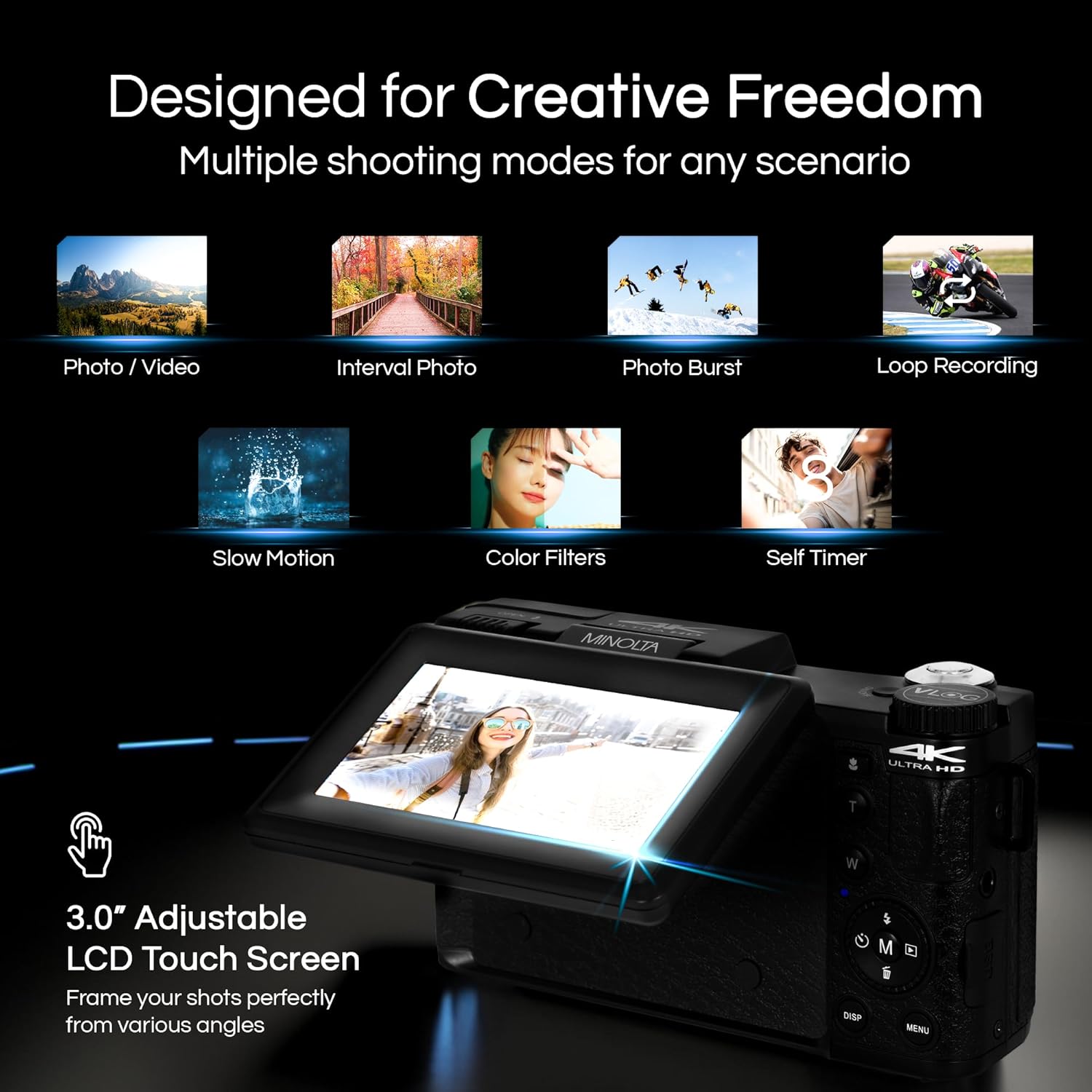
Image 4.1: The adjustable LCD screen showing various shooting modes.
The 3-inch LCD screen provides a live view, access to menus, and playback options. It can be rotated and flipped, making it suitable for vlogging and shooting from various angles. Navigate menus using the touch screen or physical buttons.
4.4 Функція масштабування
The camera features 16x digital zoom. Use the zoom lever (often marked 'W' for Wide and 'T' for Telephoto) to adjust the focal length. Note that digital zoom may reduce image quality compared to optical zoom.

Зображення 4.2: Наприкладample of using digital zoom to capture distant details.
4.5 Special Features and Modes

Image 4.3: Icons illustrating the camera's creative modes.
The MND60V offers several creative modes:
- Уповільнений рух: Записує відео з вищою частотою кадрів для уповільненого відтворення.
- Циклічний запис: Безперервно записує відео, перезаписуючи найстаріші files, коли карта пам'яті заповнена.
- Проміжок часу: Captures a series of photos at set intervals and combines them into a video.
- Вибір сцени: Pre-set modes optimized for specific shooting conditions (e.g., portrait, landscape).
- Автоспуск: Delays the shutter release for a few seconds, allowing you to get into the shot.
4.6 Використання пульта дистанційного керування
The included tripod features a built-in wireless remote. This allows you to start/stop recording or take photos from a distance, ideal for group shots or vlogging.
4.7 Передача Files
Connect the camera to a computer using the provided USB cable. The camera will appear as a removable drive, allowing you to copy photos and videos to your computer.
5. Технічне обслуговування
5.1 Очищення камери
- Використовуйте м’яку суху тканину для очищення корпусу камери.
- Для об’єктива використовуйте спеціальну серветку та розчин для чищення об’єктивів. Уникайте дотику до поверхні об’єктива пальцями.
- Не використовуйте агресивні хімікати або абразивні матеріали.
5.2 Догляд за акумулятором
- Перед першим використанням повністю зарядіть акумулятор.
- Зберігайте акумулятор у прохолодному сухому місці, коли він не використовується.
- Уникайте впливу на акумулятор екстремальних температур.
5.3 Зберігання
When not in use, store the camera and its accessories in the provided carrying case to protect them from dust, moisture, and physical damage.
6. Вирішення проблем
If you encounter issues with your Minolta MND60V camera, refer to the following common problems and solutions:
| проблема | Можлива причина | Рішення |
|---|---|---|
| Камера не вмикається. | Батарейка розряджена або неправильно вставлена. | Переконайтеся, що акумулятор повністю заряджений та правильно вставлений. |
| Photos/Videos are blurry. | Autofocus issue, insufficient light, or camera shake. | Ensure proper lighting. Allow camera to focus before capturing. Use the tripod for stability. Avoid excessive digital zoom in low light. |
| Акумулятор швидко розряджається. | Frequent use of screen/LED light, cold environment, or aging battery. | Reduce screen brightness. Turn off LED light when not needed. Keep battery warm in cold conditions. Consider a replacement battery if performance significantly degrades. |
| Помилка карти пам'яті. | Картка переповнена, пошкоджена або несумісна. | Format the memory card (this will erase all data). Try a different compatible Micro SD card. |
| No audio in video recordings. | External microphone not connected or faulty. | Ensure the external microphone is securely plugged into the camera's microphone input. Check microphone settings in the camera menu. |
7. Технічні характеристики
Key technical specifications for the Minolta MND60V VLOG Camera Kit:
| Особливість | Специфікація |
|---|---|
| Номер моделі | MND60V |
| Ефективне вирішення проблеми | 64 Мп |
| Роздільна здатність відео | 4K (3840 Pixels Effective Video Resolution) |
| Частота кадрів відео | 60 FPS (for 4K) |
| Технологія фотосенсора | CMOS (2/3-inch Photo Sensor Size) |
| Дисплей | 3-дюймовий РК-екран |
| Тип фокусування | Автофокус |
| Цифровий зум | 16x |
| Тип об'єктива | Wide Angle (Minimum/Maximum Focal Length: 3.95 mm) |
| Максимальна діафрагма | 1.8 ф |
| Стабілізація зображення | цифровий |
| Тип флеш-пам'яті | Micro SD |
| Технологія підключення | USB |
| Формат захоплення відео | MP4 |
| Підтримуваний аудіоформат | AAC |
| Підтримуваний формат зображення | JPEG |
| Джерело живлення | Lithium-Ion Battery (1 AAA battery required for remote, included) |
| Вага товару | 3.5 фунта |
| Колір | чорний |
| особливості | Anti-Shake, Built-In Flash, Microphone Input, Remote Control, Slow Motion, Time Lapse, Timer |
8. Інформація про гарантію
The Minolta MND60V VLOG Camera Kit comes with a Обмежена гарантія виробника на 1 рік. Please refer to the included Warranty Card for detailed terms and conditions, including coverage, limitations, and how to make a claim.
9. Підтримка клієнтів
For further assistance, technical support, or inquiries regarding your Minolta MND60V VLOG Camera Kit, please visit the official Minolta webсайт або зверніться до їхнього відділу обслуговування клієнтів. Контактну інформацію зазвичай можна знайти в гарантійному талоні або на упаковці виробника webсайт.