
1. Вступ
The Pronomic DX-50 USB MKII is a professional 4-channel DJ mixer designed for a wide range of applications, including discos, parties, restaurants, and presentations. Its user-friendly design ensures that both experienced and less experienced users can fully utilize its features. This manual provides detailed instructions for setting up, operating, and maintaining your mixer.
Key features include a recording function, integrated Bluetooth interface, USB player with transport controls, and multiple input channels.
2. Важливі інструкції з техніки безпеки
- Прочитайте інструкції: Перед використанням виробу прочитайте всі інструкції з безпеки та експлуатації.
- Зберігайте інструкції: Зберігайте інструкції з безпеки та експлуатації для використання в майбутньому.
- Зверніть увагу на попередження: Дотримуйтесь усіх попереджень на виробі та в інструкції з експлуатації.
- Дотримуйтесь інструкцій: Дотримуйтеся всіх інструкцій з експлуатації та використання.
- Вода і вологість: Do not use this apparatus near water (e.g., bathtub, washbowl, kitchen sink, laundry tub, wet basement, or swimming pool).
- Вентиляція: Не блокуйте вентиляційні отвори. Встановлюйте відповідно до інструкцій виробника.
- Тепло: Не встановлюйте поблизу будь-яких джерел тепла, таких як радіатори, обігрівачі, печі або інші пристрої (включаючи ampліфікатори), які виробляють тепло.
- Джерела живлення: Use only power sources specified by the manufacturer.
- Захист шнура живлення: Захищайте шнур живлення від наступання або защемлення, особливо біля вилок, розеток і в місці виходу з пристрою.
- Прибирання: Чистіть тільки сухою ганчіркою.
- Обслуговування: Не намагайтеся обслуговувати цей виріб самостійно, оскільки відкриття або зняття кришок може наразити вас на небезпечну діюtagе або інші небезпеки. Звертайтеся до кваліфікованого сервісного персоналу.
3. Вміст упаковки
Please check that all items listed below are included in your package. If any items are missing or damaged, contact your dealer immediately.
- Pronomic DX-50 USB MKII DJ Mixer
- Power Adapter (AC 12V)
- USB Stick (32 GB, if included in your specific bundle)
- Посібник користувача (цей документ)
4. Продукт закінчивсяview
Familiarize yourself with the various controls and connections on your DX-50 USB MKII mixer.
4.1 Елементи керування передньої панелі
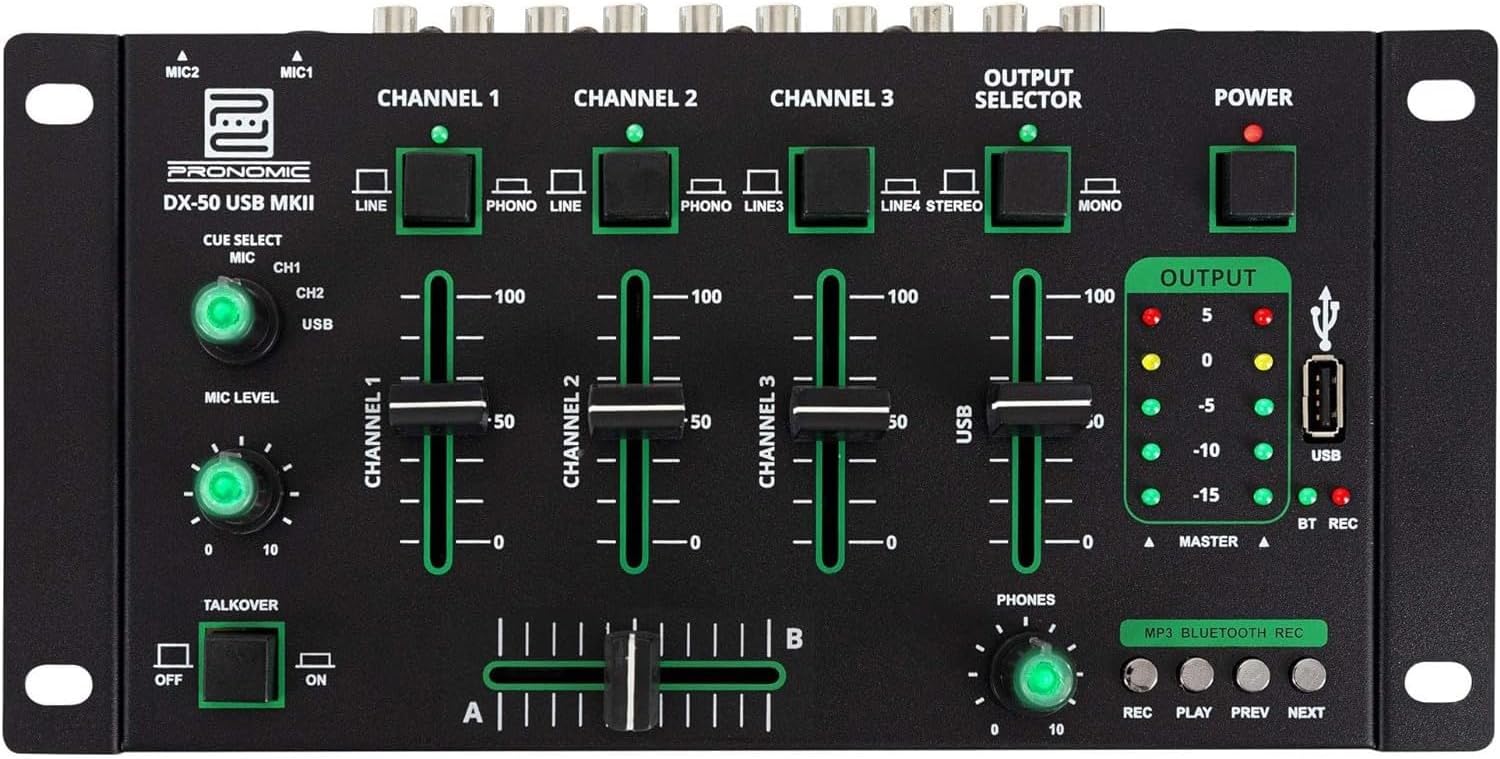
- Входи MIC 1/2: Підключіть мікрофони.
- Channel 1-4 Input Selectors: Switch between LINE, PHONO, or USB/Bluetooth inputs for each channel.
- Канали фейдерів: Налаштуйте рівень гучності для кожного каналу.
- CUE Select Buttons: Route specific channels to the headphone output for monitoring.
- MIC Level Knob: Adjust the volume of the microphone inputs.
- Talkover Switch: Activates the talkover function, which automatically lowers music volume when speaking into the microphone.
- Output Selector: Choose between Stereo or Mono master output.
- Вимикач живлення: Вмикає/вимикає міксер.
- Вимірювачі вихідного рівня: LED indicators showing the master output level.
- Порт USB: Connect a USB drive for MP3 playback and recording.
- MP3/Bluetooth/REC Player Controls: Buttons for Play/Pause, Previous, Next, and Record functions for the integrated player.
- Phones Level Knob: Регулює гучність виходу навушників.
- Кросфейдер (A/B): Blends between channels assigned to A and B.
4.2 Підключення задньої панелі

- AC 12V Power Input: Підключіть сюди наданий адаптер живлення.
- Вихід для телефонів: Роз'єм 6.3 мм для підключення навушників.
- MASTER OUT L/R (RCA): Connect to your main amplifier або активні колонки.
- Channel 1 & 2 Inputs (RCA Line/Phono): Connect turntables (Phono) or other line-level devices (CD players, media players). Use the front panel selector to switch.
- Channel 3 & 4 Inputs (RCA Line): Connect line-level devices.
- MIC 1 & 2 Inputs (6.3mm Jack): Підключіть мікрофони.
5. Налаштування
Follow these steps to set up your Pronomic DX-50 USB MKII mixer:
- Підключення живлення: Ensure the mixer's power switch is in the OFF position. Connect the supplied AC 12V power adapter to the "AC 12V" input on the rear panel of the mixer. Plug the adapter into a suitable power outlet.
- Master Output Connection: Connect the "MASTER OUT L/R" RCA outputs on the rear panel to the inputs of your amplifier або активні колонки.
- Підключення пристрою введення:
- Програвачі: Connect turntables to the "CHANNEL 1" or "CHANNEL 2" RCA inputs. Set the corresponding input selector on the front panel to "PHONO".
- CD-програвачі/лінійні пристрої: Connect CD players, media players, or other line-level devices to "CHANNEL 1", "CHANNEL 2", "CHANNEL 3", or "CHANNEL 4" RCA inputs. Set the corresponding input selector on the front panel to "LINE".
- Мікрофони: Connect microphones to the "MIC 1" or "MIC 2" 6.3mm jack inputs on the rear panel.
- Підключення навушників: Connect your headphones to the "PHONES" 6.3mm jack on the rear panel.
- USB Drive (Optional): If using a USB drive for playback or recording, insert it into the "USB" port on the front panel.
- Увімкнення: Once all connections are made, switch the mixer's power switch to the ON position. The power indicator LED will illuminate.
6. Інструкція з експлуатації
6.1 Основи змішування
- Виберіть вхід: For each channel, use the input selector switch (LINE/PHONO/USB/BT) to choose the desired audio source.
- Adjust Channel Volume: Use the vertical faders for each channel to adjust its individual volume level.
- Головний вихід: Monitor the "OUTPUT" LED meters and adjust the master volume knob (if present, otherwise rely on channel faders and amplifier volume) to achieve a suitable overall output level without clipping.
- Кросфейдер: Use the crossfader to smoothly transition between channels assigned to A and B. Channels 1 and 2 are typically assigned to the crossfader.
6.2 Використання мікрофона
- Connect your microphone to one of the MIC inputs on the rear panel.
- Adjust the "MIC LEVEL" knob on the front panel to control the microphone's volume.
- Функція Talkover: Activate the "TALKOVER" switch to automatically reduce the volume of the music when you speak into the microphone. This is useful for announcements.
6.3 Відтворення та запис через USB
- Відтворення через USB: Вставте USB-накопичувач із MP3 files into the "USB" port. Select "USB" as the input source for the dedicated USB channel. Use the "PLAY/PAUSE", "PREV", and "NEXT" buttons to control playback.
- USB-запис: Press the "REC" button to start recording the master output to the connected USB drive. Press "REC" again to stop recording. Ensure your USB drive has sufficient free space and is formatted correctly (FAT32 is commonly supported).
6.4 Підключення Bluetooth
- Активувати Bluetooth: Select "BT" as the input source for the dedicated Bluetooth channel. The mixer will enter pairing mode.
- Підключити пристрій: On your Bluetooth-enabled device (smartphone, tablet, etc.), search for available Bluetooth devices. Select "Pronomic DX-50 USB MKII" (or similar name) from the list to pair.
- Відтворення аудіо: Once paired, you can play audio from your device through the mixer. Control playback from your device or using the mixer's transport controls (if supported by your device).
6.5 Monitoring with Headphones
- Connect headphones to the "PHONES" output.
- Use the "CUE SELECT" buttons to choose which channels you want to monitor in your headphones without affecting the main output.
- Adjust the "PHONES" level knob to set your desired headphone volume.
7. Технічне обслуговування
- Прибирання: Від’єднайте живлення перед чищенням. Використовуйте м’яку суху тканину для протирання поверхні міксера. Не використовуйте рідкі засоби для чищення, аерозолі чи розчинники.
- Зберігання: Зберігайте міксер у прохолодному, сухому місці, подалі від прямих сонячних променів та екстремальних температур.
- Fader and Knob Care: Avoid excessive force when operating faders and knobs. Periodically check for dust or debris accumulation around moving parts.
- Управління кабелем: Ensure cables are not kinked or strained, which can lead to damage.
8. Вирішення проблем
| проблема | Можлива причина | Рішення |
|---|---|---|
| Немає живлення | Power adapter not connected; Power switch off; Faulty power outlet. | Check power adapter connection; Ensure power switch is ON; Try a different power outlet. |
| No sound from main output | Master volume too low; Amplifier/speakers off or disconnected; Incorrect input selection; Channel faders down. | Increase master volume; Check amplifier/speaker connections and power; Verify correct input selected for channels; Raise channel faders. |
| Немає звуку з навушників | Headphone volume too low; Headphones not connected; No CUE selected. | Increase PHONES level; Connect headphones properly; Press CUE button for desired channel. |
| Bluetooth не з’єднується | Мікшер не в режимі сполучення; пристрій знаходиться занадто далеко; перешкоди. | Ensure BT input is selected; Bring device closer; Restart mixer and device. |
| Відтворення через USB не працює | USB-накопичувач не вставлено належним чином; Неправильно file format; USB drive not formatted correctly. | Re-insert USB drive; Ensure files are MP3; Format USB drive to FAT32. |
9. Технічні характеристики
| Модель | Pronomic DX-50 USB MKII |
| Кількість каналів | 4 |
| Технологія підключення | Bluetooth, USB |
| Аудіо вхід | RCA (line/phono), 6.3mm microphone, Bluetooth, USB |
| Тип вихідного роз'єму | RCA (Master Out), 6.3mm (Phones) |
| Джерело живлення | Електричний кабель (адаптер змінного струму 12 В) |
| Dimensions (without corner brackets and controls) | 222 x 129 x 28 мм (ширина x глибина x висота) |
| Total Dimensions (with corner brackets and controls) | 267 x 136 x 51 мм (ширина x глибина x висота) |
| вага | 790 г |
10. Гарантія та підтримка
Щоб отримати інформацію про гарантію та технічну підтримку, зверніться до документації, що додається до вашої покупки, або зверніться до продавця. Зберігайте чек про покупку для будь-яких гарантійних претензій.
For further assistance, you may also visit the official Pronomic webсайту або зв’яжіться зі своїм відділом обслуговування клієнтів.