
вступ
This manual provides detailed instructions for the proper use and maintenance of your Levenhuk Atom DNB250 Digital Day and Night Vision Binoculars. Please read this manual thoroughly before operating the device to ensure optimal performance and longevity. The Levenhuk Atom DNB250 offers high-definition imaging for both day and night observations, featuring optical and digital magnification, infrared illumination, and recording capabilities.
Вміст упаковки
Обережно розпакуйте коробку та переконайтеся, що всі перелічені нижче предмети присутні та знаходяться у належному стані. Якщо будь-які предмети відсутні або пошкоджені, зверніться до продавця.
- Levenhuk Atom DNB250 Digital Night Vision Binoculars
- Сумка для перенесення
- Шийний ремінь
- Знімна акумуляторна батарея
- USB-кабель Type-C
- Очищаюча серветка
- Посібник користувача
- Гарантійний талон
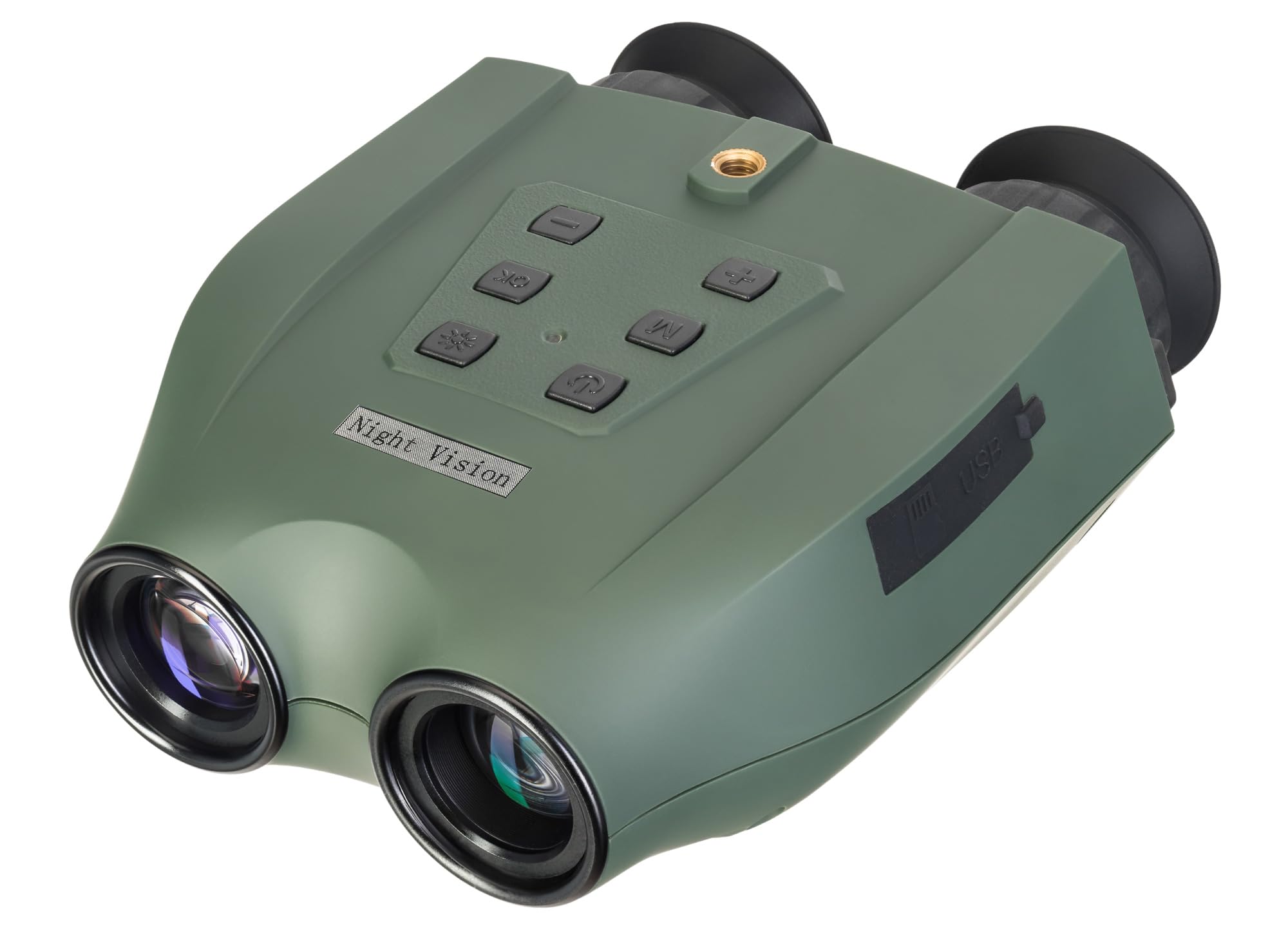
Image: Levenhuk Atom DNB250 Digital Night Vision Binoculars with all included accessories laid out.
Продукт закінченийview
Елементи керування та порти

Зображення: Верх view of the binoculars highlighting the control panel.
- Кнопка живлення: Вмикає або вимикає пристрій.
- ІЧ кнопка: Activates and adjusts the infrared illuminator brightness levels.
- Кнопка ОК: Confirms selections and takes photos/starts video recording.
- Кнопка меню: Доступ до меню налаштувань пристрою.
- Zoom In/Up Button (+): Increases digital magnification or navigates up in menus.
- Zoom Out/Down Button (-): Decreases digital magnification or navigates down in menus.

Зображення: Збоку view of the binoculars showing the USB-C port and microSD card slot.
- Слот для карт MicroSD: For inserting a memory card (up to 128GB, not included) to store photos and videos.
- Порт USB Type-C: Для заряджання пристрою та передачі даних на комп'ютер.
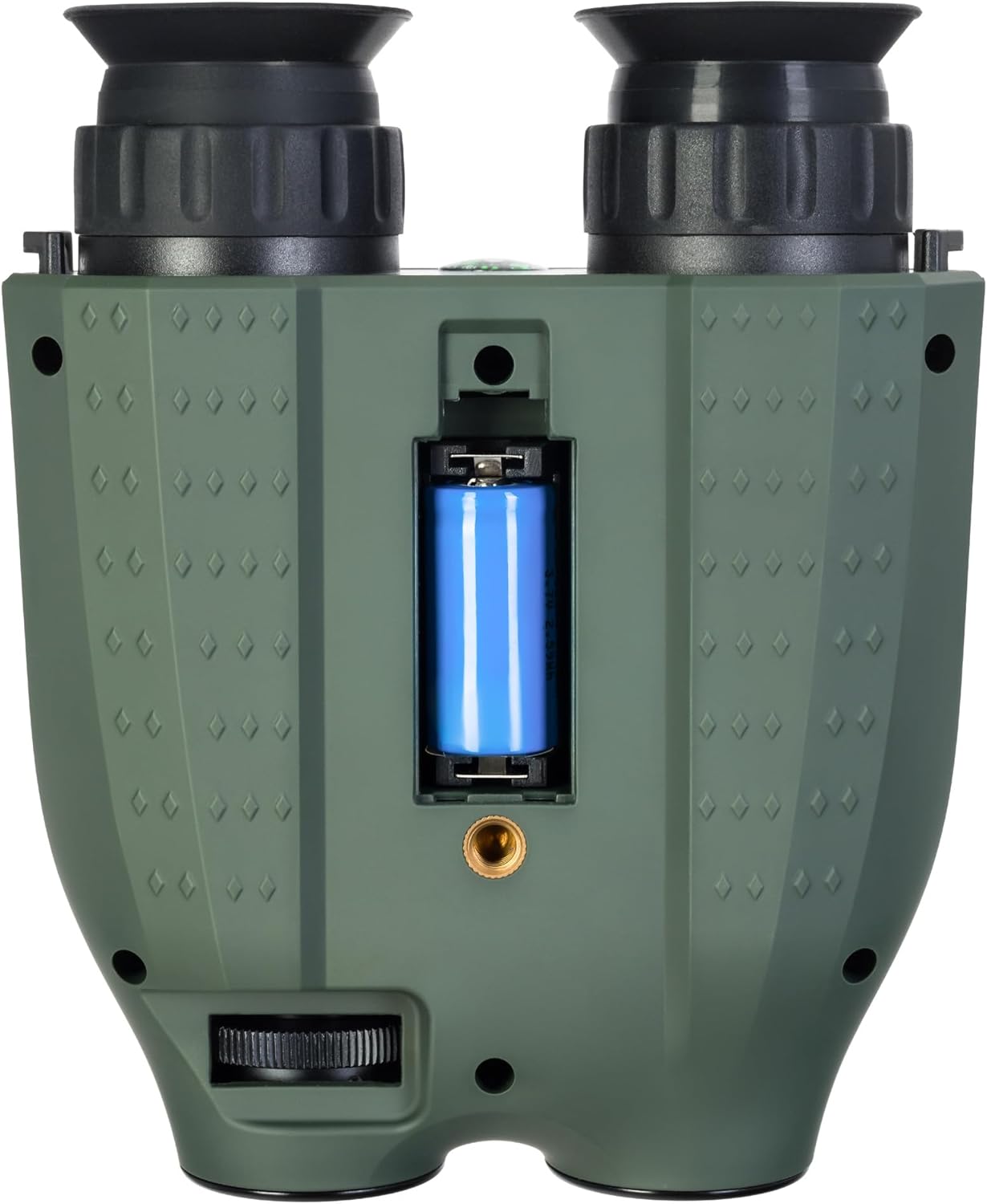
Зображення: Нижня частина view of the binoculars showing the battery compartment and tripod mounting thread.
- Батарейний відсік: Houses the removable rechargeable battery.
- Tripod Mounting Thread: Allows attachment to a standard tripod.
Налаштування
1. Встановлення батареї
- Locate the battery compartment on the bottom of the device.
- Відкрийте кришку відділення.
- Insert the provided rechargeable battery, ensuring correct polarity.
- Надійно закрийте кришку батарейного відсіку.
2. Встановлення карти пам'яті
A microSD card (up to 128GB) is required for storing photos and videos. It is not included in the package.
- Знайдіть слот для картки microSD на бічній панелі пристрою.
- Обережно вставте картку microSD у гніздо, доки вона не стане на місце із клацанням.
- Щоб вийняти, натисніть на карту всередину, доки вона не вискочить.
3. Зарядка батареї
Before first use, fully charge the battery. The device can be charged using the supplied USB Type-C cable.
- Connect the USB Type-C cable to the device's USB port.
- Connect the other end of the cable to a USB power source (e.g., computer, wall adapter - not included).
- Індикатор заряджання показуватиме стан заряджання.
Операція
1. Увімкнення/вимкнення живлення
- To power on, press and hold the Power Button until the display activates.
- To power off, press and hold the Power Button again until the display shuts down.
2. Регулювання фокусу
Adjust the focus by rotating the eyepiece rings until the image appears clear on the internal displays.
3. Magnification (Optical and Digital Zoom)
The device features 6x optical magnification and up to 8x digital zoom.
- Використовуйте Збільшити (+) і Зменшити масштаб (-) buttons to adjust the digital magnification.
4. Infrared (IR) Illumination
The infrared illuminator enhances visibility in low-light or complete darkness. It has three brightness levels.
- Натисніть ІК-кнопка to cycle through the IR brightness levels (Low, Medium, High, Off).
- The IR illuminator automatically adapts to lighting conditions.
5. Фото- та відеозапис
The built-in recorder captures observations as photos (JPG, up to 8000x6000px) and videos (AVI, up to 2560x1440px).
- Щоб зробити фотографію: Натисніть кнопку Кнопка OK один раз.
- To start video recording: Press and hold the Кнопка OK. Press again to stop recording.
- Captured media is stored on the inserted microSD card.
6. Режими відображення
The binoculars are equipped with two color IPS screens that can be used together or separately.
- Day shooting provides full-color images.
- Night shooting provides monochrome images for enhanced visibility in darkness.
Відео: Оверview of the Levenhuk Atom DNB250 Digital Night Vision Binoculars, demonstrating key features such as night vision range, magnification, high-resolution screen, photo/video capture, IR illumination, battery life, and mounting options.
Варіанти монтажу
The Levenhuk Atom DNB250 can be used handheld or mounted for stable observation.
- Кріплення штатива: The device features a standard tripod mounting thread on its base, allowing it to be attached to a tabletop tripod (included) or any compatible full-size tripod for extended, stable viewзапис та запис.
- Кріплення шолома: The NVD can also be mounted on a helmet for hands-free operation (helmet mount not included).
Технічне обслуговування та догляд
- Прибирання: Use the provided cleaning wipe to gently clean the lenses and external surfaces. Avoid abrasive materials or harsh chemicals.
- Зберігання: When not in use, store the binoculars in the carrying pouch in a cool, dry place, away from direct sunlight and extreme temperatures.
- Догляд за акумулятором: Вийміть акумулятор, якщо пристрій не використовуватиметься протягом тривалого часу.
- Довговічність: The device features a lightweight and durable ABS plastic body with a polymer coating for increased damage resistance and a reliable grip.
Усунення несправностей
| проблема | Можлива причина | Рішення |
|---|---|---|
| Пристрій не включається. | Низький заряд або розряджений акумулятор; неправильно встановлений акумулятор. | Charge the battery; ensure battery is installed with correct polarity. |
| Зображення розмите. | Неправильне налаштування фокусу. | Adjust the eyepiece rings until the image is clear. |
| Не вдається записувати фотографії/відео. | No microSD card; full microSD card; faulty microSD card. | Insert a microSD card; delete old files or use a new card; try a different card. |
| Погана робота нічного бачення. | IR illuminator off or on low setting. | Increase IR brightness using the IR button. |
Технічні характеристики
| Особливість | Деталь |
|---|---|
| Номер моделі | 83055 |
| Оптичне збільшення | 6x |
| Цифровий зум | 1-8x |
| Діаметр лінзи об'єктива | 21.3 мм |
| Діапазон нічного бачення | До 300 метрів |
| Day Vision Range | До 1000 метрів |
| Інфрачервоний опромінювач | Yes, with 3 brightness levels |
| Роздільна здатність фото | Up to 8000 x 6000px (JPG) |
| Роздільна здатність відео | Up to 2560 x 1440px (AVI) |
| Підтримка карт пам'яті | MicroSD до 128 ГБ (не входить в комплект) |
| Тип батареї | Removable 700mAh rechargeable battery |
| Battery Life (Night) | Up to 2 hours (IR activated) |
| Battery Life (Day) | До 10 годин |
| матеріал | Акрилонітрилбутадієнстирол (АБС) |
| Тип монтажу | Кріплення на штатив |
| Розміри (Д x Ш x В) | 17 х 7 х 17.5 см |
| вага | 700 грами |
Гарантія та підтримка
Levenhuk provides a lifetime warranty for all elements of this device, reflecting its commitment to high quality and standards. For warranty claims or technical support, please refer to the warranty card included in your package or visit the official Levenhuk webсайт.