
1. Вступ
This manual provides essential information for the safe and efficient operation of your Sharp GX-BT190 Portable Bluetooth Speaker. Please read it thoroughly before using the device and retain it for future reference.
2. Інформація про безпеку
- Не піддавайте динамік впливу екстремальних температур, прямих сонячних променів або високої вологості.
- Не розбирайте, не ремонтуйте та не модифікуйте динамік. Це може призвести до анулювання гарантії та створення ризиків для безпеки.
- Ensure the charging port cover is securely closed when using the speaker near water to maintain its IP67 rating.
- Використовуйте лише наданий зарядний кабель або його сертифікований еквівалент.
- Тримайте динамік подалі від дітей і домашніх тварин.
- Уникайте прослуховування на високій гучності протягом тривалого часу, щоб запобігти пошкодженню слуху.
3. Вміст упаковки
- Sharp GX-BT190 Portable Bluetooth Speaker
- USB-кабель для зарядки
- Шнурок
- Інструкція з експлуатації
4. Продукт закінчивсяview

Фронт view of the Sharp GX-BT190 speaker, showing the central speaker grille with the Sharp logo and the LED light ring.

сторона view of the Sharp GX-BT190 speaker, highlighting the textured speaker grille and the integrated lanyard.
Задня view of the Sharp GX-BT190 speaker, showing the control buttons and the sealed charging port cover.
Елементи керування та індикатори:
- Кнопка живлення: Натисніть і утримуйте, щоб увімкнути/вимкнути.
- Кнопка збільшення гучності / наступного треку (+): Коротке натискання для збільшення гучності, утримування для наступного треку.
- Кнопка зменшення гучності / попереднього треку (-): Коротке натискання для зменшення гучності, довге натискання для попереднього треку.
- Кнопка відтворення/паузи/виклику (►||): Коротке натискання для відтворення/паузи, відповіді/завершення дзвінків. Тривале натискання для відхилення дзвінків.
- Mode / Light Button (M): Short press to cycle through LED light modes. Long press to turn off LED lights.
- Порт зарядки USB-C: For charging the speaker. Ensure the rubber cover is sealed when not charging.
- Світлодіодний індикатор: Displays charging status and Bluetooth pairing status.
5. Налаштування
5.1 Заряджання динаміка
- Open the rubber cover on the back of the speaker to access the USB-C charging port.
- Підключіть наданий USB-кабель для заряджання до порту USB-C динаміка.
- Підключіть інший кінець USB-кабелю до USB-адаптера живлення (не входить до комплекту) або USB-порту комп’ютера.
- Світлодіодний індикатор світитиметься під час заряджання та вимкнеться після повного заряджання.
- Close the rubber cover securely after charging to maintain the speaker's waterproof rating.
5.2 Увімкнення/вимкнення
- Щоб увімкнути: Press and hold the Power button for approximately 3 seconds. You will hear an audible prompt, and the LED indicator will flash.
- Щоб вимкнути: Press and hold the Power button for approximately 3 seconds. You will hear an audible prompt, and the LED indicator will turn off.
5.3 Створення пари Bluetooth
- Ensure the speaker is powered on and the LED indicator is flashing, indicating it is in pairing mode.
- На мобільному пристрої ввімкніть Bluetooth і знайдіть доступні пристрої.
- Select "GX-BT190" from the list of devices.
- Після сполучення світлодіодний індикатор перестане блимати та світитиметься постійно, і ви почуєте звуковий сигнал підтвердження.
- Гучномовець автоматично підключиться до останнього сполученого пристрою після ввімкнення, якщо пристрій знаходиться в межах досяжності та Bluetooth увімкнено.
5.4 Сполучення справжнього бездротового стерео (TWS)
TWS allows you to pair two GX-BT190 speakers together for a stereo audio experience.

Two Sharp GX-BT190 speakers, one red and one blue, positioned together, illustrating the True Wireless Stereo (TWS) pairing feature.
- Ensure both GX-BT190 speakers are powered on and not connected to any Bluetooth device.
- На одному з динаміків (це буде основний динамік) двічі натисніть кнопку живлення. Колонка перейде в режим сполучення TWS.
- The two speakers will automatically search for and connect to each other. You will hear a confirmation tone once TWS pairing is successful.
- Once TWS paired, connect your mobile device to the primary speaker via Bluetooth as described in section 5.3.
- To disconnect TWS, double-press the Power button on either speaker.
6. Операційна
6.1 Відтворення аудіо
- Відтворення/пауза: Короткочасно натисніть кнопку відтворення/пауза.
- Збільшення гучності: Коротко натисніть кнопку «+».
- Зменшення гучності: Коротко натисніть кнопку «-».
- Наступний трек: Довго натисніть кнопку «+».
- Попередній трек: Довго натискайте кнопку «-».
6.2 Дзвінки в режимі «вільні руки»
- Відповісти на дзвінок: Коротко натисніть кнопку відтворення/паузи, коли дзвонить вхідний дзвінок.
- Завершити виклик: Коротко натисніть кнопку відтворення/паузи під час дзвінка.
- Відхилити виклик: Довго натискайте кнопку відтворення/паузи, коли дзвонить вхідний дзвінок.
6.3 LED Mood Lights
- Short press the 'M' (Mode/Light) button to cycle through the 6 available LED mood light modes.
- Long press the 'M' button to turn off the LED lights.
6.4 Waterproof and Dustproof Usage (IP67)

The Sharp GX-BT190 speaker partially submerged in water, demonstrating its IP67 waterproof and dustproof capabilities.
The GX-BT190 speaker is rated IP67, meaning it is protected from dust ingress and can withstand immersion in water up to 1 meter for 30 minutes. To ensure this protection:
- Always ensure the rubber cover for the charging port is fully and securely sealed before exposing the speaker to water or dust.
- Не занурюйте динамік навмисно на тривалий час або на глибину, що перевищує зазначену.
- After exposure to water, wipe the speaker dry with a soft cloth before charging.
7. Технічне обслуговування
7.1 Очищення
- Протріть динамік м'якою, damp тканина.
- Не використовуйте абразивні засоби для чищення, спирт або хімічні розчинники.
- Ensure the speaker is dry before charging or storing.
7.2 Зберігання
- Зберігайте динамік у прохолодному, сухому місці, подалі від прямих сонячних променів та екстремальних температур.
- Якщо акумулятор зберігається протягом тривалого періоду, періодично заряджайте його (наприклад, кожні 3 місяці), щоб підтримувати його в робочому стані.
8. Вирішення проблем
| проблема | Рішення |
|---|---|
| Динамік не вмикається. | Переконайтеся, що акумулятор заряджений. Підключіть динамік до джерела живлення за допомогою USB-кабелю. |
| Не вдається підключитися через Bluetooth. | Ensure the speaker is in pairing mode (LED flashing). Turn off and on Bluetooth on your device. Move the speaker closer to your device. Clear previous Bluetooth connections on your device. |
| Немає звуку або гучність низька. | Increase the volume on both the speaker and your connected device. Ensure the speaker is properly paired. |
| Погана якість звуку. | Move the speaker closer to your device. Ensure there are no obstructions between the speaker and your device. Try playing a different audio source. |
| Не вдалося підключити TWS. | Ensure both speakers are GX-BT190 models and are not connected to any other Bluetooth device. Try powering both speakers off and on, then re-attempt TWS pairing. |
9. Технічні характеристики

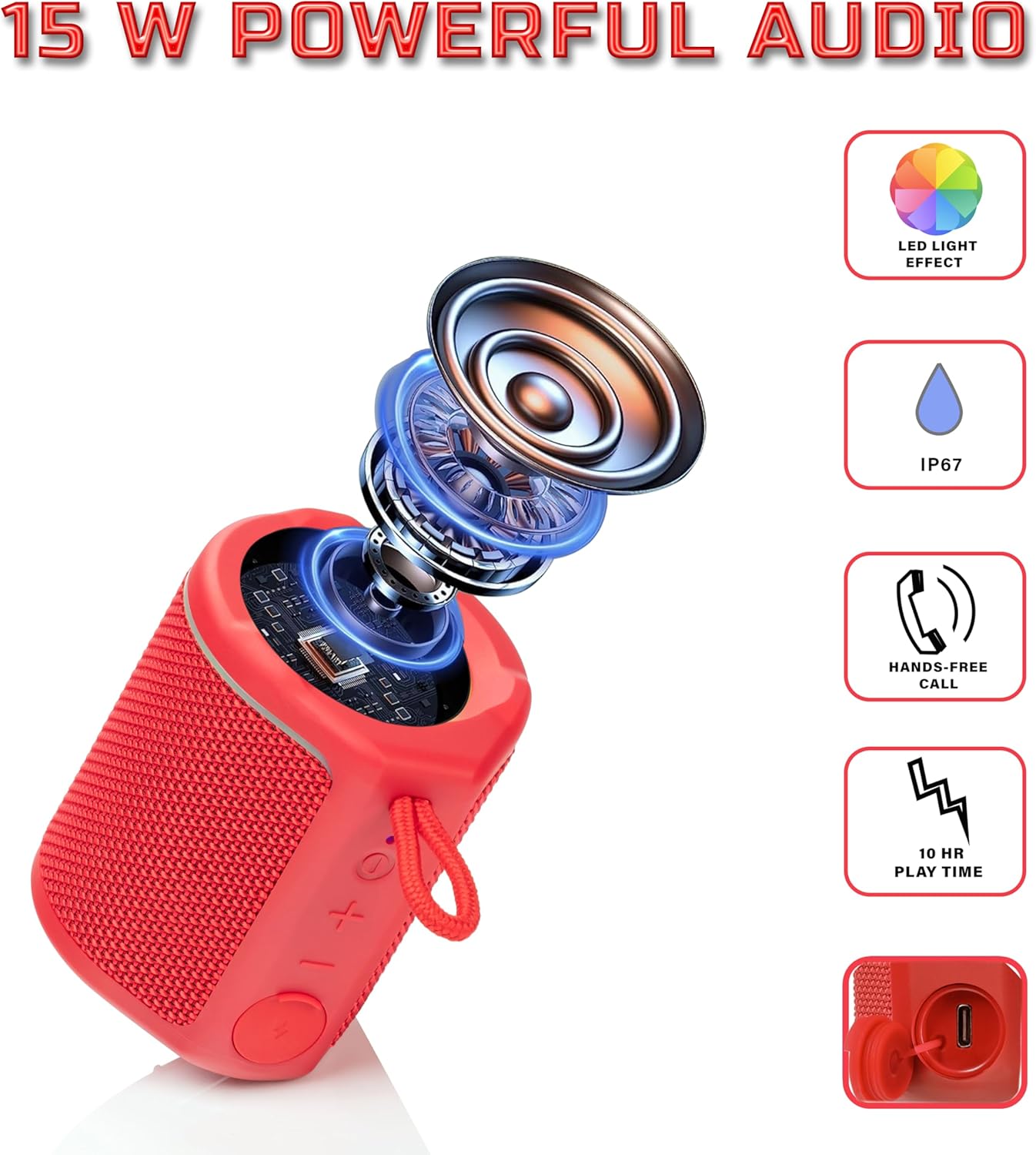
Diagram illustrating the internal components of the Sharp GX-BT190 speaker, including the speaker driver, and highlighting features like LED light effect, IP67 rating, hands-free call function, and battery life.
| Особливість | Деталь |
|---|---|
| Номер моделі | GX-BT190 |
| Технологія підключення | Bluetooth |
| Максимальна вихідна потужність динаміка | 10 Вт |
| Рейтинг водонепроникності | IP67 |
| Термін служби батареї | До 15 годин |
| Тип батареї | 1 літій-іонний (в комплекті) |
| Ємність акумулятора | 1200 мАг |
| Розміри продукту (Д x Ш x В) | 7.5 x 7.5 x 7.5 см (приблизно) |
| Вага товару | 226.8 г (8 унцій) |
| Дальність бездротового зв'язку | До 33 футів |
| Додаткові функції | LED Light, True Wireless Stereo (TWS), Hands-Free Calling |
10. Гарантія
The Sharp GX-BT190 Portable Bluetooth Speaker comes with a 1-Year Limited Warranty from the date of purchase. This warranty covers manufacturing defects under normal use. It does not cover damage caused by misuse, accidents, unauthorized modifications, or normal wear and tear. Please retain your proof of purchase for warranty claims.
11. Підтримка
For technical assistance, warranty inquiries, or further information regarding your Sharp GX-BT190 speaker, please contact Sharp Inc. customer support:
- Контактна особа виробника: Sharp Inc
- телефон: 1-800-BE-SHARP