
1. Вступ
Thank you for choosing the EasySMX T37 Wireless Switch Pro Controller. This manual provides detailed instructions for setting up, operating, maintaining, and troubleshooting your controller. Please read this manual carefully before use to ensure optimal performance and longevity of your device. This controller is compatible with Nintendo Switch, Switch Lite, and Switch OLED consoles.
2. Продукт закінчивсяview
The EasySMX T37 is a wireless gamepad designed for an enhanced gaming experience on Nintendo Switch systems. It features an ergonomic design, dual turbo vibration, and 6-axis gyro motion control.

Зображення 2.1: спереду view of the EasySMX T37 Wireless Switch Pro Controller, showcasinзавдяки своїй ергономічній формі та розташуванню кнопок.
3. Налаштування
3.1 Сполучення з Nintendo Switch
- Увімкніть консоль Nintendo Switch.
- У меню HOME виберіть Контролери > Змінити захоплення/порядок.
- On the EasySMX T37 controller, press and hold the кнопка SYNC (located on the top edge of the controller) for 3 seconds until the LED indicators start flashing rapidly.
- Once the controller is successfully paired, the player LED(s) on the bottom of the controller will light up solid.
3.2 Заряджання контролера
Connect the provided USB-C charging cable to the USB-C port on the controller and the other end to a USB power source (e.g., Switch dock, USB wall adapter, computer USB port). The LED indicators will show charging status and turn off when fully charged.
4. Інструкція з експлуатації
4.1 Основні елементи керування
The controller features standard button layouts for Nintendo Switch compatibility:
- Кнопки A/B/X/Y: Кнопки дій.
- D-Pad: Спрямований вхід.
- Лівий/правий аналогові джойстики: Рух і керування камерою.
- Кнопки L/R/ZL/ZR: Плечові та спускові кнопки.
- Кнопка "Додому: Повернення до меню Switch HOME.
- Кнопка ЗЙОМКИ: Робить скріншоти.
- PLUS (+) / MINUS (-) Buttons: Функції «Пуск/Вибір».

Image 4.1: A user holding the EasySMX T37 controller, demonstrating the comfortable grip and accessible button placement during gameplay.
4.2 Функція Турбо
The Turbo function allows for rapid, automatic pressing of a button, useful in action or arcade games.
- Активувати Турбо: Press and hold the desired action button (A/B/X/Y/L/R/ZL/ZR), then press the Турбо кнопка (T button). The button will now auto-fire.
- Відрегулюйте Turbo Speed: Тримаючи Турбо кнопка, перемістіть Правий аналоговий стік вгору або вниз to cycle through three speeds: 5 shots/s, 12 shots/s, and 20 shots/s.
- Вимкнути Турбо: Repeat the activation step (hold the action button, then press the Turbo button) or press and hold the Турбо кнопка for 5 seconds to clear all Turbo settings.
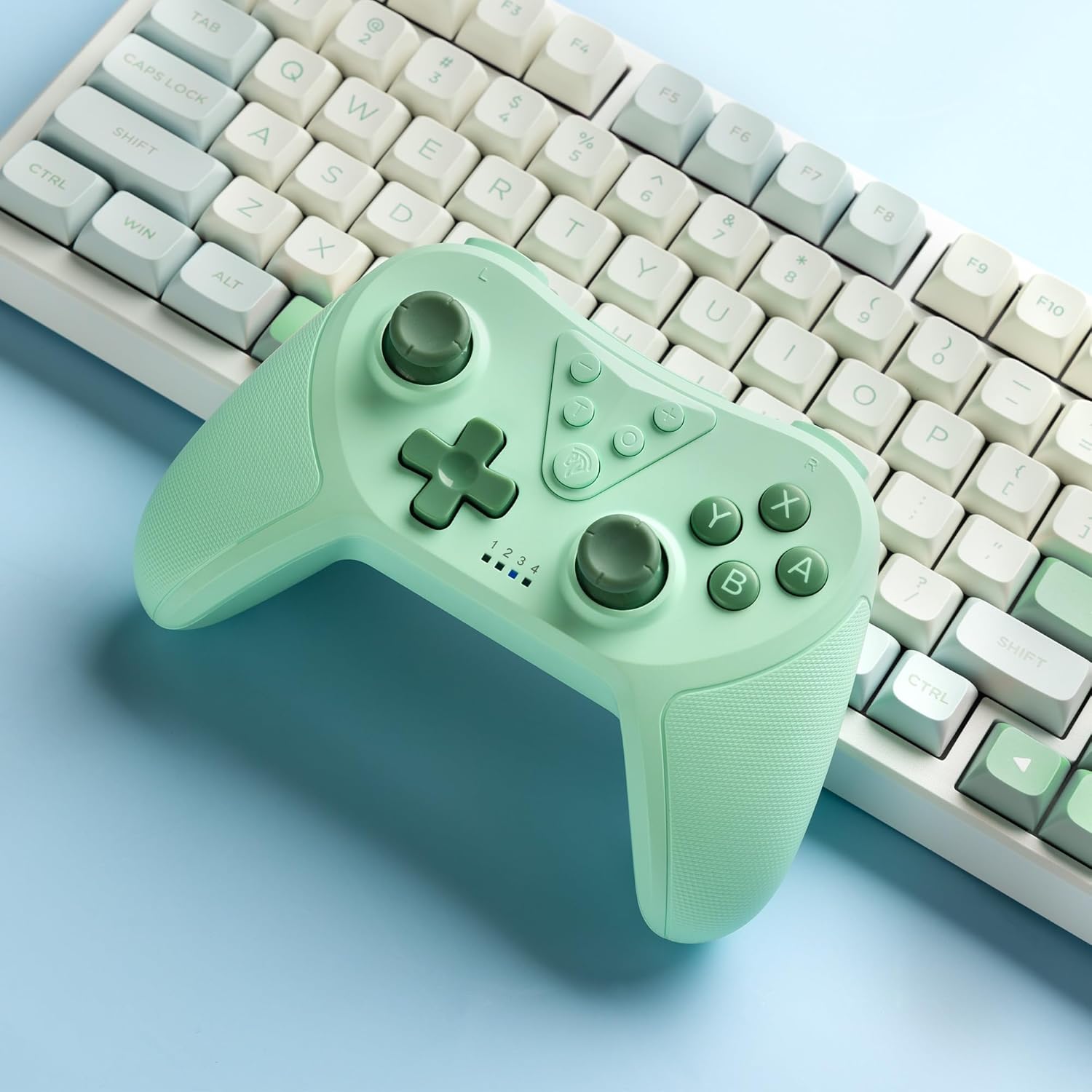
Image 4.2: Illustration of the Turbo function on the EasySMX T37 controller, showing the three adjustable speeds: 5, 12, and 20 shots per second.
4.3 Регулювання вібрації
The controller features dual motors for adjustable vibration feedback, enhancing immersion in games.
- Налаштувати інтенсивність вібрації: Натисніть і утримуйте Турбо кнопка, потім перемістіть Left Analog Stick Up or Down to cycle through four vibration levels: 0% (off), 30%, 70%, and 100%.

Image 4.3: Visual representation of the Dual Vibration feature on the EasySMX T37 controller, indicating four intensity levels from 0% to 100%.
4.4 Керування рухом 6-осьового гіроскопа
The built-in 6-axis gyroscope provides precise motion sensing, allowing for intuitive control in games that support motion input.

Image 4.4: Illustration depicting the 6-Axis Gyro Motion Control feature of the EasySMX T37 controller, showing how it interacts with a game on the Nintendo Switch screen.
5. Технічне обслуговування
- Прибирання: Використовуйте м’яку суху тканину для очищення контролера. Уникайте використання агресивних хімікатів або абразивних матеріалів.
- Зберігання: Зберігайте контролер у прохолодному, сухому місці, подалі від прямих сонячних променів та екстремальних температур.
- Догляд за акумулятором: Щоб продовжити термін служби акумулятора, уникайте частого повного розряджання контролера. Регулярно заряджайте його, навіть якщо він не використовується протягом тривалого часу.
- Уникайте крапель: Захищайте контролер від падінь та ударів, які можуть пошкодити внутрішні компоненти.
6. Вирішення проблем
6.1 Контролер не підключається
- Переконайтеся, що контролер заряджений.
- Verify the Switch console is updated to the latest system version.
- Try re-pairing the controller by following the steps in Section 3.1.
- If issues persist, try resetting the controller by inserting a thin object into the small reset hole (if present, usually on the back) for a few seconds.
6.2 Buttons Unresponsive or Lagging
- Переконайтеся, що контролер повністю заряджений.
- Move closer to the Switch console to ensure a strong wireless connection.
- Перевірте наявність будь-яких фізичних перешкод або сміття навколо кнопок.
- Повторно підключіть контролер.
6.3 Controller Not Charging
- Ensure the USB-C cable is securely connected to both the controller and the power source.
- Спробуйте використати інший кабель USB-C або адаптер живлення.
- Переконайтеся, що джерело живлення справне.
7. Технічні характеристики
- модель: T37
- Підключення: Бездротовий (Bluetooth)
- Сумісність: Nintendo Switch, Switch Lite, Switch OLED
- особливості: Dual Turbo Function, Adjustable Vibration, 6-Axis Gyro Motion Control, Ergonomic Design
- Product Identifier (ASIN): B0CTTWN84L
8. Гарантія та підтримка
For warranty information, technical support, or further assistance, please refer to the official EasySMX webсайт або зверніться безпосередньо до служби підтримки клієнтів. Зберігайте чек про покупку для гарантійних претензій.