
вступ
This manual provides detailed instructions for the installation, operation, and maintenance of your Eiszuso 150M USB2.0 Wireless Network Card. This device is designed to provide wireless connectivity for computers running Windows, Linux, and Android operating systems, featuring a detachable 2dBi antenna for enhanced signal reception.

Image: The Eiszuso 150M USB2.0 Wireless Network Card with its detachable 2dBi antenna.
Вміст упаковки
Будь ласка, перевірте наявність усіх предметів у вашій упаковці:
- Eiszuso 150M USB2.0 Wireless Network Card
- Detachable 2dBi Omnidirectional Antenna
- Driver CD (if included)
Інструкції з налаштування
- Підключіть антену: Carefully screw the detachable 2dBi omnidirectional antenna onto the USB wireless network card. Ensure it is securely fastened but do not overtighten.
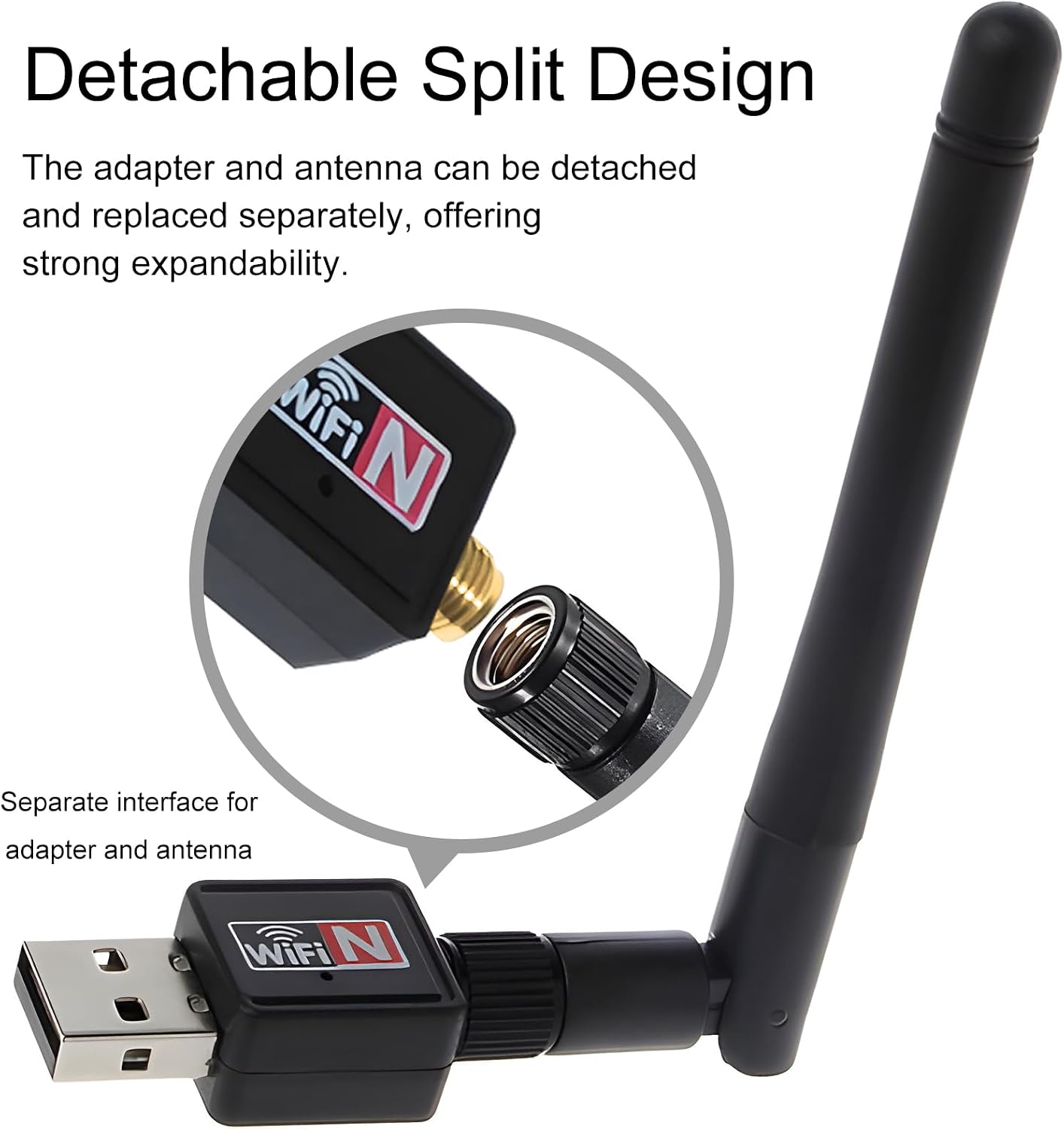
Image: Illustration of how to attach the detachable antenna to the USB adapter.
- Insert into USB Port: Plug the assembled wireless network card into an available USB 2.0 port on your computer or compatible device.
- Встановлення драйвера:
- Windows:
For most modern Windows operating systems (Windows 10/11), the driver may install automatically. If not, insert the provided driver CD and follow the on-screen instructions. Alternatively, download the latest driver from the Eiszuso support website (if available) by searching for "RTL8188ETV driver".
- Linux:
Linux distributions often have built-in support for the RTL8188ETV chipset. If the device is not recognized automatically, you may need to install specific kernel modules or drivers. Consult your distribution's documentation or community forums for "RTL8188ETV Linux driver installation".
- Android:
For Android devices, driver support is typically integrated into the device's firmware. Ensure your Android device supports external USB Wi-Fi adapters. No separate driver installation is usually required.

Image: The network card is compatible with Windows, Linux, and Android operating systems.
- Windows:
Інструкція з експлуатації
- Connect to a Wireless Network (Windows/Linux):
- Once the driver is installed, your system should detect the wireless network card.
- Open your operating system's network settings or Wi-Fi menu.
- Виберіть потрібну мережу Wi-Fi (SSID) зі списку доступних мереж.
- Введіть пароль мережі (ключ безпеки), якщо буде запропоновано.
- The device should now connect to the wireless network.
- Adjusting Antenna Position: The antenna supports multi-dimensional rotation (360° vertical, 90° horizontal) to optimize signal reception. Adjust its position for the best signal strength and stability.

Image: The antenna can be rotated 360 degrees vertically and 90 degrees horizontally for optimal signal reception.
- Using with Android Devices:
For Android devices, ensure the device supports USB OTG (On-The-Go) and external Wi-Fi adapters. Once plugged in, the Android system should automatically recognize and use the adapter for wireless connectivity.
Технічне обслуговування
- Прибирання: Використовуйте м’яку суху тканину для очищення пристрою. Не використовуйте рідкі засоби для чищення або розчинники.
- Догляд за антеною: Handle the detachable antenna with care. Avoid excessive force when attaching or detaching it.
- Зберігання: Коли пристрій не використовується, зберігайте його в прохолодному сухому місці подалі від прямих сонячних променів і екстремальних температур.
- Оновлення прошивки/драйвера: Periodically check the Eiszuso support website for updated drivers or firmware to ensure optimal performance and compatibility.
Усунення несправностей
- Пристрій не виявлено:
- Ensure the device is fully plugged into a functional USB port.
- Спробуйте інший USB-порт.
- Перевстановіть драйвери.
- Перезавантажте комп'ютер.
- Не вдається підключитися до Wi-Fi:
- Verify that the correct Wi-Fi password has been entered.
- Переконайтеся, що ваш роутер увімкнено та транслює сигнал.
- Перевірте, чи можуть інші пристрої підключитися до тієї ж мережі Wi-Fi.
- Відрегулюйте положення антени для кращого прийому сигналу.
- Restart your router and the computer.
- Низька швидкість з'єднання:
- Ensure the antenna is positioned optimally.
- Перевірте наявність перешкод від інших електронних пристроїв.
- Update the device drivers.
- Verify that your internet service provider is delivering the expected speed.
Технічні характеристики
| Особливість | Деталь |
|---|---|
| Модель | RTL8188ETV |
| Інтерфейс | USB 2.0 |
| Бездротовий стандарт | IEEE 802.11n/g/b |
| Швидкість передачі даних | До 150 Мбіт/с |
| Тип антени | Detachable 2dBi Omnidirectional Antenna |
| Операційні системи | Windows, Linux, Android |
| Чіпсет | RTL8188ETV |
| Розміри (прибл.) | 5.16 x 3.19 x 0.75 дюйма (упаковка) |
| Вага (прибл.) | 0.634 унції |

Image: Approximate dimensions of the Eiszuso USB Wireless Network Card.
Гарантія та підтримка
For warranty information and technical support, please refer to the documentation provided with your purchase or visit the official Eiszuso webсайт. Зберігайте чек про покупку для гарантійних претензій.