
1. Вступ
Thank you for choosing the Aveek Mini Karaoke Machine V9. This portable Bluetooth speaker with wireless microphones is designed to provide an enjoyable and interactive audio experience. This manual provides detailed instructions for setup, operation, and maintenance to ensure optimal performance and longevity of your device.
2. Вміст упаковки
Після розпакування, будь ласка, перевірте наявність усіх перелічених нижче предметів:
- 1 x Aveek Mini Karaoke Speaker
- 2 x бездротові мікрофони
- 1 x USB-кабель для зарядки
- 1 x Посібник користувача (цей документ)

Image: Contents of the Aveek Mini Karaoke Machine V9 package, showing the speaker, two wireless microphones, a charging cable, and the user manual.
3. Продукт закінчивсяview
The Aveek Mini Karaoke Machine V9 combines a portable Bluetooth speaker with two wireless microphones, offering versatile entertainment options. It features vibrant LED lights, multiple voice changing effects, and broad compatibility with various audio sources.
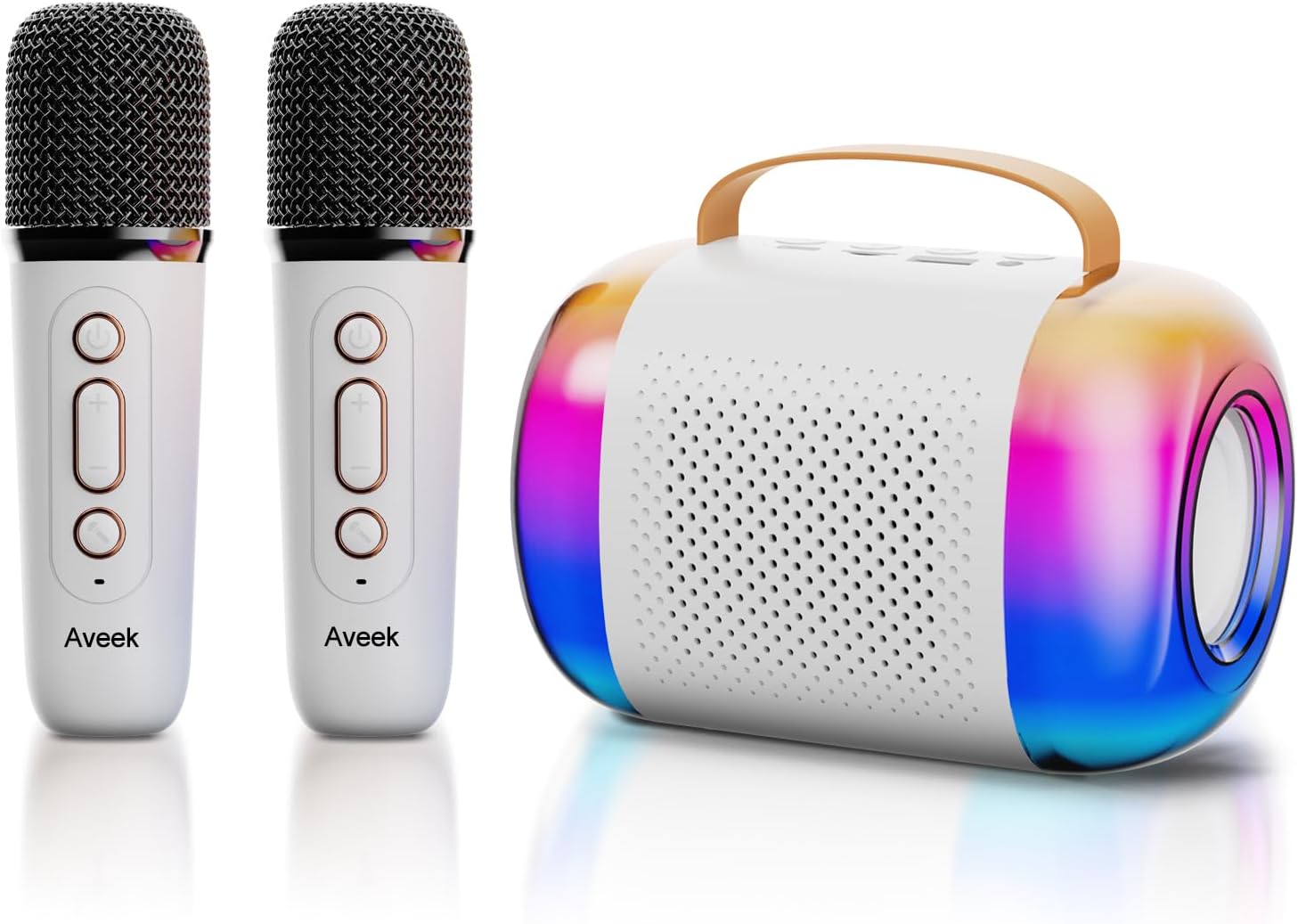
Image: The Aveek Mini Karaoke Machine V9, featuring the main speaker unit with colorful LED lights and two accompanying white wireless microphones.
Особливості динаміка:
- Підключення Bluetooth 5.3: Ensures stable wireless connection up to 50 feet.
- Кілька варіантів відтворення: Supports Bluetooth, TF card, USB drive, and AUX input.
- Динамічні світлодіодні ліхтарі: 5 ambient light modes that synchronize with music rhythm.
- Портативний дизайн: Lightweight with a convenient handle for easy transport.
- Високоякісний звук: Equipped with 2 x 52 tweeters and a 4060 bass diaphragm for clear stereo sound.

Зображення: Вибух view of the Aveek Mini Karaoke Machine V9 speaker, illustrating its internal audio components including tweeters and a bass diaphragm.
Особливості мікрофона:
- Бездротова робота: Provides freedom of movement during performances.
- Зміна голосу: Includes 4 magic voice effects (Original, Female, Male, Baby, Monster).
- Перезаряджається: Built-in Lithium Polymer batteries.

Image: A visual representation of the five voice changing options available on the Aveek Mini Karaoke Machine V9, including original, female, male, baby, and monster voices.
4. Інструкції з налаштування
4.1 Зарядка пристрою
The karaoke machine speaker and microphones are equipped with rechargeable Lithium Polymer batteries. Use the provided USB charging cable to charge them.
- Connect the USB charging cable to the Type-C charging port on the speaker and microphones.
- Підключіть інший кінець USB-кабелю до сумісного USB-адаптера живлення (не входить до комплекту) або USB-порту комп’ютера.
- The indicator light will show charging status (Red for charging, Blue for Bluetooth connection).
- Час зарядки: Speaker: 3.5-4 hours; Microphones: 2.5 hours.
- Час роботи: Speaker: 5-6 hours; Microphones: 3-4 hours.
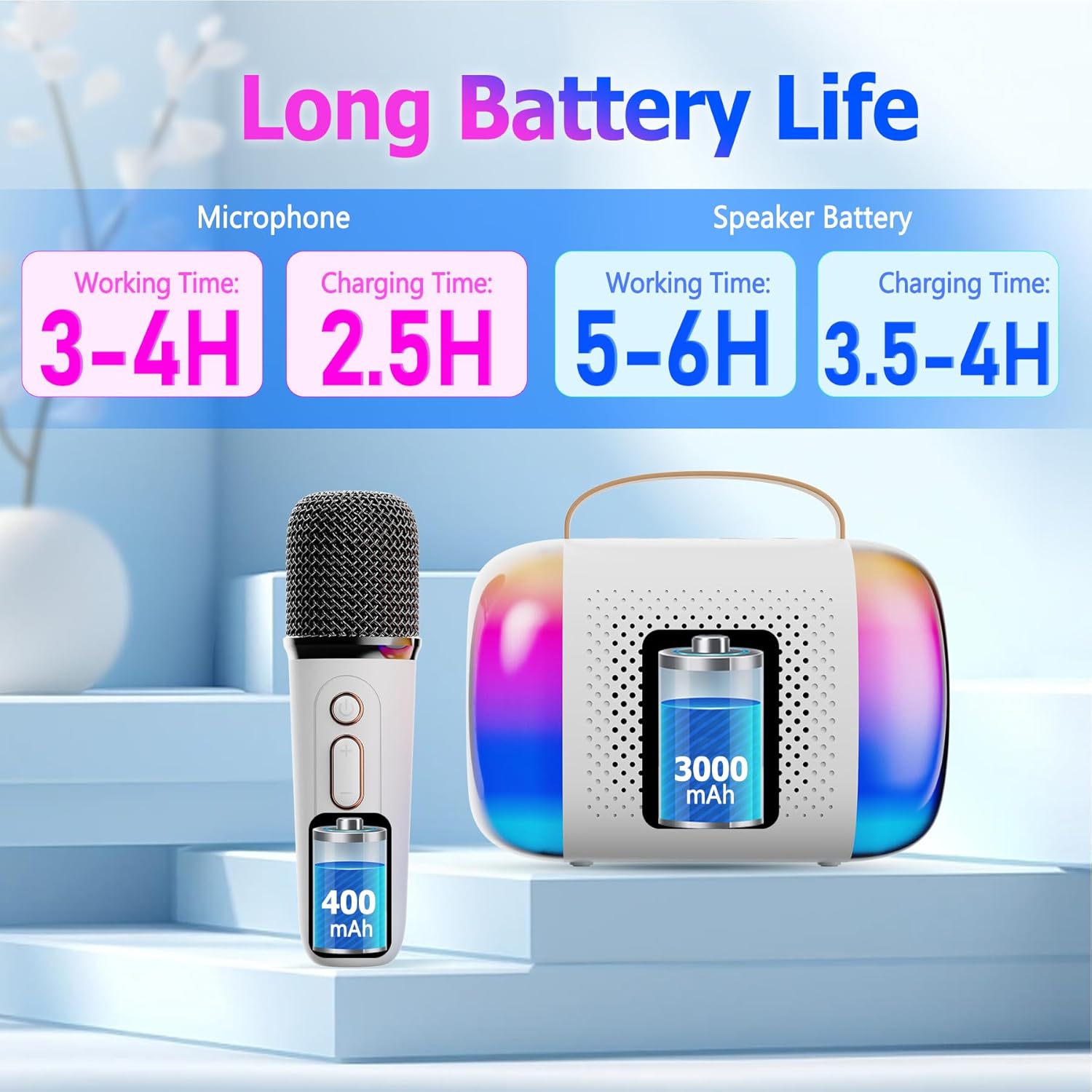
Image: A diagram illustrating the working and charging times for both the Aveek Mini Karaoke Machine V9 speaker and its wireless microphones.
4.2 Pairing Microphones with Speaker
The microphones are designed to automatically pair with the speaker when both are powered on. Ensure both devices are charged before attempting to pair.
- Power on the speaker by long pressing the Power ON/OFF Key.
- Power on each microphone by long pressing its Microphone ON/OFF button.
- The microphones should automatically connect to the speaker. A blue indicator light on the microphone signifies a successful Bluetooth connection.
4.3 Connecting to a Bluetooth Device (Phone, Tablet, PC)
To play music through the speaker, connect it to your preferred Bluetooth-enabled device.
- Ensure the karaoke speaker is powered on and in Bluetooth pairing mode (usually indicated by a flashing light).
- На вашому пристрої (телефоні, планшеті, ПК) перейдіть до налаштувань Bluetooth.
- шукати available devices and select "Aveek V9" (or similar name) to connect.
- Once connected, you can play music from your device through the karaoke speaker.

Image: The Aveek Mini Karaoke Machine V9 demonstrating its Bluetooth 5.3 connectivity and various input options including USB Drive, TF Card, Bluetooth, and Headphone/AUX.
5. Інструкція з експлуатації
5.1-динамічне керування

Image: Detailed diagram of the Aveek Mini Karaoke Machine V9 speaker, labeling its indicator light, Type-C charging port, TF card slot, USB-A drive interface, AUX 3.5mm audio input, and control buttons (-, +, Mode, Power ON/OFF).
- Клавіша УВІМК./ВИМК. живлення: Long press to turn on/off. Short press to play/pause music.
- Клавіша режиму: Double click to switch light modes. Long press to turn on/off the color lights.
- - Ключ: Long press for previous music. Short press to decrease volume (3 levels).
- + Ключ: Long press for next music. Short press to increase volume (3 levels).
- Світловий індикатор: Red for charging, Blue for Bluetooth connection.
- Порт зарядки Type-C: Для зарядки колонки.
- Слот для картки TF: Вставте TF-карту для відтворення музики.
- USB-A USB Drive Interface: Insert a USB drive for music playback.
- AUX 3.5mm Audio Input: Підключіть зовнішні аудіопристрої за допомогою кабелю AUX.
5.2 Елементи керування мікрофоном

Image: Detailed diagram of the Aveek Mini Karaoke Machine V9 wireless microphone, labeling its Microphone ON/OFF button, Bluetooth/Charging Indicator, Type-C Charging Port, and control buttons (Power ON/OFF, +, -).
- УВІМК/ВИМК мікрофона: Long press to turn the mic on/off. Short press to change voice mode. Double click to open/close accompaniment.
- Клавіша УВІМК./ВИМК. живлення: Long press to turn on/off. Short press to adjust microphone/reverberation/accompaniment. Double click playback pause.
- + Ключ: Long press to play the next music. Short press to increase volume + / reverb volume +.
- - Ключ: Short press to decrease reverb volume - / accompaniment volume -. Long press to play the previous music.
- Bluetooth/Charging Indicator: Blue light for Bluetooth connection, Red light for charging.
- Порт зарядки Type-C: Для заряджання мікрофона.
5.3 функцій зміни голосу
The microphones feature 4 unique voice changing effects in addition to the original voice. To cycle through these modes, short press the Microphone ON/OFF button.
- Оригінальний голос
- Жіночий голос
- Чоловічий голос
- Дитячий голос
- Голос монстра
5.4 світлових режимів
The speaker features 5 ambient LED light modes that can be changed by double-clicking the Mode Key on the speaker. Long press the Mode Key to turn the lights on or off.
6. Технічне обслуговування
- Прибирання: Use a soft, dry cloth to clean the speaker and microphones. Do not use liquid cleaners or abrasive materials.
- Зберігання: Зберігайте пристрій у прохолодному, сухому місці, подалі від прямих сонячних променів та екстремальних температур.
- Догляд за акумулятором: To prolong battery life, avoid fully discharging the batteries frequently. Charge the device regularly, even if not in use for extended periods.
- Вплив води: Цей пристрій не є водонепроникним. Уникайте впливу води або високої вологості.
7. Вирішення проблем
| проблема | Можлива причина | Рішення |
|---|---|---|
| Пристрій не включається. | Низький заряд батареї. | Charge the speaker/microphones fully using the provided USB cable. |
| Microphones not connecting to speaker. | Microphones are not powered on or out of range. | Ensure microphones are powered on and within 50 feet of the speaker. Re-pair if necessary. |
| Немає звуку з динаміка. | Volume too low, device not connected, or incorrect input mode. | Increase volume on both speaker and connected device. Verify Bluetooth/AUX/TF/USB connection. |
| Погана якість звуку/шум. | Interference, low microphone battery, or distance. | Move away from other electronic devices. Charge microphones. Reduce distance between mic and speaker. |
| Voice changer not working. | Неправильне натискання кнопки. | Short press the Microphone ON/OFF button to cycle through voice modes. |
8. Технічні характеристики
| Особливість | Деталь |
|---|---|
| Бренд | Авік |
| Назва моделі | V9 |
| Технологія підключення | Bluetooth 5.3 (Speaker), VHF (Microphones) |
| Джерело живлення | Живлення від батареї (2 літій-полімерні батареї в комплекті) |
| Розміри динаміка (Д x Ш x В) | 10.5 x 2.1 x 3.5 дюймів |
| Вага товару | 0.353 унції (приблизно 10 грамів) |
| матеріал | Метал, пластик |
| Співвідношення сигнал-шум | 96 дБ |
| Кількість каналів | 2 |
| Особливості | Battery Indicator Light, Voice Changer, RGB Lights |
| Сумісні пристрої | Amplifier, Audio Interface, Audio Mixer, Karaoke Machine, Speaker (via various inputs) |
| Вхідні порти | TF Card Slot, USB-A Drive Interface, AUX 3.5mm Jack |
9. Гарантія та підтримка
For warranty information and customer support, please refer to the product packaging or contact Aveek customer service directly. Keep your purchase receipt for any warranty claims.