
вступ
This manual provides essential instructions for the proper setup, operation, and maintenance of your 3nStar PTA0157-432 All-in-One POS System. Please read this manual thoroughly before using the device to ensure optimal performance and longevity.
Інформація про безпеку
Observe the following safety precautions to prevent damage to the device or injury to yourself and others:
- Не піддавайте пристрій впливу води або надмірної вологи.
- Уникайте розміщення пристрою поблизу джерел тепла або під прямими сонячними променями.
- Використовуйте лише наданий адаптер змінного струму.
- Не намагайтеся самостійно відкривати або ремонтувати пристрій. Звертайтеся до кваліфікованого персоналу для проведення будь-яких робіт з обслуговування.
- Забезпечте належну вентиляцію навколо пристрою під час роботи.
Вміст упаковки
Перевірте наявність усіх елементів в упаковці:
- 3nStar PTA0157-432 All-in-One POS System
- Адаптер змінного струму
- Посібник користувача (цей документ)
Продукт закінченийview
The 3nStar PTA0157-432 is a 15.6-inch All-in-One Point of Sale system designed for various business environments. It features a 10-point capacitive touchscreen, runs on Android 11, and is powered by a Quad-Core processor with 4GB RAM and 32GB storage. Integrated Wi-Fi and Bluetooth connectivity are also included.

Малюнок 1: Спереду view of the 3nStar PTA0157-432 All-in-One POS System, showcasing the 15.6-inch display and integrated stand.

Figure 2: A user interacting with the 10-point capacitive touchscreen of the POS system, demonstrating its touch responsiveness.

Малюнок 3: Задня частина view of the 3nStar POS System, showing the ventilation slots and the sturdy integrated stand.
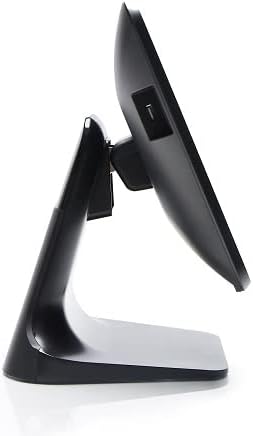
Рисунок 4: Бічний профіfile of the 3nStar POS System, highlighting its slim design and adjustable screen angle.
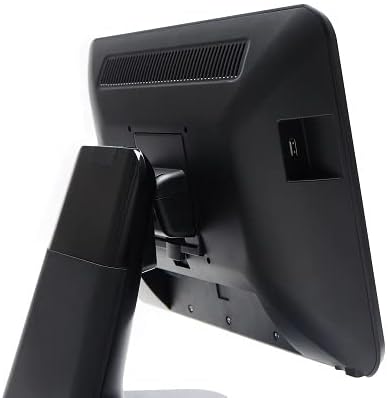
Рисунок 5: Задня сторона view of the 3nStar POS System, illustrating the location of various connectivity ports for peripherals.
Налаштування
- Розпакуйте систему: Carefully remove the POS system and all accessories from the packaging.
- Розташування системи: Place the POS system on a stable, flat surface, ensuring adequate ventilation around the device.
- Підключіть живлення: Connect the AC adapter to the power input port on the back of the POS system, then plug the adapter into a standard electrical outlet.
- Початкове ввімкнення: Press the power button, usually located on the side or back of the display. The system will boot up to the Android 11 operating system.
- Початкова конфігурація: Follow the on-screen prompts to complete the initial Android setup, including language selection, Wi-Fi connection, and Google account setup (optional).
- Підключення периферійних пристроїв: Connect any necessary peripherals such as barcode scanners, receipt printers, or cash drawers to the available USB or other designated ports. Refer to the peripheral's manual for specific connection instructions.
Інструкція з експлуатації
The 3nStar PTA0157-432 operates on Android 11, providing a familiar and intuitive user experience.
Основна навігація
- Сенсорний екран: Use your fingers to tap, swipe, pinch, and zoom on the 15.6-inch capacitive display.
- Головний екран: Access your installed applications and widgets from the main home screen.
- Ящик програм: Swipe up from the bottom of the screen or tap the app drawer icon to view всі встановлені програми.
- Сповіщення: Проведіть пальцем униз від верхньої частини екрана, щоб отримати доступ до сповіщень та швидких налаштувань.
Підключення до Wi-Fi
- Перейти до Налаштування > Мережа та Інтернет > Wi-Fi.
- Увімкнути/вимкнути Wi-Fi On.
- Виберіть потрібну мережу зі списку та введіть пароль, якщо буде запропоновано.
Підключення пристроїв Bluetooth
- Перейти до Налаштування > Підключені пристрої > Параметри підключення > Bluetooth.
- Увімкнути Bluetooth On.
- Переконайтеся, що ваш пристрій Bluetooth перебуває в режимі сполучення.
- Виберіть пристрій зі списку для сполучення.
Using POS Software
The system is designed to run various Android-compatible Point of Sale applications. Install your preferred POS software from the Google Play Store or other trusted sources. Refer to your specific POS software's documentation for detailed usage instructions.
Технічне обслуговування
Очищення пристрою
- екран: Злегка протріть м’якою тканиною без ворсу dampened with water or a screen cleaner specifically designed for electronic displays. Do not spray cleaner directly onto the screen.
- Тіло: Wipe the exterior surfaces with a soft, dry cloth. Avoid abrasive cleaners or solvents.
- Вентиляція: Ensure ventilation slots are free from dust and debris to prevent overheating. Use compressed air if necessary.
Оновлення програмного забезпечення
Regularly check for and install system updates for Android 11 to ensure optimal performance, security, and compatibility. Go to Налаштування > система > Оновлення системи.
Управління зберіганням
Monitor the 32GB internal storage to ensure sufficient space for applications and data. Delete unnecessary files or uninstall unused applications to free up space. Go to Налаштування > Зберігання.
Усунення несправностей
| проблема | Можлива причина | Рішення |
|---|---|---|
| Пристрій не включається. | Power cable not connected properly; AC adapter malfunction. | Ensure the AC adapter is securely connected to the device and a working power outlet. Test the outlet with another device. |
| Сенсорний екран не реагує. | Software glitch; screen dirty; physical damage. | Restart the device. Clean the screen with a soft cloth. If the issue persists, contact support. |
| Проблеми з підключенням до Wi-Fi. | Неправильний пароль; поза зоною досяжності; проблема з маршрутизатором. | Verify Wi-Fi password. Ensure the device is within range of the router. Restart the router and the POS system. |
| Peripheral (e.g., printer) not detected. | Incorrect connection; driver issue; peripheral not powered on. | Check physical connections. Ensure the peripheral is powered on. Install necessary drivers or apps for the peripheral. Restart the POS system. |
Технічні характеристики
| Особливість | Деталь |
|---|---|
| Номер моделі | PTA0157-432 |
| Операційна система | Android 11 |
| Розмір екрана | 15.6 дюймів |
| Роздільна здатність екрана | 1920 x 1080 пікселів |
| Сенсорний екран | 10-точковий ємнісний |
| Процесор | Quad-Core (Rockchip 3568, 2 GHz) |
| ОЗУ | 4 ГБ LPDDR4 |
| Зберігання | 32GB SSD (Flash Memory) |
| Графіка | Інтегрована графіка |
| Підключення | Wi-Fi, Bluetooth |
| Розміри продукту (ДxШxВ) | 10 x 13 x 16 дюймів |
| Вага товару | 11 фунта |
| Колір | чорний |
Гарантія та підтримка
For warranty information, technical support, or service inquiries, please refer to the official 3nStar webсайт або зверніться до свого авторизованого дилера. Зберігайте чек про покупку як підтвердження покупки для гарантійних претензій.
Online resources and frequently asked questions may be available on the manufacturer's support page: 3nStar Support