
вступ
This manual provides essential information for the installation, operation, maintenance, and troubleshooting of the Cisco Catalyst C9300L-24P-4X-E Network Essentials Switch. This device is designed for enterprise-grade access, offering 24 Gigabit PoE+ ports and four 10 Gbps SFP+ uplinks for robust network connectivity.
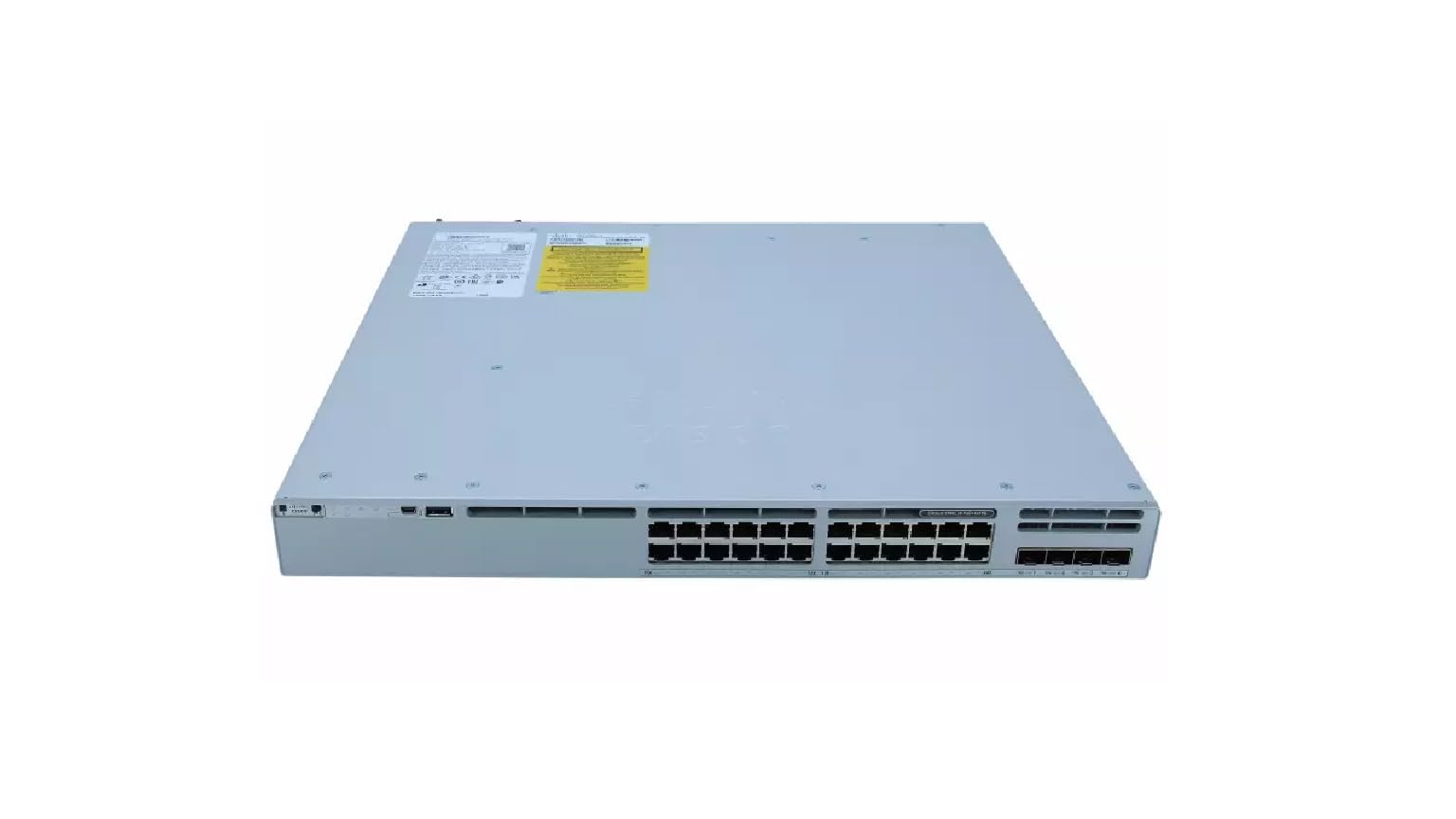
This image displays the rear panel of the Cisco Catalyst C9300L-24P-4X-E switch, highlighting the various ports, cooling fans, and the power supply unit.
Інформація про безпеку
Дотримуйтесь наступних запобіжних заходів, щоб запобігти травмам та пошкодженню обладнання:
- Перед підключенням живлення переконайтеся в належному заземленні.
- Не використовуйте вимикач у вологих або надмірно вологих середовищах.
- Використовуйте лише схвалені шнури живлення та аксесуари.
- Забезпечте належну вентиляцію, щоб запобігти перегріванню.
- Від’єднайте живлення перед виконанням будь-яких процедур технічного обслуговування або встановлення.
Вміст упаковки
Переконайтеся, що ваш пакет містить такі елементи:
- Cisco Catalyst C9300L-24P-4X-E Switch
- Шнур живлення
- Комплект для монтажу в стійку (за наявності)
- Консольний кабель (RJ-45 до DB-9)
- Документація (Короткий посібник, Інформація з безпеки)
Фізичний опис
The Cisco Catalyst C9300L-24P-4X-E switch features a robust design for network deployments. The rear panel includes:
- 24 Gigabit Ethernet PoE+ Ports: For connecting network devices and providing power over Ethernet.
- 4x 10Gbps SFP+ Uplink Ports: For high-speed connections to the distribution or core layer.
- Порт консолі: For command-line interface access.
- Порти USB: для file management and system configuration.
- Modular Power Supply Bay: For installing power supply units.
- Вентилятори охолодження: Для терморегуляції.
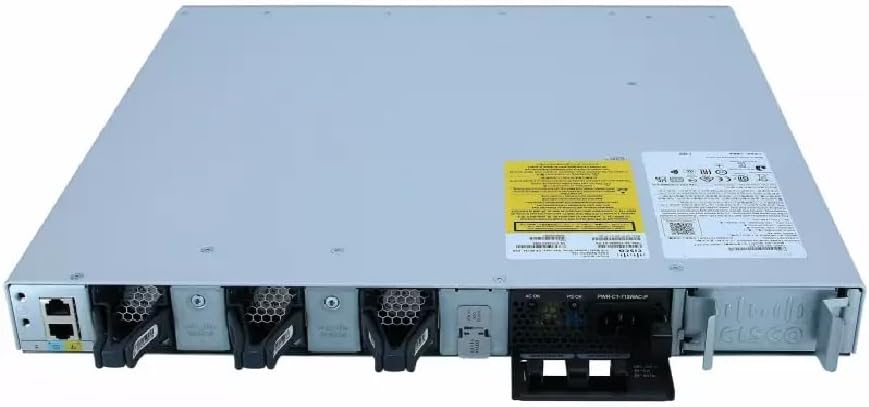
Детальний view of the rear panel of the Cisco Catalyst C9300L-24P-4X-E switch, illustrating the 24 Gigabit PoE+ ports, four 10Gbps SFP+ uplink ports, and the modular power supply bay.
Налаштування
1. Розпакування та перевірка
Carefully remove the switch from its packaging. Inspect the device for any signs of physical damage. If damage is found, contact your supplier immediately.
2. Монтаж комутатора
The switch can be mounted in a standard 19-inch equipment rack or placed on a desktop.
- Монтаж у стійку: Attach the provided rack-mount brackets to the sides of the switch using the screws. Secure the switch into the rack using appropriate rack screws.
- Встановлення на робочий стіл: Ensure the surface is flat, stable, and allows for adequate ventilation around the switch. Attach the rubber feet (if provided) to the bottom of the switch.
3. Підключення живлення
Insert the power cord into the AC power connector on the rear of the switch. Connect the other end of the power cord to a grounded electrical outlet. Ensure the power supply is properly seated in its bay.
4. Мережеві підключення
- Порти PoE+: Connect Ethernet cables from your network devices (e.g., IP phones, access points, surveillance cameras) to the 24 Gigabit PoE+ ports. These ports will provide both data connectivity and power.
- Порти SFP+ Uplink: Insert compatible SFP+ transceivers into the four 10Gbps SFP+ uplink ports. Connect fiber optic cables from these transceivers to your distribution or core network devices.
- Порт консолі: For initial configuration or troubleshooting, connect a console cable from your management workstation to the console port on the switch.
Керування комутатором
1. Початкове увімкнення
After connecting power, the switch will automatically power on. Observe the system LED indicators for boot status. The system LED should turn green once the boot process is complete.
2. Базова конфігурація
The Cisco Catalyst C9300L-24P-4X-E runs on Cisco IOS XE. Initial configuration can be performed via the console port using a command-line interface (CLI) or through a web-based graphical user interface (GUI) if enabled. Refer to Cisco's official documentation for detailed configuration guides.
3. Світлодіодні індикатори
The switch features various LED indicators to provide status information:
- Індикатор системи: Indicates overall system status (e.g., green for normal operation, amber for warning).
- Світлодіод PoE: Indicates Power over Ethernet status for the ports.
- Світлодіоди стану порту: Вказує стан з'єднання та активність для кожного мережевого порту.
Технічне обслуговування
Регулярне технічне обслуговування забезпечує оптимальну продуктивність та довговічність вашого комутатора:
- Прибирання: Періодично очищуйте зовнішню частину комутатора м’якою сухою тканиною. Переконайтеся, що вентиляційні отвори не містять пилу та сміття. Не використовуйте рідкі засоби для чищення безпосередньо на пристрої.
- Оновлення прошивки: Keep the switch firmware updated to the latest version provided by Cisco. This ensures access to new features, security patches, and performance improvements.
- Екологічний контроль: Підтримуйте робоче середовище в межах заданих діапазонів температури та вологості, щоб запобігти виходу з ладу обладнання.
- Управління кабелем: Ensure all cables are neatly organized and properly secured to prevent accidental disconnections or damage.
Усунення несправностей
Якщо у вас виникли проблеми з комутатором, розгляньте такі кроки для усунення несправностей:
- Немає живлення: Verify the power cord is securely connected to both the switch and the power outlet. Check the power source and any circuit breakers. Ensure the power supply unit is correctly installed.
- Немає підключення до мережі: Check the link status LEDs on the affected ports. Ensure Ethernet cables are properly connected and undamaged. Verify connected devices are powered on and functioning correctly.
- Пристрій PoE не вмикається: Confirm the PoE+ port is enabled and the device is PoE compatible. Check the PoE budget and ensure it's not exceeded.
- Повільна продуктивність: Check for network congestion, duplex mismatches, or errors on ports. Ensure uplink bandwidth is sufficient.
- Accessing the Switch: If unable to access via network, try connecting directly to the console port for CLI access.
Технічні характеристики
| Особливість | Деталь |
|---|---|
| Бренд | Cisco |
| Номер моделі | C9300L-24P-4X-E |
| Кількість портів | 24 Gigabit PoE+ ports, 4x 10Gbps SFP+ uplinks |
| Інтерфейс | PoE, SFP+ |
| Швидкість передачі даних | 1 Gigabits Per Second (Gigabit Ethernet), 10 Gigabits Per Second (Uplinks) |
| томtage | 240 вольт (перемінний струм) |
| Тип перемикача | Managed, Fixed, PoE+, Layer 2 |
| Тип матеріалу корпусу | пластик |
| Сумісні пристрої | Desktop, Laptop, Printer (and other network devices) |
Інформація про гарантію
Цей продукт поставляється з a 90-денна обмежена гарантія. Please refer to the warranty documentation provided with your purchase for specific terms and conditions. For warranty claims, contact your reseller or the manufacturer's support channels.
Технічна підтримка
For further assistance, technical support, or advanced configuration guidance, please refer to the official Cisco documentation available on their website. You may also contact your authorized Cisco reseller or support provider for specialized assistance.
Підтримка Cisco Webсайт: https://www.cisco.com/c/en/us/support/index.html