
1. Вступ
Thank you for choosing the VOCOO Digital Kitchen Timer Model 5285W. This versatile timer is designed for various applications, including cooking, classroom management, home gym workouts, and more. Featuring an extra-large LED display, multiple alarm options, adjustable brightness, and convenient placement methods, it aims to simplify your timing needs.
2. Ключові характеристики
- Extra Large 7.8-inch LED Display: Clear, easy-to-read numbers visible from a distance.
- 3 рівнів яскравості: Adjustable display brightness (Dim/Medium/Bright) to suit any environment.
- 4 Alarm Options with 3 Volume Levels: Choose from different melodies and adjust volume (Loud, Medium, Soft).
- Versatile Timing Modes: Countdown from 99 hours 59 minutes or count up (stopwatch) from 0 to 99 hours 59 minutes 59 seconds.
- Акумуляторна батарея: Powered by an included C battery, with a low power indicator.
- Кілька варіантів розміщення: Strong silicone-covered magnets for metal surfaces, a fold-out stand for desktops, and a hanging hole.
- Інтуїтивно зрозуміле управління: Dedicated buttons for setting time, reset, and start/pause for ease of use.
3. Вміст упаковки
- VOCOO Digital Timer (Model 5285W)
- Штекер USB-C
- Зарядний кабель USB-C
- Посібник користувача
4. Продукт закінчивсяview
Familiarize yourself with the timer's display and control buttons.
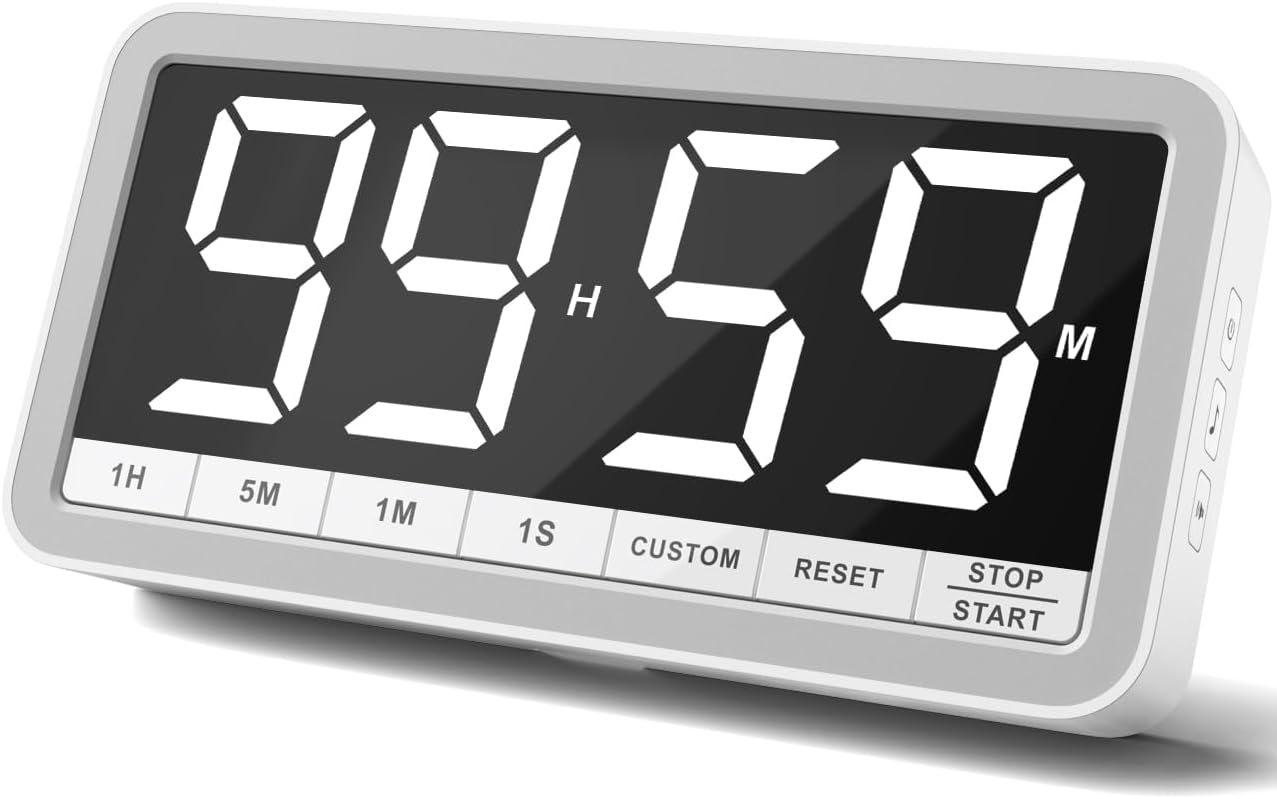
Кнопки на передній панелі:
- 1:XNUMX Add 1 hour
- 5M: Додати 5 хвилини
- 1M: Додати 1 хвилину
- 1S: Add 1 second
- МИТНА: Set/Recall custom time
- СКИДАТИ: Clear current time setting
- СТОП/ПУСК: Begin or pause timing
Side Panel Buttons:
- Кнопка живлення: Turn the timer On/Off. Also cycles through brightness levels (Dim/Medium/Bright) when pressed briefly while on.
- Кнопка музичної ноти: Cycle through 4 different alarm sounds.
- Speaker Icon Button: Cycle through 3 volume levels (Loud/Medium/Soft).
5. Налаштування
- Початкова оплата: Before first use, fully charge the timer using the provided USB-C cable and plug. A low power icon will indicate when charging is needed.
- Увімкнення: Press and hold the Power Button on the side for a few seconds to turn the timer on.
6. Інструкція з експлуатації
6.1. Режим таймера зворотного відліку
- Встановити час: Використовуйте 1H, 5M, 1M, і 1S buttons to set your desired countdown time. The maximum time is 99 hours 59 minutes.
- Початок зворотного відліку: Натисніть СТОП / СТАРТ кнопку, щоб розпочати зворотний відлік.
- Пауза/Відновлення: Прес СТОП / СТАРТ again to pause or resume the countdown.
- Скинути: Натисніть СКИДАННЯ button to clear the current time and return to 00:00.
- 1-Minute Reminder: When the countdown reaches 1 minute, the display digits will turn red to provide a visual alert.
- сигналізація: Once the timer reaches 00:00, the selected alarm will sound.

6.2. Count-Up Timer (Stopwatch) Mode
- Start Count-Up: Ensure the timer is at 00:00. Press the СТОП / СТАРТ button to begin counting up.
- Пауза/Відновлення: Прес СТОП / СТАРТ again to pause or resume the count-up.
- Скинути: Натисніть СКИДАННЯ button to clear the count-up time and return to 00:00.
6.3. Custom Time Setting
The ЗВИЧАЙНИЙ button allows you to save and quickly recall a frequently used time setting. To set a custom time, first set the desired time using the 1H, 5M, 1M, 1S buttons, then press and hold the ЗВИЧАЙНИЙ button until the display flashes, indicating the time is saved. To recall, simply press the ЗВИЧАЙНИЙ кнопку коротко.
6.4. Adjusting Alarm and Volume
Використовуйте Music Note Button on the side to cycle through the 4 available alarm sounds. Use the Speaker Icon Button on the side to select one of the 3 volume levels (Loud, Medium, Soft).

6.5. Регулювання яскравості
Коротко натисніть Кнопка живлення on the side while the timer is on to cycle through the 3 brightness levels: Dim, Medium, and Bright.

7. Варіанти розміщення
The VOCOO Digital Kitchen Timer offers flexible placement options to suit your needs:
- Магнітне кріплення: Two strong magnets covered with silicone on the back allow you to securely attach the timer to any metal surface, such as a refrigerator or whiteboard, without slipping or scratching.
- Настільна підставка: A built-in fold-out stand enables the timer to be placed upright on any flat surface, like a countertop or desk.
- висить: A hanging hole is provided on the back for wall mounting using a nail or hook.

8. Зарядка
The timer is powered by a rechargeable battery. Use the included USB-C cable and a 5V (output voltage) power plug to charge it. A low power sign will appear on the display to remind you when charging is needed. Using a power plug higher than 5V may damage the battery.
9. Технічне обслуговування
To ensure the longevity of your VOCOO Digital Kitchen Timer, follow these simple maintenance guidelines:
- Wipe the display and body with a soft, dry cloth.
- Уникайте використання абразивних засобів чи розчинників.
- Keep the timer away from extreme temperatures and direct sunlight.
- Не занурюйте таймер у воду та не піддавайте його впливу надмірної вологи.
10. Вирішення проблем
If you encounter any issues with your timer, please refer to the following common solutions:
- Дисплей не вмикається: Ensure the timer is charged. Connect it to the USB-C charger and allow it to charge for at least 30 minutes before attempting to power it on again.
- Сигналізація не звучить: Check the volume level using the Speaker Icon Button on the side. Ensure it is not set to 'LO0' (silent).
- Incorrect time setting: Press the RESET button to clear the current setting, then re-enter the desired time using the 1H, 5M, 1M, and 1S buttons.
- Timer not responding: Try turning the timer off and then on again using the Power Button.
11. Технічні характеристики
| Атрибут | Деталь |
|---|---|
| Бренд | VOCOO |
| Номер моделі | 5285 Вт |
| Колір | Білий |
| Розмір екрана | 7.8 дюймів |
| Розміри продукту | 1.38" Г x 8.27" Ш x 4.13" В |
| Вага товару | 9.5 унції (270 грама) |
| матеріал | Силікон |
| Акумулятори | Потрібна 1 батарейка типу C (входить до комплекту) |
12. Офіційне відео продукту
13. Підтримка
For any questions or support regarding your VOCOO Digital Kitchen Timer, please contact us at: support@vocoo.vip.com