
1. Вступ
This manual provides essential information for the safe and efficient operation of your NOVOPAL 5000 Watt Pure Sine Wave Power Inverter. This device converts 24V DC battery power into 110V/120V AC household electricity, suitable for powering a wide range of appliances and sensitive electronic equipment. It features a continuous power output of 5000 watts and a peak power of 10000 watts, an LCD display for monitoring, and a remote control for convenient operation.
2. Інформація про безпеку
Будь ласка, прочитайте та зрозумійте всі інструкції з безпеки перед встановленням або експлуатацією інвертора. Недотримання цих інструкцій може призвести до ураження електричним струмом, пожежі або серйозних травм.
- Правильна вентиляція: Переконайтеся, що інвертор встановлено в добре провітрюваному приміщенні, щоб запобігти перегріву.
- Правильний томtage: Connect the inverter only to a 24V DC power source. Connecting to a 12V DC source will not function, and connecting to a higher voltage може завдати шкоди.
- Заземлення: Інвертор повинен бути належним чином заземлений.
- Уникайте вологи: Не піддавайте інвертор впливу дощу, води або надмірної вологи.
- Вантажопідйомність: Do not exceed the inverter's continuous power rating of 5000 watts.
- Полярність: Always connect battery cables with correct polarity (positive to positive, negative to negative). Reverse polarity will damage the inverter.
- Вбудований запобіжник: The inverter has a built-in fuse. Do not attempt to install additional fuses internally.
The NOVOPAL inverter includes comprehensive safety features:
- Захист від перегріву
- Захист від короткого замикання
- Undervoltage Захист
- Переволtage Захист
- Захист від перевантаження
- Захист від зворотного з'єднання

Image: Visual representation of the inverter's multiple protection features, including over temperature, overvoltagе, підтtagе, захист від зворотної полярності, перевантаження та короткого замикання.
3. Вміст упаковки
Перевірте наявність усіх предметів у вашій упаковці:
- 1 x Інвертор чистої синусоїди NOVOPAL 5000 Вт 24 В
- 1 х дротовий пульт дистанційного керування (довжина кабелю 16 футів)
- 1 x Комплект кабелів для акумулятора (червоний та чорний)
- 1 x Set of Protective Terminal Covers
- 1 х заземлювальний дріт
- 1 x Посібник користувача (цей документ)
- 1 x Комплект запасних запобіжників
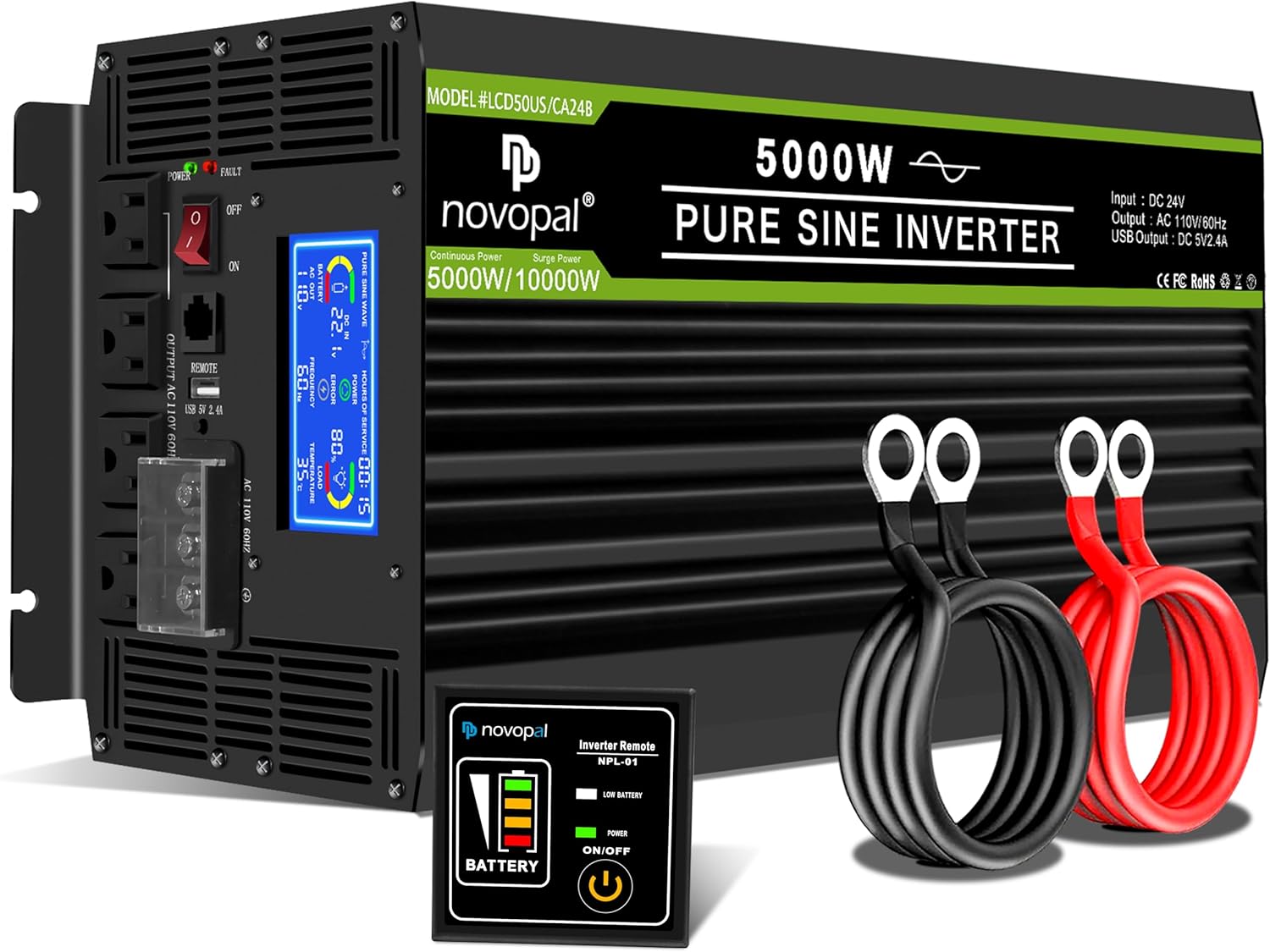
Image: The NOVOPAL 5000W Pure Sine Wave Power Inverter shown with its included accessories: battery cables (red and black), remote control, and protective terminal covers.
4. Продукт закінчивсяview
4.1. Фізичні компоненти
Familiarize yourself with the various parts of your inverter:

Зображення: Детальний view of the NOVOPAL inverter highlighting key components such as the Negative DC Terminal, Cooling Fan, Positive DC Terminal, LCD Display, High Power Terminal, Indicator Light, ON/OFF Switch, Remote Control port, USB Port 2.1A, and AC Sockets.
4.2. РК-дисплей
The integrated LCD display provides real-time operational status and diagnostic information:
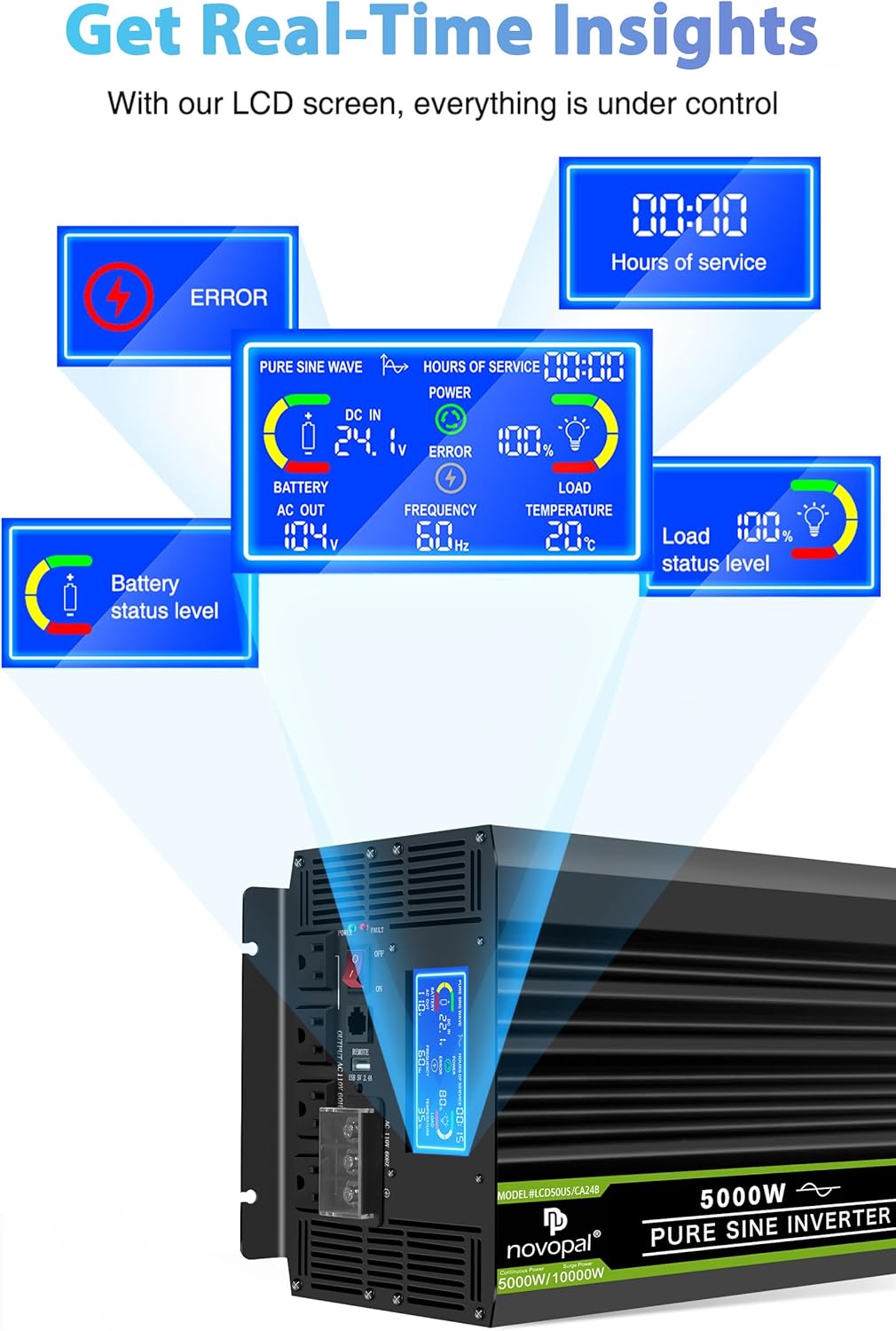
Image: Close-up of the inverter's LCD screen showing various indicators including ERROR, HOURS OF SERVICE, DC IN voltage, BATTERY level, AC OUT voltage, FREQUENCY, LOAD percentage, and TEMPERATURE.
5. Інструкції з налаштування
5.1. Монтаж інвертора
Choose a dry, cool, and well-ventilated location for mounting the inverter. Ensure there is sufficient space around the unit for airflow, especially around the cooling fans. The inverter can be mounted horizontally or vertically using the integrated mounting brackets.

Image: The NOVOPAL inverter with its dimensions (20.87 inches length, 9.21 inches width, 6.50 inches height) indicated, illustrating its physical size for mounting considerations.
5.2. Battery Connection (DC 24V)
- Переконайтеся, що вимикач живлення інвертора знаходиться в положенні ВИМКНЕНО.
- Підключіть червоний positive (+) battery cable to the positive (+) terminal of your 24V battery bank.
- Підключіть інший кінець червоний positive (+) cable to the positive (+) DC input terminal on the inverter.
- Підключіть чорний negative (-) battery cable to the negative (-) terminal of your 24V battery bank.
- Підключіть інший кінець чорний negative (-) cable to the negative (-) DC input terminal on the inverter.
- Tighten all connections securely to prevent loose contacts, which can cause overheating and damage.
5.3. Заземлення інвертора
For safety, the inverter must be properly grounded. Connect the provided ground wire from the inverter's ground terminal to a suitable earth ground point (e.g., vehicle chassis, ground rod, or electrical panel ground bus).
5.4. Підключення дистанційного керування
The remote control allows for convenient power management, especially when the inverter is installed in a less accessible location. Plug the remote control cable into the designated REMOTE port on the inverter. The remote control features an ON/OFF button and a battery level indicator.

Image: The NOVOPAL wired remote control, showing its ON/OFF button and battery level indicator, with a 16-foot cable for flexible placement.
6. Інструкція з експлуатації
6.1. Увімкнення/вимкнення живлення
- After all connections are secure, switch the inverter's main power switch to the ON position. The LCD display will illuminate.
- Alternatively, use the ON/OFF button on the remote control to power the inverter on or off.
- To power off, switch the main power switch to OFF or press the remote control's ON/OFF button.
6.2. Підключення навантажень змінного струму
- Підключіть прилади змінного струму до розеток 110 В/120 В змінного струму на інверторі.
- Забезпечте загальну безперервну подачу водиtage of all connected appliances does not exceed 5000 watts.
- For appliances with high startup (surge) power requirements, ensure the inverter's 10000-watt peak capacity is not exceeded.
6.3. Використання USB-порту
The inverter includes a 2.1A USB port for charging compatible USB-powered devices such as smartphones and tablets.
6.4. Інтерпретація РК-дисплея
The LCD display provides critical information for monitoring the inverter's performance:
- Вхідний об'ємtage (вхід постійного струму): Показує поточний об'єм постійного струмуtagвід вашого акумулятора.
- Ємність батареї: Indicates the estimated remaining battery charge level.
- Проценти потужностіtage: Відображає відсоткиtagе потужності інвертора, що використовується на даний момент.
- Час використання: Shows the duration the inverter has been operating.
- Індикатор живлення: Illuminates when the inverter is active.
- Fault Indicator (ERROR): Displays error codes or warnings if a protection feature is triggered.
- Вихідна потужність: Shows the current AC power output in watts.
- Output Frequency (FREQUENCY): Відображає вихідну частоту змінного струму (60 Гц).
- Operating Temperature (TEMPERATURE): Показує внутрішню температуру інвертора.
7. Технічне обслуговування
- Прибирання: Періодично очищуйте зовнішню частину інвертора сухою ганчіркою. Переконайтеся, що вентиляційні отвори та вентилятори охолодження чисті від пилу та сміття.
- Підключення: Регулярно перевіряйте всі з'єднання постійного та змінного струму, щоб переконатися в їх щільності та відсутності корозії.
- Вентиляція: Confirm that the inverter's ventilation remains unobstructed during operation.
8. Вирішення проблем
If the inverter is not functioning correctly, consult the LCD display for error messages and refer to the following common issues:
| проблема | Можлива причина | Рішення |
|---|---|---|
| No AC Output / Inverter Off | Низький заряд батареїtage, Overload, Overheat, Loose connections, Inverter switch off | Перевірте об'єм батареїtage, Reduce load, Allow inverter to cool, Secure all cables, Turn inverter on |
| LCD shows "ERROR" | Specific fault detected (e.g., overvoltagе, підтtage, overload, short circuit, overheat, reverse polarity) | Identify the specific error code on the display. Address the underlying issue (e.g., charge battery, reduce load, check wiring). The inverter may require a power cycle (disconnect and reconnect battery) after a fault. |
| Слабке або переривчасте живлення | Insufficient battery charge, Undersized battery cables, Loose connections | Charge battery, Use appropriate gauge cables, Tighten connections |
| Fans constantly running | Висока внутрішня температура через велике навантаження або погану вентиляцію | Ensure adequate ventilation, Reduce load if possible. This is normal operation under heavy load. |
9. Технічні характеристики
| Особливість | Специфікація |
|---|---|
| Назва моделі | LCD50US24B |
| Постійна потужність | 5000 Вт |
| Пікова потужність | 10000 Вт |
| Вхідний об'ємtage | 24 В постійного струму |
| Вихідний випtage | Змінний струм 110 В / 120 В |
| Форма вихідного сигналу | Чиста синусова хвиля |
| Вихідна частота | 60 Гц |
| Вихід USB | DC 5V, 2.1A |
| Розміри продукту | 18.34 x 4.92 x 6.49 дюймів |
| Вага товару | 23.4 фунта |
| Рекомендоване використання | Подорожі, Сamping, Business trip, Car, Boat |
| Джерело живлення | Сонячне та батарейне живлення |
10. Гарантія та підтримка
The NOVOPAL 5000W Pure Sine Wave Power Inverter comes with a Гарантія 1 рік covering materials and workmanship. For any issues encountered during use, please contact NOVOPAL customer support via email for assistance.