
SUPVAN T50M Pro/T50M Plus Label Tapes (φ 30 mm, White)
SUPVAN KATASYMBOL T50M Pro/T50M Plus Label Tapes User Manual
Model: T50M Pro/T50M Plus Label Tapes (φ 30 mm, White)
1. Вступ
Thank you for choosing SUPVAN KATASYMBOL Label Tapes. These high-quality thermal labels are designed to work seamlessly with your SUPVAN T50M Pro and T50M Plus label makers, providing durable and versatile labeling solutions for various applications. This manual will guide you through the features, setup, operation, and maintenance of your label tapes.
2. Інформація про безпеку
While SUPVAN label tapes are designed for general use and meet baby product standards, please observe the following safety guidelines:
- Keep out of reach of small children to prevent accidental ingestion.
- Do not expose labels to extreme heat or open flames.
- Ensure proper ventilation when using the label maker in conjunction with the tapes.
- Avoid direct contact with the adhesive side for prolonged periods if you have sensitive skin.
3. Продукт закінчивсяview
SUPVAN KATASYMBOL Label Tapes are engineered for superior performance and durability. Key features include:
- Сумісність: Specifically designed for SUPVAN T50M Pro and T50M Plus label makers.
- Розміри: φ 30 mm, with 220 pieces per roll.
- Довговічність: Multi-layer synthetic material ensures a lifespan of over 5 years.
- Опір: Waterproof, oil-proof, and resistant to high and low temperatures.
- Адгезія: Features strong adhesive for reliable attachment.
- Термодрук: Utilizes thermal technology, requiring no ink or toner, which saves costs and ensures clear prints.
- Безпека: BPA-free, suitable for various applications including those involving food and baby products.

Image: SUPVAN KATASYMBOL label tape compatibility and key features.

Зображення: Оверview of SUPVAN KATASYMBOL label tape properties.
4. Налаштування
To begin using your SUPVAN label tapes, follow these steps:
- Install the Label Tape: Open the cover of your SUPVAN T50M Pro or T50M Plus label maker. Carefully insert the label tape roll into the designated slot, ensuring the label feeds correctly through the printer mechanism. Close the cover securely.
- Завантажте додаток: Download the "Katasymbol" application from your device's app store (available for iOS and Android).
- Підключення до принтера: Turn on your label maker. Open the Katasymbol app and follow the on-screen instructions to connect your device to the label maker via Bluetooth.
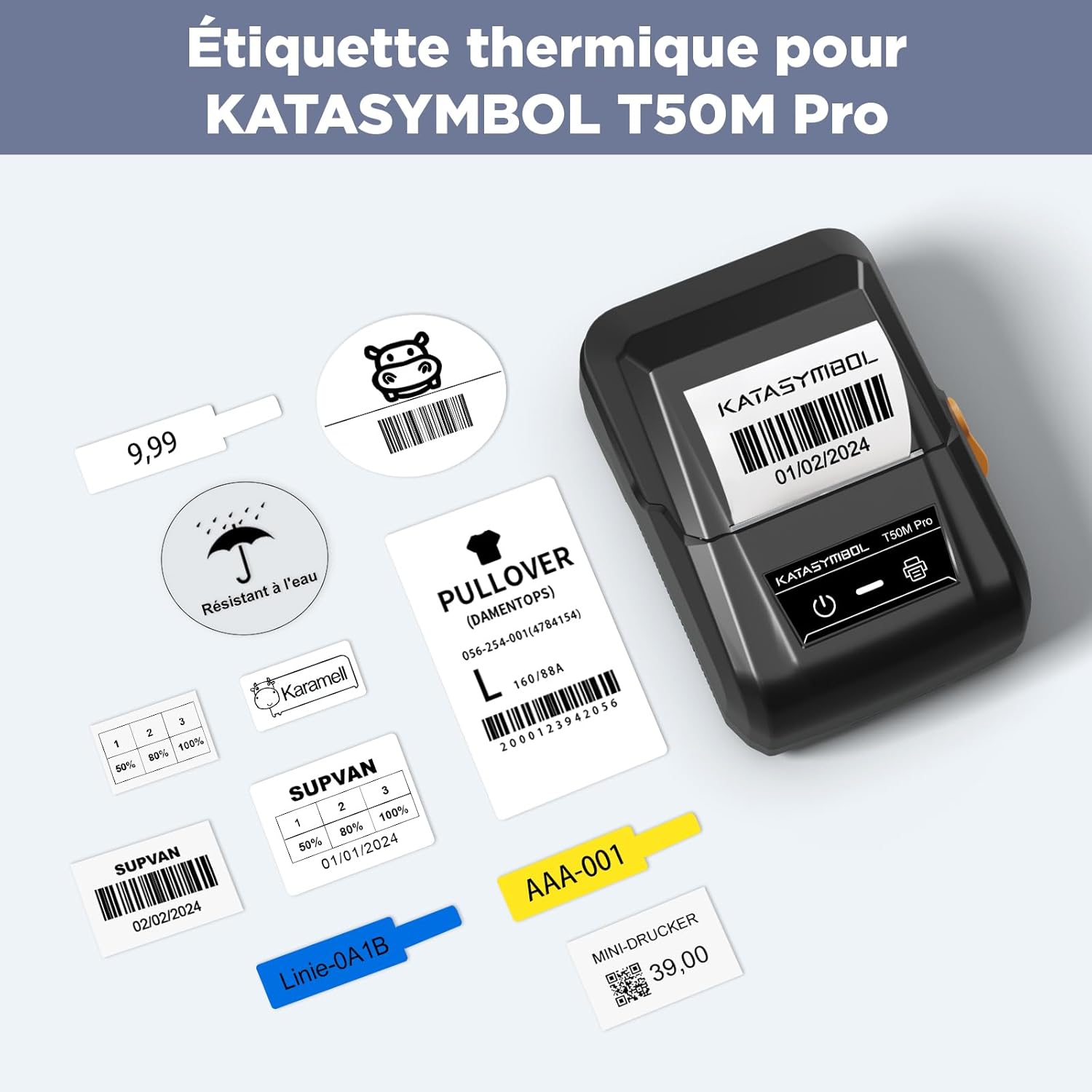
Image: SUPVAN T50M Pro printer with various label exampлес.
5. Інструкція з експлуатації
The Katasymbol app makes designing and printing labels intuitive:
- Автоматичне розпізнавання: The Katasymbol app will automatically identify the type and size of the label tape you have installed. Важлива примітка: Do not remove the small sticker on the back of the label tape roll. This sticker contains a smart chip that the app needs to identify the label type and size correctly.
- Створіть свою етикетку: Use the app's extensive features to create your desired label. You can choose from over 150 templates, select from more than 40 fonts, and add from over 700 icons to personalize your labels.
- Друк: Once your design is complete, send the print command from the app to your label maker. The thermal printing technology will quickly produce clear and crisp labels.

Image: SUPVAN label printers in operation.
6. Додатки
SUPVAN KATASYMBOL label tapes are incredibly versatile and can be used in a multitude of settings:
- Організація дому: Label spice jars, food containers, storage boxes, and organize cables.
- Використання в офісі: Create labels for files, folders, office supplies, and equipment.
- School & Study: Label books, notebooks, and school supplies.
- Роздрібна торгівля та бізнес: Generate price tags, barcodes, QR codes, product information labels, and address labels for shipping.
- Персоналізація: Design custom labels for gifts, crafts, and personal items.
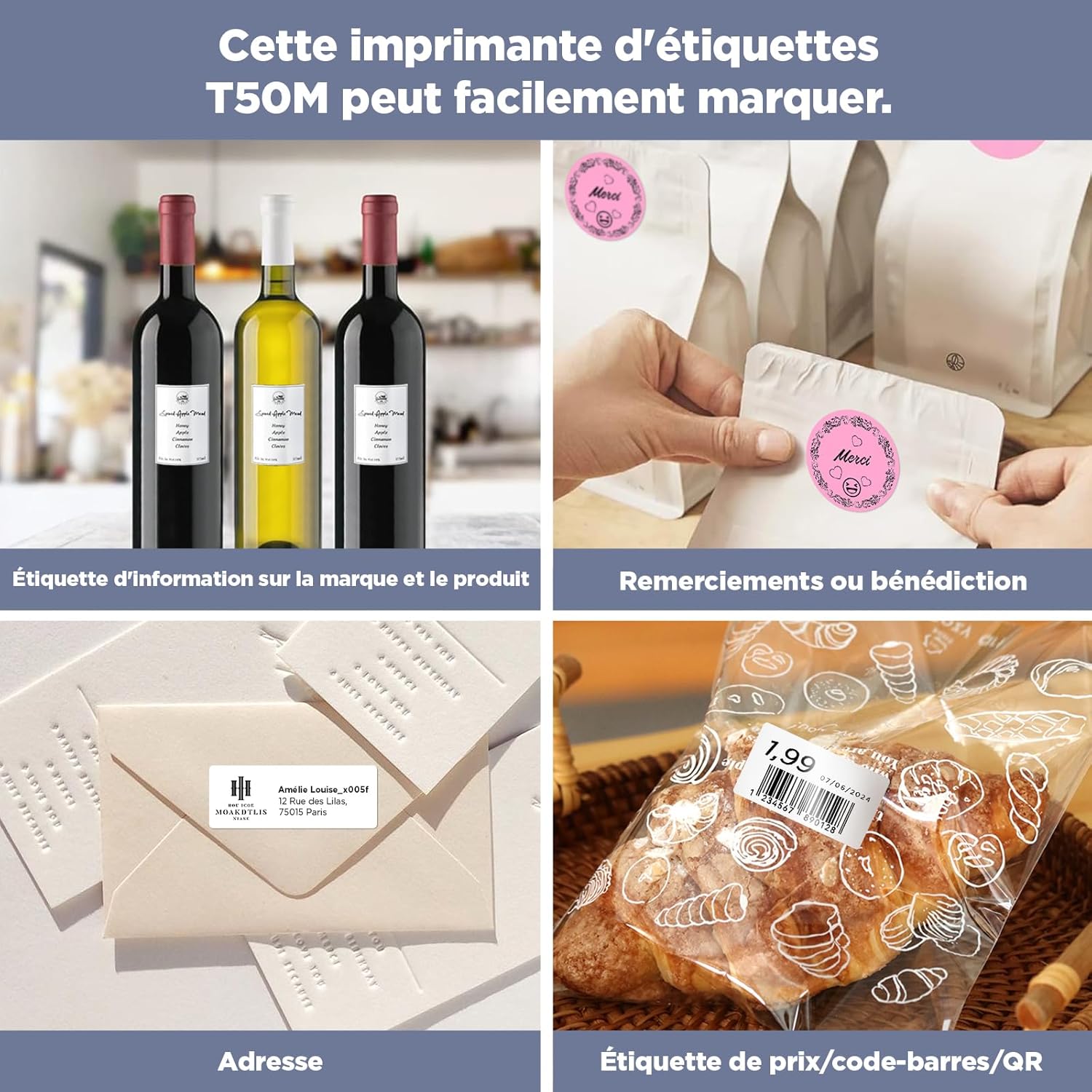
Image: Diverse applications of SUPVAN labels.

Image: Ideal for home and office organization.

Image: Versatile use for small businesses, branding, shipping, and kitchen organization.
7. Технічне обслуговування
To ensure the longevity and optimal performance of your SUPVAN label tapes:
- Зберігання: Зберігайте невикористані рулони етикеток у прохолодному, сухому місці, захищеному від прямих сонячних променів та екстремальних температур.
- Обробка: Avoid touching the adhesive side of the labels unnecessarily to maintain stickiness.
- Обслуговування принтера: Regularly clean the print head of your SUPVAN label maker as per its instruction manual to ensure clear and consistent print quality.

Image: Labels are resistant to water.

Image: Demonstrating label resistance to water, oil, residue, and scratches.
8. Вирішення проблем
If you encounter any issues with your label tapes, consider the following:
- App Not Recognizing Label: Ensure that the small sticker with the smart chip on the back of the label roll has not been removed. This sticker is crucial for the Katasymbol app to identify the label type and size.
- Погана якість друку: Check if the label tape is correctly installed and aligned in the printer. Ensure the printer's print head is clean.
- Етикетки не приклеюються: Ensure the surface you are applying the label to is clean, dry, and smooth. Avoid applying labels to textured or oily surfaces.
- Labels Difficult to Remove: While designed for easy removal, some surfaces or prolonged adhesion might make removal challenging. For best results, peel slowly from one corner.

Image: Labels are easy to remove with no sticky residue.
9. Технічні характеристики
| Особливість | Специфікація |
|---|---|
| Бренд | СУПВАН |
| Сумісність моделі | T50M Pro/T50M Plus |
| Розміри етикетки | φ 30 мм |
| Етикеток на рулон | 220 шт |
| Колір | Білий |
| Тип матеріалу | Paper (Synthetic) |
| Розміри продукту (Д x Ш x В) | 5 х 3 х 3 см |
| Вага товару | 75 г |
| Технологія друку | Теплові |
| Тип клею | Strong Adhesion |
| Особливості | Waterproof, Oil-proof, BPA-free, Temperature Resistant, No Residue |
10. Гарантія та підтримка
SUPVAN products are manufactured to high-quality standards. For any questions, technical support, or warranty inquiries regarding your label tapes or label maker, please contact SUPVAN customer service through the official website or your purchase platform. Please have your product model and purchase details ready when contacting support.
Ask a question about this manual
Ask about setup, troubleshooting, compatibility, parts, safety, or missing instructions. Manuals+ will review the question and use this page’s manual context to help answer it.