
1. Вступ
Thank you for choosing the ieGeek 5MP Outdoor Wi-Fi Security Camera. This manual provides essential information for the proper installation, operation, and maintenance of your camera. Please read these instructions carefully before use and retain them for future reference. This camera is designed to provide reliable outdoor surveillance with advanced features for enhanced security.
2. Продукт закінчивсяview
The ieGeek 5MP Outdoor Wi-Fi Security Camera offers high-definition monitoring with flexible connectivity and smart detection capabilities.
Ключові характеристики:
- Роздільна здатність HD 5 МП: Provides clear and vivid images and videos with 2880x1600 resolution and 4x digital zoom.
- Dual-Band Wi-Fi (2.4/5 GHz): Supports both 2.4 GHz and 5 GHz Wi-Fi for stable and faster network connection.
- 360° PTZ Monitoring: Pan (355° horizontal) and Tilt (120° vertical) functionality allows for comprehensive area coverage.
- Кольорове нічне бачення: Three night vision modes (color, infrared, smart) with a range of up to 15 meters (50 feet).
- PIR Humanoid Detection: Advanced human detection reduces false alarms caused by non-human movements.
- Звукова та світлова сигналізація: Deters intruders with customizable sound and light alerts.
- Безперервний запис 24/7: Supports continuous recording and event-based recording.
- Локальне та хмарне сховище: Compatible with Micro SD cards (up to 128GB, not included) and cloud storage options.
- Спільний доступ для кількох користувачів: Share camera access with family members via the dedicated app.
- Стійкість до погодних умов IP65: Designed for outdoor use, resistant to dust and water.
Компоненти камери:
The camera unit typically includes the main camera body, dual Wi-Fi antennas, a power input port, and a Micro SD card slot.
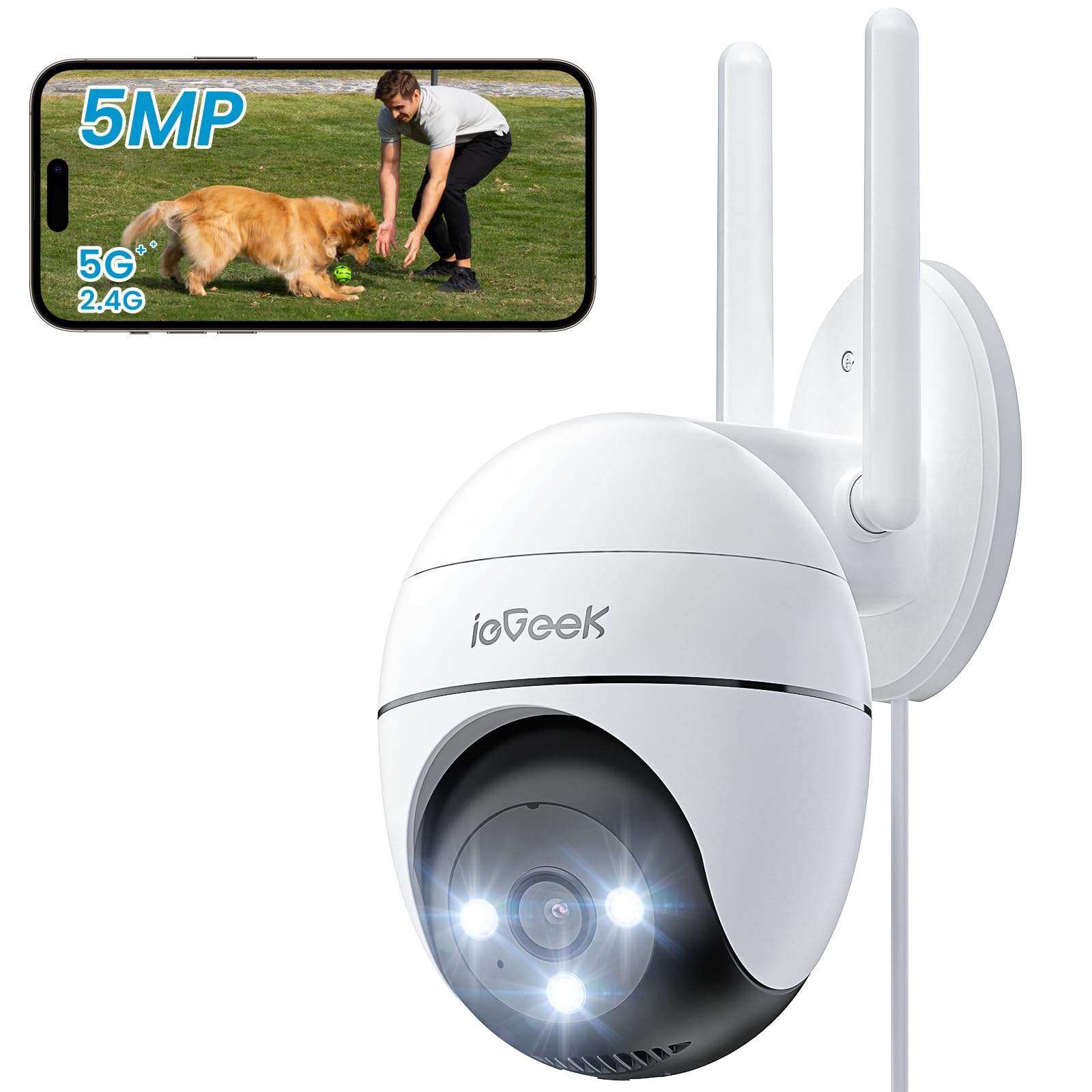
Figure 2.1: ieGeek 5MP Outdoor Wi-Fi Security Camera (Model ZS-GQ4)

Малюнок 2.2: Закінченоview of ieGeek 5MP Camera Features including PTZ, 24/7 recording, 2-way audio, humanoid tracking, Alexa compatibility, local and cloud storage, multi-user sharing, customizable alert areas, AI detection, and acoustic/light alarms.

Figure 2.3: The camera features a 5dBi antenna for improved Wi-Fi signal strength and stability.
3. Інструкції з налаштування
3.1 Вміст упаковки
- ieGeek 5MP Outdoor Wi-Fi Security Camera
- Адаптер живлення
- Монтажні гвинти та анкери
- Посібник користувача
3.2 Завантаження програми та реєстрація облікового запису
- Завантажити ieGeek Cam or CloudEdge app from your smartphone's app store (iOS/Android).
- Register for an account using your email address and create a secure password.
3.3 Підключення камери
- Power on the camera by connecting it to a power outlet using the provided adapter.
- Open the ieGeek Cam/CloudEdge app and tap the "+" icon to add a new device.
- Follow the on-screen instructions to connect the camera to your 2.4 GHz or 5 GHz Wi-Fi network. Ensure your phone is connected to the same Wi-Fi network during setup.
- Scan the QR code displayed on your phone with the camera lens when prompted.
- Після підключення ви можете назвати свою камеру та розпочати пряму трансляцію viewінж.

Figure 3.1: Connecting the power adapter to the camera.
3.4 Фізичне встановлення
- Виберіть відповідне місце на відкритому повітрі з чітким view та сильний сигнал Wi-Fi.
- Використовуйте наданий монтажний шаблон для позначення отворів для свердління.
- Drill holes, insert anchors, and secure the camera base with screws.
- За потреби відрегулюйте кут камери.

Figure 3.2: Ensure optimal Wi-Fi signal strength at the chosen installation location for stable performance.
4. Інструкція з експлуатації
4.1 Живий View та керування PTZ
- Open the ieGeek Cam/CloudEdge app and select your camera to view живий корм.
- Use the on-screen joystick or swipe gestures to control the camera's pan (horizontal 355°) and tilt (vertical 120°) movements.

Figure 4.1: Control the camera's 355° horizontal and 120° vertical rotation directly from your smartphone app.
4.2 Режими нічного бачення
Камера пропонує три режими нічного бачення:
- Кольорове нічне бачення: Utilizes built-in spotlights to provide full-color images in low-light conditions.
- Інфрачервоне нічне бачення: Використовує інфрачервоні світлодіоди для отримання чорно-білих зображень у повній темряві.
- Розумне нічне бачення: Automatically switches between infrared and color night vision upon detection of motion.
4.3 Виявлення руху та сигналізація
- PIR Humanoid Detection: Configure sensitivity levels in the app to minimize false alarms.
- Настроювані зони виявлення: Set specific areas for motion detection to focus on critical zones.
- Звукова та світлова сигналізація: When motion is detected, the camera can activate a siren and/or spotlights to deter intruders. You can choose between silent, spotlight only, siren only, or both siren and spotlight modes.

Figure 4.2: Select from silent, spotlight only, siren only, or both siren and spotlight alarm modes to suit your security needs.

Figure 4.3: The camera's humanoid motion tracking follows detected human figures, reducing false alarms from other movements.

Figure 4.4: AI smart monitoring can differentiate between various detection types such as people, animals, packages, and vehicles (some features may require a subscription).
4.4 Запис і зберігання
- Безперервне записування: The camera supports 24/7 continuous recording to a Micro SD card (not included).
- Запис події: Записує відеокліпи при виявленні руху.
- Micro SD Card: Вставте карту Micro SD (до 128 ГБ) у призначений слот для локального зберігання.
- Хмарне сховище: Optional cloud storage plans are available through the app for secure off-site backup.

Figure 4.5: The camera supports 24/7 continuous recording, ensuring constant surveillance.
5. Технічне обслуговування
5.1 Очищення камери
- Перед чищенням переконайтеся, що камера вимкнена.
- Використовуйте м'який, damp cloth to wipe the camera body.
- Для очищення об’єктива використовуйте спеціальну тканину для об’єктивів, щоб уникнути подряпин. Не використовуйте агресивні хімікати або абразивні засоби для чищення.
5.2 Екологічні міркування
- The camera has an IP65 weather resistance rating, making it suitable for outdoor use in various weather conditions.
- Діапазон робочих температур: від -20°C до 50°C (від -4°F до 122°F).

Figure 5.1: The camera is designed with IP65 weather resistance to withstand outdoor elements like rain.

Figure 5.2: The camera operates effectively within a wide temperature range of -20°C to 50°C.
6. Вирішення проблем
If you encounter issues with your ieGeek camera, please refer to the following common troubleshooting steps:
6.1 Проблеми з підключенням
- Камера офлайн: Ensure the camera is powered on and within range of your Wi-Fi router. Check your Wi-Fi signal strength in the app. Try restarting the camera and your router.
- Не вдалося підключитися до Wi-Fi: Verify your Wi-Fi password is correct. Ensure you are connecting to a 2.4 GHz or 5 GHz network as supported. If using a dual-band router, ensure the camera is connecting to the correct band.
6.2 Проблеми з виявленням руху
- Занадто багато хибних тривог: Adjust the PIR detection sensitivity in the app. Define specific detection zones to exclude areas with frequent irrelevant movements (e.g., trees swaying).
- Без виявлення руху: Ensure motion detection is enabled in the app settings. Check the camera's field of view for obstructions. Increase detection sensitivity if necessary.
6.3 Проблеми з якістю зображення
- Розмите зображення: Clean the camera lens carefully. Ensure there is no condensation on the lens.
- Погане нічне бачення: Ensure the night vision mode is set correctly (color, infrared, or smart). Check for any obstructions blocking the infrared LEDs or spotlights.
6.4 Інші питання
- SD-карта не записує: Ensure the Micro SD card is inserted correctly and is not full. Format the SD card via the app if it's a new card or if issues persist.
- Додаток не відповідає: Close and restart the app. Ensure your smartphone's operating system is up to date.
If these steps do not resolve your issue, please contact ieGeek customer support for further assistance.
7. Технічні характеристики
| Модель | ZS-GQ4 |
| роздільна здатність | 5MP (2880 x 1600) |
| Об'єктив | 3.6 мм |
| Цифровий зум | 4x |
| Відстань нічного бачення | До 15 метрів (50 фути) |
| Підключення Wi-Fi | 2.4 GHz / 5 GHz Dual-Band |
| Діапазон повороту/нахилу | Панорамування 355°, нахил 120° |
| Параметри зберігання | Карта Micro SD (до 128 ГБ, не входить до комплекту), хмарне сховище |
| Стійкість до погодних умов | IP65 |
| Робоча температура | Від -20°C до 50°C (від -4°F до 122°F) |
| Розміри | 17 х 9 х 10 см |
| Спосіб контролю | Mobile App (ieGeek Cam / CloudEdge) |
| Тип тривоги | PIR Humanoid Motion Detection, Sound & Light Alarm |
8. Гарантія та підтримка
ieGeek прагне надавати високоякісну продукцію та відмінне обслуговування клієнтів.
8.1 Інформація про гарантію
- 2-річна гарантія: Your ieGeek camera is covered by a 2-year warranty from the date of purchase, protecting against manufacturing defects.
- 30-денна гарантія повернення грошей: If you are not satisfied with your purchase, you may return the product for a full refund within 30 days.

Figure 8.1: ieGeek offers a 2-year warranty and a 30-day money-back guarantee, along with lifetime support.
8.2 Підтримка клієнтів
For any questions, technical assistance, or warranty claims, please contact ieGeek customer support. Refer to the contact information provided with your product packaging or visit the official ieGeek webдеталі підтримки.
- Інтернет-підтримка: Відвідайте www.iegeek.com/support (напрample link, please refer to actual webсайт)
- Підтримка електронною поштою: support@iegeek.com (напрample email, please refer to actual contact)
- Довічна технічна підтримка: ieGeek provides lifetime technical support for its products.