
1. Вступ
This user manual provides comprehensive instructions for the safe and efficient operation of your OLTEANP 2200 Watts Pure Sine Wave Inverter. This device is designed to convert 12V DC power from a battery source into stable 110V AC power, suitable for a wide range of electronics and home appliances. Its advanced pure sine wave technology ensures clean power output, protecting sensitive equipment from damage. Ideal for use in trucks, vehicles, RVs, during power outages, and for various outdoor applications.
2. Інформація про безпеку
Please read and understand all safety warnings and instructions before operating the inverter. Failure to do so may result in electric shock, fire, serious injury, or property damage.
- Вентиляція: Забезпечте належну вентиляцію навколо інвертора. Не блокуйте вентиляційні отвори. Перегрів може призвести до вимкнення або пошкодження інвертора.
- Середовище: Operate the inverter in a dry, well-ventilated area, away from direct sunlight, heat sources, flammable materials, and moisture.
- Електропроводка: Use appropriate gauge wiring for battery connections as specified in the setup section. Incorrect wiring can lead to overheating and fire hazards. Ensure all connections are tight and secure.
- Захист від перевантаження: Do not exceed the inverter's continuous power rating (2200W) or peak power rating (4400W). Overloading can damage the inverter and connected appliances.
- Spark-Free Protection: The inverter is equipped with a professional spark-free protection circuit. However, always exercise caution when connecting or disconnecting battery cables to minimize sparking.
- Заземлення: Ensure the inverter is properly grounded as per local electrical codes.
- Діти та домашні тварини: Тримайте інвертор у недоступному для дітей та домашніх тварин місці.
- Технічне обслуговування: Від’єднайте всі джерела живлення перед будь-яким технічним обслуговуванням або очищенням.
3. Продукт закінчивсяview
The OLTEANP 2200W Pure Sine Wave Inverter is designed for reliable power conversion. Key components and features include:
- Вихід чистої синусоїди: Provides clean, stable AC power, ideal for sensitive electronics.
- Висока вихідна потужність: 2200 Watts continuous power, 4400 Watts peak power.
- Кілька вихідних портів: Four (4) 110V AC outlets, one (1) 5V/3.1A USB port, and one (1) 30W Type-C port.
- Регульована вхідна гучністьtage: Allows setting low voltage shutdown points (9.5V-11V) for compatibility with various battery types, including lithium batteries, and to extend battery life.
- Remote Control with LCD Display: A wired remote control with an LCD screen provides real-time monitoring of inverter status, battery voltage, AC output, load wattage, and displays fault codes.
- Багатофункціональний захист безпеки: Includes high-voltage, overload, high-temperature, low-voltagе, і захист від короткого замикання.
- Ефективне охолодження: Equipped with intelligent cooling fans that activate automatically to prevent overheating.

Figure 3.1: OLTEANP 2200W Pure Sine Wave Inverter and included accessories (remote control, battery cables).

Figure 3.2: The inverter providing power to multiple appliances simultaneously via its AC outlets, USB, and Type-C ports.

Малюнок 3.3: Впрamples of devices that can be powered by the inverter, highlighting its versatility for various applications.

Figure 3.4: The inverter's intelligent chip provides comprehensive safety protections for reliable operation.
4. Налаштування
Follow these steps to set up your OLTEANP Pure Sine Wave Inverter:
- Розміщення: Choose a dry, cool, and well-ventilated location for the inverter. Ensure there is sufficient space around the unit for airflow.
- Підключення акумулятора:
- Підключіть червоний кабель акумулятора до позитивного (+) виводу інвертора та позитивного (+) виводу вашого 12-вольтового акумулятора.
- Підключіть чорний кабель акумулятора до негативного (-) виводу інвертора та негативного (-) виводу вашого 12-вольтового акумулятора.
- Ensure all connections are tight and secure to prevent voltagпадіння та перегрів.
- Refer to Figure 4.2 for a typical wiring diagram.
- Заземлення: Connect a ground wire from the inverter's grounding terminal to a suitable earth ground point (e.g., vehicle chassis, ground rod). This enhances safety and reduces interference.
- Підключення дистанційного керування: Plug the remote control cable into the designated port on the inverter. The remote control allows for convenient operation and monitoring from a distance.
- Регульована вхідна гучністьtage Налаштування: Before turning on the inverter, you can adjust the low voltage shutdown threshold using the DIP switches on the inverter. This feature is crucial for optimizing battery health, especially with lithium batteries.
- Consult the table below or on the inverter for specific switch positions and corresponding voltage settings (e.g., 9.5V, 10V, 10.5V, 11V).
- Важливо: Відрегулюйте гучністьtage setting only when the inverter is turned off.

Figure 4.1: Table showing selectable input voltage shutdown settings based on DIP switch positions, compatible with various battery types.

Малюнок 4.2: Впрample wiring diagram illustrating connections between solar panels, charge controller, battery, and the inverter.
5. Інструкція з експлуатації
Після правильного налаштування інвертора виконайте такі дії для його експлуатації:
- Увімкнення: Press the power button on the inverter or the remote control. The LCD display on the remote will illuminate, showing current status.
- Підключити прилади: Plug your AC appliances into the 110V AC outlets. For USB-powered devices, use the 5V/3.1A USB port or the 30W Type-C port.
- Статус монітора: The remote control's LCD display provides real-time information:
- Ємність батареї: Позначається значком батареї.
- Вхід постійного струму обtage: Показує поточний рівень заряду батареїtage.
- Вихід змінного струмуtage: Displays the inverter's output voltage (typically 110V-120V).
- Завантажити Ватtage: Shows the total power consumption of connected devices.
- Індикатори несправностей: Symbols will flash to indicate issues such as high voltage, низький об'ємtage, overload, short-circuit, or overheat. Refer to the Troubleshooting section for details.
- Вимкнення живлення: When finished, disconnect all appliances, then press the power button on the inverter or remote control to turn off the unit.
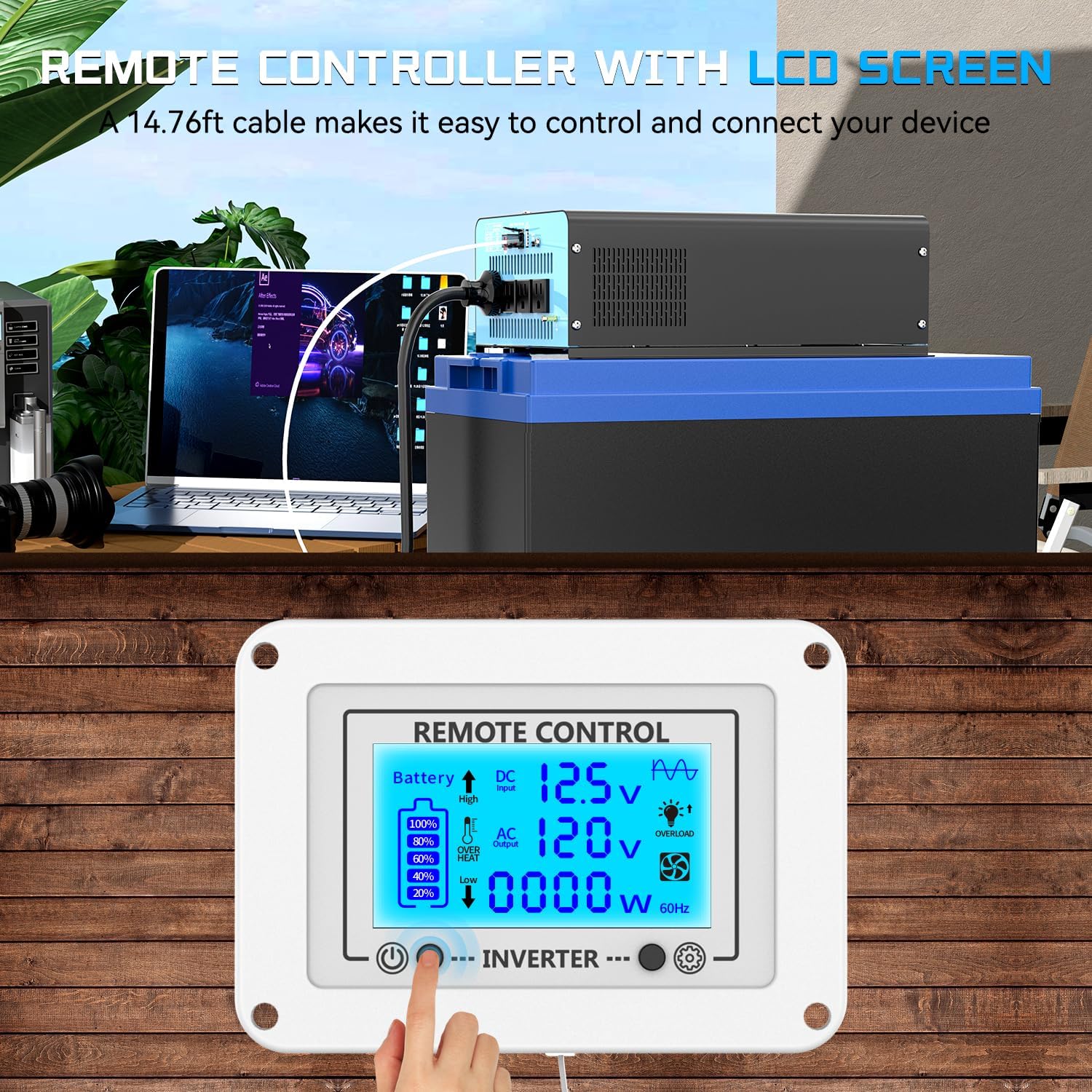
Figure 5.1: The remote control connected to the inverter, allowing convenient monitoring and operation from a distance.

Figure 5.2: Detailed explanation of the remote control LCD display, including input voltagе, ємність акумулятора, вихідний об'ємtage, load wattage, and various fault indicators.
6. Технічне обслуговування
Регулярне технічне обслуговування забезпечує довговічність та оптимальну продуктивність вашого інвертора:
- Прибирання: Періодично очищуйте зовнішню частину інвертора м’якою сухою тканиною. Не використовуйте рідкі засоби для чищення або розчинники. Переконайтеся, що вентиляційні отвори вільні від пилу та сміття.
- Перевірка підключення: Regularly inspect all battery cable connections to ensure they are tight and free from corrosion. Loose connections can cause voltage drops and heat buildup.
- Вентиляція: Ensure the inverter's cooling fans are not obstructed. The intelligent cooling fans will activate as needed to maintain optimal operating temperature. If fans are not spinning when the unit is under load and warm, check for obstructions or contact support.
- Зберігання: Якщо інвертор зберігатиметься протягом тривалого часу, від’єднайте його від акумулятора та зберігайте у прохолодному сухому місці.
7. Вирішення проблем
The remote control's LCD display provides valuable diagnostic information. Refer to the flashing symbols to identify and resolve common issues:
| Symptom / LCD Indicator | Можлива причина | Рішення |
|---|---|---|
| No Power Output / Inverter Off | Акумулятор обtage too low or too high; Loose battery connections; Overload; Inverter internal fault. | Перевірте об'єм батареїtage. Ensure connections are secure. Reduce load. Power cycle the inverter. |
| Низька гучністьtage Shutdown (Flashing Low Voltage Symbol) | Акумулятор обtage has dropped below the set low voltagпоріг вимкнення. | Recharge or replace the battery. Check battery connections for looseness or corrosion. Adjust low voltage shutdown setting if necessary (when inverter is off). |
| Високий волtage Shutdown (Flashing High Voltage Symbol) | Вхідний DC voltage exceeds the inverter's maximum allowable input. | Перевірте об’єм акумулятораtage is within the specified operating range (12V nominal). Disconnect any charging sources that might be overcharging the battery. |
| Overload (Flashing Overload Symbol) | Connected appliances draw more power than the inverter's continuous or peak rating. | Disconnect some appliances to reduce the load. Ensure total wattage does not exceed 2200W continuous or 4400W peak. |
| Overheat (Flashing Overheat Symbol) | Внутрішня температура інвертора занадто висока. | Ensure proper ventilation around the inverter. Clear any obstructions from cooling fans. Allow the inverter to cool down before restarting. Reduce load. |
| Short-Circuit (Flashing Short-Circuit Symbol) | A short circuit detected in the output. | Disconnect all AC loads. Check AC cables and appliances for short circuits. Reconnect one by one to identify the faulty device. |


Малюнок 7.1: Впрamples of fault indicators on the LCD display for high voltage, низький об'ємtage, short-circuit/overload, and overheat conditions.
8. Технічні характеристики
| Особливість | Специфікація |
|---|---|
| Модель | 12V-2200W (ae2c0f40-ec8b-4bf7-bfe5-c2fd435f5fd6) |
| Постійна потужність | 2200 Вт |
| Пікова потужність | 4400 Вт |
| Вхід DC Voltage | 12 В постійного струму |
| Вихід AC Voltage | 110 В змінного струму |
| Форма вихідного сигналу | Чиста синусова хвиля |
| Розетки змінного струму | 4 |
| порт USB | 1 (5 В/3.1 А) |
| Порт Type-C | 1 (30 Вт) |
| Розміри продукту | 13 x 7.87 x 4 дюйма (330 x 200 x 102 мм) |
| Вага товару | 10.58 фунта (4.8 кг) |
| Рекомендоване використання | Дім, автомобіль, вихід живленняtage, Vehicles, Truck, Outdoors, Boat, RV, Trip |
| Джерело живлення | Сонячне та батарейне живлення |
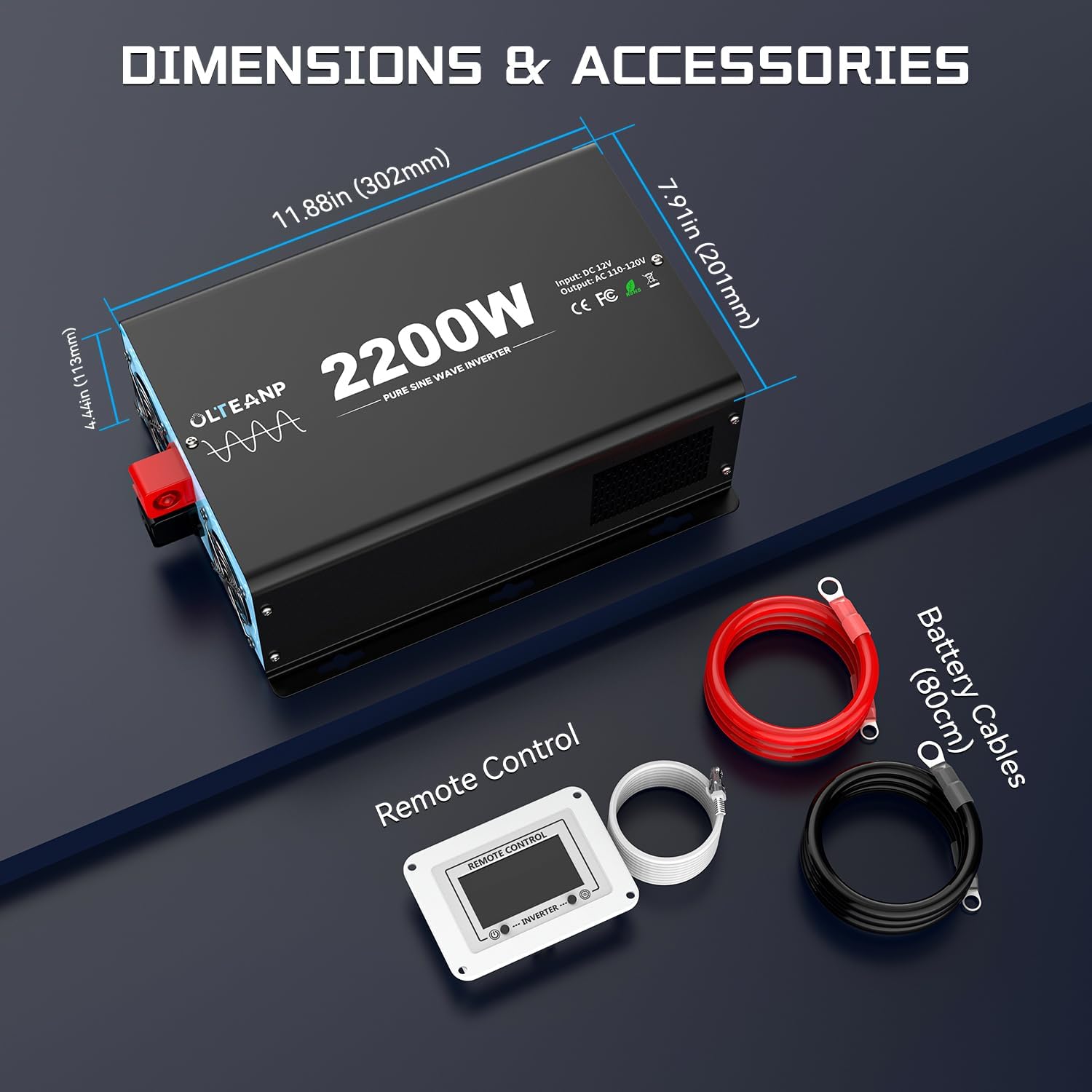
Figure 8.1: Product dimensions and a visual representation of included accessories: battery cables and remote control.
9. Гарантія та підтримка
For warranty information and technical support, please contact OLTEANP directly through their official channels or the retailer from whom the product was purchased. Protection plans may be available for purchase separately to extend coverage beyond the manufacturer's standard warranty.
For further assistance, refer to the contact information provided with your product packaging or visit the OLTEANP brand store online.