
1. Вступ
Thank you for choosing the Baseus AeQur G10 TWS Earphones. This manual provides detailed instructions on how to set up, operate, maintain, and troubleshoot your new earphones. Please read this manual thoroughly before using the product to ensure optimal performance and longevity.
2. Вміст упаковки
Обережно розпакуйте коробку та переконайтеся, що всі перелічені нижче предмети присутні та знаходяться у належному стані. Якщо будь-які предмети відсутні або пошкоджені, зверніться до продавця.
- Baseus AeQur G10 TWS Earphones (Left and Right)
- Зарядний футляр
- USB-A/USB-C Wireless Dongle
- Зарядний кабель USB-C
- Різні розміри вушних насадок
- Посібник користувача (цей документ)

Image 2.1: Complete package contents of the Baseus AeQur G10 TWS Earphones.
3. Продукт закінчивсяview
Familiarize yourself with the components of your Baseus AeQur G10 TWS Earphones.
3.1 Навушники
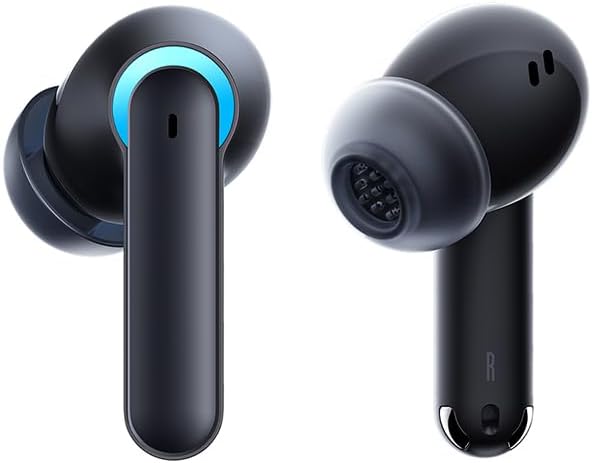
Image 3.1: Left and Right Baseus AeQur G10 Earphones. Each earphone features a touch control area, microphone, and charging contacts.
3.2 Зарядний чохол

Image 3.2: Baseus AeQur G10 Earphones in their charging case with the lid open. The case has charging slots for each earphone and an LED indicator for battery status.
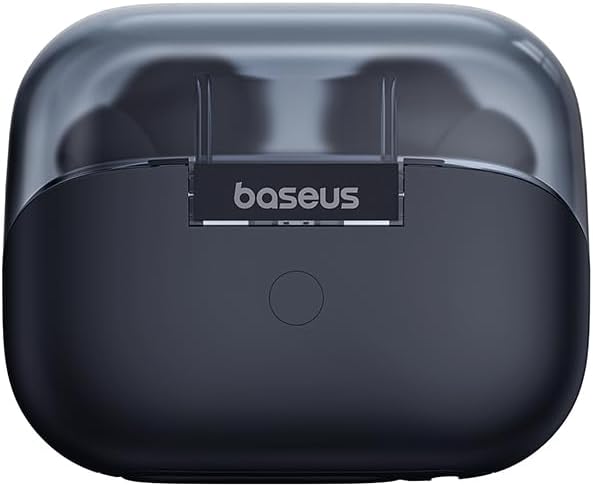
Зображення 3.3: Ззаду view of the Baseus AeQur G10 charging case, displaying the Baseus brand logo and a USB-C charging port (not explicitly visible but implied by common design).
3.3 USB-A/USB-C Wireless Dongle
The included wireless dongle allows for low-latency connection to various devices, including PCs, laptops, gaming consoles, and mobile devices.

Image 3.4: Compatibility diagram for the Baseus AeQur G10, illustrating connections to Type-C Androids & Tablets, Type-C/USB-A PCs & Laptops, PS5/PS4/Switch, Steam Deck, and VR devices.
4. Налаштування
4.1 Початкове заряджання
- Помістіть обидва навушники в зарядний футляр.
- Підключіть зарядний кабель USB-C до порту зарядки на корпусі, а інший кінець – до джерела живлення USB (наприклад, USB-порту комп’ютера, адаптера живлення).
- The LED indicator on the case will show charging status. A full charge typically takes approximately 1.5 hours for the earphones and 2 hours for the case.
4.2 Сполучення з пристроями Bluetooth
- Ensure the earphones are in the charging case and the case has sufficient charge.
- Open the charging case lid. The earphones will automatically enter pairing mode (indicated by a flashing LED on the earphones or case).
- На своєму пристрої (смартфоні, планшеті, ноутбуці) увімкніть Bluetooth та почніть пошук нових пристроїв.
- Select "Baseus AeQur G10" from the list of available devices.
- Після підключення світлодіодний індикатор перестане блимати, і ви почуєте звуковий сигнал підтвердження.
4.3 Connecting via USB Wireless Dongle
- Insert the USB-A or USB-C end of the wireless dongle into the corresponding port on your device (PC, laptop, gaming console).
- Переконайтеся, що навушники знаходяться в зарядному футлярі, а кришка відкрита.
- The earphones will automatically attempt to connect to the dongle. The dongle's LED indicator will show connection status.
- Once connected, the LED on the dongle will become solid, and you will hear a confirmation tone from the earphones.
5. Інструкція з експлуатації
5.1 Увімкнення/вимкнення живлення
- Увімкнення: Відкрийте кришку зарядного футляра або вийміть навушники з футляра. Вони увімкнуться автоматично.
- Вимкнення живлення: Place the earphones back into the charging case and close the lid. They will power off automatically and begin charging.
5.2 Носіння навушників
- Identify the 'L' (left) and 'R' (right) markings on each earphone.
- Gently insert the earphones into your ear canals.
- Rotate them slightly to find a comfortable and secure fit. Choose the appropriate ear tip size for optimal sound quality and comfort.
5.3 Сенсорне керування
The Baseus AeQur G10 earphones feature touch-sensitive controls on each earbud. The specific functions may vary slightly depending on the device and application.
| Дія | функція |
|---|---|
| Одинарне натискання (лівий/правий) | Відтворити/призупинити музику, відповісти/завершити дзвінок |
| Подвійне торкання (L) | Попередній трек |
| Подвійне натискання (R) | Наступний трек |
| Потрійне натискання (лівий/правий) | Активуйте голосовий помічник |
| Тривале натискання (лівий/правий, 2 с) | Відхилити виклик |
| Тривале натискання (лівий/правий, 3 с) | Toggle Gaming/Music Mode (if applicable) |
6. Технічне обслуговування
6.1 Очищення
- Використовуйте м’яку, суху тканину без ворсу для очищення навушників та зарядного футляра.
- For earwax or debris in the ear tips, gently remove the ear tips and clean them with a cotton swab lightly dampened with rubbing alcohol. Ensure they are completely dry before reattaching.
- Не використовуйте абразивні засоби для чищення, розчинники або аерозольні спреї.
6.2 Зберігання
- Завжди зберігайте навушники в зарядному футлярі, коли вони не використовуються, щоб захистити їх та підтримувати зарядженими.
- Зберігати в прохолодному, сухому місці, подалі від екстремальних температур та прямих сонячних променів.
6.3 Догляд за акумулятором
- Charge the earphones and case regularly, even if not used frequently, to maintain battery health.
- Уникайте повного розряджання акумуляторів протягом тривалого часу.
7. Вирішення проблем
If you encounter issues with your Baseus AeQur G10 earphones, refer to the following common solutions:
7.1 Немає звуку або переривчасте з'єднання
- Ensure earphones are charged and properly connected to your device (Bluetooth or dongle).
- Перевірте рівень гучності як на навушниках, так і на підключеному пристрої.
- Move closer to your device to avoid interference or range issues.
- Try disconnecting and re-connecting the earphones.
- For Bluetooth, forget the device on your phone and re-pair.
- For dongle, unplug and re-plug the dongle.
7.2 Навушники не заряджаються
- Переконайтеся, що зарядний кабель надійно підключений як до кейса, так і до джерела живлення.
- Перевірте, чи джерело живлення активне.
- Очистіть зарядні контакти на обох навушниках та всередині футляра сухим ватним тампоном.
- Спробуйте інший зарядний кабель або адаптер живлення.
7.3 Працює лише один навушник
- Помістіть обидва навушники назад у зарядний футляр, закрийте кришку, зачекайте кілька секунд, потім відкрийте кришку та знову вийміть їх.
- Переконайтеся, що обидва навушники заряджені.
- Спробуйте скинути налаштування навушників (див. інструкцію виробника webсайт для отримання конкретних інструкцій зі скидання, якщо потрібно).
8. Технічні характеристики
Key technical specifications for the Baseus AeQur G10 TWS Earphones:
| Особливість | Специфікація |
|---|---|
| Назва моделі | А00055400111-00 |
| Бренд | Baseus |
| колір | чорний |
| Розташування вуха | Вухо |
| Форм-фактор | Вухо |
| Технологія підключення | Бездротовий (Bluetooth) |
| Технологія бездротового зв'язку | Bluetooth |
| Акумулятори | Потрібні 1 літій-іонні батареї (у комплекті) |
| Розміри продукту | 10 х 5 х 1.27 см |
| Вага товару | 220 г |
| Виробник | Baseus |
| Особливе використання | Подорожі |
9. Гарантія та підтримка
Baseus products are designed and manufactured to the highest quality standards. For information regarding warranty coverage, technical support, or service, please refer to the warranty card included with your product or visit the official Baseus webсайт. Зберігайте чек про покупку для гарантійних претензій.
Для отримання додаткової допомоги ви можете звернутися до служби підтримки клієнтів Baseus через їхні офіційні канали.