
1. Важлива інформація з безпеки
Please read all instructions carefully before using the EVTSCAN Projection Clock. Keep this manual for future reference.
- Не піддавайте пристрій впливу екстремальних температур, прямих сонячних променів або високої вологості.
- Уникайте падіння годинника та сильних ударів.
- Не намагайтеся розбирати або ремонтувати пристрій самостійно. Зверніться до кваліфікованого сервісного персоналу.
- Use only the specified power adapter (DC 5.0V, 1.2A) or appropriate batteries (2xAAA, not included).
- Зберігати в недоступному для дітей місці.
2. Продукт закінчивсяview
The EVTSCAN Projection Clock is a versatile digital alarm clock featuring a 3-inch backlit LCD screen that displays time, date, day of the week, temperature, and humidity. It includes a projection function to display time and temperature on a wall or ceiling, dual alarms with snooze, and a USB port for charging mobile phones.
Ключові характеристики:
- 12/24-hour time format display.
- Date and day of the week display (7 languages for week).
- Temperature detection (-9℃ to +50℃) and humidity detection (20% to 95%).
- Projection function with 180-degree rotation for time and temperature.
- Dual alarm clocks with slowly increasinг об'єму.
- 5-minute snooze function.
- USB-порт для зарядки мобільних пристроїв.
- Adjustable backlight with 4 levels (high, medium, low, off).

малюнок 2.1: Фронт view of the EVTSCAN Projection Clock, showing the LCD display and projection lens.
3. Вміст упаковки
Після розпакування переконайтеся, що всі перелічені нижче предмети присутні та знаходяться у належному стані:
- 1 x EVTSCAN Projection Clock
- 1 x USB кабель
- 1 x Посібник користувача англійською мовою
Note: 2xAAA batteries are required for battery power and are not included in the package.
4. Налаштування
4.1 Живлення пристрою
The EVTSCAN Projection Clock can be powered by either AAA batteries or via the included USB cable.
4.1.1 Встановлення батареї
- Знайдіть кришку батарейного відсіку на задній панелі годинника.
- Slide open the cover.
- Вставте дві (2) батарейки типу AAA, дотримуючись правильної полярності (+/-).
- Надійно закрийте кришку батарейного відсіку.
Note: When powered by batteries, the backlight will only light up for 8 seconds when activated to conserve power. The projection lamp will also light up for 8 seconds.
4.1.2 USB Power Connection
- Connect the small end of the provided USB cable to the DC 5.0V 1.2A input port on the back of the clock.
- Connect the larger end of the USB cable to a compatible USB power adapter (not included) or a powered USB port.
Note: When powered by USB, the backlight and projection lamp can remain continuously on, with adjustable brightness for the backlight.
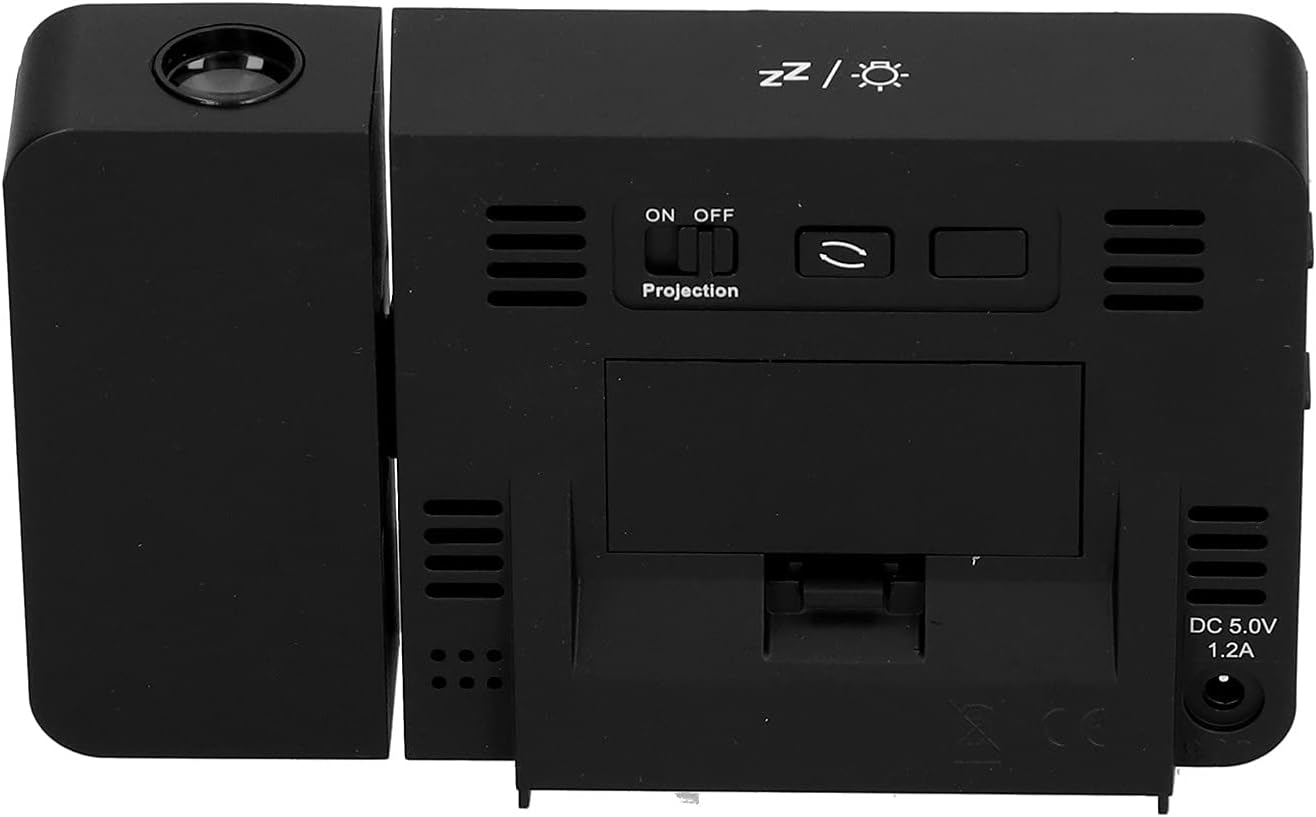
малюнок 4.1: Задня view of the clock, indicating the battery compartment and DC 5.0V 1.2A power input.
5. Інструкція з експлуатації
5.1 Функції кнопок
Familiarize yourself with the control buttons located on the front and sides of the clock:
- ЧАС: Входить у режим налаштування часу.
- ТРИВОГА: Входить у режим налаштування будильника.
- +: Increases values, switches 12/24HR format, adjusts backlight.
- -: Decreases values, switches temperature units (℃/℉).
- Projection ON/OFF Switch: Activates or deactivates the projection. (Located on the back/side)
- Alarm 1 ON/OFF Switch: Activates or deactivates Alarm 1. (Located on the side)
- Alarm 2 ON/OFF Switch: Activates or deactivates Alarm 2. (Located on the side)
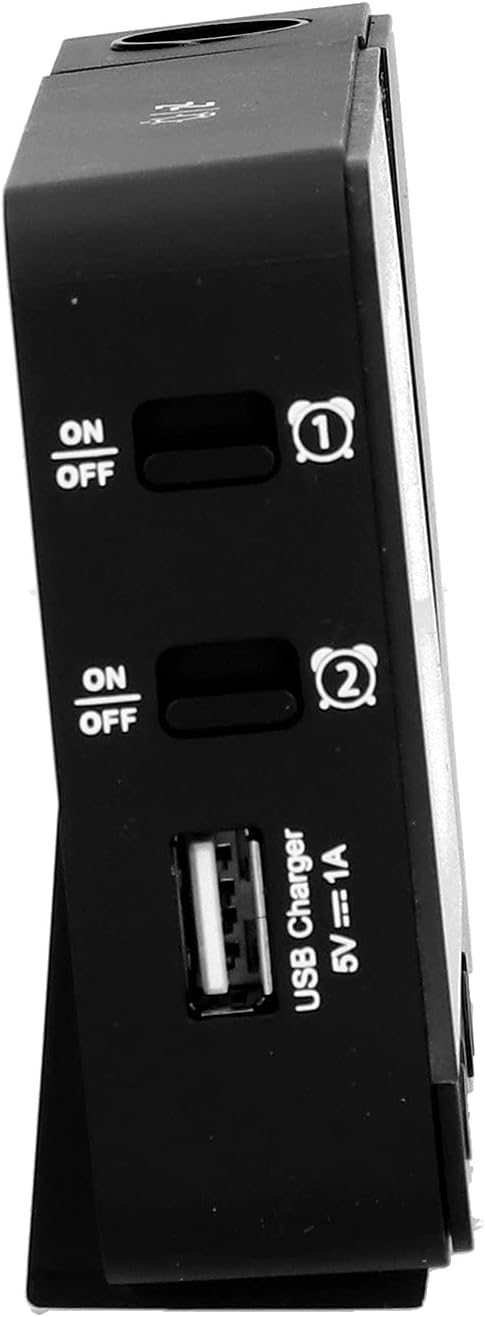
малюнок 5.1: сторона view showing Alarm 1 and Alarm 2 ON/OFF switches, and the USB charging port.
5.2 Встановлення часу та дати
- Натисніть і утримуйте ЧАС button to enter time setting mode. The hour display will flash.
- Використовуйте + or - кнопки для налаштування години.
- Прес ЧАС ще раз, щоб підтвердити налаштування годин і перейти до налаштування хвилин. Відрегулюйте за допомогою + or -.
- Продовжуйте натискати ЧАС to cycle through setting year, month, and day. Adjust each with + or -.
- Після встановлення дня натисніть ЧАС востаннє, щоб вийти з режиму налаштування.
- Щоб переключитися між 12-годинним та 24-годинним форматом, натисніть кнопку + button during normal time display.
- To switch between Celsius (℃) and Fahrenheit (℉) for temperature, press the - button during normal time display.
5.3 Налаштування будильників
Годинник має два незалежні будильники (Будильник 1 та Будильник 2).
- Натисніть і утримуйте ТРИВОГА button to enter Alarm 1 setting mode. The Alarm 1 hour display will flash.
- Використовуйте + or - кнопки для налаштування години будильника.
- Прес ТРИВОГА again to confirm the hour and move to Alarm 1 minute setting. Adjust with + or -.
- Прес ТРИВОГА again to move to Alarm 2 hour setting, and repeat the process for Alarm 2.
- After setting Alarm 2 minutes, press ТРИВОГА востаннє, щоб вийти з режиму налаштування.
- To activate or deactivate an alarm, use the corresponding Будильник 1 УВІМК./ВИМК or Будильник 2 УВІМК./ВИМК switch on the side of the clock. An alarm icon will appear on the display when active.
5.3.1 Функція відкладання
When an alarm sounds, press any button (except the alarm ON/OFF switch) to activate the 5-minute snooze function. The alarm will sound again after 5 minutes. To turn off the alarm completely, slide the corresponding alarm ON/OFF switch to OFF.
5.4 Функція проекції
The clock can project the time and temperature onto a wall or ceiling.
- Знайдіть Увімкнення/вимкнення проекції switch on the back of the clock. Slide it to ON to activate the projection.
- Adjust the angle of the projection arm (the part with the lens) to direct the projection as desired. The arm can rotate nearly 180 degrees.
- The projection will display the current time and temperature in a soft red color.

малюнок 5.2: сторона view showing the projection arm extended and ready for use.

малюнок 5.3: The clock projecting time and temperature onto a wall in a bedroom setting.
5.5 Регулювання підсвічування
When the clock is powered by USB, the backlight can be adjusted to four levels: high, medium, low, or off. Repeatedly press the + button during normal time display to cycle through the brightness levels.
When powered by batteries, the backlight will illuminate for 8 seconds when any button is pressed, then turn off to conserve power.
5.6 USB-порт для зарядки
The clock features a USB charging port (5V=1A) on its side. You can use this port to charge your mobile phone or other small electronic devices while the clock is connected to USB power.
Note: The USB charging port only functions when the clock is powered via the USB cable. It does not work when the clock is running on battery power.
6. Технічне обслуговування
6.1 Очищення
- Протріть поверхню годинника м’якою сухою тканиною.
- Do not use abrasive cleaners, solvents, or chemical sprays, as these may damage the finish or electronic components.
- Keep the projection lens clean for clear projection. Use a soft, lint-free cloth.
6.2 Заміна батареї
When the display becomes dim or the clock functions erratically while on battery power, it's time to replace the AAA batteries. Refer to Section 4.1.1 for battery installation instructions. Always replace both batteries at the same time with new ones.
7. Вирішення проблем
| проблема | Можлива причина | Рішення |
|---|---|---|
| Дисплей годинника порожній або тьмяний. | No power, low batteries, or USB cable not connected. | Check battery installation and replace if necessary. Ensure USB cable is securely connected to a power source. |
| Projection is unclear or not visible. | Projection switch is OFF, lens is dirty, or projection distance is too far/close. | Ensure Projection switch is ON. Clean the projection lens. Adjust the clock's distance from the projection surface. |
| Сигналізація не звучить. | Будильник не налаштовано або вимкнено. | Verify alarm time is set correctly. Ensure the corresponding Alarm ON/OFF switch is in the ON position. |
| Не працює порт зарядки USB. | Clock is running on battery power, or USB cable is not connected to a power source. | Ensure the clock is powered via the USB cable and connected to a functional power adapter. |
| Неправильний час/дата. | Час/дата встановлені неправильно. | Зверніться до розділу 5.2, щоб скинути налаштування часу та дати. |
8. Технічні характеристики
| модель: | B0CLGDFCGX |
| Бренд: | EVTSCAN |
| матеріал: | ABS (акрилонітрилбутадієнстирол) |
| Розміри продукту: | Приблизно 13.5 x 8 x 2.5 см (5.3 x 3.1 x 1.0 дюйма) |
| вага: | прибл. 242 г (8.5 унції) |
| Тип дисплея: | Цифровий РК-дисплей з підсвічуванням |
| Джерело живлення: | 2xAAA batteries (not included) or DC 5.0V 1.2A via USB cable |
| Вихід для зарядки через USB: | 5В=1А |
| Діапазон визначення температури: | -9℃ to +50℃ (1℃ resolution) |
| Діапазон визначення вологості: | 20% to 95% (1% resolution) |
| Temperature/Humidity Calibration Time: | 30 секунди |
| Рівні підсвічування: | 4 levels (High, Medium, Low, Off) when USB powered; 8s illumination when battery powered. |
| Проекція Lamp: | Always on when USB powered; 8s illumination when battery powered. |

малюнок 8.1: Product dimensions: 5.3 inches wide by 3.1 inches high.
9. Гарантія та підтримка
EVTSCAN products are manufactured to high quality standards. For specific warranty information, please refer to the warranty card included with your purchase or contact your retailer.
If you encounter any issues or have questions regarding your EVTSCAN Projection Clock, please contact the seller or EVTSCAN customer support for assistance. Please have your model number (B0CLGDFCGX) ready when contacting support.
Для отримання додаткової допомоги ви можете відвідати EVTSCAN Store on Amazon.