
Roku 43R4A5R
Розумний телевізор Roku – 43-дюймовий телевізор із вибраною серією 4K HDR. Посібник користувача RokuTV
Model: 43R4A5R
вступ
The Roku Select Series 4K TV is designed to provide a brilliant streaming experience with superior picture quality. This manual provides essential information for setting up, operating, and maintaining your new Roku Smart TV, ensuring you can fully enjoy its features such as 4K HDR picture, automatic brightness, and seamless access to thousands of streaming apps.

Image: The Roku 43-inch Select Series 4K HDR RokuTV, its remote, and product packaging, highlighting its key features.
Що в коробці
Перед початком налаштування перевірте наявність усіх компонентів:
- Roku 43” Select Series 4K Smart TV
- Стійки та гвинти
- Roku enhanced voice remote with batteries
- Короткий посібник

Image: A visual representation of the Roku Select Series 4K TV, its stands, power cable (for 75" model only, though listed generally), stand screws, AA batteries, and the Roku Enhanced Voice Remote.
Налаштування
Follow these steps to set up your Roku Smart TV:
- Прикріпіть стійки: Carefully place the TV screen-down on a soft, clean surface. Attach the included stands to the bottom of the TV using the provided screws. Ensure they are securely fastened.
- Підключіть живлення: Підключіть шнур живлення до телевізора, а потім до розетки.
- Підключення до мережі: Upon first power-on, the TV will guide you through connecting to your home network. Select "Wireless" for Wi-Fi or "Wired" if using an Ethernet cable. Follow the on-screen prompts to enter your network password if required.
- Початкове налаштування: The TV will then guide you through the remaining setup steps, including channel scanning (if using an antenna) and linking to a Roku account.

Зображення: Детальний view of the TV's rear input panel, showing HDMI ports (HDMI 1 eARC, HDMI 2, HDMI 3), optical audio out, headphone jack, USB, LAN, and antenna/cable input.
Відеоінструкція з налаштування
Video: An official Roku video demonstrating the setup process and key features of the Roku Select Series 4K Smart TV.
Інструкція з експлуатації
Your Roku Smart TV is designed for intuitive operation. The enhanced voice remote provides easy access to all features.
Функції дистанційного керування

Image: The Roku Enhanced Voice Remote, showing buttons for TV power, microphone, headphone jack, voice search, volume, mute, instant replay, personal shortcuts, and app shortcuts (Netflix, Disney+, Apple TV+, HBO Max).
- Кнопка живлення: Вмикає або вимикає телевізор.
- Голосова кнопка: Press and hold to use voice commands for searching content or controlling the TV.
- Directional Pad (OK button): Навігація по меню та вибір елементів.
- Кнопка "Додому: Повернення на головний екран Roku.
- Кнопки гучності: Відрегулюйте гучність телевізора.
- Кнопка вимкнення звуку: Вмикає або вимкнення звуку телевізора.
- Режим навушників: Plug headphones into the remote's headphone jack for private listening.
- Кнопки швидкого доступу до програм: Dedicated buttons for popular streaming services (e.g., Netflix, Disney+, Apple TV+, HBO Max) for quick access.
- Загублений дистанційний пошук: Use the Roku mobile app to locate your remote if it's misplaced.
Переміщення по головному екрану
The Roku Home screen provides centralized access to your streaming apps, inputs, and free live TV. Use the directional pad on your remote to browse and select options.

Image: The Roku TV home screen, showing a clean interface with large icons for streaming services like Netflix, Disney+, Apple TV, Peacock, Roku Channel, and Prime Video, along with inputs for Cable Box, Game Console, and Live TV.
Налаштування зображення та звуку
Оптимізуйте свій viewing experience with adjustable picture and sound settings.
- Чудове зображення 4K: Enjoy content in stunning 4K resolution with HDR10+ color, contrast, and brightness.
- Автоматична яскравість: The TV automatically adjusts screen brightness based on your room's lighting conditions for optimal viewінж.
- Built-in Sound Features: Utilize auto speech clarity and night mode for enhanced audio.
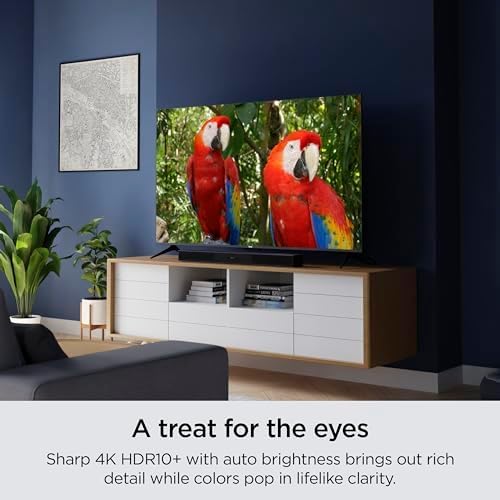
Image: A Roku TV screen showcasing sharp 4K HDR10+ picture quality with vivid colors, featuring two colorful parrots.
Підключення
The Roku Smart TV offers multiple connectivity options for your devices:
- HDMI: Connect gaming consoles, Blu-ray players, soundbars, and other HDMI-enabled devices. The TV features HDMI eARC for enhanced audio return channel capabilities.
- USB: Відтворювати медіа files з USB-накопичувача.
- Ethernet: Для стабільного дротового інтернет-з’єднання.
- Wi-Fi: Built-in fast Wi-Fi for seamless streaming.
Розумні функції
Experience a world of entertainment and smart home integration with your Roku TV.
- Endless Streaming: Access thousands of TV streaming apps, including news, sports, and family entertainment.
- Голосове керування: Use the enhanced voice remote to search for content, control playback, and more.
- Інтеграція розумного будинку: Works with Apple AirPlay, Apple Home, Alexa, and Google Home for seamless integration into your smart home ecosystem.
- Digital Gallery: Turn your TV into a digital gallery with Backdrops, browsing famous artists or uploading personal photos.

Image: A Roku TV screen showcasing its "Backdrops" feature, displaying a vibrant abstract digital painting, allowing the TV to function as a digital art display.

Image: Icons indicating compatibility with Roku Smart Home, Apple AirPlay, Apple Home, Works with Alexa, and Works with Google Home, demonstrating the TV's smart home integration capabilities.
Технічне обслуговування
To ensure the longevity and optimal performance of your Roku Smart TV, follow these maintenance guidelines:
- Очищення екрану: Обережно протріть екран м’якою сухою тканиною з мікрофібри. Для стійких плям злегка протрітьampПротріть тканину водою або розчином для очищення екранів, спеціально призначеним для електроніки. Уникайте агресивних хімікатів або абразивних матеріалів.
- Очищення організму: Використовуйте м’яку суху тканину, щоб протерти раму та підставку телевізора.
- Вентиляція: Переконайтеся, що вентиляційні отвори телевізора не заблоковані, щоб запобігти перегріву.
- Вимкнути, коли не використовується: Вимикайте телевізор, коли він не використовується, щоб заощадити енергію та продовжити термін його служби.
Усунення несправностей
If you encounter issues with your Roku Smart TV, try these common troubleshooting steps:
- Немає живлення: Перевірте, чи шнур живлення надійно підключено до телевізора та розетки. Спробуйте іншу розетку.
- Немає зображення/звуку: Переконайтеся, що вибрано правильне джерело вхідного сигналу. Перевірте всі кабельні з’єднання (HDMI, антена).
- Пульт не відповідає: Замініть батарейки в пульті дистанційного керування. Переконайтеся, що між пультом дистанційного керування та телевізором немає перешкод.
- Проблеми з мережевим підключенням: Перейти до Налаштування > Мережа > Налаштувати з'єднання to re-establish your Wi-Fi or wired connection. Restart your router.
- Додаток не завантажується/виходить з ладу: Try restarting the app. If the issue persists, remove the app and reinstall it from the Roku Channel Store.
- Погана якість зображення: Check your internet speed for streaming content. Adjust picture settings (brightness, contrast, color) in the TV menu.
For more detailed troubleshooting, refer to the official Roku support webсайт або повний посібник користувача.
Технічні характеристики
| Особливість | Специфікація |
|---|---|
| Бренд | Року |
| Номер моделі | 43R4A5R |
| Розмір екрана | 43 дюймів |
| Технологія дисплея | LED |
| роздільна здатність | 4K |
| Частота оновлення | 60 Гц |
| Особливості | Bezel-Less Design, HDR10+, Voice Remote |
| Технологія підключення | Wi-Fi, USB, Ethernet, HDMI |
| Вага товару | 19.96 фунта |
| Розміри продукту | 8.7" Г x 37.9" Ш x 24.4" В |
| Колір | чорний |
Гарантія та підтримка
For warranty information and further support, please refer to the official Roku website or the full User Guide provided with your product.
- Посібник користувача (PDF): Завантажити посібник користувача
- Підтримка Roku: Відвідайте Підтримка Roku Webсайт щоб дізнатися про поширені запитання, усунення несправностей та варіанти зв’язку.