
TecTake 404950
tectake® Foldable Exercise Bike User Manual
Brand: TecTake | Model: 404950
1. Інформація про безпеку
Please read this entire manual before assembling and using the exercise bike. Keep this manual for future reference.
- Проконсультуйтеся з лікарем, перш ніж розпочинати будь-яку програму тренувань, особливо якщо у вас є попередні захворювання.
- This product is designed for home use only. Do not use it in a commercial or institutional setting.
- The maximum user weight capacity for this exercise bike is 100 кг (220 фунта)Не перевищуйте цю межу.
- Тримайте дітей та домашніх тварин подалі від велотренажера під час використання.
- Place the exercise bike on a flat, stable surface. Ensure there is adequate clear space around the bike for safe operation.
- Одягайте відповідний одяг та взуття для занять спортом. Уникайте вільного одягу, який може потрапити в рухомі частини.
- Inspect the bike before each use for any loose or worn parts. Do not use if any damage is found.
- Негайно припиніть тренування, якщо ви відчуваєте слабкість, запаморочення або біль.
2. Продукт закінчивсяview
The tectake® Foldable Exercise Bike is a compact and efficient fitness solution designed for effective leg, waist, and glute training. Its robust steel tube construction ensures stability and durability, while its foldable design allows for space-saving storage.
Ключові характеристики:
- Quiet operation with a foldable design.
- Robust X-shaped frame made of powder-coated steel.
- Flywheel with belt system and wear-resistant magnetic brake.
- Eight adjustable resistance levels via a rotary knob.
- Seven-position height-adjustable saddle.
- Padded handlebars with integrated pulse measurement.
- Non-slip pedal surface with adjustable foot straps.
- Rubber end caps for secure footing.
- Training computer with clear LCD display.

3. Налаштування та складання
The tectake exercise bike is designed for quick and easy assembly. All necessary mounting materials are included.
3.1 Вміст упаковки:
- Exercise Bike main frame and components
- Інструкції зі складання
- Mounting Material (screws, nuts, tools)
3.2 Етапи складання:
- Carefully unpack all components and verify against the parts list in the included assembly instructions.
- Прикріпіть передній та задній стабілізатори до основної рами за допомогою наданих болтів та гайок.
- Secure the pedals to the crank arms. Note that the left pedal is reverse-threaded.
- Install the seat post and saddle, ensuring it is securely fastened.
- Attach the handlebars to the main frame, connecting any necessary sensor cables for the computer.
- Insert 2 x AA 1.5V batteries into the training computer (batteries not included).
- Connect the pulse sensor cables from the handlebars to the computer.
- Ensure all connections are tight and secure before first use.
4. Інструкція з експлуатації
4.1 Adjusting Seat Height:
The saddle can be adjusted to seven different height positions to accommodate users up to 180 cm (5'11").
- Loosen the adjustment knob located on the seat post.
- Raise or lower the saddle to your desired height. Ensure your leg has a slight bend at the knee when the pedal is at its lowest point.
- Tighten the adjustment knob securely to lock the saddle in place.
4.2 Регулювання опору:
The bike features eight levels of magnetic resistance, allowing you to customize your workout intensity.

- Locate the rotary knob on the main frame, typically below the handlebars.
- Turn the knob clockwise to increase resistance (higher numbers for more challenging workouts).
- Поверніть ручку проти годинникової стрілки, щоб зменшити опір (менші числа для легших тренувань).
4.3 Using the Training Computer:
The LCD training computer tracks important workout data.


- Функції відображення: The computer typically displays Time, Speed, Distance, Calories, and Pulse (heart rate). Some models may have a 'Scan' mode that cycles through these metrics automatically.
- Вимірювання пульсу: Grip the padded handlebars firmly with both hands. Ensure your palms are in contact with the metal sensors. Your pulse will be displayed on the screen after a few seconds.
- Кнопка режиму: Press the 'Mode' button to cycle through the different display functions or to select a specific function to view.
- Кнопка скидання: Press and hold the 'Reset' button to clear all current workout data.


5. Технічне обслуговування
5.1 Очищення:
- Зітріть велосипед рекламоюamp тканиною після кожного використання, щоб видалити піт і пил.
- Do not use abrasive cleaners or solvents, as these may damage the finish or electronic components.
- Keep the LCD display clean and dry.
5.2 Зберігання:
Thanks to its practical foldable function, the exercise bike can be stored compactly when not in use.
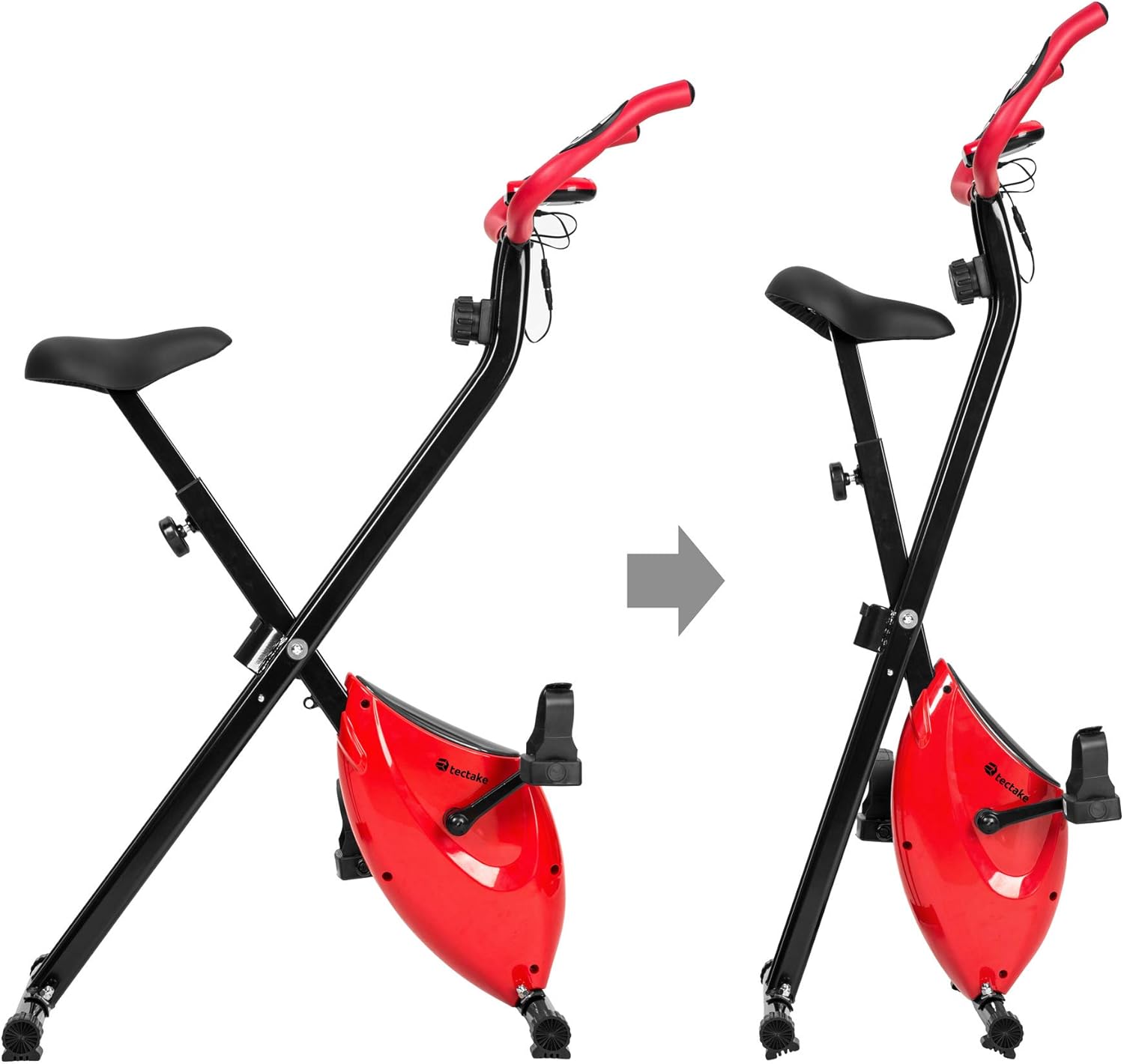
- To fold the bike, follow the instructions in the assembly manual or reverse the setup steps for folding.
- Зберігайте велосипед у сухому, прохолодному місці, подалі від прямих сонячних променів та екстремальних температур.
- Ensure the bike is stable and secure in its folded position to prevent accidental tipping.
6. Вирішення проблем
If you encounter any issues with your tectake exercise bike, please refer to the following common troubleshooting tips:
- Дисплей комп'ютера не працює:
- Check if the batteries (2 x AA 1.5V) are correctly installed and not depleted. Replace if necessary.
- Ensure all cable connections to the computer are secure.
- No Pulse Reading:
- Ensure your hands are firmly gripping both metal sensors on the handlebars.
- Make sure the pulse sensor cables are properly connected to the computer.
- Незвичайні шуми під час роботи:
- Check all bolts and nuts, especially on the frame and pedals, to ensure they are tight.
- Ensure the bike is on a flat and stable surface.
- Опір не змінюється:
- Verify that the resistance knob is turning freely and engaging with the internal mechanism.
- Якщо проблема не зникне, зверніться в службу підтримки.
For issues not covered here, please refer to the detailed assembly instructions or contact TecTake customer support.
7. Технічні характеристики
| Особливість | Специфікація |
|---|---|
| Номер моделі | 404950 |
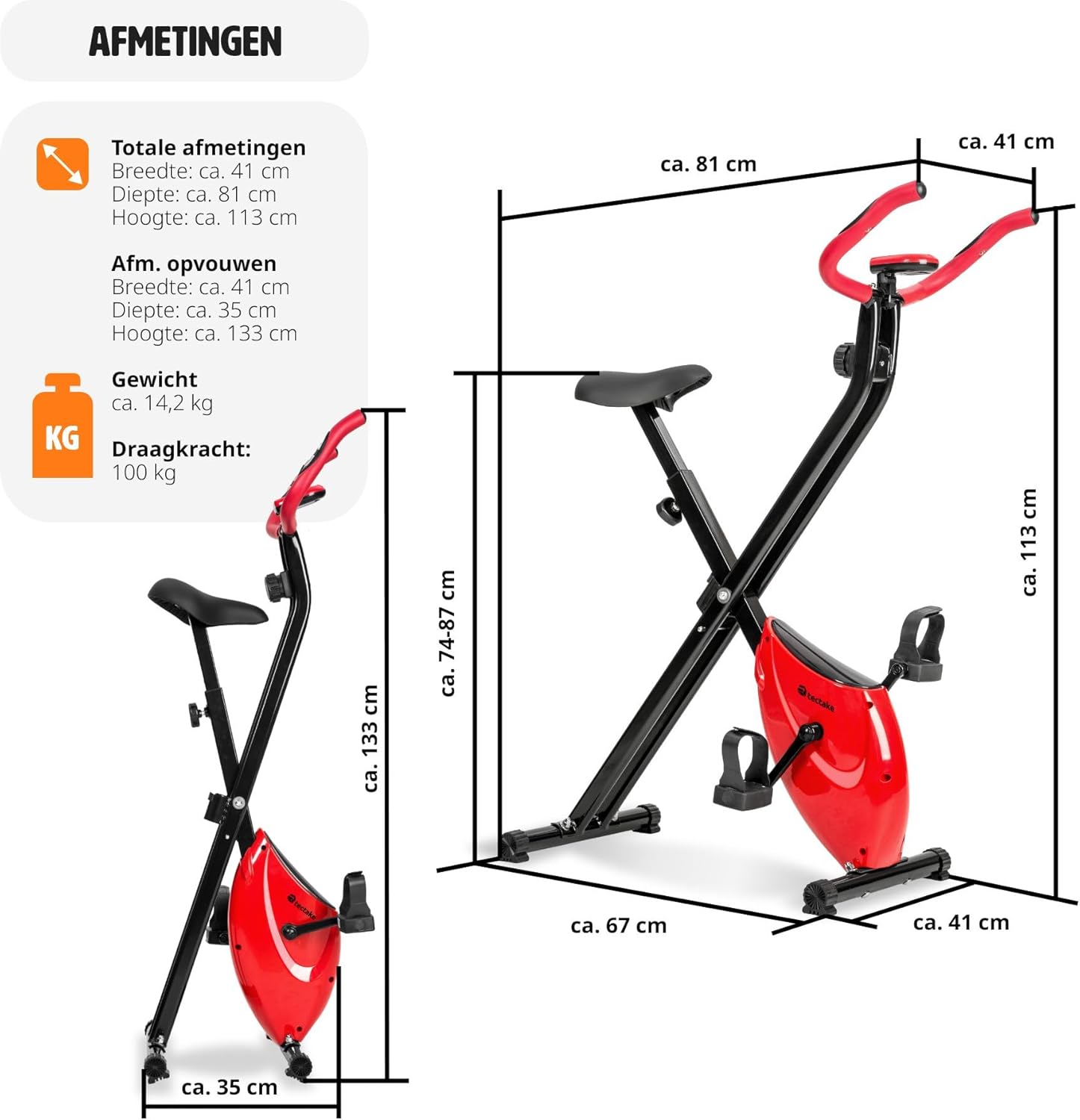
| Габаритні розміри (Д x Ш x В) | Приблизно 81 x 41 x 113 см (31.9 x 16.1 x 44.5 дюйма) |
| Розміри в складеному вигляді (Д x Ш x В) | Приблизно 41 x 35 x 133 см (16.1 x 13.8 x 52.4 дюйма) |
| вага | прибл. 14.2 кг (31.3 фунта) |
| Максимальна вага користувача | 100 кг (220 фунта) |
| Recommended Max User Height | Up to 180 cm (5'11") |
| Регулювання висоти сідла | 7 positions (approx. 68-81 cm / 26.8-31.9 inches) |
| Система опору | Магнітний, 8 рівнів |
| Training Computer Power | 2 батарейки AA 1.5 В (не входять в комплект) |
| Основний матеріал | Powder-coated steel, ABS plastic, Polypropylene, NBR rubber, Polyurethane |
| Колір | Червоний / Чорний |
8. Гарантія та підтримка
For warranty information, technical support, or to order replacement parts, please contact TecTake customer service. Refer to the contact details provided with your purchase documentation or visit the official TecTake webсайт.
Будь ласка, підготуйте номер вашої моделі (404950) та підтвердження покупки, коли звертаєтесь до служби підтримки.
Ask a question about this manual
Ask about setup, troubleshooting, compatibility, parts, safety, or missing instructions. Manuals+ will review the question and use this page’s manual context to help answer it.