
Waytronic M14Black
Посібник користувача
Infrared Motion Sensor Activated Sound Speaker
Бренд: Waytronic | модель: M14Black
1. Вступ
This manual provides detailed instructions for the setup, operation, and maintenance of your Waytronic Infrared Motion Sensor Activated Sound Speaker. This device is designed to detect motion and play a pre-recorded or custom voice message, serving various purposes such as greeting visitors, providing security alerts, or acting as a reminder.
2. Особливості продукту
The Waytronic Infrared Motion Sensor Activated Sound Speaker offers the following key functionalities:
- Customizable Voice Recording: Equipped with a built-in microphone, allowing users to record and customize their own voice messages. Recording is initiated by pressing a button.
- Extended Recording Capacity: Supports recording up to 130 seconds, with the ability to segment recordings.
- Wide Motion Detection: Features a detection range with a 120-degree horizontal and 60-degree vertical angle.
- Регульована гучність: Provides two distinct volume levels for clear audio output.
- Гнучкі параметри живлення: Can be powered by three AAA dry batteries or a DC5V USB power supply.
- Easy Re-recording: Messages can be re-recorded as many times as needed, simply by pressing a button.
3. Вміст упаковки
Будь ласка, перевірте наявність усіх предметів у упаковці:
- Infrared Motion Sensor Activated Sound Speaker (Black)
- Монтажні гвинти
- Ball Mounting Accessories
- Посібник користувача (цей документ)
4. Продукт закінчивсяview

малюнок 4.1: Спереду і збоку view of the Waytronic Infrared Motion Sensor Activated Sound Speaker. The front features the PIR sensor and speaker grille, while the side shows the mounting bracket.
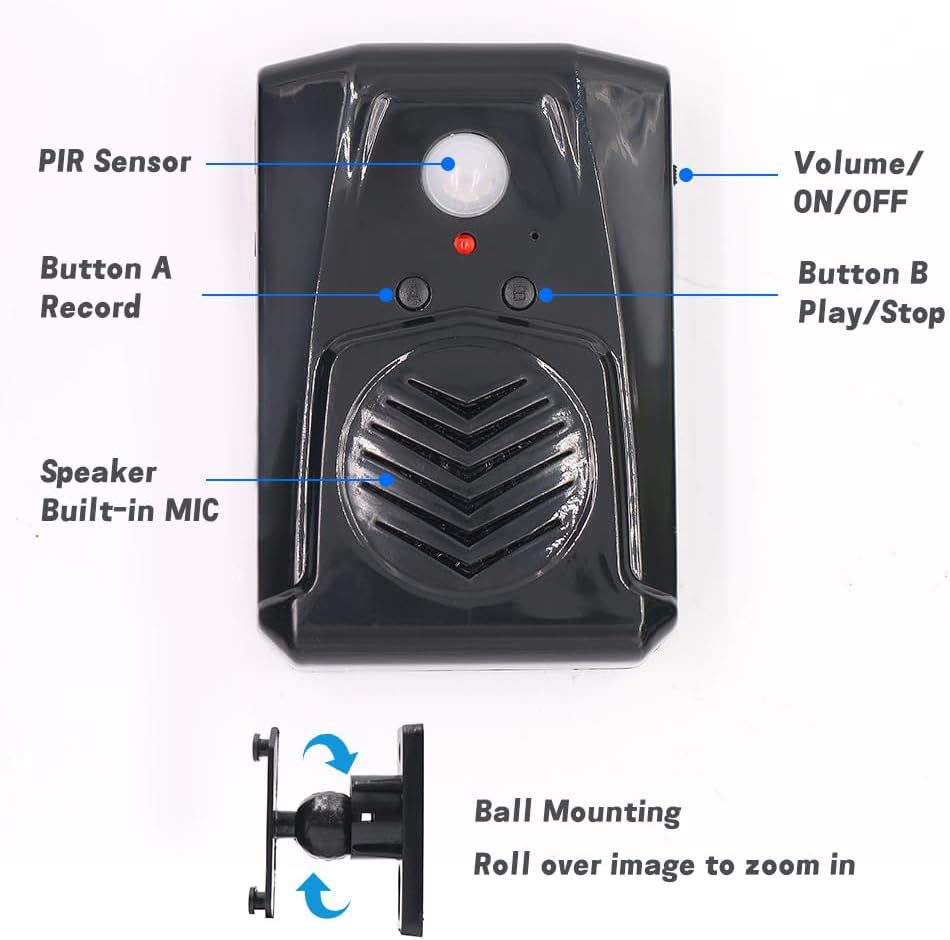
малюнок 4.2: Детальний фронт view of the speaker with key components labeled: PIR Sensor, Volume/ON/OFF switch, Button A (Record), Button B (Play/Stop), and the built-in speaker/microphone. The ball mounting accessory is also shown.

малюнок 4.3: Задня view of the speaker showing the Screw Mounting Hole, Bracket Mounting points, and the Battery Case for three AAA batteries.

малюнок 4.4: сторона view illustrating the USB port for power supply (DC5V) and the 360-degree rotatable mounting bracket.
5. Монтаж
- Джерело живлення:
- Insert three AAA batteries into the battery case located on the back of the device (refer to Figure 4.3). Ensure correct polarity.
- Alternatively, power the device using a DC5V USB cable connected to the USB port on the side (refer to Figure 4.4).
- Місце монтажу:
- Choose an indoor location such as a front door, corridor, or shop entrance.
- For optimal performance and to prevent false triggers, avoid areas with direct sunlight, significant temperature variations, or proximity to air conditioners and heaters.
- Монтаж пристрою:
- Use the provided mounting screws and ball mounting accessories to secure the speaker to a wall or surface. The ball mounting allows for 360-degree rotation to adjust the detection angle.
- Ensure the PIR sensor (Figure 4.2) faces the area where motion detection is desired.
6. Операція
6.1. Recording a Message
- Ensure the device is powered on using the Volume/ON/OFF switch (Figure 4.2).
- Натисніть і утримуйте Button A (Record). The indicator light may change to confirm recording mode.
- Speak clearly into the built-in microphone (located near the speaker grille, Figure 4.2). The maximum recording time is 130 seconds.
- Звільнення Кнопка А to stop recording. A successful recording typically requires more than 3 seconds of audio.
- To re-record, simply repeat the process. The new recording will overwrite the previous one.
6.2. Playing a Message
- After recording, the device is ready to play the message upon motion detection.
- To manually play the current message, press Button B (Play/Stop). Press again to stop playback.
6.3. Регулювання гучності
Використовуйте Volume/ON/OFF switch (Figure 4.2) to select between two volume levels. Slide the switch to the desired position.
6.4. Виявлення руху
Once powered on and a message is recorded, the device will automatically play the message when motion is detected within its 120-degree horizontal and 60-degree vertical detection range.

малюнок 6.1: This diagram illustrates that audio files are changed via button recording, not through USB data cable or TF card.
7. Додатки
The Waytronic Motion Sensor Speaker can be utilized in various scenarios:
- Greeting Visitors: Place at an entrance to play a welcoming message.
- Security Reminder: Record a warning message to deter intruders or remind individuals of security protocols.
- Daily Audio Reminders: Use for personal reminders in homes or offices.
- Sale Advertising: Play promotional messages in retail environments.
- Animal Deterrent: Record sounds to discourage animals from entering certain areas.
- Event Enhancement: Integrate into festive displays or haunted house setups for interactive sound effects.
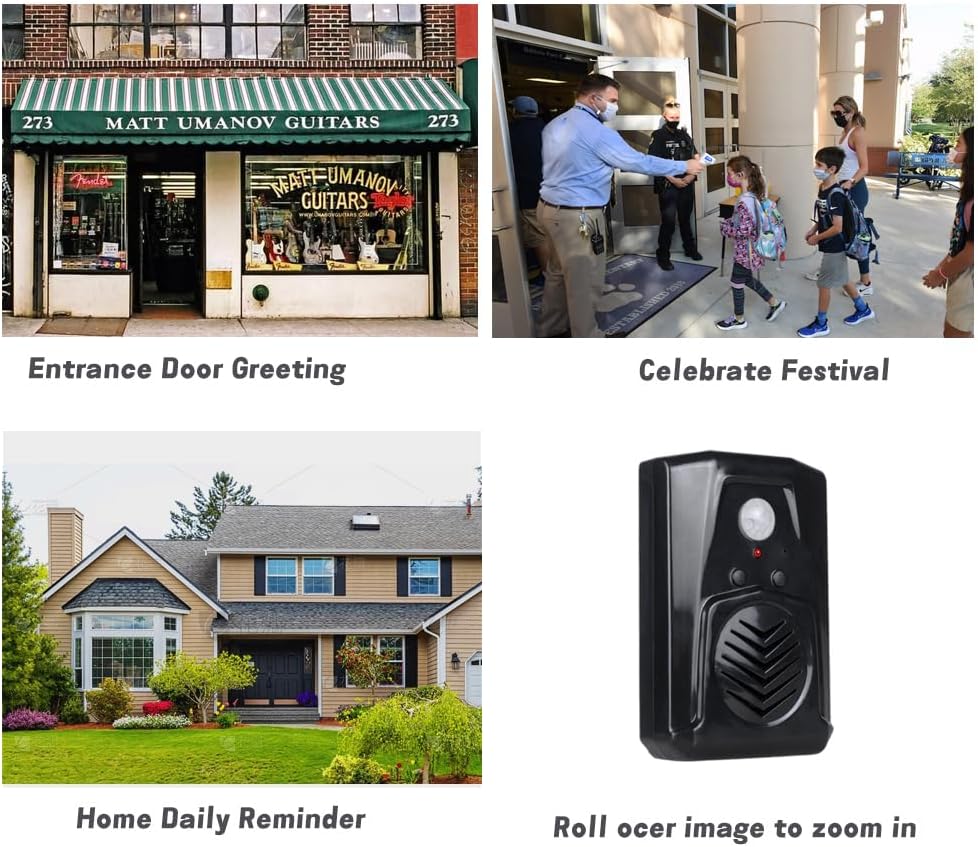
малюнок 7.1: Examples of applications including entrance door greeting, celebrating festivals, and home daily reminders.

малюнок 7.2: The speaker used to greet visitors upon entry.

малюнок 7.3: The speaker playing a security message to an approaching individual.

малюнок 7.4: The speaker used to deter animals, such as a lemur, with an audible message.
8. Вирішення проблем
| проблема | Можлива причина | Рішення |
|---|---|---|
| Пристрій не включається. | Батарейки розряджені або неправильно вставлені; USB-кабель не підключений або несправний. | Check battery polarity and replace if necessary. Ensure USB cable is securely connected and functional. |
| Cannot record a message. | Button A not held long enough; recording time too short (less than 3 seconds). | Press and hold Button A for the entire duration of your message. Ensure the recording is at least 3 seconds long. |
| Датчик руху не виявляє. | Obstruction in detection path; incorrect placement; sensor malfunction. | Ensure a clear line of sight for the PIR sensor. Reposition the device to avoid direct sunlight or heat sources. Verify the device is powered on. |
| Якість звуку погана або спотворена. | Low battery power; volume set too high; microphone too far during recording. | Replace batteries or use USB power. Adjust volume to a lower setting. Ensure you speak close to the microphone during recording. |
| Device triggers falsely. | Placed in an area with direct sunlight, large temperature variations, or near air conditioners/heaters. | Relocate the device to an area free from environmental factors that can cause false triggers. |
9. Технічні характеристики
| Особливість | Деталь |
|---|---|
| Бренд | Waytronic |
| Номер моделі | M14Black |
| Колір | чорний |
| Джерело живлення | Battery Powered (3x AAA) or DC5V USB |
| Вага товару | 0.11 кілограма (3.84 унції) |
| Maximum Range (Motion Detection) | 13 футів (4 метр) |
| Detection Angle (Horizontal) | 120 градусів |
| Detection Angle (Vertical) | 60 градусів |
| Час запису | До 130 секунд |
| Тип монтажу | Door Mount (with included accessories) |
| Робоча температура | 60 градусів за Фаренгейтом |
| Розміри упаковки | 5.28 x 3.66 x 2.6 дюймів |
10. Інформація про безпеку
- Не піддавайте пристрій впливу екстремальних температур, прямих сонячних променів або високої вологості.
- Тримайте пристрій подалі від води та інших рідин.
- Не намагайтеся самостійно відкривати або ремонтувати пристрій. Зверніться до кваліфікованого персоналу для обслуговування.
- Утилізуйте батарейки відповідно до місцевих правил. Не змішуйте старі та нові батарейки або батарейки різних типів.
- Keep out of reach of children to prevent accidental ingestion of small parts or batteries.
11. Підтримка клієнтів
If you have any questions or encounter issues with your Waytronic Infrared Motion Sensor Activated Sound Speaker, please contact our customer support team. We are committed to assisting you within 24 hours.
Щоб отримати підтримку, відвідайте Waytronic Store on Amazon або зверніться до контактної інформації, наданої під час покупки.
Ask a question about this manual
Ask about setup, troubleshooting, compatibility, parts, safety, or missing instructions. Manuals+ will review the question and use this page’s manual context to help answer it.