
1. Вступ
Thank you for choosing the techno line WT2600 Digital Calendar. This device provides accurate time, date, indoor temperature, and humidity readings, along with alarm functions. This manual will guide you through the setup, operation, and maintenance of your new digital calendar.
2. Інформація про безпеку
- Не піддавайте пристрій впливу екстремальних температур, прямих сонячних променів або високої вологості.
- Не кидайте пристрій і не піддавайте його сильним ударам.
- Не намагайтеся розбирати або ремонтувати пристрій самостійно. Зверніться до кваліфікованого сервісного персоналу.
- Утилізуйте використані батареї відповідально відповідно до місцевих правил.
- Тримайте пристрій у недоступному для дітей місці.
3. Вміст упаковки
Будь ласка, перевірте, чи всі предмети присутні у вашій упаковці:
- techno line WT2600 Digital Calendar Unit
- Посібник користувача (цей документ)
- Batteries (may be included depending on region)
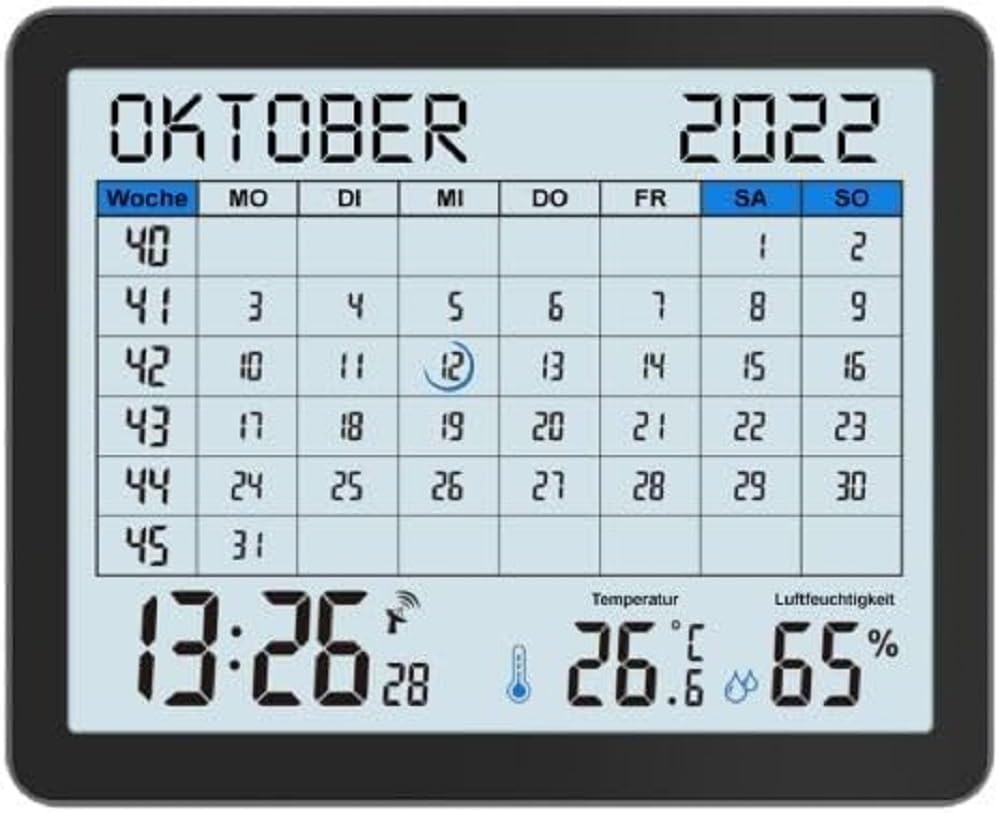
Image of the techno line WT2600 Digital Calendar packaging, showing the device and its key features.
4. Особливості продукту
The techno line WT2600 Digital Calendar offers the following key features:
- DCF-77 Radio-Controlled Clock: Automatic time synchronization for precise timekeeping, with an option for manual setting.
- 12/24 Hour Time Display: Select your preferred time format.
- Відображення календаря: Shows the current date, day of the week, and month.
- 7-Language Month Display: Choose from seven languages for the month display.
- Відображення температури в приміщенні: Shows indoor temperature in Celsius (°C) or Fahrenheit (°F).
- Відображення вологості в приміщенні: Displays the current indoor humidity level.
- MIN/MAX Display: Records and displays the minimum and maximum temperature and humidity values.
- Подвійний будильник з функцією повтору будильника: Set two independent alarms with a convenient snooze function.
- Індикатор низького заряду батареї: Попереджає вас, коли потрібно замінити батарейки.
- Універсальне розміщення: Designed for both wall mounting and table standing.

Фронт view of the techno line WT2600 Digital Calendar display, showing the calendar grid, current time, temperature, and humidity.
5. Налаштування
5.1 Встановлення батареї
- Знайдіть відсік для батарейок на задній панелі пристрою.
- Відкрийте кришку батарейного відсіку.
- Insert the required batteries (e.g., 2 x AAA, not specified in data, common for such devices) according to the polarity markings (+ and -).
- Надійно закрийте кришку батарейного відсіку.
5.2 Initial Power On and DCF-77 Signal Reception
Upon battery insertion, the device will power on and automatically begin searching for the DCF-77 radio signal. This process may take several minutes. For optimal reception, place the unit near a window and away from electronic interference.
- A signal icon (e.g., an antenna symbol) will flash during signal search.
- Once the signal is received, the time and date will be set automatically, and the signal icon will become solid.
- If no signal is received after 10-15 minutes, try repositioning the unit.
5.3 Ручне налаштування часу та дати
If automatic synchronization is not desired or unsuccessful, you can set the time and date manually.
- Press and hold the 'SET' button (or similar, refer to device buttons) for a few seconds to enter manual setting mode.
- Використовуйте кнопки «+» або «-», щоб налаштувати миготливе значення (наприклад, година, хвилина, рік, місяць, день).
- Press 'SET' again to confirm the current setting and move to the next adjustable parameter.
- Повторюйте, доки не будуть завершені всі налаштування.
5.4 Налаштування мови
To change the display language for the month:
- Enter the setting mode (e.g., by pressing 'SET').
- Navigate through the settings until the language option appears.
- Use the '+' or '-' buttons to cycle through the available 7 languages.
- Підтвердьте свій вибір.
6. Операційна
6.1 Viewing Time, Date, Temperature, and Humidity
The main display continuously shows the current time, date, indoor temperature, and indoor humidity. You can switch between 12-hour and 24-hour time formats by pressing a dedicated button (e.g., '12/24H' or 'MODE').
6.2 Налаштування будильників
The device features two independent alarms.
- Press the 'ALARM' button (or similar) to view Будильник 1 рази.
- Press and hold 'ALARM' to enter Alarm 1 setting mode.
- Use '+' or '-' to adjust the hour and minute, pressing 'ALARM' to confirm each.
- Repeat for Alarm 2.
- Щоб увімкнути/вимкнути будильник, натискайте кнопку «ALARM» кілька разів, доки не з’явиться/зникне значок будильника.
6.3 Using Snooze
When an alarm sounds, press the 'SNOOZE' button (or similar, often a large button on top) to temporarily silence the alarm. The alarm will sound again after a few minutes (typically 5-10 minutes). To stop the alarm completely, press any other button.
6.4 MIN/MAX Display Function
The device records the minimum and maximum temperature and humidity values since the last reset.
- Press the 'MIN/MAX' button (or similar) once to view максимальні зареєстровані значення.
- Натисніть ще раз, щоб view мінімальні зареєстровані значення.
- To reset the MIN/MAX records, press and hold the 'MIN/MAX' button while viewведення записів.

Close-up of the techno line WT2600 Digital Calendar display, highlighting the time, temperature, and humidity readings.
7. Технічне обслуговування
7.1 Очищення
Протріть пристрій м’якою, damp тканиною. Не використовуйте абразивні засоби для чищення або розчинники, оскільки вони можуть пошкодити дисплей абоasing.
7.2 Заміна батареї
When the low battery indicator appears on the display, replace all batteries with new ones of the same type. Follow the battery installation steps in Section 5.1.
8. Вирішення проблем
- Немає дисплея: Check battery polarity and ensure batteries are fresh.
- Неправильний час/дата: Ensure the DCF-77 signal icon is solid. If not, reposition the unit or set the time manually (Section 5.3). Check your time zone setting if applicable (not explicitly mentioned in data, but common).
- Temperature/Humidity Readings Seem Inaccurate: Ensure the unit is placed in a location with good air circulation, away from direct heat sources or drafts. Allow some time for readings to stabilize after initial setup or relocation.
- Сигналізація не звучить: Verify that the alarm is activated (alarm icon displayed) and the alarm time is set correctly.
9. Технічні характеристики
| Особливість | Специфікація |
|---|---|
| Номер моделі | WT2600 |
| Розміри (Д x Ш x В) | 17.3 х 3.81 х 14 см |
| вага | 380 г |
| Колір | чорний |
| матеріал | пластик |
| Джерело живлення | Працює від акумулятора |
| Тип дисплея | цифровий |
| Використання в приміщенні/на вулиці | закритий |
10. Гарантія та підтримка
Information regarding product warranty and customer support was not available in the provided product data. Please refer to the retailer or manufacturer's official webсайт для отримання детальної інформації про гарантійне покриття та варіанти підтримки.